mirror of
https://github.com/nunocoracao/blowfish.git
synced 2026-10-11 14:29:31 +00:00
Compare commits
| Author | SHA1 | Date | |
|---|---|---|---|
 Nuno Coração Nuno Coração
|
2f12b8d0d9 | ||
|
Nuno Coração
|
f2e224a042 | ||
|
Nuno Coração
|
560e927b87 | ||
|
Nuno Coração
|
485b641756 | ||
|
Nuno Coração
|
03f9c7d732 | ||
|
Nuno Coração
|
9aa6ec7e57 | ||
|
Nuno Coração
|
472a89c7a5 | ||
|
Nuno Coração
|
92229cfda9 | ||
|
Nuno Coração
|
8fef4e4424 | ||
|
Nuno Coração
|
fa6e9e122f | ||
|
Nuno Coração
|
3e52d26e30 | ||
|
Nuno Coração
|
e3e12fff5f | ||
|
Nuno Coração
|
250b39c40e | ||
|
Nuno Coração
|
c2ea4c27b6 | ||
|
Nuno Coração
|
da44c6e047 | ||
|
Nuno Coração
|
d97945d23b | ||
|
Nuno Coração
|
1c43a42adb | ||
|
Nuno Coração
|
c308942f0c | ||
|
Nuno Coração
|
771673c79a | ||
|
Nuno Coração
|
4c92836470 | ||
|
Nuno Coração
|
87f4f2529a | ||
|
Nuno Coração
|
7269b6642d | ||
|
Nuno Coração
|
f3ea173e21 | ||
|
Nuno Coração
|
86bc307033 | ||
|
Nuno Coração
|
ce88fc8b27 | ||
|
Nuno Coração
|
6d73dcc941 | ||
|
Nuno Coração
|
7524bbca7e | ||
|
Nuno Coração
|
e3994c650e | ||
|
Nuno Coração
|
f864a3da51 | ||
|
Served Smart
|
cee01113cd | ||
|
Weaxs
|
52b47665c8 | ||
|
Chris Herborth
|
64d8a6267b | ||
|
Served Smart
|
d97b1e5c38 | ||
|
Served Smart
|
de49717700 | ||
|
Served Smart
|
9f85c0566e | ||
|
Served Smart
|
9cb0db3e08 | ||
|
Served Smart
|
4ff3d07d30 | ||
|
Served Smart
|
37ab1055e7 | ||
|
Jojo Chan
|
07c897c3b9 | ||
|
ZhenShuo Leo
|
c3fbfc9545 | ||
|
Shun Sakai
|
eee95cf5a7 | ||
|
ZhenShuo Leo
|
72a6b84d04 | ||
|
dependabot[bot]
|
a6739eb7d8 | ||
|
Rick Lan
|
64e09b546b | ||
|
Rick Lan
|
0b1f43373f | ||
|
nunocoracao
|
bcf13c4dee | ||
|
Nuno Coração
|
8387c6ea0a | ||
|
Nuno Coração
|
397197a890 | ||
|
dependabot[bot]
|
c9369d61e6 | ||
|
Nuno Coração
|
a1db31f370 | ||
|
Nuno Coração
|
0b5792987f | ||
|
Nuno Coração
|
1320d51586 | ||
|
kirill.chalov
|
58f0e30d65 | ||
|
ZhenShuo Leo
|
e6f0522b60 | ||
|
dependabot[bot]
|
018b6ece23 | ||
|
dependabot[bot]
|
456f630dab | ||
|
dependabot[bot]
|
73411d6865 | ||
|
dependabot[bot]
|
eaceca84fb | ||
|
ZhenShuo Leo
|
4ca31fadca | ||
|
ZhenShuo Leo
|
7cc521bc1e | ||
|
Nuno Coração
|
850f987a68 | ||
|
Nuno Coração
|
3aabf55f89 | ||
|
Nuno Coração
|
9b6fffafc3 | ||
|
dependabot[bot]
|
d10340d72c | ||
|
Andreas Deininger
|
8fdd687640 | ||
|
Served Smart
|
dc36597427 | ||
|
Nuno Coração
|
80e9daaf67 | ||
|
nunocoracao
|
9751a37436 | ||
|
ZhenShuo Leo
|
90b798ec33 | ||
|
ZhenShuo Leo
|
e26d1c7e74 | ||
|
ZhenShuo Leo
|
e785f50575 | ||
|
ZhenShuo Leo
|
d4ab6b1159 | ||
|
ZhenShuo Leo
|
6be21955d5 | ||
|
ZhenShuo Leo
|
fb2c7b88e2 | ||
|
Nuno Coração
|
287bb274eb | ||
|
Tim Cappalli
|
87138e8ee0 | ||
|
Nuno Coração
|
533e7c5015 | ||
|
Nuno Coração
|
0b06a64139 | ||
|
dependabot[bot]
|
d58d8d5534 | ||
|
dependabot[bot]
|
3ab8892302 | ||
|
Nuno Coração
|
6ff5508c4b | ||
|
Nuno Coração
|
94424416bc | ||
|
Nuno Coração
|
f316c9b437 | ||
|
Nuno Coração
|
79a6007bd8 | ||
|
Nuno Coração
|
68bd843e73 | ||
|
Nuno Coração
|
26f3f0510b | ||
|
Nuno Coração
|
e9ebdc4dbe | ||
|
Nuno Coração
|
8f17fb2b37 | ||
|
Nuno Coração
|
35f31317e9 | ||
|
Nuno Coração
|
7afecd63e5 | ||
|
Nuno Coração
|
375bf31e0b | ||
|
Nuno Coração
|
c93fafd3ee | ||
|
Nuno Coração
|
f711f1afaa | ||
|
Nuno Coração
|
5fc28a1ffd | ||
|
Nuno Coração
|
248180fbc5 | ||
|
Nuno Coração
|
b7478e4bad | ||
|
Nuno Coração
|
a95165da21 | ||
|
Nuno Coração
|
add29d687d | ||
|
Nuno Coração
|
43c5551ee9 | ||
|
Nuno Coração
|
05756a31a4 | ||
|
Nuno Coração
|
9fec001916 | ||
|
Nuno Coração
|
15bf72abb3 | ||
|
Nuno Coração
|
ab4d88511a | ||
|
Nuno Coração
|
553edf4f2a | ||
|
Nuno Coração
|
130433c253 | ||
|
Nuno Coração
|
754076de7f | ||
|
Nuno Coração
|
321e1cf07c | ||
|
Nuno Coração
|
01fc28a36a | ||
|
Nuno Coração
|
28675c347e | ||
|
Nuno Coração
|
2abffc3e26 | ||
|
Nuno Coração
|
4ebf766331 | ||
|
Nuno Coração
|
da1a923993 | ||
|
Nuno Coração
|
b68d82dc79 | ||
|
Nuno Coração
|
0b127993c5 | ||
|
Nuno Coração
|
ee41a7a4e3 | ||
|
Nuno Coração
|
87ed609be2 | ||
|
Nuno Coração
|
b98d016269 | ||
|
Nuno Coração
|
34a1c6a629 | ||
|
Nuno Coração
|
1323da317c | ||
|
Nuno Coração
|
d443f3adbb | ||
|
Nuno Coração
|
4a2e4aa4ed | ||
|
Nuno Coração
|
530806dbf2 | ||
|
Nuno Coração
|
3680ff6458 | ||
|
Nuno Coração
|
99d1fb28ba | ||
|
Nuno Coração
|
24df345a03 | ||
|
Nuno Coração
|
9b35221031 | ||
|
Nuno Coração
|
22b55a2982 | ||
|
ZhenShuo Leo
|
69fc96ed5b | ||
|
ZhenShuo Leo
|
deec874d7c | ||
|
ZhenShuo Leo
|
eb0d04a014 | ||
|
ZhenShuo Leo
|
bc6d4d86c7 | ||
|
Aleksey @soar Smyrnov
|
2bbcd3ab8c | ||
|
ZhenShuo Leo
|
86fa25f27f | ||
|
ZhenShuo Leo
|
eb0afc16ea | ||
|
ZhenShuo Leo
|
6ab1964e22 | ||
|
ZhenShuo Leo
|
4688d1e8c4 | ||
|
ZhenShuo Leo
|
5afceca56a | ||
|
ZhenShuo Leo
|
30d74227df | ||
|
ZhenShuo Leo
|
7c70f27a62 | ||
|
ZhenShuo Leo
|
079660d207 | ||
|
nunocoracao
|
5c905b1a56 | ||
|
dependabot[bot]
|
e8411dfe64 | ||
|
dependabot[bot]
|
7f95fe7164 | ||
|
dependabot[bot]
|
3fd762f22b | ||
|
dependabot[bot]
|
90d9219c6d | ||
|
dependabot[bot]
|
845e4b3ebb | ||
|
dependabot[bot]
|
b1d1e967c7 | ||
|
Nuno Coração
|
bcc95318ec | ||
|
dependabot[bot]
|
0f6d0df82c | ||
|
Nuno Coração
|
835e1adfd2 | ||
|
Nuno Coração
|
8a76760e7e | ||
|
Nuno Coração
|
46d4c02fdc | ||
|
dependabot[bot]
|
67d893b5dd | ||
|
Nuno Coração
|
79bb4b6f5d | ||
|
Nuno Coração
|
17979638e8 | ||
|
papo1011
|
1784896021 | ||
|
ZhenShuo Leo
|
8be58016ae | ||
|
ZhenShuo Leo
|
3d0b59f413 | ||
|
ZhenShuo2021
|
6b0db754f7 | ||
|
ZhenShuo Leo
|
48e66514f9 | ||
|
dependabot[bot]
|
cc14bed6a1 | ||
|
dependabot[bot]
|
5ba591bf0e | ||
|
kyo_123
|
6f57e69985 | ||
|
nunocoracao
|
a8f016cce3 | ||
|
ZhenShuo Leo
|
8fe07b5550 | ||
|
Tim Cappalli
|
5a9e92d81b | ||
|
Tim Cappalli
|
49ec3b5a01 | ||
|
ZhenShuo Leo
|
61fcafc319 | ||
|
ZhenShuo Leo
|
c705186e41 | ||
|
Lin, Chiang-Yu
|
6281f6661d | ||
|
ZhenShuo Leo
|
ea7b69f4e6 | ||
|
ZhenShuo Leo
|
3081c5f1d1 | ||
|
ZhenShuo Leo
|
45c5ddbdaf | ||
|
ZhenShuo Leo
|
a9996082c4 | ||
|
ZhenShuo Leo
|
c20a86585e | ||
|
ZhenShuo Leo
|
6e49bfac5e | ||
|
dependabot[bot]
|
f77272fed0 | ||
|
dependabot[bot]
|
1448746ce9 | ||
|
ZhenShuo Leo
|
73cbdae595 | ||
|
ZhenShuo Leo
|
772bcfb879 | ||
|
ZhenShuo Leo
|
adc828128d | ||
|
ZhenShuo Leo
|
c941b70c60 | ||
|
ZhenShuo Leo
|
e169dfa5ec | ||
|
ZhenShuo Leo
|
7c13ba985f | ||
|
ZhenShuo Leo
|
c4d7112520 | ||
|
ZhenShuo Leo
|
c59cb293bf | ||
|
ZhenShuo Leo
|
6fb8b945d7 | ||
|
José Manuel Mariño Mariño
|
ec09dd41e6 | ||
|
ZhenShuo Leo
|
6486908601 | ||
|
ZhenShuo Leo
|
806a8612b8 | ||
|
ZhenShuo Leo
|
f19c61cb97 | ||
|
ZhenShuo Leo
|
3afe8b5e00 | ||
|
ZhenShuo Leo
|
e4b76d6fce | ||
|
Marian Steinbach
|
8b0b0b9c80 | ||
|
Marian Steinbach
|
a109230b22 | ||
|
Ariel Góes de Castro
|
bc235ae526 | ||
|
Nuno Coração
|
de9a38161a | ||
|
Nuno Coração
|
1d21656d5e | ||
|
Nuno Coração
|
1731c36c7c | ||
|
Nuno Coração
|
a219b38010 | ||
|
Nuno Coração
|
70586cab25 | ||
|
Nuno Coração
|
6fafc4b628 | ||
|
Nuno Coração
|
b3dcccf856 | ||
|
ZhenShuo Leo
|
faa22c47d8 | ||
|
ZhenShuo Leo
|
6f33b9d5cf | ||
|
ZhenShuo Leo
|
7072628632 | ||
|
nunocoracao
|
f0267b0338 | ||
|
Nuno Coração
|
d4538c93ec | ||
|
Nuno Coração
|
2d053f76c4 | ||
|
Nuno Coração
|
e6927136a4 | ||
|
Nuno Coração
|
a29c3734cb | ||
|
Nuno Coração
|
ec252d1854 | ||
|
Nuno Coração
|
ad6061c9cf | ||
|
Nuno Coração
|
0b8946933b | ||
|
Nuno Coração
|
04532c7c29 | ||
|
Nuno Coração
|
5c7d489f4e | ||
|
Nuno Coração
|
88f92209f9 | ||
|
Nuno Coração
|
c6b1639e3d | ||
|
Nuno Coração
|
61fe2d32e5 | ||
|
Nuno Coração
|
8e92c24873 | ||
|
Nuno Coração
|
8b965d3ffe | ||
|
Nuno Coração
|
02c864ce3e | ||
|
Nuno Coração
|
0ce6d89ca9 | ||
|
Nuno Coração
|
a062778735 | ||
|
Nuno Coração
|
8d3a3dce93 | ||
|
Nuno Coração
|
01f60987bf | ||
|
Nuno Coração
|
c838202da6 | ||
|
Nuno Coração
|
41c7456f98 | ||
|
Nuno Coração
|
326839575e | ||
|
Nuno Coração
|
963da57589 | ||
|
Nuno Coração
|
4ae556cd21 | ||
|
Nuno Coração
|
00cca47203 | ||
|
Nuno Coração
|
151874a741 | ||
|
Nuno Coração
|
bf09259a6e | ||
|
Nuno Coração
|
5e765336c8 | ||
|
Nuno Coração
|
55acc7f9f7 | ||
|
dependabot[bot]
|
d37234ccf4 | ||
|
Ryan Gibson
|
c8305c53cc | ||
|
Ryan Gibson
|
76dcccf069 | ||
|
Ryan Gibson
|
f91edf0d3c | ||
|
Ryan Gibson
|
38f0f3def6 | ||
|
ALXD
|
5af31913f1 | ||
|
nunocoracao
|
ed1ea928c8 | ||
|
Xeonzilla
|
9aded4b52b | ||
|
dependabot[bot]
|
a9cfffc1e1 | ||
|
dependabot[bot]
|
c84259171c | ||
|
dependabot[bot]
|
9a090ccdea | ||
|
dependabot[bot]
|
d2bf769e05 | ||
|
dependabot[bot]
|
c26a66f8cd | ||
|
Nuno Coração
|
655f997ed0 | ||
|
Nuno Coração
|
abaa9912d8 | ||
|
Nuno Coração
|
f69e4b88b3 | ||
|
ZhenShuo Leo
|
059d22ca96 | ||
|
nunocoracao
|
668f47ce11 | ||
|
yukiutym
|
dbb344e917 | ||
|
dependabot[bot]
|
d2fd432d88 | ||
|
Nuno Coração
|
14e5cbb3d0 | ||
|
Nuno Coração
|
04a2c5838a | ||
|
Karun Sandhu
|
9b3f313d00 | ||
|
dependabot[bot]
|
1a17faeca5 | ||
|
dependabot[bot]
|
3085bd3dc1 | ||
|
dependabot[bot]
|
eb127c47cb | ||
|
Adri Antunez
|
f6a6012c85 | ||
|
Ryan Gibson
|
6cfea9bfd1 | ||
|
Ryan Gibson
|
baaf251bde | ||
|
dependabot[bot]
|
a599079568 | ||
|
Panos Korovesis
|
0ada981a1b | ||
|
Michael Bagaskoro Edwards
|
7e1df06046 | ||
|
Nuno Coração
|
0b183ed248 | ||
|
Nuno Coração
|
0d03681d20 | ||
|
Nuno Coração
|
e1785fa68f | ||
|
Nuno Coração
|
787af6762e | ||
|
Nuno Coração
|
04410deac7 | ||
|
Nuno Coração
|
10d55c186c | ||
|
Nuno Coração
|
ce3c37324b | ||
|
Nuno Coração
|
fdf8896276 | ||
|
Nuno Coração
|
c4ae51b557 | ||
|
Nuno Coração
|
89b1f129ff | ||
|
Nuno Coração
|
8f06de0ffe | ||
|
Nuno Coração
|
7b1b7350ae | ||
|
Nuno Coração
|
f39b3ed142 | ||
|
Nuno Coração
|
703867f239 | ||
|
Nuno Coração
|
fc51aaa7c9 | ||
|
Nuno Coração
|
588a7064eb | ||
|
Nuno Coração
|
dce6c3ed45 | ||
|
Nuno Coração
|
7dff10fae0 | ||
|
Nuno Coração
|
ce44c08ce2 | ||
|
Nuno Coração
|
28d2f8da5b | ||
|
Nuno Coração
|
9c67afb503 | ||
|
Nuno Coração
|
72b97dac6f | ||
|
Nuno Coração
|
a76e667b62 | ||
|
Nuno Coração
|
d3d66e8230 | ||
|
Nuno Coração
|
aca812906f | ||
|
Nuno Coração
|
b88b951bf5 | ||
|
Nuno Coração
|
bfc111050d | ||
|
Nuno Coração
|
36af37300e | ||
|
Xeonzilla
|
4663ecf3a4 | ||
|
dependabot[bot]
|
2be809d578 | ||
|
dependabot[bot]
|
9bf29e79bc | ||
|
Nuno Coração
|
a2493eab91 | ||
|
Nuno Coração
|
e54c585ca3 | ||
|
dependabot[bot]
|
6c9c29f92b | ||
|
dependabot[bot]
|
9a46bc5077 | ||
|
Nuno Coração
|
2f3db043df | ||
|
Nuno Coração
|
1cfd7e6b16 | ||
|
dependabot[bot]
|
0b6f940efe | ||
|
dependabot[bot]
|
7f77ee0693 | ||
|
Nuno Coração
|
0a145e1c49 | ||
|
Nuno Coração
|
797be63d18 | ||
|
Nuno Coração
|
f5e0550536 | ||
|
dependabot[bot]
|
c3628b330b | ||
|
Nuno Coração
|
df4ccefb38 | ||
|
Nuno Coração
|
46def1e5de | ||
|
Nuno Coração
|
5d99f91b49 | ||
|
Nuno Coração
|
f7e4f80eef | ||
|
Nuno Coração
|
2872ea814d | ||
|
dependabot[bot]
|
79edd44e59 | ||
|
dependabot[bot]
|
7b60775e6a | ||
|
Daniel Sailer
|
eba44f69aa | ||
|
Michael Dorner
|
08c9207ea7 | ||
|
dependabot[bot]
|
ebf829059b | ||
|
wermos
|
d5ee17d95f | ||
|
wermos
|
525e4b5547 | ||
|
nunocoracao
|
c22816af2e | ||
|
StepaniaH
|
abe5113f22 | ||
|
lambertwiddersinn
|
e67be8c64c | ||
|
dependabot[bot]
|
52ddf54d26 | ||
|
Corey Todaro
|
4c44b67fe6 | ||
|
Michael Bagaskoro Edwards
|
527d9fd8e5 | ||
|
wermos
|
cf7ab8f949 | ||
|
Hudson
|
91e3c15fc2 | ||
|
Hudson
|
e8d1c4bd0b | ||
|
Hudson
|
8f76891400 | ||
|
Chill-Try
|
a9b3b5021e | ||
|
ZhenShuo2021
|
923cefdf6b | ||
|
ZhenShuo2021
|
3f00958e80 | ||
|
Nuno Coração
|
24dfec3d0f | ||
|
Nuno Coração
|
e56f94397f | ||
|
Nuno Coração
|
96a116a8b0 | ||
|
Nuno Coração
|
5e2e4ee32a | ||
|
Nuno Coração
|
54dca8a81f | ||
|
Nuno Coração
|
1cea342076 | ||
|
Nuno Coração
|
5cc1192330 | ||
|
dependabot[bot]
|
84fd03787e | ||
|
Nuno Coração
|
c44bc8bd77 | ||
|
Nuno Coração
|
370deda4cd | ||
|
Nuno Coração
|
6879e14def | ||
|
Nuno Coração
|
8490a25223 | ||
|
Nuno Coração
|
a5f572cc89 | ||
|
Nuno Coração
|
6e21f769d1 | ||
|
Nuno Coração
|
c6fa55916e | ||
|
Nuno Coração
|
069db2b8cf | ||
|
Nuno Coração
|
59e24f4a51 | ||
|
Nuno Coração
|
c5ad9e91e8 | ||
|
Nofal Briansah
|
bf539c5a41 | ||
|
Nofal Briansah
|
04242b038b | ||
|
Nofal Briansah
|
ce7988bdff | ||
|
Nofal Briansah
|
ef7a2675da | ||
|
Nofal Briansah
|
9a82989342 | ||
|
Nofal Briansah
|
8d558418b3 | ||
|
dependabot[bot]
|
1d748ef2a4 | ||
|
dependabot[bot]
|
c4b2cec058 | ||
|
bootlegcoal
|
a1f210b144 | ||
|
nunocoracao
|
df49054c0c | ||
|
dependabot[bot]
|
4eb6613699 | ||
|
dependabot[bot]
|
d7a39e7664 | ||
|
dependabot[bot]
|
1d48f60a44 | ||
|
Nuno Coração
|
ff1e79bb7b | ||
|
Nuno Coração
|
2e131883ca | ||
|
Nuno Coração
|
1c40fe8a0e | ||
|
Nuno Coração
|
6738fc65d9 | ||
|
Nuno Coração
|
36ec58db7d | ||
|
Nuno Coração
|
1ad0fa346a | ||
|
Nuno Coração
|
36fb1626a4 | ||
|
Nuno Coração
|
f3581e5ec1 | ||
|
Nuno Coração
|
a2cb57f569 | ||
|
dependabot[bot]
|
2a4d3a9087 | ||
|
Nuno Coração
|
97410e6145 | ||
|
Nuno Coração
|
bb2bb3419c | ||
|
Nuno Coração
|
5c63a8a86c | ||
|
dependabot[bot]
|
d6b3699153 | ||
|
Nuno Coração
|
8a1df11b6d | ||
|
Nuno Coração
|
db869f5d48 | ||
|
Nuno Coração
|
a574ab74cb | ||
|
Nuno Coração
|
c4057bb73e | ||
|
Nuno Coração
|
cb80d24a80 | ||
|
dependabot[bot]
|
bd248ac324 | ||
|
Nuno Coração
|
efdf53479c | ||
|
dependabot[bot]
|
35ed4b3d3f | ||
|
dependabot[bot]
|
04e1fc7136 | ||
|
dependabot[bot]
|
51be6af160 | ||
|
Nuno Coração
|
80ed7696d1 | ||
|
Nuno Coração
|
c334e74233 | ||
|
Nuno Coração
|
260651a849 | ||
|
dependabot[bot]
|
916699e5cb | ||
|
dependabot[bot]
|
d415b5d1e2 | ||
|
zzzzz
|
cbce208cc5 | ||
|
nunocoracao
|
387cc067ed | ||
|
William Termini
|
983cb80a03 | ||
|
willhack-g
|
177ff7516b | ||
|
dependabot[bot]
|
7c14090951 | ||
|
dependabot[bot]
|
32a4ee43ea | ||
|
dependabot[bot]
|
20944de723 | ||
|
dependabot[bot]
|
050e4e0655 | ||
|
dependabot[bot]
|
675426e0d2 | ||
|
dependabot[bot]
|
06a812d34b | ||
|
Nuno Coração
|
c15cd36993 | ||
|
Nuno Coração
|
26d1205439 | ||
|
Nuno Coração
|
4efc324b6f | ||
|
Nuno Coração
|
16716dbb14 | ||
|
Nuno Coração
|
5ed3305106 | ||
|
Nuno Coração
|
31e19a6bc5 | ||
|
Nuno Coração
|
3888252df9 | ||
|
Nuno Coração
|
25386511f5 | ||
|
Nuno Coração
|
ef5186ce4c | ||
|
Nuno Coração
|
7736a480e3 | ||
|
Nuno Coração
|
c4af18e2b8 | ||
|
Nuno Coração
|
dfb3dcef7b | ||
|
Nuno Coração
|
4d8fd4f89a | ||
|
Nuno Coração
|
3b356312d4 | ||
|
Nuno Coração
|
4de11801b7 | ||
|
Nuno Coração
|
21a7eafd89 | ||
|
Nuno Coração
|
078a023f28 | ||
|
Nuno Coração
|
1e435bd3c7 | ||
|
Nuno Coração
|
e23181bf3c | ||
|
Nuno Coração
|
d2a0c0a9e5 | ||
|
Nuno Coração
|
eebbf00941 | ||
|
dependabot[bot]
|
829b41c689 | ||
|
Nuno Coração
|
f5dbd609c3 | ||
|
Nuno Coração
|
cd4a4fb651 | ||
|
Nuno Coração
|
b4900a92bb | ||
|
Nuno Coração
|
a3698d957f | ||
|
Nuno Coração
|
99d377ed1a | ||
|
Nuno Coração
|
93d5dfbe87 | ||
|
dependabot[bot]
|
5f7e9964cf | ||
|
morethan987
|
4a0b135331 | ||
|
dependabot[bot]
|
e051dc7501 | ||
|
Nuno Coração
|
199d9f4cce | ||
|
Nuno Coração
|
77c6dad63d | ||
|
Nuno Coração
|
ff2b8ffccc | ||
|
dependabot[bot]
|
a2fd514f85 | ||
|
dependabot[bot]
|
553e7a6a81 | ||
|
dependabot[bot]
|
7aba38cb0c | ||
|
dependabot[bot]
|
54b8788e1a | ||
|
dependabot[bot]
|
346e17774b | ||
|
dependabot[bot]
|
f047261996 | ||
|
dependabot[bot]
|
12e7042e9e | ||
|
dependabot[bot]
|
5afa11c2e1 | ||
|
nunocoracao
|
80cfb06797 | ||
|
Nuno Coração
|
7d3c37c226 | ||
|
dependabot[bot]
|
8022ada78a | ||
|
Nuno Coração
|
b9eb4e9db7 | ||
|
Nuno Coração
|
1cd0c0b76c | ||
|
Nuno Coração
|
775d86da5a | ||
|
Nuno Coração
|
db2404977f | ||
|
dependabot[bot]
|
10e4949a41 | ||
|
Azzam Alsharafi
|
904e077b74 | ||
|
Laterre
|
b042075ad2 | ||
|
Changil Kim
|
456a805bb0 | ||
|
Changil Kim
|
3f476412ac | ||
|
StepaniaH
|
6f836381c3 | ||
|
dependabot[bot]
|
bf1ab08a24 | ||
|
Dinh Truong Vu
|
9d29c280a2 | ||
|
racehd
|
235767e212 | ||
|
dependabot[bot]
|
5427850be0 | ||
|
dependabot[bot]
|
fb33c0790b | ||
|
dependabot[bot]
|
ccf6178a31 | ||
|
Nuno Coração
|
4eed37fc2c | ||
|
Nuno Coração
|
396692e017 | ||
|
Nuno Coração
|
ee5646f91b | ||
|
Nuno Coração
|
07bf4e93e0 | ||
|
Nuno Coração
|
3bdb1205d9 | ||
|
Nuno Coração
|
305816b51f | ||
|
Nuno Coração
|
f9c5373300 | ||
|
Nuno Coração
|
2bd5ad0353 | ||
|
racehd
|
272e69f01b | ||
|
racehd
|
9f700552bc | ||
|
racehd
|
08bfbf4cae | ||
|
racehd
|
297cc1aef5 | ||
|
racehd
|
ec7a3ed420 | ||
|
racehd
|
c8cf84cf9f | ||
|
ZhenShuo2021
|
6d20417fd5 | ||
|
Nuno Coração
|
00a24c2448 | ||
|
Nuno Coração
|
e61c34249f | ||
|
Nuno Coração
|
4dd078be9d | ||
|
Nuno Coração
|
b58bbbede6 | ||
|
Nuno Coração
|
fa33a779cf | ||
|
Nuno Coração
|
db83544894 | ||
|
Nuno Coração
|
f05818ee04 | ||
|
nunocoracao
|
8c2250cf44 | ||
|
Nuno Coração
|
30062aa335 | ||
|
Nuno Coração
|
82f5a0721c | ||
|
Nuno Coração
|
5c8c1af029 | ||
|
Nuno Coração
|
6effb88c54 | ||
|
Nuno Coração
|
ae0b6b5f8d | ||
|
Nuno Coração
|
62892f1987 | ||
|
Nuno Coração
|
304b042964 | ||
|
Nuno Coração
|
ddfdc86137 | ||
|
dependabot[bot]
|
cbf4347d52 | ||
|
dependabot[bot]
|
c2245c07a2 | ||
|
Nuno Coração
|
d3c64c2580 | ||
|
Nuno Coração
|
da7ae4a72a | ||
|
Nuno Coração
|
123a6e48ff | ||
|
Nuno Coração
|
1dc47fcc32 | ||
|
Nick
|
7bbc108651 | ||
|
nunocoracao
|
e8afdb5eaf | ||
|
Weaxs
|
369812f77f | ||
|
dependabot[bot]
|
0254c095ed | ||
|
dependabot[bot]
|
bca65aaa01 | ||
|
dependabot[bot]
|
166427eafc | ||
|
dependabot[bot]
|
4e870ee86c | ||
|
dependabot[bot]
|
c2a965304e | ||
|
dependabot[bot]
|
af9eb0006c | ||
|
Juliano Costa
|
da82429133 | ||
|
sabac-co
|
c95f7afcaf | ||
|
sabac-co
|
e41df121e5 | ||
|
acamiz
|
b77617ce86 | ||
|
Nuno Coração
|
cf6c0ab6cc | ||
|
Nuno Coração
|
3a50c14d2f | ||
|
Nuno Coração
|
a21d70697f | ||
|
Nuno Coração
|
c2e76d7a12 | ||
|
Nuno Coração
|
78c3b581ab | ||
|
Nuno Coração
|
478cab6da0 | ||
|
Nuno Coração
|
699df484b5 | ||
|
Nuno Coração
|
01b0b80d4a | ||
|
Nuno Coração
|
2d9a14aa7f | ||
|
Nuno Coração
|
a365e1c040 | ||
|
Nuno Coração
|
75875e6d98 | ||
|
Nuno Coração
|
b1b781b9a6 | ||
|
Nuno Coração
|
024de8035d | ||
|
Nuno Coração
|
4e0e3aa87c | ||
|
Nuno Coração
|
1daae2dbe0 | ||
|
Nuno Coração
|
b7a033503e | ||
|
Nuno Coração
|
65708bbe4f | ||
|
Nuno Coração
|
18f406820b | ||
|
Nuno Coração
|
acc2d0b21a | ||
|
Nuno Coração
|
90211d1a55 | ||
|
Nuno Coração
|
efab80ad78 | ||
|
dependabot[bot]
|
4840073ad6 | ||
|
Nuno Coração
|
c9a257162c | ||
|
Nuno Coração
|
a9fbe00438 | ||
|
Nuno Coração
|
d1f89af71e | ||
|
Nuno Coração
|
be3d698d3b | ||
|
nunocoracao
|
2496210812 | ||
|
Raphael Das Gupta
|
020f03e683 | ||
|
dependabot[bot]
|
237e860a47 | ||
|
Mauro Morales
|
860e792064 | ||
|
May Meow
|
2a6078588b | ||
|
Charles Chin
|
924953a0a2 | ||
|
Perry Kundert
|
9951816b08 | ||
|
May Meow
|
ad81bcc034 | ||
|
May Meow
|
22999a341b | ||
|
Asterisk
|
5125c2debb | ||
|
Andreas Deininger
|
4ab18490cd | ||
|
dependabot[bot]
|
5c72109045 | ||
|
dependabot[bot]
|
63b56b9c05 | ||
|
unacro
|
2a61aadd7a | ||
|
unacro
|
b543764ef3 | ||
|
Bemn
|
69ff783616 | ||
|
Michael Dorner
|
d08898ba67 | ||
|
dependabot[bot]
|
953500d193 | ||
|
dependabot[bot]
|
78a827991a | ||
|
dependabot[bot]
|
8fb8ddbb1b | ||
|
dependabot[bot]
|
3d81e00ac3 | ||
|
May Meow
|
eedb814199 | ||
|
Dimitris Pergelidis
|
39c1d4069f | ||
|
Nuno Coração
|
c2db79ee4b | ||
|
Nuno Coração
|
fec955c0b6 | ||
|
Nuno Coração
|
2ee519e779 | ||
|
Nuno Coração
|
f037da3120 | ||
|
Nuno Coração
|
738f136984 | ||
|
Nuno Coração
|
155c750026 | ||
|
Nuno Coração
|
5dabf59887 | ||
|
Nuno Coração
|
17e4692174 | ||
|
Nuno Coração
|
a0b1f2d6bd | ||
|
dependabot[bot]
|
fc2c99de42 | ||
|
dependabot[bot]
|
118d021a69 | ||
|
Nuno Coração
|
6dd2640439 | ||
|
Nuno Coração
|
884c6d5bc9 | ||
|
Nuno Coração
|
d3cdb21cf2 | ||
|
Nuno Coração
|
08525e6829 | ||
|
Nuno Coração
|
cbf083ff9a | ||
|
Nuno Coração
|
d8f5fb6213 | ||
|
Nuno Coração
|
c842d11364 | ||
|
Nuno Coração
|
ea0a500139 | ||
|
Nuno Coração
|
76d9e284a7 | ||
|
Nuno Coração
|
6345645094 | ||
|
Nuno Coração
|
84dcb63a65 | ||
|
Nuno Coração
|
5dc59aefbd | ||
|
Nuno Coração
|
c6f1ea85f7 | ||
|
Nuno Coração
|
9353b468bd | ||
|
dependabot[bot]
|
0e48700847 | ||
|
Nuno Coração
|
234fdf8f3b | ||
|
Nuno Coração
|
c881801600 | ||
|
wermos
|
a0ab030937 | ||
|
dependabot[bot]
|
e6a00754eb | ||
|
dependabot[bot]
|
ef37c92237 | ||
|
dependabot[bot]
|
bbd36a2ef7 | ||
|
dependabot[bot]
|
9e8b165eb9 | ||
|
Utrodus Said Al Baqi
|
317cd183b1 | ||
|
Raphael Borun Das Gupta
|
18f17a9c51 | ||
|
nunocoracao
|
ec91103321 | ||
|
dependabot[bot]
|
9b5339db57 | ||
|
Nuno Coração
|
4de04aec44 | ||
|
Nuno Coração
|
c6ba36a470 | ||
|
Nuno Coração
|
703cb68f80 | ||
|
Nuno Coração
|
0ca678531c | ||
|
Nuno Coração
|
f20d063d7c | ||
|
Nuno Coração
|
0b50f6ce22 | ||
|
Roland Marchand
|
8534ee5e65 | ||
|
dependabot[bot]
|
d7a2d9450f | ||
|
Xeonzilla
|
81a2aa35f9 | ||
|
nunocoracao
|
221fe896eb | ||
|
Andreas Deininger
|
8e67e8e55f | ||
|
Luiz Glomyer
|
bc290dcc6c | ||
|
Utrodus Said Al Baqi
|
77fcb98e75 | ||
|
dependabot[bot]
|
596bc11cc6 | ||
|
dependabot[bot]
|
fbe468e21c | ||
|
dependabot[bot]
|
6537023a09 | ||
|
dependabot[bot]
|
a88dab3179 | ||
|
褐瞳さん
|
ba8454a790 | ||
|
Nuno Coração
|
2abd24dcb1 | ||
|
Nuno Coração
|
178a2f4849 | ||
|
Nuno Coração
|
706b694303 | ||
|
Nuno Coração
|
f506883a91 | ||
|
Nuno Coração
|
7c7c0c2114 | ||
|
Nuno Coração
|
274b566734 | ||
|
Nuno Coração
|
64cfe7b102 | ||
|
nunocoracao
|
6f95415af4 | ||
|
dependabot[bot]
|
5e33decff2 | ||
|
dependabot[bot]
|
947558cbe7 | ||
|
dependabot[bot]
|
b36fc3c94c | ||
|
dependabot[bot]
|
3f9e2c9687 | ||
|
dependabot[bot]
|
4dccd5f297 | ||
|
dependabot[bot]
|
e45c0485bc | ||
|
dependabot[bot]
|
18c3a6156e | ||
|
dependabot[bot]
|
c87b0156f1 | ||
|
Nuno Coração
|
6cff148d61 | ||
|
LaTeRrE
|
9c92b901b5 | ||
|
Laterre
|
0c949e5c98 | ||
|
Laterre
|
c3acfb006f | ||
|
Laterre
|
ff5b884c85 | ||
|
Laterre
|
ed51c26040 | ||
|
Laterre
|
e4c7ce160c |
No files matched your search
@@ -0,0 +1,10 @@
|
||||
[*]
|
||||
charset = utf-8
|
||||
end_of_line = lf
|
||||
insert_final_newline = true
|
||||
trim_trailing_whitespace = true
|
||||
indent_style = space
|
||||
indent_size = 2
|
||||
|
||||
[*.md]
|
||||
trim_trailing_whitespace = false
|
||||
@@ -1,5 +0,0 @@
|
||||
{
|
||||
"projects": {
|
||||
"default": "blowfish-21fff"
|
||||
}
|
||||
}
|
||||
@@ -16,28 +16,28 @@ jobs:
|
||||
- run: npm install
|
||||
- run: npm run assets
|
||||
- name: Commit and push Chart.js changes
|
||||
uses: stefanzweifel/git-auto-commit-action@v5
|
||||
uses: stefanzweifel/git-auto-commit-action@v6
|
||||
with:
|
||||
branch: "${{ github.head_ref }}"
|
||||
push_options: "--dry-run"
|
||||
file_pattern: "assets/lib/chart/*"
|
||||
commit_message: "📦 Update packaged ChartJS"
|
||||
- name: Commit Fuse changes
|
||||
uses: stefanzweifel/git-auto-commit-action@v5
|
||||
uses: stefanzweifel/git-auto-commit-action@v6
|
||||
with:
|
||||
branch: "${{ github.head_ref }}"
|
||||
push_options: "--dry-run"
|
||||
file_pattern: "assets/lib/fuse/*"
|
||||
commit_message: "📦 Update packaged FuseJS"
|
||||
- name: Commit KaTeX changes
|
||||
uses: stefanzweifel/git-auto-commit-action@v5
|
||||
uses: stefanzweifel/git-auto-commit-action@v6
|
||||
with:
|
||||
branch: "${{ github.head_ref }}"
|
||||
push_options: "--dry-run"
|
||||
file_pattern: "assets/lib/katex/*"
|
||||
commit_message: "📦 Update packaged KaTeX"
|
||||
- name: Commit Mermaid changes
|
||||
uses: stefanzweifel/git-auto-commit-action@v5
|
||||
uses: stefanzweifel/git-auto-commit-action@v6
|
||||
with:
|
||||
branch: "${{ github.head_ref }}"
|
||||
push_options: "--dry-run"
|
||||
@@ -45,10 +45,10 @@ jobs:
|
||||
commit_message: "📦 Update packaged Mermaid"
|
||||
- run: npm run build
|
||||
- name: Commit CSS changes
|
||||
uses: stefanzweifel/git-auto-commit-action@v5
|
||||
uses: stefanzweifel/git-auto-commit-action@v6
|
||||
with:
|
||||
branch: "${{ github.head_ref }}"
|
||||
push_options: "--dry-run"
|
||||
file_pattern: "assets/css/compiled/main.css"
|
||||
commit_message: "💄 Rebuild CSS"
|
||||
- run: git push
|
||||
- run: git push
|
||||
@@ -0,0 +1,21 @@
|
||||
name: Create ZIP
|
||||
on:
|
||||
release:
|
||||
types: [published]
|
||||
workflow_dispatch:
|
||||
|
||||
jobs:
|
||||
zip:
|
||||
runs-on: ubuntu-latest
|
||||
steps:
|
||||
- uses: actions/checkout@v4
|
||||
- run: zip -r config-default.zip config/_default
|
||||
- uses: actions/upload-artifact@v4
|
||||
with:
|
||||
name: config-default
|
||||
path: config-default.zip
|
||||
- name: Upload to release
|
||||
uses: softprops/action-gh-release@v2
|
||||
with:
|
||||
files: config-default.zip
|
||||
tag_name: ${{ github.event.release.tag_name }}
|
||||
@@ -1,38 +0,0 @@
|
||||
name: Deploy Preview to Firebase
|
||||
'on': pull_request
|
||||
jobs:
|
||||
build_and_preview:
|
||||
if: '${{ github.event.pull_request.head.repo.full_name == github.repository }}'
|
||||
runs-on: ubuntu-latest
|
||||
steps:
|
||||
|
||||
- name: Hugo setup
|
||||
uses: peaceiris/actions-hugo@v3.0.0
|
||||
with:
|
||||
hugo-version: 0.120.4
|
||||
extended: true
|
||||
env:
|
||||
ACTIONS_ALLOW_UNSECURE_COMMANDS: 'true'
|
||||
|
||||
- name: Check out code into the Go module directory
|
||||
uses: actions/checkout@v4
|
||||
with:
|
||||
submodules: true # Fetch Hugo themes (true OR recursive)
|
||||
fetch-depth: 0 # Fetch all history for .GitInfo and .Lastmod
|
||||
|
||||
- name: Build with Hugo
|
||||
env:
|
||||
# For maximum backward compatibility with Hugo modules
|
||||
HUGO_ENVIRONMENT: production
|
||||
HUGO_ENV: production
|
||||
run: |
|
||||
hugo -E -F --minify -s exampleSite --themesDir ../.. -d ../public --baseURL https://blowfish.page
|
||||
|
||||
- name: Deploy preview
|
||||
uses: FirebaseExtended/action-hosting-deploy@v0
|
||||
with:
|
||||
repoToken: '${{ secrets.GITHUB_TOKEN }}'
|
||||
firebaseServiceAccount: '${{ secrets.FIREBASE_SERVICE_ACCOUNT_BLOWFISH_21FFF }}'
|
||||
expires: 30d
|
||||
channelId: preview-${{ github.event.number }}
|
||||
projectId: blowfish-21fff
|
||||
@@ -1,39 +0,0 @@
|
||||
name: Deploy Production to Firebase
|
||||
'on':
|
||||
push:
|
||||
branches:
|
||||
- main
|
||||
jobs:
|
||||
build_and_deploy:
|
||||
runs-on: ubuntu-latest
|
||||
steps:
|
||||
|
||||
- name: Hugo setup
|
||||
uses: peaceiris/actions-hugo@v3.0.0
|
||||
with:
|
||||
hugo-version: 0.120.4
|
||||
extended: true
|
||||
env:
|
||||
ACTIONS_ALLOW_UNSECURE_COMMANDS: 'true'
|
||||
|
||||
- name: Check out code into the Go module directory
|
||||
uses: actions/checkout@v4
|
||||
with:
|
||||
submodules: true # Fetch Hugo themes (true OR recursive)
|
||||
fetch-depth: 0 # Fetch all history for .GitInfo and .Lastmod
|
||||
|
||||
- name: Build with Hugo
|
||||
env:
|
||||
# For maximum backward compatibility with Hugo modules
|
||||
HUGO_ENVIRONMENT: production
|
||||
HUGO_ENV: production
|
||||
run: |
|
||||
hugo -E -F --minify -s exampleSite --themesDir ../.. -d ../public --baseURL https://blowfish.page
|
||||
|
||||
- name: Deploy Production
|
||||
uses: FirebaseExtended/action-hosting-deploy@v0
|
||||
with:
|
||||
repoToken: '${{ secrets.GITHUB_TOKEN }}'
|
||||
firebaseServiceAccount: '${{ secrets.FIREBASE_SERVICE_ACCOUNT_BLOWFISH_21FFF }}'
|
||||
channelId: live
|
||||
projectId: blowfish-21fff
|
||||
@@ -9,8 +9,8 @@ jobs:
|
||||
issues: write
|
||||
pull-requests: write
|
||||
steps:
|
||||
- uses: actions/first-interaction@v1
|
||||
with:
|
||||
repo-token: ${{ secrets.GITHUB_TOKEN }}
|
||||
issue-message: "Thanks for contributing to Blowfish"
|
||||
pr-message: "Thanks for contributing to Blowfish"
|
||||
- uses: actions/first-interaction@v1
|
||||
with:
|
||||
repo-token: ${{ secrets.GITHUB_TOKEN }}
|
||||
issue-message: "Thanks for contributing to Blowfish"
|
||||
pr-message: "Thanks for contributing to Blowfish"
|
||||
@@ -2,7 +2,7 @@ name: Update Hugo version
|
||||
|
||||
on:
|
||||
schedule:
|
||||
- cron: '0 6 * * *'
|
||||
- cron: "0 6 * * *"
|
||||
|
||||
workflow_dispatch:
|
||||
|
||||
@@ -10,42 +10,43 @@ jobs:
|
||||
updateBlowfish:
|
||||
runs-on: ubuntu-latest
|
||||
steps:
|
||||
|
||||
- name: Check out code into the Go module directory
|
||||
uses: actions/checkout@v4
|
||||
with:
|
||||
ref: dev
|
||||
submodules: true # Fetch Hugo themes (true OR recursive)
|
||||
fetch-depth: 0 # Fetch all history for .GitInfo and .Lastmod
|
||||
submodules: true # Fetch Hugo themes (true OR recursive)
|
||||
fetch-depth: 0 # Fetch all history for .GitInfo and .Lastmod
|
||||
|
||||
- name: Fetch release version
|
||||
id: fetch-release
|
||||
run: |
|
||||
curl -sL https://api.github.com/repos/gohugoio/hugo/releases/latest | \
|
||||
jq -r ".tag_name" > release-versions/hugo-latest.txt
|
||||
jq -r ".tag_name" > release-versions/hugo-latest.txt
|
||||
|
||||
- name: Check for modified files
|
||||
id: git-check
|
||||
run: echo ::set-output name=modified::$([ -z "`git status --porcelain`" ] && echo "false" || echo "true")
|
||||
|
||||
run:
|
||||
echo ::set-output name=modified::$([ -z "`git status --porcelain`" ]
|
||||
&& echo "false" || echo "true")
|
||||
|
||||
- name: Update config.toml
|
||||
id: update-config
|
||||
if: steps.git-check.outputs.modified == 'true'
|
||||
run: |
|
||||
cat release-versions/hugo-latest.txt | \
|
||||
while read version; do sed -i'' -E "s/(max = \")[0-9]+\.[0-9]+\.[0-9]+(\")/\1${version#v}\2/g" config.toml; done
|
||||
while read version; do sed -i'' -E "s/(max = \")[0-9]+\.[0-9]+\.[0-9]+(\")/\1${version#v}\2/g" config.toml; done
|
||||
|
||||
- name: Create Pull Request
|
||||
if: steps.git-check.outputs.modified == 'true'
|
||||
uses: peter-evans/create-pull-request@v6
|
||||
uses: peter-evans/create-pull-request@v7
|
||||
with:
|
||||
commit-message: Update Hugo supported version
|
||||
title: ⚙️ Update Hugo supported version
|
||||
body: |
|
||||
Updates [Hugo][1] support
|
||||
|
||||
|
||||
Auto-generated by [create-pull-request][2]
|
||||
|
||||
|
||||
[1]: https://github.com/gohugoio/hugo
|
||||
[2]: https://github.com/peter-evans/create-pull-request
|
||||
labels: dependencies, automated pr
|
||||
|
||||
@@ -7,21 +7,28 @@ name: Mark stale issues and pull requests
|
||||
|
||||
on:
|
||||
schedule:
|
||||
- cron: '60 1 * * *'
|
||||
- cron: "0 1 * * *"
|
||||
workflow_dispatch:
|
||||
|
||||
jobs:
|
||||
stale:
|
||||
|
||||
runs-on: ubuntu-latest
|
||||
permissions:
|
||||
issues: write
|
||||
pull-requests: write
|
||||
|
||||
steps:
|
||||
- uses: actions/stale@v9
|
||||
with:
|
||||
repo-token: ${{ secrets.GITHUB_TOKEN }}
|
||||
stale-issue-message: 'This issue will be closed since it has been stale for 60 days.'
|
||||
stale-pr-message: 'This pull request will be closed since it has been stale for 60 days.'
|
||||
stale-issue-label: 'no-issue-activity'
|
||||
stale-pr-label: 'no-pr-activity'
|
||||
- uses: actions/stale@v9
|
||||
with:
|
||||
repo-token: ${{ secrets.GITHUB_TOKEN }}
|
||||
stale-issue-message:
|
||||
"This issue will be closed since it has been stale for 60 days."
|
||||
stale-pr-message:
|
||||
"This pull request will be closed since it has been stale for 60
|
||||
days."
|
||||
stale-issue-label: "no-issue-activity"
|
||||
stale-pr-label: "no-pr-activity"
|
||||
days-before-stale: 60
|
||||
days-before-close: 0
|
||||
remove-stale-when-updated: true
|
||||
operations-per-run: 100
|
||||
@@ -22,4 +22,6 @@ jobs:
|
||||
|
||||
- name: Build
|
||||
working-directory: ./exampleSite
|
||||
run: hugo --minify --themesDir ../.. --baseURL https://nunocoracao.github.io/blowfish/
|
||||
run:
|
||||
hugo --minify --themesDir ../.. --baseURL
|
||||
https://nunocoracao.github.io/blowfish/
|
||||
@@ -0,0 +1,40 @@
|
||||
# https://github.com/gohugoio/hugo/blob/b39b24962350090122b5f3927456dde710cffb57/docs/.prettierignore
|
||||
# https://github.com/gohugoio/hugo/blob/b39b24962350090122b5f3927456dde710cffb57/docs/.prettierrc
|
||||
|
||||
# develop
|
||||
.vscode
|
||||
node_modules
|
||||
package.json
|
||||
|
||||
# Hugo
|
||||
assets/lib
|
||||
assets/css/compiled
|
||||
content
|
||||
themes
|
||||
public
|
||||
static
|
||||
*.md
|
||||
|
||||
# Invalid nodes and unexpected tokens, mostly caused by unmatched tags in Hugo statements.
|
||||
# For example:
|
||||
# {{ with .Params.externalUrl }}
|
||||
# <a href="{{ . }}">
|
||||
# {{ else }}
|
||||
# <a href="{{ .RelPermalink }}" class="min-w-full">
|
||||
# {{ end }}
|
||||
#
|
||||
# This create an unclose node
|
||||
|
||||
layouts/_default/_markup/render-heading.html
|
||||
layouts/_default/index.json
|
||||
layouts/_default/list.html
|
||||
layouts/partials/article-link/card-related.html
|
||||
layouts/partials/article-link/card.html
|
||||
layouts/partials/article-link/simple.html
|
||||
layouts/partials/header/basic.html
|
||||
layouts/partials/hero/background.html
|
||||
layouts/partials/head.html
|
||||
layouts/shortcodes/screenshot.html
|
||||
layouts/shortcodes/figure.html
|
||||
|
||||
assets/js/appearance.js
|
||||
+45
@@ -0,0 +1,45 @@
|
||||
{
|
||||
"singleQuote": false,
|
||||
"tabWidth": 2,
|
||||
"useTabs": false,
|
||||
"semi": true,
|
||||
"trailingComma": "all",
|
||||
"proseWrap": "always",
|
||||
"plugins": [
|
||||
"prettier-plugin-go-template",
|
||||
"@awmottaz/prettier-plugin-void-html"
|
||||
],
|
||||
"overrides": [
|
||||
{
|
||||
"files": ["*.html"],
|
||||
"options": {
|
||||
"useTabs": false,
|
||||
"parser": "go-template",
|
||||
"goTemplateBracketSpacing": true,
|
||||
"printWidth": 112,
|
||||
"bracketSameLine": true
|
||||
}
|
||||
},
|
||||
{
|
||||
"files": ["*.js", "*.mjs", "*.mts", "*.ts"],
|
||||
"options": {
|
||||
"semi": true,
|
||||
"useTabs": false,
|
||||
"printWidth": 112,
|
||||
"singleQuote": false
|
||||
}
|
||||
},
|
||||
{
|
||||
"files": ["*.yml", "*.yaml"],
|
||||
"options": {
|
||||
"singleQuote": false
|
||||
}
|
||||
},
|
||||
{
|
||||
"files": ["*.json*"],
|
||||
"options": {
|
||||
"trailingComma": "none"
|
||||
}
|
||||
}
|
||||
]
|
||||
}
|
||||
+2
-2
@@ -12,7 +12,7 @@
|
||||
|
||||
- Great! Open a new GitHub pull request with the patch.
|
||||
- All development occurs on the `dev` branch and new PRs should be forked from here.
|
||||
- The command `npm run example` can be used to test local changes using the example site.
|
||||
- The commands `npm run example`, `npm run example:core`, and `npm run example:production` can be used to test local changes using the example site.
|
||||
- Ensure the PR description clearly describes the problem and solution. Include the relevant issue number, if applicable.
|
||||
- **Before submitting**, check the [coding conventions](#coding-conventions) section below to learn more about coding and commit message expectations.
|
||||
|
||||
@@ -45,7 +45,7 @@ The project includes a Prettier config that helps to format code in line with th
|
||||
|
||||
#### Commit message guidelines
|
||||
|
||||
- Use [Gitmoji](https://gitmoji.dev) in commit messages to provide context.
|
||||
- Use [Gitmoji](https://gitmoji.dev) in PR messages to provide context.
|
||||
- Clearly describe the change with a short summary in the first 72 characters.
|
||||
- Place more detailed explanations in paragraphs below the summary, separated by a blank line.
|
||||
- Use imperative language (ie. "Fix bug", not "Fixed bug" or "Fixes bug").
|
||||
|
||||
+5
-1
@@ -1,2 +1,6 @@
|
||||
github: [nunocoracao]
|
||||
custom: ["https://www.paypal.me/nunocoracao", "https://www.buymeacoffee.com/nunocoracao"]
|
||||
custom:
|
||||
[
|
||||
"https://www.paypal.me/nunocoracao",
|
||||
"https://www.buymeacoffee.com/nunocoracao",
|
||||
]
|
||||
+144
@@ -0,0 +1,144 @@
|
||||
**[English](https://github.com/nunocoracao/blowfish/blob/main/README.md) | Indonesian | [简体中文](https://github.com/nunocoracao/blowfish/blob/main/README.zh-cn.md) | [日本語](https://github.com/nunocoracao/blowfish/blob/main/README.ja.md)**
|
||||
|
||||
# Blowfish
|
||||
[](https://app.netlify.com/sites/snazzy-dango-efb2ec/deploys)
|
||||
[](https://github.com/gohugoio/hugo/releases/tag/v0.87.0)
|
||||
[](https://github.com/nunocoracao/blowfish/blob/main/LICENSE)
|
||||
[](https://themes.gohugo.io/themes/blowfish/)
|
||||

|
||||
|
||||
Blowfish dirancang sebagai tema yang kuat dan ringan untuk [Hugo](https://gohugo.io). Tema ini dibuat menggunakan Tailwind CSS dengan desain yang bersih dan minimalis, yang mengutamakan konten Anda.
|
||||
|
||||
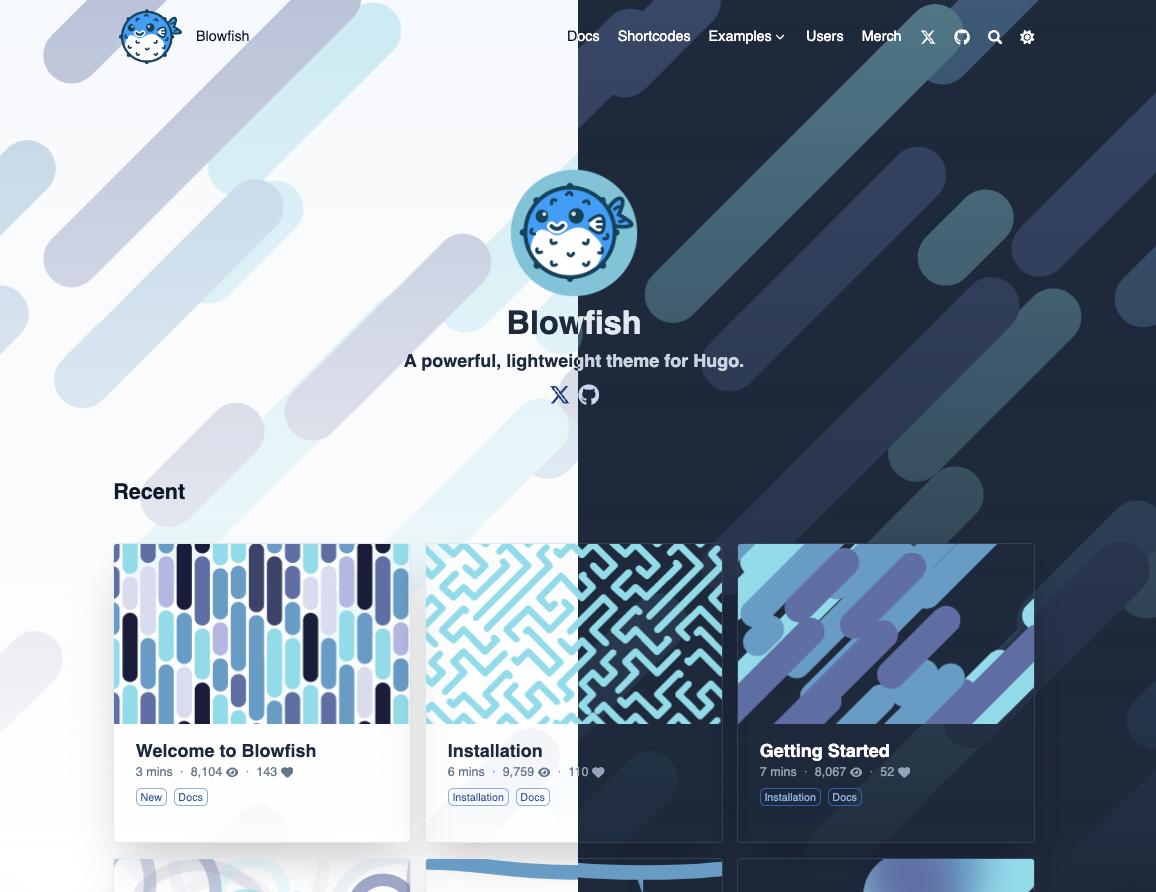
|
||||
|
||||
🌏 [Situs demo](https://blowfish.page/)
|
||||
📑 [Dokumentasi tema](https://blowfish.page/docs/)
|
||||
💎 [Toko Merch](http://tee.pub/lic/qwSlWVBL5zc)
|
||||
🐛 [Laporan bug & masalah](https://github.com/nunocoracao/blowfish/issues)
|
||||
💡 [Pertanyaan & permintaan fitur](https://github.com/nunocoracao/blowfish/discussions)
|
||||
|
||||
<a href="https://www.buymeacoffee.com/nunocoracao" target="_blank"><img src="https://cdn.buymeacoffee.com/buttons/v2/default-yellow.png" alt="Belikan Saya Kopi" style="height: 60px !important;width: 217px !important;" ></a>
|
||||
<a target="_blank" href="http://tee.pub/lic/qwSlWVBL5zc"><img class="nozoom" src="https://img.buymeacoffee.com/button-api/?text=Toko Merch &emoji=💎&slug=nunocoracao&button_colour=5F7FFF&font_colour=ffffff&font_family=Lato&outline_colour=000000&coffee_colour=FFDD00" /></a>
|
||||
|
||||
## Fitur
|
||||
|
||||
- Tata letak responsif sepenuhnya dengan Tailwind CSS 3.0
|
||||
- Beragam skema warna (atau sesuaikan sendiri)
|
||||
- Mode gelap (paksa aktif/nonaktif atau otomatis dengan pengaturan pengguna)
|
||||
- Konfigurasi yang sangat dapat disesuaikan
|
||||
- Integrasi Firebase untuk mendukung data dinamis
|
||||
- Penghitung tampilan & mekanisme suka
|
||||
- Artikel terkait
|
||||
- Beragam tata letak halaman utama
|
||||
- Dukungan untuk banyak penulis
|
||||
- Seri artikel
|
||||
- Penyortiran artikel berdasarkan tanggal dan bobot
|
||||
- Mode Zen untuk membaca artikel
|
||||
- Fleksibel dengan berbagai jenis konten, taksonomi, dan menu
|
||||
- Menu header dan footer
|
||||
- Menu bersarang & sub-menu navigasi
|
||||
- Daftar isi yang dapat digulir
|
||||
- Dukungan untuk konten multibahasa termasuk bahasa RTL
|
||||
- Kemampuan untuk menautkan ke artikel di situs web pihak ketiga
|
||||
- Dukungan untuk beberapa shortcode seperti Galeri, Timeline, Kartu GitHub, dan Carousel
|
||||
- Integrasi BuyMeACoffee
|
||||
- Pencarian situs berbasis klien dengan Fuse.js
|
||||
- Diagram dan visualisasi menggunakan Mermaid
|
||||
- Grafik menggunakan Chart.js
|
||||
- Integrasi TypeIt
|
||||
- Sematan YouTube dengan peningkatan kinerja
|
||||
- Notasi matematika menggunakan KaTeX
|
||||
- Ikon SVG dari FontAwesome 6
|
||||
- Pengubahan ukuran gambar otomatis menggunakan Hugo Pipes
|
||||
- Anchor heading, daftar isi, salin kode, tombol, lencana, dan lainnya
|
||||
- Dukungan HTML dan emoji dalam artikel 🎉
|
||||
- SEO-friendly dengan tautan berbagi ke media sosial
|
||||
- Dukungan untuk Fathom Analytics dan Google Analytics
|
||||
- Dukungan RSS feed, favicon, dan komentar
|
||||
- Kustomisasi tingkat lanjut dengan definisi warna dan gaya Tailwind yang sederhana
|
||||
- Dioptimalkan untuk kinerja dan aksesibilitas dengan skor Lighthouse sempurna
|
||||
- Dokumentasi lengkap dengan pembaruan rutin
|
||||
|
||||
---
|
||||
|
||||

|
||||
|
||||
## Dokumentasi
|
||||
|
||||
Blowfish memiliki [dokumentasi lengkap](https://blowfish.page/docs/) yang mencakup semua aspek tema. Pastikan untuk [membaca dokumentasi](https://blowfish.page/docs/) guna mempelajari cara menggunakan tema dan fiturnya.
|
||||
|
||||
---
|
||||
|
||||
## Instalasi
|
||||
|
||||
Blowfish mendukung beberapa metode instalasi - sebagai submodul git, Modul Hugo, atau instalasi manual sepenuhnya.
|
||||
|
||||
Instruksi terperinci untuk setiap metode dapat ditemukan dalam [dokumentasi instalasi](https://blowfish.page/docs/installation).
|
||||
|
||||
### Instalasi Cepat Menggunakan Blowfish Tools
|
||||
|
||||
> **Catatan:** Pastikan Anda sudah menginstal **Node.js**, **Git**, **Go**, dan **Hugo**, serta telah membuat proyek Hugo sebelum melanjutkan.
|
||||
|
||||
Kami baru saja meluncurkan alat CLI baru untuk membantu Anda memulai dengan Blowfish. Ini akan membuat proyek Hugo baru, menginstal tema, dan mengatur file konfigurasi tema untuk Anda.
|
||||
|
||||
Instal alat CLI secara global menggunakan npm (atau manajer paket lainnya):
|
||||
```shell
|
||||
npm i -g blowfish-tools
|
||||
```
|
||||
|
||||
Kemudian jalankan perintah berikut untuk memulai interaksi yang akan memandu Anda melalui proses pembuatan dan konfigurasi:
|
||||
```shell
|
||||
blowfish-tools
|
||||
```
|
||||
|
||||
Untuk membuat proyek Hugo baru dan menginstal tema sekaligus, gunakan:
|
||||
```shell
|
||||
blowfish-tools new mynewsite
|
||||
```
|
||||
|
||||
### Instalasi Cepat Menggunakan Git Submodules
|
||||
|
||||
> **Catatan:** Pastikan Anda sudah menginstal **Git**, **Go**, dan **Hugo**, serta telah membuat proyek Hugo sebelum melanjutkan.
|
||||
|
||||
1. Dari direktori proyek Anda, inisialisasi git:
|
||||
```shell
|
||||
git init
|
||||
```
|
||||
|
||||
2. Konfigurasikan Blowfish sebagai submodul git:
|
||||
```shell
|
||||
git submodule add -b main https://github.com/nunocoracao/blowfish.git themes/blowfish
|
||||
```
|
||||
|
||||
3. Hapus file `config.toml` di root proyek dan salin file `*.toml` dari tema ke dalam folder `config/_default/`.
|
||||
|
||||
4. Ikuti petunjuk [Memulai](https://blowfish.page/docs/getting-started/) untuk mengonfigurasi situs web Anda.
|
||||
|
||||
### Memperbarui Tema
|
||||
|
||||
Untuk memperbarui tema ke rilis terbaru, cukup jalankan perintah berikut di direktori proyek Anda:
|
||||
```shell
|
||||
hugo mod get -u
|
||||
```
|
||||
|
||||
Instruksi pembaruan selengkapnya tersedia dalam [dokumentasi instalasi](https://blowfish.page/docs/installation/#installing-updates).
|
||||
|
||||
---
|
||||
|
||||
## Kontribusi
|
||||
|
||||
Blowfish akan terus berkembang seiring waktu. Jika Anda memiliki ide atau ingin melaporkan bug, silakan hubungi kami:
|
||||
|
||||
- 🐛 **Laporan bug & masalah:** Gunakan [GitHub Issues](https://github.com/nunocoracao/blowfish/issues)
|
||||
- 💡 **Ide fitur baru:** Buat diskusi di [GitHub Discussions](https://github.com/nunocoracao/blowfish/discussions)
|
||||
- 🙋♀️ **Pertanyaan umum:** Kunjungi [GitHub Discussions](https://github.com/nunocoracao/blowfish/discussions)
|
||||
|
||||
Jika Anda bisa memperbaiki bug atau menambahkan fitur baru, kontribusi dalam bentuk PR sangat dihargai. Pelajari lebih lanjut dalam [panduan kontribusi](https://github.com/nunocoracao/blowfish/blob/main/CONTRIBUTING.md).
|
||||
|
||||
---
|
||||
|
||||
## Grafik Stargazers
|
||||
|
||||
[](https://starchart.cc/nunocoracao/blowfish)
|
||||
|
||||
<a rel="me" href="https://masto.ai/@blowfish">Mastodon</a>
|
||||
+178
@@ -0,0 +1,178 @@
|
||||
[English](https://github.com/nunocoracao/blowfish/blob/main/README.md) | [Indonesian](https://github.com/nunocoracao/blowfish/blob/main/README.id.md) | [简体中文](https://github.com/nunocoracao/blowfish/blob/main/README.zh-cn.md) | 日本語
|
||||
# Blowfish
|
||||
[](https://app.netlify.com/sites/snazzy-dango-efb2ec/deploys)
|
||||
[](https://github.com/gohugoio/hugo/releases/tag/v0.87.0)
|
||||
[](https://github.com/nunocoracao/blowfish/blob/main/LICENSE)
|
||||
[](https://themes.gohugo.io/themes/blowfish/)
|
||||

|
||||
|
||||
Blowfishは[Hugo](https://gohugo.io)のために設計された強力で軽量なテーマです。Tailwind CSS を使用し、コンテンツを優先したクリーンでミニマルなデザインでが特徴です。
|
||||
|
||||

|
||||
|
||||
|
||||
🌏 [デモサイト](https://blowfish.page/)
|
||||
📑 [ドキュメント](https://blowfish.page/docs/)
|
||||
💎 [グッズストア](http://tee.pub/lic/qwSlWVBL5zc)
|
||||
🐛 [バグ報告と問題点](https://github.com/nunocoracao/blowfish/issues)
|
||||
💡 [質問と機能リクエスト](https://github.com/nunocoracao/blowfish/discussions)
|
||||
|
||||
|
||||
|
||||
<a href="https://www.buymeacoffee.com/nunocoracao" target="_blank"><img src="https://cdn.buymeacoffee.com/buttons/v2/default-yellow.png" alt="Buy Me A Coffee" style="height: 60px !important;width: 217px !important;" ></a>
|
||||
<a target="_blank" href="http://tee.pub/lic/qwSlWVBL5zc"><img class="nozoom" src="https://img.buymeacoffee.com/button-api/?text=Merch Store &emoji=💎&slug=nunocoracao&button_colour=5F7FFF&font_colour=ffffff&font_family=Lato&outline_colour=000000&coffee_colour=FFDD00" /></a>
|
||||
|
||||
|
||||
|
||||
## 機能
|
||||
|
||||
- Tailwind CSS 3.0 で構築された、完璧なレスポンシブデザイン
|
||||
- 複数の配色 (または、自分で完全にカスタマイズ可能)
|
||||
- ダークモード (強制オン/オフ か 自動選択・ユーザー切り替え)
|
||||
- 高度なカスタマイズが可能な設定
|
||||
- Firebase 連携で動的データをサポート
|
||||
- 閲覧数といいね機能
|
||||
- 関連記事
|
||||
- 複数のホームページレイアウト
|
||||
- 複数人の著者
|
||||
- シリーズ記事
|
||||
- 日付と価値付けによる記事の並べ替え
|
||||
- 記事を読むための Zen モード
|
||||
- あらゆるコンテンツタイプ、分類、メニューに柔軟に対応
|
||||
- ヘッダー/フッターメニュー
|
||||
- 階層化されたメニューとサブナビゲーションメニュー
|
||||
- スクロール可能な目次
|
||||
- RTL 言語を含む多言語コンテンツのサポート
|
||||
- サードパーティー ウェブサイトの投稿へのリンク
|
||||
- ギャラリー、タイムライン、GitHub カード、カルーセルなど、複数のショートコードに対応
|
||||
- Buy Me a Coffee 連携
|
||||
- Fuse.js を利用したクライアントサイドのサイト内検索
|
||||
- Mermaid を使用したダイアグラムや視覚化
|
||||
- Chart.js を使用したグラフ表示
|
||||
- TypeIt 連携
|
||||
- パフォーマンスを改善した YouTube 埋め込み
|
||||
- KaTeX を使用した数式表現
|
||||
- FontAwesome 6 の SVG アイコン
|
||||
- Hugo Pipes を使用した画像の自動リサイズ
|
||||
- アンカーリンク、目次、コードコピー、ボタン、バッジなど
|
||||
- 記事内での HTML と絵文字のサポート 🎉
|
||||
- ソーシャルメディアへの共有リンクを備えた SEO フレンドリーな設計
|
||||
- Fathom Analytics と Google Analytics のサポート
|
||||
- RSS フィード、ファビコン、コメント機能のサポート
|
||||
- Tailwind の色定義とスタイルを使った高度なカスタマイズ
|
||||
- Lighthouse で満点評価を獲得したパフォーマンスとアクセシビリティの最適化
|
||||
- 充実したドキュメントと定期的なアップデート
|
||||
|
||||
---
|
||||
|
||||

|
||||
|
||||
## ドキュメント
|
||||
|
||||
Blowfish には、テーマのあらゆる側面を網羅した[詳細なドキュメント](https://blowfish.page/docs/)があります。テーマの使い方や機能を詳しく知るために、必ず[ドキュメントを読んで](https://blowfish.page/docs/)ください。
|
||||
|
||||
---
|
||||
|
||||
## インストール
|
||||
|
||||
Blowfish は、git サブモジュール、Hugo モジュール、または完全な手動インストールなど、いくつかのインストール方法をサポートしています。
|
||||
|
||||
各方法の詳細な手順は、[インストール](https://blowfish.page/docs/installation)ドキュメントに記載されています。最も簡単なセットアップ方法については、ドキュメントを参照してください。以下にクイックスタートガイドを示します。git を使用している場合はサブモジュール、Hugo テーマのインストールに慣れている場合は Hugo モジュールを使用するのがおすすめです。
|
||||
|
||||
### Blowfish Tools を使ったクイックスタート
|
||||
|
||||
> **注意:** **Node.js**、**Git**、**Go**、**Hugo** がインストールされていること、そして先に進む前に新しい Hugo プロジェクトが作成されていることを確認してください。
|
||||
|
||||
Blowfish を使い始めるのに役立つ新しい CLI ツールをリリースしました。このツールは、新しい Hugo プロジェクトを作成し、テーマをインストールし、テーマ設定ファイルをセットアップします。まだベータ版なので、[問題を見つけたら報告してください](https://github.com/nunocoracao/blowfish-tools)。
|
||||
|
||||
npm(または他のパッケージマネージャー)を使って CLI ツールをグローバルにインストールします:
|
||||
```shell
|
||||
npm i -g blowfish-tools
|
||||
```
|
||||
|
||||
`blowfish-tools` コマンドを実行すると、対話形式でプロジェクトの作成と設定をガイドするツールが起動します。
|
||||
```shell
|
||||
blowfish-tools
|
||||
```
|
||||
|
||||
`blowfish-tools new` コマンドを実行すると、新しい Hugo プロジェクトを作成し、テーマを一度にインストールすることもできます。詳細については、CLI のヘルプを参照してください。
|
||||
```shell
|
||||
blowfish-tools new mynewsite
|
||||
```
|
||||
|
||||
### git サブモジュールを使ったクイックスタート
|
||||
|
||||
> **注意:** **Git**、**Go**、**Hugo** がインストールされていること、そして先に進む前に新しい Hugo プロジェクトが作成されていることを確認してください。
|
||||
|
||||
1. プロジェクトディレクトリで、git を初期化します。
|
||||
|
||||
```shell
|
||||
git init
|
||||
```
|
||||
|
||||
2. Blowfish を git サブモジュールとして設定します。
|
||||
|
||||
```shell
|
||||
git submodule add -b main https://github.com/nunocoracao/blowfish.git themes/blowfish
|
||||
```
|
||||
|
||||
3. ウェブサイトのルートフォルダで、Hugo によって生成された `config.toml` ファイルを削除します。テーマから `*.toml` 設定ファイルをコピーして、`config/_default/` フォルダに保存します。
|
||||
|
||||
これらのテーマ設定ファイルは、Hugo キャッシュディレクトリにあります。または、GitHub から[コピーをダウンロード](https://github.com/nunocoracao/blowfish/releases/latest/download/config-default.zip)できます。
|
||||
|
||||
4. [Getting Started](https://blowfish.page/docs/getting-started/) の手順に従って、ウェブサイトを設定します。
|
||||
|
||||
### Hugo を使ったクイックスタート
|
||||
|
||||
> **注意:** **Go** と **Hugo** がインストールされていること、そして先に進む前に新しい Hugo プロジェクトが作成されていることを確認してください。
|
||||
|
||||
1. プロジェクトディレクトリから、Hugo Modules を初期化します。
|
||||
|
||||
```shell
|
||||
hugo mod init github.com/<username>/<repo-name>
|
||||
```
|
||||
|
||||
2. `config/_default/module.toml` を作成し、以下を追加します。
|
||||
|
||||
```toml
|
||||
[[imports]]
|
||||
path = "github.com/nunocoracao/blowfish/v2"
|
||||
```
|
||||
|
||||
3. `hugo server` を使用してサーバーを起動すると、テーマが自動的にダウンロードされます。
|
||||
|
||||
4. ウェブサイトのルートフォルダにある、Hugo によって生成された `config.toml` ファイルを削除します。テーマの `*.toml` 設定ファイルを `config/_default/` フォルダにコピーします。
|
||||
|
||||
> **注意:** 上記で作成した `module.toml` ファイルを上書きしないでください!
|
||||
|
||||
これらのテーマ設定ファイルは、Hugo のキャッシュディレクトリにあります。または、GitHub から[コピーをダウンロード](https://github.com/nunocoracao/blowfish/releases/latest/download/config-default.zip)できます。
|
||||
|
||||
5. [Getting Started](https://blowfish.page/docs/getting-started/) の手順に従って、ウェブサイトを設定します。
|
||||
|
||||
### テーマのアップデートのインストール
|
||||
|
||||
新しいリリースが公開されたら、Hugo を使ってテーマをアップデートできます。プロジェクトディレクトリから `hugo mod get -u` を実行するだけで、テーマは自動的に最新リリースにアップデートされます。
|
||||
|
||||
詳細な[アップデート手順](https://blowfish.page/docs/installation/#installing-updates)はドキュメントに記載されています。
|
||||
|
||||
---
|
||||
|
||||
## 貢献
|
||||
|
||||
Blowfish は時間とともに進化していく予定です。必要に応じて機能の追加や変更を続けていく予定です。
|
||||
|
||||
問題や追加してほしい新機能の提案があれば、お気軽にご連絡ください。
|
||||
|
||||
- 🐛 **バグ報告と問題点:** [GitHub Issues](https://github.com/nunocoracao/blowfish/issues) を使用してください
|
||||
- 💡 **新機能のアイデア:** [GitHub Discussions](https://github.com/nunocoracao/blowfish/discussions) でディスカッションを開始してください
|
||||
- 🙋♀️ **一般的な質問:** [GitHub Discussions](https://github.com/nunocoracao/blowfish/discussions) へ進んでください
|
||||
|
||||
バグ修正や新機能の実装ができる方は、Pull Request を歓迎します。詳しくは[貢献ガイドライン](https://github.com/nunocoracao/blowfish/blob/main/CONTRIBUTING.md)をご覧ください。
|
||||
|
||||
---
|
||||
|
||||
## スター数の推移
|
||||
|
||||
[](https://starchart.cc/nunocoracao/blowfish)
|
||||
|
||||
<a rel="me" href="https://masto.ai/@blowfish">Mastodon</a>
|
||||
@@ -1,7 +1,6 @@
|
||||
English | [简体中文](https://github.com/nunocoracao/blowfish/blob/main/README.zh-cn.md)
|
||||
English | [Indonesian](https://github.com/nunocoracao/blowfish/blob/main/README.id.md) | [简体中文](https://github.com/nunocoracao/blowfish/blob/main/README.zh-cn.md) | [日本語](https://github.com/nunocoracao/blowfish/blob/main/README.ja.md)
|
||||
# Blowfish
|
||||
[](https://github.com/nunocoracao/blowfish/actions/workflows/firebase-production.yml)
|
||||
[](https://github.com/nunocoracao/blowfish/actions/workflows/pages.yml)
|
||||
[](https://app.netlify.com/sites/snazzy-dango-efb2ec/deploys)
|
||||
[](https://github.com/gohugoio/hugo/releases/tag/v0.87.0)
|
||||
[](https://github.com/nunocoracao/blowfish/blob/main/LICENSE)
|
||||
[](https://themes.gohugo.io/themes/blowfish/)
|
||||
@@ -119,7 +118,7 @@ blowfish-tools new mynewsite
|
||||
|
||||
3. In the root folder of your website, delete the `config.toml` file that was generated by Hugo. Copy the `*.toml` config files from the theme into your `config/_default/` folder.
|
||||
|
||||
You will find these theme config files in the Hugo cache directory, or [download a copy](https://minhaskamal.github.io/DownGit/#/home?url=https://github.com/nunocoracao/blowfish/tree/main/config/_default) from GitHub.
|
||||
You will find these theme config files in the Hugo cache directory, or [download a copy](https://github.com/nunocoracao/blowfish/releases/latest/download/config-default.zip) from GitHub.
|
||||
|
||||
4. Follow the [Getting Started](https://blowfish.page/docs/getting-started/) instructions to configure your website.
|
||||
|
||||
@@ -145,8 +144,8 @@ blowfish-tools new mynewsite
|
||||
4. In the root folder of your website, delete the `hugo.toml` file that was generated by Hugo. Copy the `*.toml` config files from the theme into your `config/_default/` folder.
|
||||
|
||||
> **Note:** Do not overwrite the `module.toml` file you created above!
|
||||
|
||||
You will find these theme config files in the Hugo cache directory, or [download a copy](https://minhaskamal.github.io/DownGit/#/home?url=https://github.com/nunocoracao/blowfish/tree/main/config/_default) from GitHub.
|
||||
|
||||
You will find these theme config files in the Hugo cache directory, or [download a copy](https://github.com/nunocoracao/blowfish/releases/latest/download/config-default.zip) from GitHub.
|
||||
|
||||
5. Follow the [Getting Started](https://blowfish.page/docs/getting-started/) instructions to configure your website.
|
||||
|
||||
|
||||
+4
-5
@@ -1,7 +1,6 @@
|
||||
[English](https://github.com/nunocoracao/blowfish/blob/main/README.md) | 简体中文
|
||||
[English](https://github.com/nunocoracao/blowfish/blob/main/README.md) | [Indonesian](https://github.com/nunocoracao/blowfish/blob/main/README.id.md) | 简体中文 | [日本語](https://github.com/nunocoracao/blowfish/blob/main/README.ja.md)
|
||||
# Blowfish
|
||||
[](https://github.com/nunocoracao/blowfish/actions/workflows/firebase-production.yml)
|
||||
[](https://github.com/nunocoracao/blowfish/actions/workflows/pages.yml)
|
||||
[](https://app.netlify.com/sites/snazzy-dango-efb2ec/deploys)
|
||||
[](https://github.com/gohugoio/hugo/releases/tag/v0.87.0)
|
||||
[](https://github.com/nunocoracao/blowfish/blob/main/LICENSE)
|
||||
[](https://themes.gohugo.io/themes/blowfish/)
|
||||
@@ -116,7 +115,7 @@ blowfish-tools new mynewsite
|
||||
|
||||
3. 在你网站的根目录中删除由 Hugo 自动生成的 `config.toml`文件,并把主题文件夹中的`*.toml`配置文件复制到你的 `config/_default/`文件夹中
|
||||
|
||||
你可在 Hugo 缓存目录中找到主题配置文件,或者也可以从[这里](https://minhaskamal.github.io/DownGit/#/home?url=https://github.com/nunocoracao/blowfish/tree/main/config/_default)下载一份。
|
||||
你可在 Hugo 缓存目录中找到主题配置文件,或者也可以从[这里](https://github.com/nunocoracao/blowfish/releases/latest/download/config-default.zip)下载一份。
|
||||
|
||||
4. 按照[入门指南](https://blowfish.page/zh-cn/docs/getting-started/)来配置你的网站
|
||||
|
||||
@@ -143,7 +142,7 @@ blowfish-tools new mynewsite
|
||||
|
||||
> **注** 不要覆盖之前的 `module.toml` !
|
||||
|
||||
你可在 Hugo 缓存目录中找到主题配置文件,或者也可以从[这里](https://minhaskamal.github.io/DownGit/#/home?url=https://github.com/nunocoracao/blowfish/tree/main/config/_default)下载一份。
|
||||
你可在 Hugo 缓存目录中找到主题配置文件,或者也可以从[这里](https://github.com/nunocoracao/blowfish/releases/latest/download/config-default.zip)下载一份。
|
||||
|
||||
5. 按照[入门指南](https://blowfish.page/zh-cn/docs/getting-started/)来配置你的网站
|
||||
|
||||
|
||||
+4175
-4879
File diff suppressed because it is too large.
Load diff
@@ -1,16 +1,14 @@
|
||||
#zen-mode-button {
|
||||
cursor:pointer
|
||||
cursor: pointer;
|
||||
}
|
||||
|
||||
.zen-mode {
|
||||
position: relative;
|
||||
position: relative;
|
||||
}
|
||||
|
||||
body.zen-mode-enable {
|
||||
#bmc-wbtn, .author {
|
||||
display:none !important;
|
||||
}
|
||||
#bmc-wbtn,
|
||||
.author {
|
||||
display: none !important;
|
||||
}
|
||||
}
|
||||
|
||||
|
||||
|
||||
+680
-186
File diff suppressed because it is too large.
Load diff
@@ -1,32 +1,33 @@
|
||||
:root { --color-neutral: 255, 255, 255;
|
||||
--color-neutral-50: 255,255,255;
|
||||
--color-neutral-100: 214,251,252;
|
||||
--color-neutral-200: 142,245,247;
|
||||
--color-neutral-300: 70,239,243;
|
||||
--color-neutral-400: 15,217,222;
|
||||
--color-neutral-500: 10,147,150;
|
||||
--color-neutral-600: 7,110,112;
|
||||
--color-neutral-700: 5,72,74;
|
||||
--color-neutral-800: 2,35,35;
|
||||
--color-neutral-900: 0,0,0;
|
||||
--color-primary-50: 255,255,255;
|
||||
--color-primary-100: 255,255,255;
|
||||
--color-primary-200: 255,240,212;
|
||||
--color-primary-300: 255,213,136;
|
||||
--color-primary-400: 255,187,59;
|
||||
--color-primary-500: 238,155,0;
|
||||
--color-primary-600: 197,128,0;
|
||||
--color-primary-700: 156,102,0;
|
||||
--color-primary-800: 116,75,0;
|
||||
--color-primary-900: 75,49,0;
|
||||
--color-secondary-50: 255,255,255;
|
||||
--color-secondary-100: 255,246,241;
|
||||
--color-secondary-200: 254,194,166;
|
||||
--color-secondary-300: 252,142,91;
|
||||
--color-secondary-400: 251,91,15;
|
||||
--color-secondary-500: 187,62,3;
|
||||
--color-secondary-600: 147,49,2;
|
||||
--color-secondary-700: 107,35,2;
|
||||
--color-secondary-800: 67,22,1;
|
||||
--color-secondary-900: 26,9,0;
|
||||
}
|
||||
:root {
|
||||
--color-neutral: 255, 255, 255;
|
||||
--color-neutral-50: 255, 255, 255;
|
||||
--color-neutral-100: 214, 251, 252;
|
||||
--color-neutral-200: 142, 245, 247;
|
||||
--color-neutral-300: 70, 239, 243;
|
||||
--color-neutral-400: 15, 217, 222;
|
||||
--color-neutral-500: 10, 147, 150;
|
||||
--color-neutral-600: 7, 110, 112;
|
||||
--color-neutral-700: 5, 72, 74;
|
||||
--color-neutral-800: 2, 35, 35;
|
||||
--color-neutral-900: 0, 0, 0;
|
||||
--color-primary-50: 255, 255, 255;
|
||||
--color-primary-100: 255, 255, 255;
|
||||
--color-primary-200: 255, 240, 212;
|
||||
--color-primary-300: 255, 213, 136;
|
||||
--color-primary-400: 255, 187, 59;
|
||||
--color-primary-500: 238, 155, 0;
|
||||
--color-primary-600: 197, 128, 0;
|
||||
--color-primary-700: 156, 102, 0;
|
||||
--color-primary-800: 116, 75, 0;
|
||||
--color-primary-900: 75, 49, 0;
|
||||
--color-secondary-50: 255, 255, 255;
|
||||
--color-secondary-100: 255, 246, 241;
|
||||
--color-secondary-200: 254, 194, 166;
|
||||
--color-secondary-300: 252, 142, 91;
|
||||
--color-secondary-400: 251, 91, 15;
|
||||
--color-secondary-500: 187, 62, 3;
|
||||
--color-secondary-600: 147, 49, 2;
|
||||
--color-secondary-700: 107, 35, 2;
|
||||
--color-secondary-800: 67, 22, 1;
|
||||
--color-secondary-900: 26, 9, 0;
|
||||
}
|
||||
@@ -1,32 +1,33 @@
|
||||
:root { --color-neutral: 255, 255, 255;
|
||||
--color-neutral-50: 255,255,255;
|
||||
--color-neutral-100: 254,197,207;
|
||||
--color-neutral-200: 253,121,144;
|
||||
--color-neutral-300: 251,46,82;
|
||||
--color-neutral-400: 217,4,41;
|
||||
--color-neutral-500: 177,3,33;
|
||||
--color-neutral-600: 137,3,26;
|
||||
--color-neutral-700: 97,2,18;
|
||||
--color-neutral-800: 57,1,11;
|
||||
--color-neutral-900: 17,0,3;
|
||||
--color-primary-50: 255,255,255;
|
||||
--color-primary-100: 255,255,255;
|
||||
--color-primary-200: 230,233,238;
|
||||
--color-primary-300: 186,193,206;
|
||||
--color-primary-400: 141,153,174;
|
||||
--color-primary-500: 117,132,157;
|
||||
--color-primary-600: 97,111,136;
|
||||
--color-primary-700: 80,92,113;
|
||||
--color-primary-800: 63,72,89;
|
||||
--color-primary-900: 46,53,65;
|
||||
--color-secondary-50: 255,255,255;
|
||||
--color-secondary-100: 217,230,238;
|
||||
--color-secondary-200: 164,195,215;
|
||||
--color-secondary-300: 111,160,192;
|
||||
--color-secondary-400: 69,123,157;
|
||||
--color-secondary-500: 57,101,129;
|
||||
--color-secondary-600: 44,79,100;
|
||||
--color-secondary-700: 32,56,72;
|
||||
--color-secondary-800: 19,34,44;
|
||||
--color-secondary-900: 7,12,15;
|
||||
}
|
||||
:root {
|
||||
--color-neutral: 255, 255, 255;
|
||||
--color-neutral-50: 255, 255, 255;
|
||||
--color-neutral-100: 254, 197, 207;
|
||||
--color-neutral-200: 253, 121, 144;
|
||||
--color-neutral-300: 251, 46, 82;
|
||||
--color-neutral-400: 217, 4, 41;
|
||||
--color-neutral-500: 177, 3, 33;
|
||||
--color-neutral-600: 137, 3, 26;
|
||||
--color-neutral-700: 97, 2, 18;
|
||||
--color-neutral-800: 57, 1, 11;
|
||||
--color-neutral-900: 17, 0, 3;
|
||||
--color-primary-50: 255, 255, 255;
|
||||
--color-primary-100: 255, 255, 255;
|
||||
--color-primary-200: 230, 233, 238;
|
||||
--color-primary-300: 186, 193, 206;
|
||||
--color-primary-400: 141, 153, 174;
|
||||
--color-primary-500: 117, 132, 157;
|
||||
--color-primary-600: 97, 111, 136;
|
||||
--color-primary-700: 80, 92, 113;
|
||||
--color-primary-800: 63, 72, 89;
|
||||
--color-primary-900: 46, 53, 65;
|
||||
--color-secondary-50: 255, 255, 255;
|
||||
--color-secondary-100: 217, 230, 238;
|
||||
--color-secondary-200: 164, 195, 215;
|
||||
--color-secondary-300: 111, 160, 192;
|
||||
--color-secondary-400: 69, 123, 157;
|
||||
--color-secondary-500: 57, 101, 129;
|
||||
--color-secondary-600: 44, 79, 100;
|
||||
--color-secondary-700: 32, 56, 72;
|
||||
--color-secondary-800: 19, 34, 44;
|
||||
--color-secondary-900: 7, 12, 15;
|
||||
}
|
||||
@@ -1,32 +1,33 @@
|
||||
:root { --color-neutral: 255, 255, 255;
|
||||
--color-neutral-50: 255,255,255;
|
||||
--color-neutral-100: 232,238,237;
|
||||
--color-neutral-200: 188,206,203;
|
||||
--color-neutral-300: 143,174,170;
|
||||
--color-neutral-400: 101,140,134;
|
||||
--color-neutral-500: 84,116,111;
|
||||
--color-neutral-600: 67,93,89;
|
||||
--color-neutral-700: 50,69,66;
|
||||
--color-neutral-800: 33,45,43;
|
||||
--color-neutral-900: 16,21,21;
|
||||
--color-primary-50: 255,255,255;
|
||||
--color-primary-100: 255,255,255;
|
||||
--color-primary-200: 205,252,247;
|
||||
--color-primary-300: 132,249,235;
|
||||
--color-primary-400: 59,245,223;
|
||||
--color-primary-500: 20,243,217;
|
||||
--color-primary-600: 11,212,188;
|
||||
--color-primary-700: 9,173,153;
|
||||
--color-primary-800: 7,134,119;
|
||||
--color-primary-900: 5,95,84;
|
||||
--color-secondary-50: 255,255,255;
|
||||
--color-secondary-100: 194,253,219;
|
||||
--color-secondary-200: 120,251,175;
|
||||
--color-secondary-300: 45,249,130;
|
||||
--color-secondary-400: 6,212,92;
|
||||
--color-secondary-500: 5,172,75;
|
||||
--color-secondary-600: 4,133,58;
|
||||
--color-secondary-700: 3,93,40;
|
||||
--color-secondary-800: 2,53,23;
|
||||
--color-secondary-900: 0,14,6;
|
||||
}
|
||||
:root {
|
||||
--color-neutral: 255, 255, 255;
|
||||
--color-neutral-50: 255, 255, 255;
|
||||
--color-neutral-100: 232, 238, 237;
|
||||
--color-neutral-200: 188, 206, 203;
|
||||
--color-neutral-300: 143, 174, 170;
|
||||
--color-neutral-400: 101, 140, 134;
|
||||
--color-neutral-500: 84, 116, 111;
|
||||
--color-neutral-600: 67, 93, 89;
|
||||
--color-neutral-700: 50, 69, 66;
|
||||
--color-neutral-800: 33, 45, 43;
|
||||
--color-neutral-900: 16, 21, 21;
|
||||
--color-primary-50: 255, 255, 255;
|
||||
--color-primary-100: 255, 255, 255;
|
||||
--color-primary-200: 205, 252, 247;
|
||||
--color-primary-300: 132, 249, 235;
|
||||
--color-primary-400: 59, 245, 223;
|
||||
--color-primary-500: 20, 243, 217;
|
||||
--color-primary-600: 11, 212, 188;
|
||||
--color-primary-700: 9, 173, 153;
|
||||
--color-primary-800: 7, 134, 119;
|
||||
--color-primary-900: 5, 95, 84;
|
||||
--color-secondary-50: 255, 255, 255;
|
||||
--color-secondary-100: 194, 253, 219;
|
||||
--color-secondary-200: 120, 251, 175;
|
||||
--color-secondary-300: 45, 249, 130;
|
||||
--color-secondary-400: 6, 212, 92;
|
||||
--color-secondary-500: 5, 172, 75;
|
||||
--color-secondary-600: 4, 133, 58;
|
||||
--color-secondary-700: 3, 93, 40;
|
||||
--color-secondary-800: 2, 53, 23;
|
||||
--color-secondary-900: 0, 14, 6;
|
||||
}
|
||||
@@ -1,32 +1,33 @@
|
||||
:root { --color-neutral: 255, 255, 255;
|
||||
--color-neutral-50: 255,255,255;
|
||||
--color-neutral-100: 255,255,255;
|
||||
--color-neutral-200: 201,209,244;
|
||||
--color-neutral-300: 137,156,231;
|
||||
--color-neutral-400: 74,103,217;
|
||||
--color-neutral-500: 37,65,178;
|
||||
--color-neutral-600: 30,53,144;
|
||||
--color-neutral-700: 23,40,110;
|
||||
--color-neutral-800: 16,28,77;
|
||||
--color-neutral-900: 9,16,43;
|
||||
--color-primary-50: 255,255,255;
|
||||
--color-primary-100: 255,255,255;
|
||||
--color-primary-200: 252,211,226;
|
||||
--color-primary-300: 246,140,178;
|
||||
--color-primary-400: 240,69,131;
|
||||
--color-primary-500: 216,17,89;
|
||||
--color-primary-600: 178,14,73;
|
||||
--color-primary-700: 140,11,58;
|
||||
--color-primary-800: 103,8,42;
|
||||
--color-primary-900: 65,5,27;
|
||||
--color-secondary-50: 255,255,255;
|
||||
--color-secondary-100: 255,255,255;
|
||||
--color-secondary-200: 255,255,255;
|
||||
--color-secondary-300: 255,242,219;
|
||||
--color-secondary-400: 255,215,143;
|
||||
--color-secondary-500: 255,188,66;
|
||||
--color-secondary-600: 255,174,25;
|
||||
--color-secondary-700: 239,155,0;
|
||||
--color-secondary-800: 199,128,0;
|
||||
--color-secondary-900: 158,102,0;
|
||||
}
|
||||
:root {
|
||||
--color-neutral: 255, 255, 255;
|
||||
--color-neutral-50: 255, 255, 255;
|
||||
--color-neutral-100: 255, 255, 255;
|
||||
--color-neutral-200: 201, 209, 244;
|
||||
--color-neutral-300: 137, 156, 231;
|
||||
--color-neutral-400: 74, 103, 217;
|
||||
--color-neutral-500: 37, 65, 178;
|
||||
--color-neutral-600: 30, 53, 144;
|
||||
--color-neutral-700: 23, 40, 110;
|
||||
--color-neutral-800: 16, 28, 77;
|
||||
--color-neutral-900: 9, 16, 43;
|
||||
--color-primary-50: 255, 255, 255;
|
||||
--color-primary-100: 255, 255, 255;
|
||||
--color-primary-200: 252, 211, 226;
|
||||
--color-primary-300: 246, 140, 178;
|
||||
--color-primary-400: 240, 69, 131;
|
||||
--color-primary-500: 216, 17, 89;
|
||||
--color-primary-600: 178, 14, 73;
|
||||
--color-primary-700: 140, 11, 58;
|
||||
--color-primary-800: 103, 8, 42;
|
||||
--color-primary-900: 65, 5, 27;
|
||||
--color-secondary-50: 255, 255, 255;
|
||||
--color-secondary-100: 255, 255, 255;
|
||||
--color-secondary-200: 255, 255, 255;
|
||||
--color-secondary-300: 255, 242, 219;
|
||||
--color-secondary-400: 255, 215, 143;
|
||||
--color-secondary-500: 255, 188, 66;
|
||||
--color-secondary-600: 255, 174, 25;
|
||||
--color-secondary-700: 239, 155, 0;
|
||||
--color-secondary-800: 199, 128, 0;
|
||||
--color-secondary-900: 158, 102, 0;
|
||||
}
|
||||
+33
-32
@@ -1,32 +1,33 @@
|
||||
:root { --color-neutral: 255, 255, 255;
|
||||
--color-neutral-50: 255,255,255;
|
||||
--color-neutral-100: 255,255,255;
|
||||
--color-neutral-200: 218,196,249;
|
||||
--color-neutral-300: 175,126,243;
|
||||
--color-neutral-400: 131,56,236;
|
||||
--color-neutral-500: 108,22,229;
|
||||
--color-neutral-600: 91,18,192;
|
||||
--color-neutral-700: 73,15,155;
|
||||
--color-neutral-800: 56,11,118;
|
||||
--color-neutral-900: 38,8,80;
|
||||
--color-primary-50: 255,255,255;
|
||||
--color-primary-100: 255,230,241;
|
||||
--color-primary-200: 255,153,197;
|
||||
--color-primary-300: 255,77,154;
|
||||
--color-primary-400: 255,0,110;
|
||||
--color-primary-500: 214,0,92;
|
||||
--color-primary-600: 173,0,75;
|
||||
--color-primary-700: 133,0,57;
|
||||
--color-primary-800: 92,0,40;
|
||||
--color-primary-900: 51,0,22;
|
||||
--color-secondary-50: 255,255,255;
|
||||
--color-secondary-100: 255,255,255;
|
||||
--color-secondary-200: 211,228,255;
|
||||
--color-secondary-300: 135,181,255;
|
||||
--color-secondary-400: 58,134,255;
|
||||
--color-secondary-500: 17,109,255;
|
||||
--color-secondary-600: 0,89,231;
|
||||
--color-secondary-700: 0,74,191;
|
||||
--color-secondary-800: 0,58,150;
|
||||
--color-secondary-900: 0,42,109;
|
||||
}
|
||||
:root {
|
||||
--color-neutral: 255, 255, 255;
|
||||
--color-neutral-50: 255, 255, 255;
|
||||
--color-neutral-100: 255, 255, 255;
|
||||
--color-neutral-200: 218, 196, 249;
|
||||
--color-neutral-300: 175, 126, 243;
|
||||
--color-neutral-400: 131, 56, 236;
|
||||
--color-neutral-500: 108, 22, 229;
|
||||
--color-neutral-600: 91, 18, 192;
|
||||
--color-neutral-700: 73, 15, 155;
|
||||
--color-neutral-800: 56, 11, 118;
|
||||
--color-neutral-900: 38, 8, 80;
|
||||
--color-primary-50: 255, 255, 255;
|
||||
--color-primary-100: 255, 230, 241;
|
||||
--color-primary-200: 255, 153, 197;
|
||||
--color-primary-300: 255, 77, 154;
|
||||
--color-primary-400: 255, 0, 110;
|
||||
--color-primary-500: 214, 0, 92;
|
||||
--color-primary-600: 173, 0, 75;
|
||||
--color-primary-700: 133, 0, 57;
|
||||
--color-primary-800: 92, 0, 40;
|
||||
--color-primary-900: 51, 0, 22;
|
||||
--color-secondary-50: 255, 255, 255;
|
||||
--color-secondary-100: 255, 255, 255;
|
||||
--color-secondary-200: 211, 228, 255;
|
||||
--color-secondary-300: 135, 181, 255;
|
||||
--color-secondary-400: 58, 134, 255;
|
||||
--color-secondary-500: 17, 109, 255;
|
||||
--color-secondary-600: 0, 89, 231;
|
||||
--color-secondary-700: 0, 74, 191;
|
||||
--color-secondary-800: 0, 58, 150;
|
||||
--color-secondary-900: 0, 42, 109;
|
||||
}
|
||||
+33
-32
@@ -1,32 +1,33 @@
|
||||
:root { --color-neutral: 255, 255, 255;
|
||||
--color-neutral-50: 255,255,255;
|
||||
--color-neutral-100: 255,255,255;
|
||||
--color-neutral-200: 214,219,222;
|
||||
--color-neutral-300: 172,183,188;
|
||||
--color-neutral-400: 129,146,154;
|
||||
--color-neutral-500: 92,107,115;
|
||||
--color-neutral-600: 74,86,92;
|
||||
--color-neutral-700: 56,65,70;
|
||||
--color-neutral-800: 38,44,47;
|
||||
--color-neutral-900: 19,23,24;
|
||||
--color-primary-50: 255,255,255;
|
||||
--color-primary-100: 255,255,255;
|
||||
--color-primary-200: 255,255,255;
|
||||
--color-primary-300: 250,251,252;
|
||||
--color-primary-400: 204,216,222;
|
||||
--color-primary-500: 157,180,192;
|
||||
--color-primary-600: 132,161,176;
|
||||
--color-primary-700: 107,142,160;
|
||||
--color-primary-800: 89,121,138;
|
||||
--color-primary-900: 73,99,113;
|
||||
--color-secondary-50: 255,255,255;
|
||||
--color-secondary-100: 255,255,255;
|
||||
--color-secondary-200: 182,240,255;
|
||||
--color-secondary-300: 105,225,255;
|
||||
--color-secondary-400: 28,209,255;
|
||||
--color-secondary-500: 0,165,207;
|
||||
--color-secondary-600: 0,132,166;
|
||||
--color-secondary-700: 0,100,125;
|
||||
--color-secondary-800: 0,67,85;
|
||||
--color-secondary-900: 0,35,44;
|
||||
}
|
||||
:root {
|
||||
--color-neutral: 255, 255, 255;
|
||||
--color-neutral-50: 255, 255, 255;
|
||||
--color-neutral-100: 255, 255, 255;
|
||||
--color-neutral-200: 214, 219, 222;
|
||||
--color-neutral-300: 172, 183, 188;
|
||||
--color-neutral-400: 129, 146, 154;
|
||||
--color-neutral-500: 92, 107, 115;
|
||||
--color-neutral-600: 74, 86, 92;
|
||||
--color-neutral-700: 56, 65, 70;
|
||||
--color-neutral-800: 38, 44, 47;
|
||||
--color-neutral-900: 19, 23, 24;
|
||||
--color-primary-50: 255, 255, 255;
|
||||
--color-primary-100: 255, 255, 255;
|
||||
--color-primary-200: 255, 255, 255;
|
||||
--color-primary-300: 250, 251, 252;
|
||||
--color-primary-400: 204, 216, 222;
|
||||
--color-primary-500: 157, 180, 192;
|
||||
--color-primary-600: 132, 161, 176;
|
||||
--color-primary-700: 107, 142, 160;
|
||||
--color-primary-800: 89, 121, 138;
|
||||
--color-primary-900: 73, 99, 113;
|
||||
--color-secondary-50: 255, 255, 255;
|
||||
--color-secondary-100: 255, 255, 255;
|
||||
--color-secondary-200: 182, 240, 255;
|
||||
--color-secondary-300: 105, 225, 255;
|
||||
--color-secondary-400: 28, 209, 255;
|
||||
--color-secondary-500: 0, 165, 207;
|
||||
--color-secondary-600: 0, 132, 166;
|
||||
--color-secondary-700: 0, 100, 125;
|
||||
--color-secondary-800: 0, 67, 85;
|
||||
--color-secondary-900: 0, 35, 44;
|
||||
}
|
||||
@@ -1,32 +1,33 @@
|
||||
:root { --color-neutral: 255, 255, 255;
|
||||
--color-neutral-50: 255,255,255;
|
||||
--color-neutral-100: 238,232,238;
|
||||
--color-neutral-200: 206,188,206;
|
||||
--color-neutral-300: 174,143,174;
|
||||
--color-neutral-400: 140,101,140;
|
||||
--color-neutral-500: 116,84,116;
|
||||
--color-neutral-600: 93,67,93;
|
||||
--color-neutral-700: 69,50,69;
|
||||
--color-neutral-800: 45,33,45;
|
||||
--color-neutral-900: 21,16,21;
|
||||
--color-primary-50: 255,255,255;
|
||||
--color-primary-100: 255,255,255;
|
||||
--color-primary-200: 252,205,252;
|
||||
--color-primary-300: 249,132,247;
|
||||
--color-primary-400: 245,59,242;
|
||||
--color-primary-500: 243,20,239;
|
||||
--color-primary-600: 212,11,208;
|
||||
--color-primary-700: 173,9,170;
|
||||
--color-primary-800: 134,7,132;
|
||||
--color-primary-900: 95,5,94;
|
||||
--color-secondary-50: 255,255,255;
|
||||
--color-secondary-100: 227,194,253;
|
||||
--color-secondary-200: 192,120,251;
|
||||
--color-secondary-300: 157,45,249;
|
||||
--color-secondary-400: 119,6,212;
|
||||
--color-secondary-500: 97,5,172;
|
||||
--color-secondary-600: 74,4,133;
|
||||
--color-secondary-700: 52,3,93;
|
||||
--color-secondary-800: 30,2,53;
|
||||
--color-secondary-900: 8,0,14;
|
||||
}
|
||||
:root {
|
||||
--color-neutral: 255, 255, 255;
|
||||
--color-neutral-50: 255, 255, 255;
|
||||
--color-neutral-100: 238, 232, 238;
|
||||
--color-neutral-200: 206, 188, 206;
|
||||
--color-neutral-300: 174, 143, 174;
|
||||
--color-neutral-400: 140, 101, 140;
|
||||
--color-neutral-500: 116, 84, 116;
|
||||
--color-neutral-600: 93, 67, 93;
|
||||
--color-neutral-700: 69, 50, 69;
|
||||
--color-neutral-800: 45, 33, 45;
|
||||
--color-neutral-900: 21, 16, 21;
|
||||
--color-primary-50: 255, 255, 255;
|
||||
--color-primary-100: 255, 255, 255;
|
||||
--color-primary-200: 252, 205, 252;
|
||||
--color-primary-300: 249, 132, 247;
|
||||
--color-primary-400: 245, 59, 242;
|
||||
--color-primary-500: 243, 20, 239;
|
||||
--color-primary-600: 212, 11, 208;
|
||||
--color-primary-700: 173, 9, 170;
|
||||
--color-primary-800: 134, 7, 132;
|
||||
--color-primary-900: 95, 5, 94;
|
||||
--color-secondary-50: 255, 255, 255;
|
||||
--color-secondary-100: 227, 194, 253;
|
||||
--color-secondary-200: 192, 120, 251;
|
||||
--color-secondary-300: 157, 45, 249;
|
||||
--color-secondary-400: 119, 6, 212;
|
||||
--color-secondary-500: 97, 5, 172;
|
||||
--color-secondary-600: 74, 4, 133;
|
||||
--color-secondary-700: 52, 3, 93;
|
||||
--color-secondary-800: 30, 2, 53;
|
||||
--color-secondary-900: 8, 0, 14;
|
||||
}
|
||||
@@ -1,32 +1,33 @@
|
||||
:root { --color-neutral: 255, 255, 255;
|
||||
--color-neutral-50: 203,255,227;
|
||||
--color-neutral-100: 126,255,186;
|
||||
--color-neutral-200: 49,255,145;
|
||||
--color-neutral-300: 0,228,106;
|
||||
--color-neutral-400: 0,152,71;
|
||||
--color-neutral-500: 0,75,35;
|
||||
--color-neutral-600: 0,50,23;
|
||||
--color-neutral-700: 0,24,11;
|
||||
--color-neutral-800: 0,24,11;
|
||||
--color-neutral-900: 0,0,0;
|
||||
--color-primary-50: 255,255,255;
|
||||
--color-primary-100: 236,255,227;
|
||||
--color-primary-200: 184,255,150;
|
||||
--color-primary-300: 132,255,74;
|
||||
--color-primary-400: 80,252,0;
|
||||
--color-primary-500: 56,176,0;
|
||||
--color-primary-600: 48,151,0;
|
||||
--color-primary-700: 40,125,0;
|
||||
--color-primary-800: 40,125,0;
|
||||
--color-primary-900: 7,23,0;
|
||||
--color-secondary-50: 255,255,255;
|
||||
--color-secondary-100: 239,248,252;
|
||||
--color-secondary-200: 173,220,242;
|
||||
--color-secondary-300: 107,192,231;
|
||||
--color-secondary-400: 41,164,220;
|
||||
--color-secondary-500: 26,117,159;
|
||||
--color-secondary-600: 22,101,137;
|
||||
--color-secondary-700: 19,85,115;
|
||||
--color-secondary-800: 19,85,115;
|
||||
--color-secondary-900: 4,20,28;
|
||||
}
|
||||
:root {
|
||||
--color-neutral: 255, 255, 255;
|
||||
--color-neutral-50: 203, 255, 227;
|
||||
--color-neutral-100: 126, 255, 186;
|
||||
--color-neutral-200: 49, 255, 145;
|
||||
--color-neutral-300: 0, 228, 106;
|
||||
--color-neutral-400: 0, 152, 71;
|
||||
--color-neutral-500: 0, 75, 35;
|
||||
--color-neutral-600: 0, 50, 23;
|
||||
--color-neutral-700: 0, 24, 11;
|
||||
--color-neutral-800: 0, 24, 11;
|
||||
--color-neutral-900: 0, 0, 0;
|
||||
--color-primary-50: 255, 255, 255;
|
||||
--color-primary-100: 236, 255, 227;
|
||||
--color-primary-200: 184, 255, 150;
|
||||
--color-primary-300: 132, 255, 74;
|
||||
--color-primary-400: 80, 252, 0;
|
||||
--color-primary-500: 56, 176, 0;
|
||||
--color-primary-600: 48, 151, 0;
|
||||
--color-primary-700: 40, 125, 0;
|
||||
--color-primary-800: 40, 125, 0;
|
||||
--color-primary-900: 7, 23, 0;
|
||||
--color-secondary-50: 255, 255, 255;
|
||||
--color-secondary-100: 239, 248, 252;
|
||||
--color-secondary-200: 173, 220, 242;
|
||||
--color-secondary-300: 107, 192, 231;
|
||||
--color-secondary-400: 41, 164, 220;
|
||||
--color-secondary-500: 26, 117, 159;
|
||||
--color-secondary-600: 22, 101, 137;
|
||||
--color-secondary-700: 19, 85, 115;
|
||||
--color-secondary-800: 19, 85, 115;
|
||||
--color-secondary-900: 4, 20, 28;
|
||||
}
|
||||

@@ -0,0 +1 @@
|
||||
<svg xmlns="http://www.w3.org/2000/svg" viewBox="0 0 512 512"><!--!Font Awesome Pro 6.4.2 by @fontawesome - https://fontawesome.com License -https://fontawesome.com/license (Commercial License) Copyright 2023 Fonticons, Inc. --><path fill="currentColor" d="M311 196.8v81.3c0 2.1-1.6 3.7-3.7 3.7h-13c-1.3 0-2.4-.7-3-1.5l-37.3-50.3v48.2c0 2.1-1.6 3.7-3.7 3.7h-13c-2.1 0-3.7-1.6-3.7-3.7V196.9c0-2.1 1.6-3.7 3.7-3.7h12.9c1.1 0 2.4 .6 3 1.6l37.3 50.3V196.9c0-2.1 1.6-3.7 3.7-3.7h13c2.1-.1 3.8 1.6 3.8 3.5zm-93.7-3.7h-13c-2.1 0-3.7 1.6-3.7 3.7v81.3c0 2.1 1.6 3.7 3.7 3.7h13c2.1 0 3.7-1.6 3.7-3.7V196.8c0-1.9-1.6-3.7-3.7-3.7zm-31.4 68.1H150.3V196.8c0-2.1-1.6-3.7-3.7-3.7h-13c-2.1 0-3.7 1.6-3.7 3.7v81.3c0 1 .3 1.8 1 2.5c.7 .6 1.5 1 2.5 1h52.2c2.1 0 3.7-1.6 3.7-3.7v-13c0-1.9-1.6-3.7-3.5-3.7zm193.7-68.1H327.3c-1.9 0-3.7 1.6-3.7 3.7v81.3c0 1.9 1.6 3.7 3.7 3.7h52.2c2.1 0 3.7-1.6 3.7-3.7V265c0-2.1-1.6-3.7-3.7-3.7H344V247.7h35.5c2.1 0 3.7-1.6 3.7-3.7V230.9c0-2.1-1.6-3.7-3.7-3.7H344V213.5h35.5c2.1 0 3.7-1.6 3.7-3.7v-13c-.1-1.9-1.7-3.7-3.7-3.7zM512 93.4V419.4c-.1 51.2-42.1 92.7-93.4 92.6H92.6C41.4 511.9-.1 469.8 0 418.6V92.6C.1 41.4 42.2-.1 93.4 0H419.4c51.2 .1 92.7 42.1 92.6 93.4zM441.6 233.5c0-83.4-83.7-151.3-186.4-151.3s-186.4 67.9-186.4 151.3c0 74.7 66.3 137.4 155.9 149.3c21.8 4.7 19.3 12.7 14.4 42.1c-.8 4.7-3.8 18.4 16.1 10.1s107.3-63.2 146.5-108.2c27-29.7 39.9-59.8 39.9-93.1z" /></svg>
|
||||
|
After Width: | Height: | Size: 1.4 KiB |

@@ -0,0 +1 @@
|
||||
<svg xmlns="http://www.w3.org/2000/svg" viewBox="0 0 365 486.53"><path fill="currentColor" d="M0,243.26V0l182.5,121.63L0,243.26Z"/><path fill="currentColor" d="M0,486.53v-243.26l182.5,121.63L0,486.53Z"/><path fill="currentColor" d="M182.5,364.9V121.63l182.5,121.63-182.5,121.63Z"/></svg>
|
||||
|
After Width: | Height: | Size: 287 B |

@@ -0,0 +1 @@
|
||||
<svg xmlns="http://www.w3.org/2000/svg" viewBox="0 0 510 510"><path fill="currentColor" d="M255,510C114.17,510,0,395.83,0,255S114.17,0,255,0s255,114.17,255,255-114.17,255-255,255ZM234.75,310.67h46.78c44.06,0,79.79-34.78,79.79-77.67s-35.72-77.68-79.79-77.68h-67.51c-25.42,0-46.03,20.06-46.03,44.82v174.42l66.77-63.88Z"/></svg>
|
||||
|
After Width: | Height: | Size: 325 B |

@@ -0,0 +1,5 @@
|
||||
<svg width="592" height="592" viewBox="0 0 592 592" fill="none" xmlns="http://www.w3.org/2000/svg">
|
||||
<path d="M46 260.286L292.269 46L546 260.286" stroke="currentColor" stroke-width="91" stroke-linecap="round" stroke-linejoin="round"/>
|
||||
<path d="M46 447.786L292.269 233.5L546 447.786" stroke="currentColor" stroke-width="91" stroke-linecap="round" stroke-linejoin="round"/>
|
||||
<path d="M293.619 407.607V546" stroke="currentColor" stroke-width="91" stroke-linecap="round"/>
|
||||
</svg>
|
||||
|
After Width: | Height: | Size: 486 B |
+13
-3
@@ -76,14 +76,24 @@ var updateMeta = () => {
|
||||
{{ $secondaryLogo := resources.Get .Site.Params.SecondaryLogo }}
|
||||
{{ if and ($primaryLogo) ($secondaryLogo) }}
|
||||
var updateLogo = (targetAppearance) => {
|
||||
var elems;
|
||||
elems = document.querySelectorAll("img.logo")
|
||||
var imgElems = document.querySelectorAll("img.logo");
|
||||
var logoContainers = document.querySelectorAll("span.logo");
|
||||
|
||||
targetLogoPath =
|
||||
targetAppearance == "{{ .Site.Params.DefaultAppearance }}" ?
|
||||
"{{ $primaryLogo.RelPermalink }}" : "{{ $secondaryLogo.RelPermalink }}"
|
||||
for (const elem of elems) {
|
||||
for (const elem of imgElems) {
|
||||
elem.setAttribute("src", targetLogoPath)
|
||||
}
|
||||
|
||||
{{ if eq $primaryLogo.MediaType.SubType "svg" }}
|
||||
targetContent =
|
||||
targetAppearance == "{{ .Site.Params.DefaultAppearance }}" ?
|
||||
`{{ $primaryLogo.Content | safeHTML }}` : `{{ $secondaryLogo.Content | safeHTML }}`
|
||||
for (const container of logoContainers) {
|
||||
container.innerHTML = targetContent;
|
||||
}
|
||||
{{ end }}
|
||||
}
|
||||
{{ end }}
|
||||
{{- end }}
|
||||
|
||||
@@ -0,0 +1,15 @@
|
||||
function setBackgroundBlur() {
|
||||
const scriptElement = document.currentScript;
|
||||
const targetId =
|
||||
scriptElement && scriptElement.getAttribute("data-target-id")
|
||||
? scriptElement.getAttribute("data-target-id")
|
||||
: (console.error("data-target-id is null"), null);
|
||||
|
||||
window.addEventListener("scroll", () => {
|
||||
const scroll = window.pageYOffset || document.documentElement.scrollTop || document.body.scrollTop || 0;
|
||||
const backgroundBlur = document.getElementById(targetId);
|
||||
backgroundBlur.style.opacity = scroll / 300;
|
||||
});
|
||||
}
|
||||
|
||||
setBackgroundBlur();
|
||||
+6
-2
@@ -1,6 +1,10 @@
|
||||
var scriptBundle = document.getElementById("script-bundle");
|
||||
var copyText = scriptBundle && scriptBundle.getAttribute("data-copy")? scriptBundle.getAttribute("data-copy") : "Copy";
|
||||
var copiedText = scriptBundle && scriptBundle.getAttribute("data-copied")? scriptBundle.getAttribute("data-copied") : "Copied";
|
||||
var copyText =
|
||||
scriptBundle && scriptBundle.getAttribute("data-copy") ? scriptBundle.getAttribute("data-copy") : "Copy";
|
||||
var copiedText =
|
||||
scriptBundle && scriptBundle.getAttribute("data-copied")
|
||||
? scriptBundle.getAttribute("data-copied")
|
||||
: "Copied";
|
||||
|
||||
function createCopyButton(highlightDiv) {
|
||||
const button = document.createElement("button");
|
||||
|
||||
@@ -0,0 +1,36 @@
|
||||
function fetchRepo() {
|
||||
const scriptElement = document.currentScript;
|
||||
const repoURL =
|
||||
scriptElement && scriptElement.getAttribute("data-repo-url")
|
||||
? scriptElement.getAttribute("data-repo-url")
|
||||
: (console.error("data-repo-url is null"), null);
|
||||
const repoId =
|
||||
scriptElement && scriptElement.getAttribute("data-repo-id")
|
||||
? scriptElement.getAttribute("data-repo-id")
|
||||
: (console.error("data-repo-id is null"), null);
|
||||
const requestObjects = repoId.startsWith("github")
|
||||
? ["full_name", "description", "stargazers_count", "forks"]
|
||||
: repoId.startsWith("gitlab")
|
||||
? ["name_with_namespace", "description", "star_count", "forks_count"]
|
||||
: ["full_name", "description", "stars_count", "forks_count"];
|
||||
fetch(repoURL, {
|
||||
headers: new Headers({
|
||||
"User-agent": "Mozilla/4.0 Custom User Agent",
|
||||
}),
|
||||
})
|
||||
.then((response) => response.json())
|
||||
.then((data) => {
|
||||
requestObjects.forEach((requestObject) => {
|
||||
let element = document.getElementById(`${repoId}-${requestObject}`);
|
||||
if (requestObject === "stargazers_count" && repoId.startsWith("github")) {
|
||||
element = document.getElementById(`${repoId}-stargazers`);
|
||||
}
|
||||
element
|
||||
? (element.innerHTML = data[requestObject])
|
||||
: (console.error(`Element '${repoId}-${requestObject}' not found`), null);
|
||||
});
|
||||
})
|
||||
.catch((error) => console.error(error));
|
||||
}
|
||||
|
||||
fetchRepo();
|
||||
+12
-1
@@ -2,6 +2,17 @@ function css(name) {
|
||||
return "rgb(" + getComputedStyle(document.documentElement).getPropertyValue(name) + ")";
|
||||
}
|
||||
|
||||
document.addEventListener("DOMContentLoaded", () => {
|
||||
const mermaidDivs = document.querySelectorAll("div.mermaid");
|
||||
|
||||
for (const div of mermaidDivs) {
|
||||
const preElement = div.querySelector("pre");
|
||||
if (preElement) {
|
||||
div.textContent = preElement.textContent;
|
||||
}
|
||||
}
|
||||
});
|
||||
|
||||
mermaid.initialize({
|
||||
theme: "base",
|
||||
themeVariables: {
|
||||
@@ -17,4 +28,4 @@ mermaid.initialize({
|
||||
"ui-sans-serif,system-ui,-apple-system,BlinkMacSystemFont,segoe ui,Roboto,helvetica neue,Arial,noto sans,sans-serif",
|
||||
fontSize: "16px",
|
||||
},
|
||||
});
|
||||
});
|
||||
@@ -4,16 +4,16 @@ var menuWrapper = document.getElementById("menu-wrapper");
|
||||
|
||||
var menuOpen = false;
|
||||
|
||||
var openMenu = function (e) {
|
||||
var openMenu = function () {
|
||||
if (!menuOpen) {
|
||||
menuOpen = true;
|
||||
document.body.style.overflowY = "hidden";
|
||||
menuButton.style.visibility = "hidden";
|
||||
menuWrapper.style.visibility = "visible";
|
||||
menuWrapper.style.opacity = "1";
|
||||
window.onbeforeunload = function (event) {
|
||||
closeMenu()
|
||||
}
|
||||
window.onbeforeunload = function () {
|
||||
closeMenu();
|
||||
};
|
||||
}
|
||||
};
|
||||
|
||||
@@ -24,10 +24,10 @@ var closeMenu = function (e) {
|
||||
menuButton.style.visibility = "visible";
|
||||
menuWrapper.style.visibility = "hidden";
|
||||
menuWrapper.style.opacity = "0";
|
||||
window.onbeforeunload = function (event) { }
|
||||
window.onbeforeunload = function () {};
|
||||
e.stopPropagation();
|
||||
}
|
||||
}
|
||||
};
|
||||
|
||||
menuButton.addEventListener("click", openMenu);
|
||||
menuCloseButton.addEventListener("click", closeMenu);
|
||||
menuButton && menuButton.addEventListener("click", openMenu);
|
||||
menuCloseButton && menuCloseButton.addEventListener("click", closeMenu);
|
||||
+111
-86
@@ -1,106 +1,131 @@
|
||||
var liked_page = false
|
||||
var id = oid ? oid.replaceAll("/", "-") : oid
|
||||
var id_likes = oid_likes ? oid_likes.replaceAll("/", "-") : oid_likes
|
||||
const pageScriptElement = document.currentScript;
|
||||
const oid =
|
||||
pageScriptElement && pageScriptElement.getAttribute("data-oid")
|
||||
? pageScriptElement.getAttribute("data-oid")
|
||||
: (console.error("data-oid is null"), null);
|
||||
const oid_likes =
|
||||
pageScriptElement && pageScriptElement.getAttribute("data-oid-likes")
|
||||
? pageScriptElement.getAttribute("data-oid-likes")
|
||||
: (console.error("data-oid-likes is null"), null);
|
||||
const liked_page = false;
|
||||
const id = oid ? oid.replaceAll("/", "-") : oid;
|
||||
const id_likes = oid_likes ? oid_likes.replaceAll("/", "-") : oid_likes;
|
||||
|
||||
if (typeof auth !== 'undefined') {
|
||||
|
||||
var viewed = localStorage.getItem(id);
|
||||
if (typeof auth !== "undefined") {
|
||||
const viewed = localStorage.getItem(id);
|
||||
|
||||
if (!viewed) {
|
||||
auth.signInAnonymously()
|
||||
.then(() => {
|
||||
var docRef = db.collection('views').doc(id)
|
||||
localStorage.setItem(id, true);
|
||||
docRef.get().then((doc) => {
|
||||
if (doc.exists) {
|
||||
db.collection('views').doc(id).update({
|
||||
views: firebase.firestore.FieldValue.increment(1)
|
||||
});
|
||||
} else {
|
||||
db.collection('views').doc(id).set({ views: 1 })
|
||||
}
|
||||
}).catch((error) => {
|
||||
console.log("Error getting document:", error);
|
||||
if (!viewed) {
|
||||
auth
|
||||
.signInAnonymously()
|
||||
.then(() => {
|
||||
const docRef = db.collection("views").doc(id);
|
||||
localStorage.setItem(id, true);
|
||||
docRef
|
||||
.get()
|
||||
.then((doc) => {
|
||||
if (doc.exists) {
|
||||
db.collection("views")
|
||||
.doc(id)
|
||||
.update({
|
||||
views: firebase.firestore.FieldValue.increment(1),
|
||||
});
|
||||
})
|
||||
.catch((error) => {
|
||||
var errorCode = error.code;
|
||||
var errorMessage = error.message;
|
||||
console.error(errorCode, errorMessage)
|
||||
});
|
||||
}
|
||||
} else {
|
||||
db.collection("views").doc(id).set({ views: 1 });
|
||||
}
|
||||
})
|
||||
.catch((error) => {
|
||||
console.log("Error getting document:", error);
|
||||
});
|
||||
})
|
||||
.catch((error) => {
|
||||
const errorCode = error.code;
|
||||
const errorMessage = error.message;
|
||||
console.error(errorCode, errorMessage);
|
||||
});
|
||||
}
|
||||
|
||||
var liked = localStorage.getItem(id_likes);
|
||||
|
||||
if (liked) {
|
||||
liked_page = true
|
||||
document.querySelectorAll("span[id='button_likes_heart']")[0].style.display = ""
|
||||
document.querySelectorAll("span[id='button_likes_emtpty_heart']")[0].style.display = "none"
|
||||
document.querySelectorAll("span[id='button_likes_text']")[0].innerText = ""
|
||||
}
|
||||
const liked = localStorage.getItem(id_likes);
|
||||
|
||||
if (liked) {
|
||||
liked_page = true;
|
||||
document.querySelectorAll("span[id='button_likes_heart']")[0].style.display = "";
|
||||
document.querySelectorAll("span[id='button_likes_emtpty_heart']")[0].style.display = "none";
|
||||
document.querySelectorAll("span[id='button_likes_text']")[0].innerText = "";
|
||||
}
|
||||
}
|
||||
|
||||
function like_article(id_likes) {
|
||||
auth.signInAnonymously()
|
||||
.then(() => {
|
||||
var docRef = db.collection('likes').doc(id_likes)
|
||||
docRef.get().then((doc) => {
|
||||
liked_page = true
|
||||
localStorage.setItem(id_likes, true);
|
||||
document.querySelectorAll("span[id='button_likes_heart']")[0].style.display = ""
|
||||
document.querySelectorAll("span[id='button_likes_emtpty_heart']")[0].style.display = "none"
|
||||
document.querySelectorAll("span[id='button_likes_text']")[0].innerText = ""
|
||||
if (doc.exists) {
|
||||
db.collection('likes').doc(id_likes).update({
|
||||
likes: firebase.firestore.FieldValue.increment(1)
|
||||
});
|
||||
} else {
|
||||
db.collection('likes').doc(id_likes).set({ likes: 1 })
|
||||
}
|
||||
}).catch((error) => {
|
||||
console.log("Error getting document:", error);
|
||||
});
|
||||
auth
|
||||
.signInAnonymously()
|
||||
.then(() => {
|
||||
const docRef = db.collection("likes").doc(id_likes);
|
||||
docRef
|
||||
.get()
|
||||
.then((doc) => {
|
||||
liked_page = true;
|
||||
localStorage.setItem(id_likes, true);
|
||||
document.querySelectorAll("span[id='button_likes_heart']")[0].style.display = "";
|
||||
document.querySelectorAll("span[id='button_likes_emtpty_heart']")[0].style.display = "none";
|
||||
document.querySelectorAll("span[id='button_likes_text']")[0].innerText = "";
|
||||
if (doc.exists) {
|
||||
db.collection("likes")
|
||||
.doc(id_likes)
|
||||
.update({
|
||||
likes: firebase.firestore.FieldValue.increment(1),
|
||||
});
|
||||
} else {
|
||||
db.collection("likes").doc(id_likes).set({ likes: 1 });
|
||||
}
|
||||
})
|
||||
.catch((error) => {
|
||||
var errorCode = error.code;
|
||||
var errorMessage = error.message;
|
||||
console.error(errorCode, errorMessage)
|
||||
console.log("Error getting document:", error);
|
||||
});
|
||||
})
|
||||
.catch((error) => {
|
||||
const errorCode = error.code;
|
||||
const errorMessage = error.message;
|
||||
console.error(errorCode, errorMessage);
|
||||
});
|
||||
}
|
||||
|
||||
function remove_like_article(id_likes) {
|
||||
auth.signInAnonymously()
|
||||
.then(() => {
|
||||
var docRef = db.collection('likes').doc(id_likes)
|
||||
docRef.get().then((doc) => {
|
||||
liked_page = false
|
||||
localStorage.removeItem(id_likes);
|
||||
document.querySelectorAll("span[id='button_likes_heart']")[0].style.display = "none"
|
||||
document.querySelectorAll("span[id='button_likes_emtpty_heart']")[0].style.display = ""
|
||||
document.querySelectorAll("span[id='button_likes_text']")[0].innerText = "\xa0Like"
|
||||
if (doc.exists) {
|
||||
db.collection('likes').doc(id_likes).update({
|
||||
likes: firebase.firestore.FieldValue.increment(-1)
|
||||
});
|
||||
} else {
|
||||
db.collection('likes').doc(id_likes).set({ likes: 0 })
|
||||
}
|
||||
}).catch((error) => {
|
||||
console.log("Error getting document:", error);
|
||||
});
|
||||
auth
|
||||
.signInAnonymously()
|
||||
.then(() => {
|
||||
const docRef = db.collection("likes").doc(id_likes);
|
||||
docRef
|
||||
.get()
|
||||
.then((doc) => {
|
||||
liked_page = false;
|
||||
localStorage.removeItem(id_likes);
|
||||
document.querySelectorAll("span[id='button_likes_heart']")[0].style.display = "none";
|
||||
document.querySelectorAll("span[id='button_likes_emtpty_heart']")[0].style.display = "";
|
||||
document.querySelectorAll("span[id='button_likes_text']")[0].innerText = "\xa0Like";
|
||||
if (doc.exists) {
|
||||
db.collection("likes")
|
||||
.doc(id_likes)
|
||||
.update({
|
||||
likes: firebase.firestore.FieldValue.increment(-1),
|
||||
});
|
||||
} else {
|
||||
db.collection("likes").doc(id_likes).set({ likes: 0 });
|
||||
}
|
||||
})
|
||||
.catch((error) => {
|
||||
var errorCode = error.code;
|
||||
var errorMessage = error.message;
|
||||
console.error(errorCode, errorMessage)
|
||||
console.log("Error getting document:", error);
|
||||
});
|
||||
})
|
||||
.catch((error) => {
|
||||
const errorCode = error.code;
|
||||
const errorMessage = error.message;
|
||||
console.error(errorCode, errorMessage);
|
||||
});
|
||||
}
|
||||
|
||||
function process_article() {
|
||||
if (!liked_page) {
|
||||
like_article(id_likes)
|
||||
} else {
|
||||
remove_like_article(id_likes)
|
||||
}
|
||||
}
|
||||
if (!liked_page) {
|
||||
like_article(id_likes);
|
||||
} else {
|
||||
remove_like_article(id_likes);
|
||||
}
|
||||
}
|
||||
+64
-65
@@ -1,71 +1,70 @@
|
||||
if (typeof auth !== 'undefined') {
|
||||
var viewsCollection = db.collection('views');
|
||||
var likesCollection = db.collection('likes');
|
||||
if (typeof auth !== "undefined") {
|
||||
var viewsCollection = db.collection("views");
|
||||
var likesCollection = db.collection("likes");
|
||||
|
||||
function numberWithCommas(x) {
|
||||
return x.toString().replace(/\B(?=(\d{3})+(?!\d))/g, ',');
|
||||
function numberWithCommas(x) {
|
||||
return x.toString().replace(/\B(?=(\d{3})+(?!\d))/g, ",");
|
||||
}
|
||||
|
||||
function toggleLoaders(node) {
|
||||
var classesString = node.className;
|
||||
if (classesString == "") return;
|
||||
var classes = classesString.split(" ");
|
||||
for (var i in classes) {
|
||||
node.classList.toggle(classes[i]);
|
||||
}
|
||||
}
|
||||
|
||||
function toggleLoaders(node){
|
||||
var classesString = node.className;
|
||||
if(classesString == "") return
|
||||
var classes = classesString.split(" ");
|
||||
for(var i in classes){
|
||||
node.classList.toggle(classes[i])
|
||||
var update_views = function (node, id) {
|
||||
viewsCollection.doc(id).onSnapshot((doc) => {
|
||||
var data = doc.data();
|
||||
if (data) {
|
||||
node.innerText = numberWithCommas(data.views);
|
||||
} else {
|
||||
node.innerText = 0;
|
||||
}
|
||||
toggleLoaders(node);
|
||||
});
|
||||
};
|
||||
|
||||
var update_likes = function (node, id) {
|
||||
likesCollection.doc(id).onSnapshot((doc) => {
|
||||
var data = doc.data();
|
||||
if (data) {
|
||||
node.innerText = numberWithCommas(data.likes);
|
||||
} else {
|
||||
node.innerText = 0;
|
||||
}
|
||||
toggleLoaders(node);
|
||||
});
|
||||
};
|
||||
|
||||
auth
|
||||
.signInAnonymously()
|
||||
.then(() => {
|
||||
var views_nodes = document.querySelectorAll("span[id^='views_']");
|
||||
|
||||
for (var i in views_nodes) {
|
||||
var node = views_nodes[i];
|
||||
var id = node.id ? node.id.replaceAll("/", "-") : node.id;
|
||||
if (id) {
|
||||
update_views(node, id);
|
||||
}
|
||||
}
|
||||
}
|
||||
|
||||
var update_views = function (node, id) {
|
||||
viewsCollection.doc(id).onSnapshot(doc => {
|
||||
var data = doc.data();
|
||||
if (data) {
|
||||
node.innerText = numberWithCommas(data.views)
|
||||
} else {
|
||||
node.innerText = 0
|
||||
}
|
||||
toggleLoaders(node)
|
||||
})
|
||||
}
|
||||
var likes_nodes = document.querySelectorAll("span[id^='likes_']");
|
||||
|
||||
var update_likes = function (node, id) {
|
||||
likesCollection.doc(id).onSnapshot(doc => {
|
||||
var data = doc.data();
|
||||
if (data) {
|
||||
node.innerText = numberWithCommas(data.likes)
|
||||
} else {
|
||||
node.innerText = 0
|
||||
}
|
||||
toggleLoaders(node)
|
||||
|
||||
})
|
||||
}
|
||||
|
||||
|
||||
auth.signInAnonymously()
|
||||
.then(() => {
|
||||
var views_nodes = document.querySelectorAll("span[id^='views_']")
|
||||
|
||||
for (var i in views_nodes) {
|
||||
var node = views_nodes[i]
|
||||
var id = node.id ? node.id.replaceAll("/", "-") : node.id
|
||||
if (id) {
|
||||
update_views(node, id)
|
||||
}
|
||||
}
|
||||
|
||||
var likes_nodes = document.querySelectorAll("span[id^='likes_']")
|
||||
|
||||
for (var i in likes_nodes) {
|
||||
var node = likes_nodes[i]
|
||||
var id = node.id ? node.id.replaceAll("/", "-") : node.id
|
||||
if (id) {
|
||||
update_likes(node, id)
|
||||
}
|
||||
}
|
||||
})
|
||||
.catch((error) => {
|
||||
var errorCode = error.code;
|
||||
var errorMessage = error.message;
|
||||
console.error(errorCode, errorMessage)
|
||||
});
|
||||
}
|
||||
for (var i in likes_nodes) {
|
||||
var node = likes_nodes[i];
|
||||
var id = node.id ? node.id.replaceAll("/", "-") : node.id;
|
||||
if (id) {
|
||||
update_likes(node, id);
|
||||
}
|
||||
}
|
||||
})
|
||||
.catch((error) => {
|
||||
var errorCode = error.code;
|
||||
var errorMessage = error.message;
|
||||
console.error(errorCode, errorMessage);
|
||||
});
|
||||
}
|
||||
+23
-8
@@ -13,8 +13,8 @@ var indexed = false;
|
||||
var hasResults = false;
|
||||
|
||||
// Listen for events
|
||||
showButton? showButton.addEventListener("click", displaySearch) : null;
|
||||
showButtonMobile? showButtonMobile.addEventListener("click", displaySearch) : null;
|
||||
showButton ? showButton.addEventListener("click", displaySearch) : null;
|
||||
showButtonMobile ? showButtonMobile.addEventListener("click", displaySearch) : null;
|
||||
hideButton.addEventListener("click", hideSearch);
|
||||
wrapper.addEventListener("click", hideSearch);
|
||||
modal.addEventListener("click", function (event) {
|
||||
@@ -25,7 +25,11 @@ modal.addEventListener("click", function (event) {
|
||||
document.addEventListener("keydown", function (event) {
|
||||
// Forward slash to open search wrapper
|
||||
if (event.key == "/") {
|
||||
if (!searchVisible) {
|
||||
const active = document.activeElement;
|
||||
const tag = active.tagName;
|
||||
const isInputField = tag === "INPUT" || tag === "TEXTAREA" || active.isContentEditable;
|
||||
|
||||
if (!searchVisible && !isInputField) {
|
||||
event.preventDefault();
|
||||
displaySearch();
|
||||
}
|
||||
@@ -75,7 +79,6 @@ document.addEventListener("keydown", function (event) {
|
||||
}
|
||||
}
|
||||
}
|
||||
|
||||
});
|
||||
|
||||
// Update search on each keypress
|
||||
@@ -122,7 +125,7 @@ function fetchJSON(path, callback) {
|
||||
|
||||
function buildIndex() {
|
||||
var baseURL = wrapper.getAttribute("data-url");
|
||||
baseURL = baseURL.replace(/\/?$/, '/');
|
||||
baseURL = baseURL.replace(/\/?$/, "/");
|
||||
fetchJSON(baseURL + "index.json", function (data) {
|
||||
var options = {
|
||||
shouldSort: true,
|
||||
@@ -153,8 +156,20 @@ function executeQuery(term) {
|
||||
|
||||
if (results.length > 0) {
|
||||
results.forEach(function (value, key) {
|
||||
var title = value.item.externalUrl? value.item.title + '<span class="text-xs ml-2 align-center cursor-default text-neutral-400 dark:text-neutral-500">'+value.item.externalUrl+'</span>' : value.item.title;
|
||||
var linkconfig = value.item.externalUrl? 'target="_blank" rel="noopener" href="'+value.item.externalUrl+'"' : 'href="'+value.item.permalink+'"';
|
||||
console.log(value.item.summary);
|
||||
var html = value.item.summary;
|
||||
var div = document.createElement("div");
|
||||
div.innerHTML = html;
|
||||
value.item.summary = div.textContent || div.innerText || "";
|
||||
var title = value.item.externalUrl
|
||||
? value.item.title +
|
||||
'<span class="text-xs ml-2 align-center cursor-default text-neutral-400 dark:text-neutral-500">' +
|
||||
value.item.externalUrl +
|
||||
"</span>"
|
||||
: value.item.title;
|
||||
var linkconfig = value.item.externalUrl
|
||||
? 'target="_blank" rel="noopener" href="' + value.item.externalUrl + '"'
|
||||
: 'href="' + value.item.permalink + '"';
|
||||
resultsHTML =
|
||||
resultsHTML +
|
||||
`<li class="mb-2">
|
||||
@@ -164,7 +179,7 @@ function executeQuery(term) {
|
||||
<div class="-mb-1 text-lg font-bold">
|
||||
${title}
|
||||
</div>
|
||||
<div class="text-sm text-neutral-500 dark:text-neutral-400">${value.item.section}<span class="px-2 text-primary-500">·</span>${value.item.date? value.item.date : ""}</span></div>
|
||||
<div class="text-sm text-neutral-500 dark:text-neutral-400">${value.item.section}<span class="px-2 text-primary-500">·</span>${value.item.date ? value.item.date : ""}</span></div>
|
||||
<div class="text-sm italic">${value.item.summary}</div>
|
||||
</div>
|
||||
<div class="ml-2 ltr:block rtl:hidden text-neutral-500">→</div>
|
||||
|
||||
@@ -1,22 +1,21 @@
|
||||
function _getDefaultPackeryOptions() {
|
||||
return {
|
||||
percentPosition: true,
|
||||
gutter: 5,
|
||||
resize: true
|
||||
};
|
||||
return {
|
||||
percentPosition: true,
|
||||
gutter: 5,
|
||||
resize: true,
|
||||
};
|
||||
}
|
||||
|
||||
(function init() {
|
||||
$(window).on("load", function () {
|
||||
let packeries = [];
|
||||
let nodeGalleries = document.querySelectorAll(".gallery");
|
||||
|
||||
$(window).on("load", function () {
|
||||
let packeries = [];
|
||||
let nodeGalleries = document.querySelectorAll('.gallery');
|
||||
|
||||
nodeGalleries.forEach(nodeGallery => {
|
||||
// TODO : implement a reader of Packery configuration _getPackeryOptions; for example by reading data-attribute
|
||||
let packery = new Packery(nodeGallery, _getDefaultPackeryOptions());
|
||||
packeries.push(packery);
|
||||
});
|
||||
console.groupEnd();
|
||||
nodeGalleries.forEach((nodeGallery) => {
|
||||
// TODO : implement a reader of Packery configuration _getPackeryOptions; for example by reading data-attribute
|
||||
let packery = new Packery(nodeGallery, _getDefaultPackeryOptions());
|
||||
packeries.push(packery);
|
||||
});
|
||||
})();
|
||||
console.groupEnd();
|
||||
});
|
||||
})();
|
||||
+26
-22
@@ -1,46 +1,50 @@
|
||||
function _toogleZenMode(zendModeButton) {
|
||||
// Nodes selection
|
||||
const body = document.querySelector('body');
|
||||
const tocRight = document.querySelector('.toc-right');
|
||||
const tocInside = document.querySelector('.toc-inside');
|
||||
const articleContent = document.querySelector('.article-content');
|
||||
const header = document.querySelector('#single_header');
|
||||
|
||||
const body = document.querySelector("body");
|
||||
const footer = document.querySelector("footer");
|
||||
const tocRight = document.querySelector(".toc-right");
|
||||
const tocInside = document.querySelector(".toc-inside");
|
||||
const articleContent = document.querySelector(".article-content");
|
||||
const header = document.querySelector("#single_header");
|
||||
|
||||
// Add semantic class into body tag
|
||||
body.classList.toggle('zen-mode-enable');
|
||||
body.classList.toggle("zen-mode-enable");
|
||||
|
||||
// Show/Hide 'toc right' and 'toc inside'
|
||||
if (tocRight)
|
||||
tocRight.classList.toggle('lg:block');
|
||||
if (tocInside)
|
||||
tocInside.classList.toggle('lg:hidden');
|
||||
if (tocRight) tocRight.classList.toggle("lg:block");
|
||||
if (tocInside) tocInside.classList.toggle("lg:hidden");
|
||||
|
||||
// Change width of article content
|
||||
articleContent.classList.toggle('max-w-fit');
|
||||
articleContent.classList.toggle('max-w-prose');
|
||||
articleContent.classList.toggle("max-w-fit");
|
||||
articleContent.classList.toggle("max-w-prose");
|
||||
|
||||
// Change width of article title and footer
|
||||
header.classList.toggle("max-w-full");
|
||||
header.classList.toggle("max-w-prose");
|
||||
footer.classList.toggle("max-w-full");
|
||||
footer.classList.toggle("max-w-prose");
|
||||
|
||||
// Read i18n title from data-attributes
|
||||
const titleI18nDisable = zendModeButton.getAttribute('data-title-i18n-disable');
|
||||
const titleI18nEnable = zendModeButton.getAttribute('data-title-i18n-enable');
|
||||
const titleI18nDisable = zendModeButton.getAttribute("data-title-i18n-disable");
|
||||
const titleI18nEnable = zendModeButton.getAttribute("data-title-i18n-enable");
|
||||
|
||||
if (body.classList.contains('zen-mode-enable')) {
|
||||
if (body.classList.contains("zen-mode-enable")) {
|
||||
// Persist configuration
|
||||
//localStorage.setItem('blowfish-zen-mode-enabled', 'true');
|
||||
|
||||
// Change title to enable
|
||||
zendModeButton.setAttribute('title', titleI18nEnable)
|
||||
zendModeButton.setAttribute("title", titleI18nEnable);
|
||||
// Auto-scroll to title article
|
||||
window.scrollTo(window.scrollX, header.getBoundingClientRect().top - 90);
|
||||
} else {
|
||||
//localStorage.setItem('blowfish-zen-mode-enabled', 'false');
|
||||
zendModeButton.setAttribute('title', titleI18nDisable);
|
||||
document.querySelector('body').scrollIntoView();
|
||||
zendModeButton.setAttribute("title", titleI18nDisable);
|
||||
document.querySelector("body").scrollIntoView();
|
||||
}
|
||||
}
|
||||
|
||||
function _registerZendModeButtonClick(zendModeButton) {
|
||||
zendModeButton.addEventListener('click', function (event) {
|
||||
zendModeButton.addEventListener("click", function (event) {
|
||||
event.preventDefault();
|
||||
|
||||
// Toggle zen-mode
|
||||
@@ -51,9 +55,9 @@ function _registerZendModeButtonClick(zendModeButton) {
|
||||
(function init() {
|
||||
window.addEventListener("DOMContentLoaded", (event) => {
|
||||
// Register click on 'zen-mode-button' node element
|
||||
const zendModeButton = document.getElementById('zen-mode-button');
|
||||
const zendModeButton = document.getElementById("zen-mode-button");
|
||||
if (zendModeButton !== null && zendModeButton !== undefined) {
|
||||
_registerZendModeButtonClick(zendModeButton);
|
||||
}
|
||||
});
|
||||
})();
|
||||
})();
|
||||
Vendored
+4
-4
@@ -1,14 +1,14 @@
|
||||
/*!
|
||||
* Chart.js v4.4.3
|
||||
* Chart.js v4.4.9
|
||||
* https://www.chartjs.org
|
||||
* (c) 2024 Chart.js Contributors
|
||||
* (c) 2025 Chart.js Contributors
|
||||
* Released under the MIT License
|
||||
*/
|
||||
!function(t,e){"object"==typeof exports&&"undefined"!=typeof module?module.exports=e():"function"==typeof define&&define.amd?define(e):(t="undefined"!=typeof globalThis?globalThis:t||self).Chart=e()}(this,(function(){"use strict";var t=Object.freeze({__proto__:null,get Colors(){return Go},get Decimation(){return Qo},get Filler(){return ma},get Legend(){return ya},get SubTitle(){return ka},get Title(){return Ma},get Tooltip(){return Ba}});function e(){}const i=(()=>{let t=0;return()=>t++})();function s(t){return null==t}function n(t){if(Array.isArray&&Array.isArray(t))return!0;const e=Object.prototype.toString.call(t);return"[object"===e.slice(0,7)&&"Array]"===e.slice(-6)}function o(t){return null!==t&&"[object Object]"===Object.prototype.toString.call(t)}function a(t){return("number"==typeof t||t instanceof Number)&&isFinite(+t)}function r(t,e){return a(t)?t:e}function l(t,e){return void 0===t?e:t}const h=(t,e)=>"string"==typeof t&&t.endsWith("%")?parseFloat(t)/100:+t/e,c=(t,e)=>"string"==typeof t&&t.endsWith("%")?parseFloat(t)/100*e:+t;function d(t,e,i){if(t&&"function"==typeof t.call)return t.apply(i,e)}function u(t,e,i,s){let a,r,l;if(n(t))if(r=t.length,s)for(a=r-1;a>=0;a--)e.call(i,t[a],a);else for(a=0;a<r;a++)e.call(i,t[a],a);else if(o(t))for(l=Object.keys(t),r=l.length,a=0;a<r;a++)e.call(i,t[l[a]],l[a])}function f(t,e){let i,s,n,o;if(!t||!e||t.length!==e.length)return!1;for(i=0,s=t.length;i<s;++i)if(n=t[i],o=e[i],n.datasetIndex!==o.datasetIndex||n.index!==o.index)return!1;return!0}function g(t){if(n(t))return t.map(g);if(o(t)){const e=Object.create(null),i=Object.keys(t),s=i.length;let n=0;for(;n<s;++n)e[i[n]]=g(t[i[n]]);return e}return t}function p(t){return-1===["__proto__","prototype","constructor"].indexOf(t)}function m(t,e,i,s){if(!p(t))return;const n=e[t],a=i[t];o(n)&&o(a)?x(n,a,s):e[t]=g(a)}function x(t,e,i){const s=n(e)?e:[e],a=s.length;if(!o(t))return t;const r=(i=i||{}).merger||m;let l;for(let e=0;e<a;++e){if(l=s[e],!o(l))continue;const n=Object.keys(l);for(let e=0,s=n.length;e<s;++e)r(n[e],t,l,i)}return t}function b(t,e){return x(t,e,{merger:_})}function _(t,e,i){if(!p(t))return;const s=e[t],n=i[t];o(s)&&o(n)?b(s,n):Object.prototype.hasOwnProperty.call(e,t)||(e[t]=g(n))}const y={"":t=>t,x:t=>t.x,y:t=>t.y};function v(t){const e=t.split("."),i=[];let s="";for(const t of e)s+=t,s.endsWith("\\")?s=s.slice(0,-1)+".":(i.push(s),s="");return i}function M(t,e){const i=y[e]||(y[e]=function(t){const e=v(t);return t=>{for(const i of e){if(""===i)break;t=t&&t[i]}return t}}(e));return i(t)}function w(t){return t.charAt(0).toUpperCase()+t.slice(1)}const k=t=>void 0!==t,S=t=>"function"==typeof t,P=(t,e)=>{if(t.size!==e.size)return!1;for(const i of t)if(!e.has(i))return!1;return!0};function D(t){return"mouseup"===t.type||"click"===t.type||"contextmenu"===t.type}const C=Math.PI,O=2*C,A=O+C,T=Number.POSITIVE_INFINITY,L=C/180,E=C/2,R=C/4,I=2*C/3,z=Math.log10,F=Math.sign;function V(t,e,i){return Math.abs(t-e)<i}function B(t){const e=Math.round(t);t=V(t,e,t/1e3)?e:t;const i=Math.pow(10,Math.floor(z(t))),s=t/i;return(s<=1?1:s<=2?2:s<=5?5:10)*i}function W(t){const e=[],i=Math.sqrt(t);let s;for(s=1;s<i;s++)t%s==0&&(e.push(s),e.push(t/s));return i===(0|i)&&e.push(i),e.sort(((t,e)=>t-e)).pop(),e}function N(t){return!isNaN(parseFloat(t))&&isFinite(t)}function H(t,e){const i=Math.round(t);return i-e<=t&&i+e>=t}function j(t,e,i){let s,n,o;for(s=0,n=t.length;s<n;s++)o=t[s][i],isNaN(o)||(e.min=Math.min(e.min,o),e.max=Math.max(e.max,o))}function $(t){return t*(C/180)}function Y(t){return t*(180/C)}function U(t){if(!a(t))return;let e=1,i=0;for(;Math.round(t*e)/e!==t;)e*=10,i++;return i}function X(t,e){const i=e.x-t.x,s=e.y-t.y,n=Math.sqrt(i*i+s*s);let o=Math.atan2(s,i);return o<-.5*C&&(o+=O),{angle:o,distance:n}}function q(t,e){return Math.sqrt(Math.pow(e.x-t.x,2)+Math.pow(e.y-t.y,2))}function K(t,e){return(t-e+A)%O-C}function G(t){return(t%O+O)%O}function Z(t,e,i,s){const n=G(t),o=G(e),a=G(i),r=G(o-n),l=G(a-n),h=G(n-o),c=G(n-a);return n===o||n===a||s&&o===a||r>l&&h<c}function J(t,e,i){return Math.max(e,Math.min(i,t))}function Q(t){return J(t,-32768,32767)}function tt(t,e,i,s=1e-6){return t>=Math.min(e,i)-s&&t<=Math.max(e,i)+s}function et(t,e,i){i=i||(i=>t[i]<e);let s,n=t.length-1,o=0;for(;n-o>1;)s=o+n>>1,i(s)?o=s:n=s;return{lo:o,hi:n}}const it=(t,e,i,s)=>et(t,i,s?s=>{const n=t[s][e];return n<i||n===i&&t[s+1][e]===i}:s=>t[s][e]<i),st=(t,e,i)=>et(t,i,(s=>t[s][e]>=i));function nt(t,e,i){let s=0,n=t.length;for(;s<n&&t[s]<e;)s++;for(;n>s&&t[n-1]>i;)n--;return s>0||n<t.length?t.slice(s,n):t}const ot=["push","pop","shift","splice","unshift"];function at(t,e){t._chartjs?t._chartjs.listeners.push(e):(Object.defineProperty(t,"_chartjs",{configurable:!0,enumerable:!1,value:{listeners:[e]}}),ot.forEach((e=>{const i="_onData"+w(e),s=t[e];Object.defineProperty(t,e,{configurable:!0,enumerable:!1,value(...e){const n=s.apply(this,e);return t._chartjs.listeners.forEach((t=>{"function"==typeof t[i]&&t[i](...e)})),n}})})))}function rt(t,e){Line truncated
|
||||
!function(t,e){"object"==typeof exports&&"undefined"!=typeof module?module.exports=e():"function"==typeof define&&define.amd?define(e):(t="undefined"!=typeof globalThis?globalThis:t||self).Chart=e()}(this,(function(){"use strict";var t=Object.freeze({__proto__:null,get Colors(){return Zo},get Decimation(){return ta},get Filler(){return xa},get Legend(){return va},get SubTitle(){return Sa},get Title(){return wa},get Tooltip(){return Wa}});function e(){}const i=(()=>{let t=0;return()=>t++})();function s(t){return null==t}function n(t){if(Array.isArray&&Array.isArray(t))return!0;const e=Object.prototype.toString.call(t);return"[object"===e.slice(0,7)&&"Array]"===e.slice(-6)}function o(t){return null!==t&&"[object Object]"===Object.prototype.toString.call(t)}function a(t){return("number"==typeof t||t instanceof Number)&&isFinite(+t)}function r(t,e){return a(t)?t:e}function l(t,e){return void 0===t?e:t}const h=(t,e)=>"string"==typeof t&&t.endsWith("%")?parseFloat(t)/100:+t/e,c=(t,e)=>"string"==typeof t&&t.endsWith("%")?parseFloat(t)/100*e:+t;function d(t,e,i){if(t&&"function"==typeof t.call)return t.apply(i,e)}function u(t,e,i,s){let a,r,l;if(n(t))if(r=t.length,s)for(a=r-1;a>=0;a--)e.call(i,t[a],a);else for(a=0;a<r;a++)e.call(i,t[a],a);else if(o(t))for(l=Object.keys(t),r=l.length,a=0;a<r;a++)e.call(i,t[l[a]],l[a])}function f(t,e){let i,s,n,o;if(!t||!e||t.length!==e.length)return!1;for(i=0,s=t.length;i<s;++i)if(n=t[i],o=e[i],n.datasetIndex!==o.datasetIndex||n.index!==o.index)return!1;return!0}function g(t){if(n(t))return t.map(g);if(o(t)){const e=Object.create(null),i=Object.keys(t),s=i.length;let n=0;for(;n<s;++n)e[i[n]]=g(t[i[n]]);return e}return t}function p(t){return-1===["__proto__","prototype","constructor"].indexOf(t)}function m(t,e,i,s){if(!p(t))return;const n=e[t],a=i[t];o(n)&&o(a)?x(n,a,s):e[t]=g(a)}function x(t,e,i){const s=n(e)?e:[e],a=s.length;if(!o(t))return t;const r=(i=i||{}).merger||m;let l;for(let e=0;e<a;++e){if(l=s[e],!o(l))continue;const n=Object.keys(l);for(let e=0,s=n.length;e<s;++e)r(n[e],t,l,i)}return t}function b(t,e){return x(t,e,{merger:_})}function _(t,e,i){if(!p(t))return;const s=e[t],n=i[t];o(s)&&o(n)?b(s,n):Object.prototype.hasOwnProperty.call(e,t)||(e[t]=g(n))}const y={"":t=>t,x:t=>t.x,y:t=>t.y};function v(t){const e=t.split("."),i=[];let s="";for(const t of e)s+=t,s.endsWith("\\")?s=s.slice(0,-1)+".":(i.push(s),s="");return i}function M(t,e){const i=y[e]||(y[e]=function(t){const e=v(t);return t=>{for(const i of e){if(""===i)break;t=t&&t[i]}return t}}(e));return i(t)}function w(t){return t.charAt(0).toUpperCase()+t.slice(1)}const k=t=>void 0!==t,S=t=>"function"==typeof t,P=(t,e)=>{if(t.size!==e.size)return!1;for(const i of t)if(!e.has(i))return!1;return!0};function D(t){return"mouseup"===t.type||"click"===t.type||"contextmenu"===t.type}const C=Math.PI,O=2*C,A=O+C,T=Number.POSITIVE_INFINITY,L=C/180,E=C/2,R=C/4,I=2*C/3,z=Math.log10,F=Math.sign;function V(t,e,i){return Math.abs(t-e)<i}function B(t){const e=Math.round(t);t=V(t,e,t/1e3)?e:t;const i=Math.pow(10,Math.floor(z(t))),s=t/i;return(s<=1?1:s<=2?2:s<=5?5:10)*i}function W(t){const e=[],i=Math.sqrt(t);let s;for(s=1;s<i;s++)t%s==0&&(e.push(s),e.push(t/s));return i===(0|i)&&e.push(i),e.sort(((t,e)=>t-e)).pop(),e}function N(t){return!function(t){return"symbol"==typeof t||"object"==typeof t&&null!==t&&!(Symbol.toPrimitive in t||"toString"in t||"valueOf"in t)}(t)&&!isNaN(parseFloat(t))&&isFinite(t)}function H(t,e){const i=Math.round(t);return i-e<=t&&i+e>=t}function j(t,e,i){let s,n,o;for(s=0,n=t.length;s<n;s++)o=t[s][i],isNaN(o)||(e.min=Math.min(e.min,o),e.max=Math.max(e.max,o))}function $(t){return t*(C/180)}function Y(t){return t*(180/C)}function U(t){if(!a(t))return;let e=1,i=0;for(;Math.round(t*e)/e!==t;)e*=10,i++;return i}function X(t,e){const i=e.x-t.x,s=e.y-t.y,n=Math.sqrt(i*i+s*s);let o=Math.atan2(s,i);return o<-.5*C&&(o+=O),{angle:o,distance:n}}function q(t,e){return Math.sqrt(Math.pow(e.x-t.x,2)+Math.pow(e.y-t.y,2))}function K(t,e){return(t-e+A)%O-C}function G(t){return(t%O+O)%O}function Z(t,e,i,s){const n=G(t),o=G(e),a=G(i),r=G(o-n),l=G(a-n),h=G(n-o),c=G(n-a);return n===o||n===a||s&&o===a||r>l&&h<c}function J(t,e,i){return Math.max(e,Math.min(i,t))}function Q(t){return J(t,-32768,32767)}function tt(t,e,i,s=1e-6){return t>=Math.min(e,i)-s&&t<=Math.max(e,i)+s}function et(t,e,i){i=i||(i=>t[i]<e);let s,n=t.length-1,o=0;for(;n-o>1;)s=o+n>>1,i(s)?o=s:n=s;return{lo:o,hi:n}}const it=(t,e,i,s)=>et(t,i,s?s=>{const n=t[s][e];return n<i||n===i&&t[s+1][e]===i}:s=>t[s][e]<i),st=(t,e,i)=>et(t,i,(s=>t[s][e]>=i));function nt(t,e,i){let s=0,n=t.length;for(;s<n&&t[s]<e;)s++;for(;n>s&&t[n-1]>i;)n--;return s>0||n<t.length?t.slice(s,n):t}const ot=["push","pop","shift","splice","unshift"];function at(t,e){t._chartjs?t._chartjs.listeners.push(e):(Object.defineProperty(t,"_chartjs",{configurable:!0,enumerable:!1,value:{listeners:[e]}}),ot.forEach((e=>{const i="_onData"+w(e),s=t[e];Object.defineProperty(t,e,{configurable:!0,enumerable:!1,value(...eLine truncated
|
||||
/*!
|
||||
* @kurkle/color v0.3.2
|
||||
* https://github.com/kurkle/color#readme
|
||||
* (c) 2023 Jukka Kurkela
|
||||
* Released under the MIT License
|
||||
*/function _t(t){return t+.5|0}const yt=(t,e,i)=>Math.max(Math.min(t,i),e);function vt(t){return yt(_t(2.55*t),0,255)}function Mt(t){return yt(_t(255*t),0,255)}function wt(t){return yt(_t(t/2.55)/100,0,1)}function kt(t){return yt(_t(100*t),0,100)}const St={0:0,1:1,2:2,3:3,4:4,5:5,6:6,7:7,8:8,9:9,A:10,B:11,C:12,D:13,E:14,F:15,a:10,b:11,c:12,d:13,e:14,f:15},Pt=[..."0123456789ABCDEF"],Dt=t=>Pt[15&t],Ct=t=>Pt[(240&t)>>4]+Pt[15&t],Ot=t=>(240&t)>>4==(15&t);function At(t){var e=(t=>Ot(t.r)&&Ot(t.g)&&Ot(t.b)&&Ot(t.a))(t)?Dt:Ct;return t?"#"+e(t.r)+e(t.g)+e(t.b)+((t,e)=>t<255?e(t):"")(t.a,e):void 0}const Tt=/^(hsla?|hwb|hsv)\(\s*([-+.e\d]+)(?:deg)?[\s,]+([-+.e\d]+)%[\s,]+([-+.e\d]+)%(?:[\s,]+([-+.e\d]+)(%)?)?\s*\)$/;function Lt(t,e,i){const s=e*Math.min(i,1-i),n=(e,n=(e+t/30)%12)=>i-s*Math.max(Math.min(n-3,9-n,1),-1);return[n(0),n(8),n(4)]}function Et(t,e,i){const s=(s,n=(s+t/60)%6)=>i-i*e*Math.max(Math.min(n,4-n,1),0);return[s(5),s(3),s(1)]}function Rt(t,e,i){const s=Lt(t,1,.5);let n;for(e+i>1&&(n=1/(e+i),e*=n,i*=n),n=0;n<3;n++)s[n]*=1-e-i,s[n]+=e;return s}function It(t){const e=t.r/255,i=t.g/255,s=t.b/255,n=Math.max(e,i,s),o=Math.min(e,i,s),a=(n+o)/2;let r,l,h;return n!==o&&(h=n-o,l=a>.5?h/(2-n-o):h/(n+o),r=function(t,e,i,s,n){return t===n?(e-i)/s+(e<i?6:0):e===n?(i-t)/s+2:(t-e)/s+4}(e,i,s,h,n),r=60*r+.5),[0|r,l||0,a]}function zt(t,e,i,s){return(Array.isArray(e)?t(e[0],e[1],e[2]):t(e,i,s)).map(Mt)}function Ft(t,e,i){return zt(Lt,t,e,i)}function Vt(t){return(t%360+360)%360}function Bt(t){const e=Tt.exec(t);let i,s=255;if(!e)return;e[5]!==i&&(s=e[6]?vt(+e[5]):Mt(+e[5]));const n=Vt(+e[2]),o=+e[3]/100,a=+e[4]/100;return i="hwb"===e[1]?function(t,e,i){return zt(Rt,t,e,i)}(n,o,a):"hsv"===e[1]?function(t,e,i){return zt(Et,t,e,i)}(n,o,a):Ft(n,o,a),{r:i[0],g:i[1],b:i[2],a:s}}const Wt={x:"dark",Z:"light",Y:"re",X:"blu",W:"gr",V:"medium",U:"slate",A:"ee",T:"ol",S:"or",B:"ra",C:"lateg",D:"ights",R:"in",Q:"turquois",E:"hi",P:"ro",O:"al",N:"le",M:"de",L:"yello",F:"en",K:"ch",G:"arks",H:"ea",I:"ightg",J:"wh"},Nt={OiceXe:"f0f8ff",antiquewEte:"faebd7",aqua:"ffff",aquamarRe:"7fffd4",azuY:"f0ffff",beige:"f5f5dc",bisque:"ffe4c4",black:"0",blanKedOmond:"ffebcd",Xe:"ff",XeviTet:"8a2be2",bPwn:"a52a2a",burlywood:"deb887",caMtXe:"5f9ea0",KartYuse:"7fff00",KocTate:"d2691e",cSO:"ff7f50",cSnflowerXe:"6495ed",cSnsilk:"fff8dc",crimson:"dc143c",cyan:"ffff",xXe:"8b",xcyan:"8b8b",xgTMnPd:"b8860b",xWay:"a9a9a9",xgYF:"6400",xgYy:"a9a9a9",xkhaki:"bdb76b",xmagFta:"8b008b",xTivegYF:"556b2f",xSange:"ff8c00",xScEd:"9932cc",xYd:"8b0000",xsOmon:"e9967a",xsHgYF:"8fbc8f",xUXe:"483d8b",xUWay:"2f4f4f",xUgYy:"2f4f4f",xQe:"ced1",xviTet:"9400d3",dAppRk:"ff1493",dApskyXe:"bfff",dimWay:"696969",dimgYy:"696969",dodgerXe:"1e90ff",fiYbrick:"b22222",flSOwEte:"fffaf0",foYstWAn:"228b22",fuKsia:"ff00ff",gaRsbSo:"dcdcdc",ghostwEte:"f8f8ff",gTd:"ffd700",gTMnPd:"daa520",Way:"808080",gYF:"8000",gYFLw:"adff2f",gYy:"808080",honeyMw:"f0fff0",hotpRk:"ff69b4",RdianYd:"cd5c5c",Rdigo:"4b0082",ivSy:"fffff0",khaki:"f0e68c",lavFMr:"e6e6fa",lavFMrXsh:"fff0f5",lawngYF:"7cfc00",NmoncEffon:"fffacd",ZXe:"add8e6",ZcSO:"f08080",Zcyan:"e0ffff",ZgTMnPdLw:"fafad2",ZWay:"d3d3d3",ZgYF:"90ee90",ZgYy:"d3d3d3",ZpRk:"ffb6c1",ZsOmon:"ffa07a",ZsHgYF:"20b2aa",ZskyXe:"87cefa",ZUWay:"778899",ZUgYy:"778899",ZstAlXe:"b0c4de",ZLw:"ffffe0",lime:"ff00",limegYF:"32cd32",lRF:"faf0e6",magFta:"ff00ff",maPon:"800000",VaquamarRe:"66cdaa",VXe:"cd",VScEd:"ba55d3",VpurpN:"9370db",VsHgYF:"3cb371",VUXe:"7b68ee",VsprRggYF:"fa9a",VQe:"48d1cc",VviTetYd:"c71585",midnightXe:"191970",mRtcYam:"f5fffa",mistyPse:"ffe4e1",moccasR:"ffe4b5",navajowEte:"ffdead",navy:"80",Tdlace:"fdf5e6",Tive:"808000",TivedBb:"6b8e23",Sange:"ffa500",SangeYd:"ff4500",ScEd:"da70d6",pOegTMnPd:"eee8aa",pOegYF:"98fb98",pOeQe:"afeeee",pOeviTetYd:"db7093",papayawEp:"ffefd5",pHKpuff:"ffdab9",peru:"cd853f",pRk:"ffc0cb",plum:"dda0dd",powMrXe:"b0e0e6",purpN:"800080",YbeccapurpN:"663399",Yd:"ff0000",Psybrown:"bc8f8f",PyOXe:"4169e1",saddNbPwn:"8b4513",sOmon:"fa8072",sandybPwn:"f4a460",sHgYF:"2e8b57",sHshell:"fff5ee",siFna:"a0522d",silver:"c0c0c0",skyXe:"87ceeb",UXe:"6a5acd",UWay:"708090",UgYy:"708090",snow:"fffafa",sprRggYF:"ff7f",stAlXe:"4682b4",tan:"d2b48c",teO:"8080",tEstN:"d8bfd8",tomato:"ff6347",Qe:"40e0d0",viTet:"ee82ee",JHt:"f5deb3",wEte:"ffffff",wEtesmoke:"f5f5f5",Lw:"ffff00",LwgYF:"9acd32"};let Ht;function jt(t){Ht||(Ht=function(){const t={},e=Object.keys(Nt),i=Object.keys(Wt);let s,n,o,a,r;for(s=0;s<e.length;s++){for(a=r=e[s],n=0;n<i.length;n++)o=i[n],r=r.replace(o,Wt[o]);o=parseInt(Nt[a],16),t[r]=[o>>16&255,o>>8&255,255&o]}return t}(),Ht.transparent=[0,0,0,0]);const e=Ht[t.toLowerCase()];return e&&{r:e[0],g:e[1],b:e[2],a:4===e.length?e[3]:255}}const $t=/^rgba?\(\s*([-+.\d]+)(%)?[\s,]+([-+.e\d]+)(%)?[\s,]+([-+.e\d]+)(%)?(?:[\s,/]+([-+.e\d]+)(%)?)?\s*\)$/;const Yt=t=>t<=.0031308?12.92*t:1.055*Math.pow(t,1/2.4)-.055,Ut=t=>t<=.04045?t/12.92:Math.pow((t+.055)/1.055,2.4);function Xt(t,e,i){if(t){let s=It(t);s[e]=Math.max(0,Math.min(s[e]+s[e]*i,0===e?360:1)),Line truncated
|
||||
*/function _t(t){return t+.5|0}const yt=(t,e,i)=>Math.max(Math.min(t,i),e);function vt(t){return yt(_t(2.55*t),0,255)}function Mt(t){return yt(_t(255*t),0,255)}function wt(t){return yt(_t(t/2.55)/100,0,1)}function kt(t){return yt(_t(100*t),0,100)}const St={0:0,1:1,2:2,3:3,4:4,5:5,6:6,7:7,8:8,9:9,A:10,B:11,C:12,D:13,E:14,F:15,a:10,b:11,c:12,d:13,e:14,f:15},Pt=[..."0123456789ABCDEF"],Dt=t=>Pt[15&t],Ct=t=>Pt[(240&t)>>4]+Pt[15&t],Ot=t=>(240&t)>>4==(15&t);function At(t){var e=(t=>Ot(t.r)&&Ot(t.g)&&Ot(t.b)&&Ot(t.a))(t)?Dt:Ct;return t?"#"+e(t.r)+e(t.g)+e(t.b)+((t,e)=>t<255?e(t):"")(t.a,e):void 0}const Tt=/^(hsla?|hwb|hsv)\(\s*([-+.e\d]+)(?:deg)?[\s,]+([-+.e\d]+)%[\s,]+([-+.e\d]+)%(?:[\s,]+([-+.e\d]+)(%)?)?\s*\)$/;function Lt(t,e,i){const s=e*Math.min(i,1-i),n=(e,n=(e+t/30)%12)=>i-s*Math.max(Math.min(n-3,9-n,1),-1);return[n(0),n(8),n(4)]}function Et(t,e,i){const s=(s,n=(s+t/60)%6)=>i-i*e*Math.max(Math.min(n,4-n,1),0);return[s(5),s(3),s(1)]}function Rt(t,e,i){const s=Lt(t,1,.5);let n;for(e+i>1&&(n=1/(e+i),e*=n,i*=n),n=0;n<3;n++)s[n]*=1-e-i,s[n]+=e;return s}function It(t){const e=t.r/255,i=t.g/255,s=t.b/255,n=Math.max(e,i,s),o=Math.min(e,i,s),a=(n+o)/2;let r,l,h;return n!==o&&(h=n-o,l=a>.5?h/(2-n-o):h/(n+o),r=function(t,e,i,s,n){return t===n?(e-i)/s+(e<i?6:0):e===n?(i-t)/s+2:(t-e)/s+4}(e,i,s,h,n),r=60*r+.5),[0|r,l||0,a]}function zt(t,e,i,s){return(Array.isArray(e)?t(e[0],e[1],e[2]):t(e,i,s)).map(Mt)}function Ft(t,e,i){return zt(Lt,t,e,i)}function Vt(t){return(t%360+360)%360}function Bt(t){const e=Tt.exec(t);let i,s=255;if(!e)return;e[5]!==i&&(s=e[6]?vt(+e[5]):Mt(+e[5]));const n=Vt(+e[2]),o=+e[3]/100,a=+e[4]/100;return i="hwb"===e[1]?function(t,e,i){return zt(Rt,t,e,i)}(n,o,a):"hsv"===e[1]?function(t,e,i){return zt(Et,t,e,i)}(n,o,a):Ft(n,o,a),{r:i[0],g:i[1],b:i[2],a:s}}const Wt={x:"dark",Z:"light",Y:"re",X:"blu",W:"gr",V:"medium",U:"slate",A:"ee",T:"ol",S:"or",B:"ra",C:"lateg",D:"ights",R:"in",Q:"turquois",E:"hi",P:"ro",O:"al",N:"le",M:"de",L:"yello",F:"en",K:"ch",G:"arks",H:"ea",I:"ightg",J:"wh"},Nt={OiceXe:"f0f8ff",antiquewEte:"faebd7",aqua:"ffff",aquamarRe:"7fffd4",azuY:"f0ffff",beige:"f5f5dc",bisque:"ffe4c4",black:"0",blanKedOmond:"ffebcd",Xe:"ff",XeviTet:"8a2be2",bPwn:"a52a2a",burlywood:"deb887",caMtXe:"5f9ea0",KartYuse:"7fff00",KocTate:"d2691e",cSO:"ff7f50",cSnflowerXe:"6495ed",cSnsilk:"fff8dc",crimson:"dc143c",cyan:"ffff",xXe:"8b",xcyan:"8b8b",xgTMnPd:"b8860b",xWay:"a9a9a9",xgYF:"6400",xgYy:"a9a9a9",xkhaki:"bdb76b",xmagFta:"8b008b",xTivegYF:"556b2f",xSange:"ff8c00",xScEd:"9932cc",xYd:"8b0000",xsOmon:"e9967a",xsHgYF:"8fbc8f",xUXe:"483d8b",xUWay:"2f4f4f",xUgYy:"2f4f4f",xQe:"ced1",xviTet:"9400d3",dAppRk:"ff1493",dApskyXe:"bfff",dimWay:"696969",dimgYy:"696969",dodgerXe:"1e90ff",fiYbrick:"b22222",flSOwEte:"fffaf0",foYstWAn:"228b22",fuKsia:"ff00ff",gaRsbSo:"dcdcdc",ghostwEte:"f8f8ff",gTd:"ffd700",gTMnPd:"daa520",Way:"808080",gYF:"8000",gYFLw:"adff2f",gYy:"808080",honeyMw:"f0fff0",hotpRk:"ff69b4",RdianYd:"cd5c5c",Rdigo:"4b0082",ivSy:"fffff0",khaki:"f0e68c",lavFMr:"e6e6fa",lavFMrXsh:"fff0f5",lawngYF:"7cfc00",NmoncEffon:"fffacd",ZXe:"add8e6",ZcSO:"f08080",Zcyan:"e0ffff",ZgTMnPdLw:"fafad2",ZWay:"d3d3d3",ZgYF:"90ee90",ZgYy:"d3d3d3",ZpRk:"ffb6c1",ZsOmon:"ffa07a",ZsHgYF:"20b2aa",ZskyXe:"87cefa",ZUWay:"778899",ZUgYy:"778899",ZstAlXe:"b0c4de",ZLw:"ffffe0",lime:"ff00",limegYF:"32cd32",lRF:"faf0e6",magFta:"ff00ff",maPon:"800000",VaquamarRe:"66cdaa",VXe:"cd",VScEd:"ba55d3",VpurpN:"9370db",VsHgYF:"3cb371",VUXe:"7b68ee",VsprRggYF:"fa9a",VQe:"48d1cc",VviTetYd:"c71585",midnightXe:"191970",mRtcYam:"f5fffa",mistyPse:"ffe4e1",moccasR:"ffe4b5",navajowEte:"ffdead",navy:"80",Tdlace:"fdf5e6",Tive:"808000",TivedBb:"6b8e23",Sange:"ffa500",SangeYd:"ff4500",ScEd:"da70d6",pOegTMnPd:"eee8aa",pOegYF:"98fb98",pOeQe:"afeeee",pOeviTetYd:"db7093",papayawEp:"ffefd5",pHKpuff:"ffdab9",peru:"cd853f",pRk:"ffc0cb",plum:"dda0dd",powMrXe:"b0e0e6",purpN:"800080",YbeccapurpN:"663399",Yd:"ff0000",Psybrown:"bc8f8f",PyOXe:"4169e1",saddNbPwn:"8b4513",sOmon:"fa8072",sandybPwn:"f4a460",sHgYF:"2e8b57",sHshell:"fff5ee",siFna:"a0522d",silver:"c0c0c0",skyXe:"87ceeb",UXe:"6a5acd",UWay:"708090",UgYy:"708090",snow:"fffafa",sprRggYF:"ff7f",stAlXe:"4682b4",tan:"d2b48c",teO:"8080",tEstN:"d8bfd8",tomato:"ff6347",Qe:"40e0d0",viTet:"ee82ee",JHt:"f5deb3",wEte:"ffffff",wEtesmoke:"f5f5f5",Lw:"ffff00",LwgYF:"9acd32"};let Ht;function jt(t){Ht||(Ht=function(){const t={},e=Object.keys(Nt),i=Object.keys(Wt);let s,n,o,a,r;for(s=0;s<e.length;s++){for(a=r=e[s],n=0;n<i.length;n++)o=i[n],r=r.replace(o,Wt[o]);o=parseInt(Nt[a],16),t[r]=[o>>16&255,o>>8&255,255&o]}return t}(),Ht.transparent=[0,0,0,0]);const e=Ht[t.toLowerCase()];return e&&{r:e[0],g:e[1],b:e[2],a:4===e.length?e[3]:255}}const $t=/^rgba?\(\s*([-+.\d]+)(%)?[\s,]+([-+.e\d]+)(%)?[\s,]+([-+.e\d]+)(%)?(?:[\s,/]+([-+.e\d]+)(%)?)?\s*\)$/;const Yt=t=>t<=.0031308?12.92*t:1.055*Math.pow(t,1/2.4)-.055,Ut=t=>t<=.04045?t/12.92:Math.pow((t+.055)/1.055,2.4);function Xt(t,e,i){if(t){let s=It(t);s[e]=Math.max(0,Math.min(s[e]+s[e]*i,0===e?360:1)),Line truncated
|
||||
//# sourceMappingURL=chart.umd.js.map
|
||||
Vendored
+3
-3
@@ -1,9 +1,9 @@
|
||||
/**
|
||||
* Fuse.js v7.0.0 - Lightweight fuzzy-search (http://fusejs.io)
|
||||
* Fuse.js v7.1.0 - Lightweight fuzzy-search (http://fusejs.io)
|
||||
*
|
||||
* Copyright (c) 2023 Kiro Risk (http://kiro.me)
|
||||
* Copyright (c) 2025 Kiro Risk (http://kiro.me)
|
||||
* All Rights Reserved. Apache Software License 2.0
|
||||
*
|
||||
* http://www.apache.org/licenses/LICENSE-2.0
|
||||
*/
|
||||
var e,t;e=this,t=function(){"use strict";function e(e,t){var n=Object.keys(e);if(Object.getOwnPropertySymbols){var r=Object.getOwnPropertySymbols(e);t&&(r=r.filter((function(t){return Object.getOwnPropertyDescriptor(e,t).enumerable}))),n.push.apply(n,r)}return n}function t(t){for(var n=1;n<arguments.length;n++){var r=null!=arguments[n]?arguments[n]:{};n%2?e(Object(r),!0).forEach((function(e){c(t,e,r[e])})):Object.getOwnPropertyDescriptors?Object.defineProperties(t,Object.getOwnPropertyDescriptors(r)):e(Object(r)).forEach((function(e){Object.defineProperty(t,e,Object.getOwnPropertyDescriptor(r,e))}))}return t}function n(e){return n="function"==typeof Symbol&&"symbol"==typeof Symbol.iterator?function(e){return typeof e}:function(e){return e&&"function"==typeof Symbol&&e.constructor===Symbol&&e!==Symbol.prototype?"symbol":typeof e},n(e)}function r(e,t){if(!(e instanceof t))throw new TypeError("Cannot call a class as a function")}function i(e,t){for(var n=0;n<t.length;n++){var r=t[n];r.enumerable=r.enumerable||!1,r.configurable=!0,"value"in r&&(r.writable=!0),Object.defineProperty(e,v(r.key),r)}}function o(e,t,n){return t&&i(e.prototype,t),n&&i(e,n),Object.defineProperty(e,"prototype",{writable:!1}),e}function c(e,t,n){return(t=v(t))in e?Object.defineProperty(e,t,{value:n,enumerable:!0,configurable:!0,writable:!0}):e[t]=n,e}function a(e,t){if("function"!=typeof t&&null!==t)throw new TypeError("Super expression must either be null or a function");e.prototype=Object.create(t&&t.prototype,{constructor:{value:e,writable:!0,configurable:!0}}),Object.defineProperty(e,"prototype",{writable:!1}),t&&u(e,t)}function s(e){return s=Object.setPrototypeOf?Object.getPrototypeOf.bind():function(e){return e.__proto__||Object.getPrototypeOf(e)},s(e)}function u(e,t){return u=Object.setPrototypeOf?Object.setPrototypeOf.bind():function(e,t){return e.__proto__=t,e},u(e,t)}function h(e,t){if(t&&("object"==typeof t||"function"==typeof t))return t;if(void 0!==t)throw new TypeError("Derived constructors may only return object or undefined");return function(e){if(void 0===e)throw new ReferenceError("this hasn't been initialised - super() hasn't been called");return e}(e)}function l(e){var t=function(){if("undefined"==typeof Reflect||!Reflect.construct)return!1;if(Reflect.construct.sham)return!1;if("function"==typeof Proxy)return!0;try{return Boolean.prototype.valueOf.call(Reflect.construct(Boolean,[],(function(){}))),!0}catch(e){return!1}}();return function(){var n,r=s(e);if(t){var i=s(this).constructor;n=Reflect.construct(r,arguments,i)}else n=r.apply(this,arguments);return h(this,n)}}function f(e){return function(e){if(Array.isArray(e))return d(e)}(e)||function(e){if("undefined"!=typeof Symbol&&null!=e[Symbol.iterator]||null!=e["@@iterator"])return Array.from(e)}(e)||function(e,t){if(e){if("string"==typeof e)return d(e,t);var n=Object.prototype.toString.call(e).slice(8,-1);return"Object"===n&&e.constructor&&(n=e.constructor.name),"Map"===n||"Set"===n?Array.from(e):"Arguments"===n||/^(?:Ui|I)nt(?:8|16|32)(?:Clamped)?Array$/.test(n)?d(e,t):void 0}}(e)||function(){throw new TypeError("Invalid attempt to spread non-iterable instance.\nIn order to be iterable, non-array objects must have a [Symbol.iterator]() method.")}()}function d(e,t){(null==t||t>e.length)&&(t=e.length);for(var n=0,r=new Array(t);n<t;n++)r[n]=e[n];return r}function v(e){var t=function(e,t){if("object"!=typeof e||null===e)return e;var n=e[Symbol.toPrimitive];if(void 0!==n){var r=n.call(e,t||"default");if("object"!=typeof r)return r;throw new TypeError("@@toPrimitive must return a primitive value.")}return("string"===t?String:Number)(e)}(e,"string");return"symbol"==typeof t?t:String(t)}function g(e){return Array.isArray?Array.isArray(e):"[object Array]"===S(e)}var y=1/0;function p(e){return null==e?"":function(e){if("string"==typeof e)return e;var t=e+"";return"0"==t&&1/e==-y?"-0":t}(e)}function m(e){return"string"==typeof e}function k(e){return"number"==typeof e}function M(e){return!0===e||!1===e||function(e){return b(e)&&null!==e}(e)&&"[object Boolean]"==S(e)}function b(e){return"object"===n(e)}function x(e){return null!=e}function w(e){return!e.trim().length}function S(e){return null==e?void 0===e?"[object Undefined]":"[object Null]":Object.prototype.toString.call(e)}var L=function(e){return"Missing ".concat(e," property in key")},_=function(e){return"Property 'weight' in key '".concat(e,"' must be a positive integer")},O=Object.prototype.hasOwnProperty,j=function(){function e(t){var n=this;r(this,e),this._keys=[],this._keyMap={};var i=0;t.forEach((function(e){var t=A(e);n._keys.push(t),n._keyMap[t.id]=t,i+=t.weight})),this._keys.forEach((function(e){e.weight/=i}))}return o(e,[{key:"get",value:function(e){return this._keyMap[e]}},{key:"keys",value:function(){return this._keys}},{key:"toJSON",value:function(){return JSON.stringify(this._keys)}}]),e}();function A(e){var t=null,n=null,r=null,i=1,o=null;if(m(e)||g(e))r=e,t=I(e),n=C(e);else{if(!O.call(e,"name"))throw new ErLine truncated
|
||||
var e,t;e=this,t=function(){"use strict";function e(e,t){var n=Object.keys(e);if(Object.getOwnPropertySymbols){var r=Object.getOwnPropertySymbols(e);t&&(r=r.filter((function(t){return Object.getOwnPropertyDescriptor(e,t).enumerable}))),n.push.apply(n,r)}return n}function t(t){for(var n=1;n<arguments.length;n++){var r=null!=arguments[n]?arguments[n]:{};n%2?e(Object(r),!0).forEach((function(e){o(t,e,r[e])})):Object.getOwnPropertyDescriptors?Object.defineProperties(t,Object.getOwnPropertyDescriptors(r)):e(Object(r)).forEach((function(e){Object.defineProperty(t,e,Object.getOwnPropertyDescriptor(r,e))}))}return t}function n(e){return n="function"==typeof Symbol&&"symbol"==typeof Symbol.iterator?function(e){return typeof e}:function(e){return e&&"function"==typeof Symbol&&e.constructor===Symbol&&e!==Symbol.prototype?"symbol":typeof e},n(e)}function r(e,t){if(!(e instanceof t))throw new TypeError("Cannot call a class as a function")}function i(e,t){for(var n=0;n<t.length;n++){var r=t[n];r.enumerable=r.enumerable||!1,r.configurable=!0,"value"in r&&(r.writable=!0),Object.defineProperty(e,v(r.key),r)}}function u(e,t,n){return t&&i(e.prototype,t),n&&i(e,n),Object.defineProperty(e,"prototype",{writable:!1}),e}function o(e,t,n){return(t=v(t))in e?Object.defineProperty(e,t,{value:n,enumerable:!0,configurable:!0,writable:!0}):e[t]=n,e}function c(e,t){if("function"!=typeof t&&null!==t)throw new TypeError("Super expression must either be null or a function");e.prototype=Object.create(t&&t.prototype,{constructor:{value:e,writable:!0,configurable:!0}}),Object.defineProperty(e,"prototype",{writable:!1}),t&&s(e,t)}function a(e){return a=Object.setPrototypeOf?Object.getPrototypeOf.bind():function(e){return e.__proto__||Object.getPrototypeOf(e)},a(e)}function s(e,t){return s=Object.setPrototypeOf?Object.setPrototypeOf.bind():function(e,t){return e.__proto__=t,e},s(e,t)}function h(e,t){if(t&&("object"==typeof t||"function"==typeof t))return t;if(void 0!==t)throw new TypeError("Derived constructors may only return object or undefined");return function(e){if(void 0===e)throw new ReferenceError("this hasn't been initialised - super() hasn't been called");return e}(e)}function l(e){var t=function(){if("undefined"==typeof Reflect||!Reflect.construct)return!1;if(Reflect.construct.sham)return!1;if("function"==typeof Proxy)return!0;try{return Boolean.prototype.valueOf.call(Reflect.construct(Boolean,[],(function(){}))),!0}catch(e){return!1}}();return function(){var n,r=a(e);if(t){var i=a(this).constructor;n=Reflect.construct(r,arguments,i)}else n=r.apply(this,arguments);return h(this,n)}}function f(e){return function(e){if(Array.isArray(e))return d(e)}(e)||function(e){if("undefined"!=typeof Symbol&&null!=e[Symbol.iterator]||null!=e["@@iterator"])return Array.from(e)}(e)||function(e,t){if(e){if("string"==typeof e)return d(e,t);var n=Object.prototype.toString.call(e).slice(8,-1);return"Object"===n&&e.constructor&&(n=e.constructor.name),"Map"===n||"Set"===n?Array.from(e):"Arguments"===n||/^(?:Ui|I)nt(?:8|16|32)(?:Clamped)?Array$/.test(n)?d(e,t):void 0}}(e)||function(){throw new TypeError("Invalid attempt to spread non-iterable instance.\nIn order to be iterable, non-array objects must have a [Symbol.iterator]() method.")}()}function d(e,t){(null==t||t>e.length)&&(t=e.length);for(var n=0,r=new Array(t);n<t;n++)r[n]=e[n];return r}function v(e){var t=function(e,t){if("object"!=typeof e||null===e)return e;var n=e[Symbol.toPrimitive];if(void 0!==n){var r=n.call(e,t||"default");if("object"!=typeof r)return r;throw new TypeError("@@toPrimitive must return a primitive value.")}return("string"===t?String:Number)(e)}(e,"string");return"symbol"==typeof t?t:String(t)}function g(e){return Array.isArray?Array.isArray(e):"[object Array]"===M(e)}var y=1/0;function p(e){return null==e?"":function(e){if("string"==typeof e)return e;var t=e+"";return"0"==t&&1/e==-y?"-0":t}(e)}function A(e){return"string"==typeof e}function m(e){return"number"==typeof e}function C(e){return!0===e||!1===e||function(e){return k(e)&&null!==e}(e)&&"[object Boolean]"==M(e)}function k(e){return"object"===n(e)}function E(e){return null!=e}function F(e){return!e.trim().length}function M(e){return null==e?void 0===e?"[object Undefined]":"[object Null]":Object.prototype.toString.call(e)}var b=function(e){return"Missing ".concat(e," property in key")},D=function(e){return"Property 'weight' in key '".concat(e,"' must be a positive integer")},B=Object.prototype.hasOwnProperty,x=function(){function e(t){var n=this;r(this,e),this._keys=[],this._keyMap={};var i=0;t.forEach((function(e){var t=w(e);n._keys.push(t),n._keyMap[t.id]=t,i+=t.weight})),this._keys.forEach((function(e){e.weight/=i}))}return u(e,[{key:"get",value:function(e){return this._keyMap[e]}},{key:"keys",value:function(){return this._keys}},{key:"toJSON",value:function(){return JSON.stringify(this._keys)}}]),e}();function w(e){var t=null,n=null,r=null,i=1,u=null;if(A(e)||g(e))r=e,t=S(e),n=L(e);else{if(!B.call(e,"name"))throw new ErLine truncated
|
||||
Vendored
+1
-1
@@ -1 +1 @@
|
||||
!function(e,t){"object"==typeof exports&&"object"==typeof module?module.exports=t(require("katex")):"function"==typeof define&&define.amd?define(["katex"],t):"object"==typeof exports?exports.renderMathInElement=t(require("katex")):e.renderMathInElement=t(e.katex)}("undefined"!=typeof self?self:this,(function(e){return function(){"use strict";var t={771:function(t){t.exports=e}},n={};function r(e){var o=n[e];if(void 0!==o)return o.exports;var i=n[e]={exports:{}};return t[e](i,i.exports,r),i.exports}r.n=function(e){var t=e&&e.__esModule?function(){return e.default}:function(){return e};return r.d(t,{a:t}),t},r.d=function(e,t){for(var n in t)r.o(t,n)&&!r.o(e,n)&&Object.defineProperty(e,n,{enumerable:!0,get:t[n]})},r.o=function(e,t){return Object.prototype.hasOwnProperty.call(e,t)};var o={};return function(){r.d(o,{default:function(){return d}});var e=r(771),t=r.n(e);const n=function(e,t,n){let r=n,o=0;const i=e.length;for(;r<t.length;){const n=t[r];if(o<=0&&t.slice(r,r+i)===e)return r;"\\"===n?r++:"{"===n?o++:"}"===n&&o--,r++}return-1},i=/^\\begin{/;var a=function(e,t){let r;const o=[],a=new RegExp("("+t.map((e=>e.left.replace(/[-/\\^$*+?.()|[\]{}]/g,"\\$&"))).join("|")+")");for(;r=e.search(a),-1!==r;){r>0&&(o.push({type:"text",data:e.slice(0,r)}),e=e.slice(r));const a=t.findIndex((t=>e.startsWith(t.left)));if(r=n(t[a].right,e,t[a].left.length),-1===r)break;const l=e.slice(0,r+t[a].right.length),s=i.test(l)?l:e.slice(t[a].left.length,r);o.push({type:"math",data:s,rawData:l,display:t[a].display}),e=e.slice(r+t[a].right.length)}return""!==e&&o.push({type:"text",data:e}),o};const l=function(e,n){const r=a(e,n.delimiters);if(1===r.length&&"text"===r[0].type)return null;const o=document.createDocumentFragment();for(let e=0;e<r.length;e++)if("text"===r[e].type)o.appendChild(document.createTextNode(r[e].data));else{const i=document.createElement("span");let a=r[e].data;n.displayMode=r[e].display;try{n.preProcess&&(a=n.preProcess(a)),t().render(a,i,n)}catch(i){if(!(i instanceof t().ParseError))throw i;n.errorCallback("KaTeX auto-render: Failed to parse `"+r[e].data+"` with ",i),o.appendChild(document.createTextNode(r[e].rawData));continue}o.appendChild(i)}return o},s=function(e,t){for(let n=0;n<e.childNodes.length;n++){const r=e.childNodes[n];if(3===r.nodeType){let o=r.textContent,i=r.nextSibling,a=0;for(;i&&i.nodeType===Node.TEXT_NODE;)o+=i.textContent,i=i.nextSibling,a++;const s=l(o,t);if(s){for(let e=0;e<a;e++)r.nextSibling.remove();n+=s.childNodes.length-1,e.replaceChild(s,r)}else n+=a}else if(1===r.nodeType){const e=" "+r.className+" ";-1===t.ignoredTags.indexOf(r.nodeName.toLowerCase())&&t.ignoredClasses.every((t=>-1===e.indexOf(" "+t+" ")))&&s(r,t)}}};var d=function(e,t){if(!e)throw new Error("No element provided to render");const n={};for(const e in t)t.hasOwnProperty(e)&&(n[e]=t[e]);n.delimiters=n.delimiters||[{left:"$$",right:"$$",display:!0},{left:"\\(",right:"\\)",display:!1},{left:"\\begin{equation}",right:"\\end{equation}",display:!0},{left:"\\begin{align}",right:"\\end{align}",display:!0},{left:"\\begin{alignat}",right:"\\end{alignat}",display:!0},{left:"\\begin{gather}",right:"\\end{gather}",display:!0},{left:"\\begin{CD}",right:"\\end{CD}",display:!0},{left:"\\[",right:"\\]",display:!0}],n.ignoredTags=n.ignoredTags||["script","noscript","style","textarea","pre","code","option"],n.ignoredClasses=n.ignoredClasses||[],n.errorCallback=n.errorCallback||console.error,n.macros=n.macros||{},s(e,n)}}(),o=o.default}()}));
|
||||
!function(e,t){"object"==typeof exports&&"object"==typeof module?module.exports=t(require("katex")):"function"==typeof define&&define.amd?define(["katex"],t):"object"==typeof exports?exports.renderMathInElement=t(require("katex")):e.renderMathInElement=t(e.katex)}("undefined"!=typeof self?self:this,(function(e){return function(){"use strict";var t={757:function(t){t.exports=e}},n={};function r(e){var o=n[e];if(void 0!==o)return o.exports;var i=n[e]={exports:{}};return t[e](i,i.exports,r),i.exports}r.n=function(e){var t=e&&e.__esModule?function(){return e.default}:function(){return e};return r.d(t,{a:t}),t},r.d=function(e,t){for(var n in t)r.o(t,n)&&!r.o(e,n)&&Object.defineProperty(e,n,{enumerable:!0,get:t[n]})},r.o=function(e,t){return Object.prototype.hasOwnProperty.call(e,t)};var o={};r.d(o,{default:function(){return p}});var i=r(757),a=r.n(i);const l=function(e,t,n){let r=n,o=0;const i=e.length;for(;r<t.length;){const n=t[r];if(o<=0&&t.slice(r,r+i)===e)return r;"\\"===n?r++:"{"===n?o++:"}"===n&&o--,r++}return-1},s=/^\\begin{/;var d=function(e,t){let n;const r=[],o=new RegExp("("+t.map((e=>e.left.replace(/[-/\\^$*+?.()|[\]{}]/g,"\\$&"))).join("|")+")");for(;n=e.search(o),-1!==n;){n>0&&(r.push({type:"text",data:e.slice(0,n)}),e=e.slice(n));const o=t.findIndex((t=>e.startsWith(t.left)));if(n=l(t[o].right,e,t[o].left.length),-1===n)break;const i=e.slice(0,n+t[o].right.length),a=s.test(i)?i:e.slice(t[o].left.length,n);r.push({type:"math",data:a,rawData:i,display:t[o].display}),e=e.slice(n+t[o].right.length)}return""!==e&&r.push({type:"text",data:e}),r};const c=function(e,t){const n=d(e,t.delimiters);if(1===n.length&&"text"===n[0].type)return null;const r=document.createDocumentFragment();for(let e=0;e<n.length;e++)if("text"===n[e].type)r.appendChild(document.createTextNode(n[e].data));else{const o=document.createElement("span");let i=n[e].data;t.displayMode=n[e].display;try{t.preProcess&&(i=t.preProcess(i)),a().render(i,o,t)}catch(o){if(!(o instanceof a().ParseError))throw o;t.errorCallback("KaTeX auto-render: Failed to parse `"+n[e].data+"` with ",o),r.appendChild(document.createTextNode(n[e].rawData));continue}r.appendChild(o)}return r},f=function(e,t){for(let n=0;n<e.childNodes.length;n++){const r=e.childNodes[n];if(3===r.nodeType){let o=r.textContent,i=r.nextSibling,a=0;for(;i&&i.nodeType===Node.TEXT_NODE;)o+=i.textContent,i=i.nextSibling,a++;const l=c(o,t);if(l){for(let e=0;e<a;e++)r.nextSibling.remove();n+=l.childNodes.length-1,e.replaceChild(l,r)}else n+=a}else if(1===r.nodeType){const e=" "+r.className+" ";-1===t.ignoredTags.indexOf(r.nodeName.toLowerCase())&&t.ignoredClasses.every((t=>-1===e.indexOf(" "+t+" ")))&&f(r,t)}}};var p=function(e,t){if(!e)throw new Error("No element provided to render");const n={};for(const e in t)t.hasOwnProperty(e)&&(n[e]=t[e]);n.delimiters=n.delimiters||[{left:"$$",right:"$$",display:!0},{left:"\\(",right:"\\)",display:!1},{left:"\\begin{equation}",right:"\\end{equation}",display:!0},{left:"\\begin{align}",right:"\\end{align}",display:!0},{left:"\\begin{alignat}",right:"\\end{alignat}",display:!0},{left:"\\begin{gather}",right:"\\end{gather}",display:!0},{left:"\\begin{CD}",right:"\\end{CD}",display:!0},{left:"\\[",right:"\\]",display:!0}],n.ignoredTags=n.ignoredTags||["script","noscript","style","textarea","pre","code","option"],n.ignoredClasses=n.ignoredClasses||[],n.errorCallback=n.errorCallback||console.error,n.macros=n.macros||{},f(e,n)};return o=o.default}()}));
|
||||
Vendored
+1
-1
@@ -1 +1 @@
|
||||
@font-face{font-family:KaTeX_AMS;font-style:normal;font-weight:400;src:url(fonts/KaTeX_AMS-Regular.woff2) format("woff2"),url(fonts/KaTeX_AMS-Regular.woff) format("woff"),url(fonts/KaTeX_AMS-Regular.ttf) format("truetype")}@font-face{font-family:KaTeX_Caligraphic;font-style:normal;font-weight:700;src:url(fonts/KaTeX_Caligraphic-Bold.woff2) format("woff2"),url(fonts/KaTeX_Caligraphic-Bold.woff) format("woff"),url(fonts/KaTeX_Caligraphic-Bold.ttf) format("truetype")}@font-face{font-family:KaTeX_Caligraphic;font-style:normal;font-weight:400;src:url(fonts/KaTeX_Caligraphic-Regular.woff2) format("woff2"),url(fonts/KaTeX_Caligraphic-Regular.woff) format("woff"),url(fonts/KaTeX_Caligraphic-Regular.ttf) format("truetype")}@font-face{font-family:KaTeX_Fraktur;font-style:normal;font-weight:700;src:url(fonts/KaTeX_Fraktur-Bold.woff2) format("woff2"),url(fonts/KaTeX_Fraktur-Bold.woff) format("woff"),url(fonts/KaTeX_Fraktur-Bold.ttf) format("truetype")}@font-face{font-family:KaTeX_Fraktur;font-style:normal;font-weight:400;src:url(fonts/KaTeX_Fraktur-Regular.woff2) format("woff2"),url(fonts/KaTeX_Fraktur-Regular.woff) format("woff"),url(fonts/KaTeX_Fraktur-Regular.ttf) format("truetype")}@font-face{font-family:KaTeX_Main;font-style:normal;font-weight:700;src:url(fonts/KaTeX_Main-Bold.woff2) format("woff2"),url(fonts/KaTeX_Main-Bold.woff) format("woff"),url(fonts/KaTeX_Main-Bold.ttf) format("truetype")}@font-face{font-family:KaTeX_Main;font-style:italic;font-weight:700;src:url(fonts/KaTeX_Main-BoldItalic.woff2) format("woff2"),url(fonts/KaTeX_Main-BoldItalic.woff) format("woff"),url(fonts/KaTeX_Main-BoldItalic.ttf) format("truetype")}@font-face{font-family:KaTeX_Main;font-style:italic;font-weight:400;src:url(fonts/KaTeX_Main-Italic.woff2) format("woff2"),url(fonts/KaTeX_Main-Italic.woff) format("woff"),url(fonts/KaTeX_Main-Italic.ttf) format("truetype")}@font-face{font-family:KaTeX_Main;font-style:normal;font-weight:400;src:url(fonts/KaTeX_Main-Regular.woff2) format("woff2"),url(fonts/KaTeX_Main-Regular.woff) format("woff"),url(fonts/KaTeX_Main-Regular.ttf) format("truetype")}@font-face{font-family:KaTeX_Math;font-style:italic;font-weight:700;src:url(fonts/KaTeX_Math-BoldItalic.woff2) format("woff2"),url(fonts/KaTeX_Math-BoldItalic.woff) format("woff"),url(fonts/KaTeX_Math-BoldItalic.ttf) format("truetype")}@font-face{font-family:KaTeX_Math;font-style:italic;font-weight:400;src:url(fonts/KaTeX_Math-Italic.woff2) format("woff2"),url(fonts/KaTeX_Math-Italic.woff) format("woff"),url(fonts/KaTeX_Math-Italic.ttf) format("truetype")}@font-face{font-family:"KaTeX_SansSerif";font-style:normal;font-weight:700;src:url(fonts/KaTeX_SansSerif-Bold.woff2) format("woff2"),url(fonts/KaTeX_SansSerif-Bold.woff) format("woff"),url(fonts/KaTeX_SansSerif-Bold.ttf) format("truetype")}@font-face{font-family:"KaTeX_SansSerif";font-style:italic;font-weight:400;src:url(fonts/KaTeX_SansSerif-Italic.woff2) format("woff2"),url(fonts/KaTeX_SansSerif-Italic.woff) format("woff"),url(fonts/KaTeX_SansSerif-Italic.ttf) format("truetype")}@font-face{font-family:"KaTeX_SansSerif";font-style:normal;font-weight:400;src:url(fonts/KaTeX_SansSerif-Regular.woff2) format("woff2"),url(fonts/KaTeX_SansSerif-Regular.woff) format("woff"),url(fonts/KaTeX_SansSerif-Regular.ttf) format("truetype")}@font-face{font-family:KaTeX_Script;font-style:normal;font-weight:400;src:url(fonts/KaTeX_Script-Regular.woff2) format("woff2"),url(fonts/KaTeX_Script-Regular.woff) format("woff"),url(fonts/KaTeX_Script-Regular.ttf) format("truetype")}@font-face{font-family:KaTeX_Size1;font-style:normal;font-weight:400;src:url(fonts/KaTeX_Size1-Regular.woff2) format("woff2"),url(fonts/KaTeX_Size1-Regular.woff) format("woff"),url(fonts/KaTeX_Size1-Regular.ttf) format("truetype")}@font-face{font-family:KaTeX_Size2;font-style:normal;font-weight:400;src:url(fonts/KaTeX_Size2-Regular.woff2) format("woff2"),url(fonts/KaTeX_Size2-Regular.woff) format("woff"),url(fonts/KaTeX_Size2-Regular.ttf) format("truetype")}@font-face{font-family:KaTeX_Size3;font-style:normal;font-weight:400;src:url(fonts/KaTeX_Size3-Regular.woff2) format("woff2"),url(fonts/KaTeX_Size3-Regular.woff) format("woff"),url(fonts/KaTeX_Size3-Regular.ttf) format("truetype")}@font-face{font-family:KaTeX_Size4;font-style:normal;font-weight:400;src:url(fonts/KaTeX_Size4-Regular.woff2) format("woff2"),url(fonts/KaTeX_Size4-Regular.woff) format("woff"),url(fonts/KaTeX_Size4-Regular.ttf) format("truetype")}@font-face{font-family:KaTeX_Typewriter;font-style:normal;font-weight:400;src:url(fonts/KaTeX_Typewriter-Regular.woff2) format("woff2"),url(fonts/KaTeX_Typewriter-Regular.woff) format("woff"),url(fonts/KaTeX_Typewriter-Regular.ttf) format("truetype")}.katex{font:normal 1.21em KaTeX_Main,Times New Roman,serif;line-height:1.2;text-indent:0;text-rendering:auto}.katex *{-ms-high-contrast-adjust:none!important;border-color:currentColor}.katex .katex-version:after{content:"0.16.11"}.katex .katex-mathml{clip:rect(1px,1px,1px,1px);border:0;height:1pLine truncated
|
||||
@font-face{font-family:KaTeX_AMS;font-style:normal;font-weight:400;src:url(fonts/KaTeX_AMS-Regular.woff2) format("woff2"),url(fonts/KaTeX_AMS-Regular.woff) format("woff"),url(fonts/KaTeX_AMS-Regular.ttf) format("truetype")}@font-face{font-family:KaTeX_Caligraphic;font-style:normal;font-weight:700;src:url(fonts/KaTeX_Caligraphic-Bold.woff2) format("woff2"),url(fonts/KaTeX_Caligraphic-Bold.woff) format("woff"),url(fonts/KaTeX_Caligraphic-Bold.ttf) format("truetype")}@font-face{font-family:KaTeX_Caligraphic;font-style:normal;font-weight:400;src:url(fonts/KaTeX_Caligraphic-Regular.woff2) format("woff2"),url(fonts/KaTeX_Caligraphic-Regular.woff) format("woff"),url(fonts/KaTeX_Caligraphic-Regular.ttf) format("truetype")}@font-face{font-family:KaTeX_Fraktur;font-style:normal;font-weight:700;src:url(fonts/KaTeX_Fraktur-Bold.woff2) format("woff2"),url(fonts/KaTeX_Fraktur-Bold.woff) format("woff"),url(fonts/KaTeX_Fraktur-Bold.ttf) format("truetype")}@font-face{font-family:KaTeX_Fraktur;font-style:normal;font-weight:400;src:url(fonts/KaTeX_Fraktur-Regular.woff2) format("woff2"),url(fonts/KaTeX_Fraktur-Regular.woff) format("woff"),url(fonts/KaTeX_Fraktur-Regular.ttf) format("truetype")}@font-face{font-family:KaTeX_Main;font-style:normal;font-weight:700;src:url(fonts/KaTeX_Main-Bold.woff2) format("woff2"),url(fonts/KaTeX_Main-Bold.woff) format("woff"),url(fonts/KaTeX_Main-Bold.ttf) format("truetype")}@font-face{font-family:KaTeX_Main;font-style:italic;font-weight:700;src:url(fonts/KaTeX_Main-BoldItalic.woff2) format("woff2"),url(fonts/KaTeX_Main-BoldItalic.woff) format("woff"),url(fonts/KaTeX_Main-BoldItalic.ttf) format("truetype")}@font-face{font-family:KaTeX_Main;font-style:italic;font-weight:400;src:url(fonts/KaTeX_Main-Italic.woff2) format("woff2"),url(fonts/KaTeX_Main-Italic.woff) format("woff"),url(fonts/KaTeX_Main-Italic.ttf) format("truetype")}@font-face{font-family:KaTeX_Main;font-style:normal;font-weight:400;src:url(fonts/KaTeX_Main-Regular.woff2) format("woff2"),url(fonts/KaTeX_Main-Regular.woff) format("woff"),url(fonts/KaTeX_Main-Regular.ttf) format("truetype")}@font-face{font-family:KaTeX_Math;font-style:italic;font-weight:700;src:url(fonts/KaTeX_Math-BoldItalic.woff2) format("woff2"),url(fonts/KaTeX_Math-BoldItalic.woff) format("woff"),url(fonts/KaTeX_Math-BoldItalic.ttf) format("truetype")}@font-face{font-family:KaTeX_Math;font-style:italic;font-weight:400;src:url(fonts/KaTeX_Math-Italic.woff2) format("woff2"),url(fonts/KaTeX_Math-Italic.woff) format("woff"),url(fonts/KaTeX_Math-Italic.ttf) format("truetype")}@font-face{font-family:"KaTeX_SansSerif";font-style:normal;font-weight:700;src:url(fonts/KaTeX_SansSerif-Bold.woff2) format("woff2"),url(fonts/KaTeX_SansSerif-Bold.woff) format("woff"),url(fonts/KaTeX_SansSerif-Bold.ttf) format("truetype")}@font-face{font-family:"KaTeX_SansSerif";font-style:italic;font-weight:400;src:url(fonts/KaTeX_SansSerif-Italic.woff2) format("woff2"),url(fonts/KaTeX_SansSerif-Italic.woff) format("woff"),url(fonts/KaTeX_SansSerif-Italic.ttf) format("truetype")}@font-face{font-family:"KaTeX_SansSerif";font-style:normal;font-weight:400;src:url(fonts/KaTeX_SansSerif-Regular.woff2) format("woff2"),url(fonts/KaTeX_SansSerif-Regular.woff) format("woff"),url(fonts/KaTeX_SansSerif-Regular.ttf) format("truetype")}@font-face{font-family:KaTeX_Script;font-style:normal;font-weight:400;src:url(fonts/KaTeX_Script-Regular.woff2) format("woff2"),url(fonts/KaTeX_Script-Regular.woff) format("woff"),url(fonts/KaTeX_Script-Regular.ttf) format("truetype")}@font-face{font-family:KaTeX_Size1;font-style:normal;font-weight:400;src:url(fonts/KaTeX_Size1-Regular.woff2) format("woff2"),url(fonts/KaTeX_Size1-Regular.woff) format("woff"),url(fonts/KaTeX_Size1-Regular.ttf) format("truetype")}@font-face{font-family:KaTeX_Size2;font-style:normal;font-weight:400;src:url(fonts/KaTeX_Size2-Regular.woff2) format("woff2"),url(fonts/KaTeX_Size2-Regular.woff) format("woff"),url(fonts/KaTeX_Size2-Regular.ttf) format("truetype")}@font-face{font-family:KaTeX_Size3;font-style:normal;font-weight:400;src:url(fonts/KaTeX_Size3-Regular.woff2) format("woff2"),url(fonts/KaTeX_Size3-Regular.woff) format("woff"),url(fonts/KaTeX_Size3-Regular.ttf) format("truetype")}@font-face{font-family:KaTeX_Size4;font-style:normal;font-weight:400;src:url(fonts/KaTeX_Size4-Regular.woff2) format("woff2"),url(fonts/KaTeX_Size4-Regular.woff) format("woff"),url(fonts/KaTeX_Size4-Regular.ttf) format("truetype")}@font-face{font-family:KaTeX_Typewriter;font-style:normal;font-weight:400;src:url(fonts/KaTeX_Typewriter-Regular.woff2) format("woff2"),url(fonts/KaTeX_Typewriter-Regular.woff) format("woff"),url(fonts/KaTeX_Typewriter-Regular.ttf) format("truetype")}.katex{font:normal 1.21em KaTeX_Main,Times New Roman,serif;line-height:1.2;text-indent:0;text-rendering:auto}.katex *{-ms-high-contrast-adjust:none!important;border-color:currentColor}.katex .katex-version:after{content:"0.16.22"}.katex .katex-mathml{clip:rect(1px,1px,1px,1px);border:0;height:1pLine truncated
|
||||
Vendored
+1
-1
@@ -1 +1 @@
|
||||
!function(e,t){"object"==typeof exports&&"object"==typeof module?module.exports=t():"function"==typeof define&&define.amd?define([],t):"object"==typeof exports?exports.katex=t():e.katex=t()}("undefined"!=typeof self?self:this,(function(){return function(){"use strict";var e={d:function(t,r){for(var n in r)e.o(r,n)&&!e.o(t,n)&&Object.defineProperty(t,n,{enumerable:!0,get:r[n]})},o:function(e,t){return Object.prototype.hasOwnProperty.call(e,t)}},t={};e.d(t,{default:function(){return Yn}});class r{constructor(e,t){this.name=void 0,this.position=void 0,this.length=void 0,this.rawMessage=void 0;let n,o,s="KaTeX parse error: "+e;const i=t&&t.loc;if(i&&i.start<=i.end){const e=i.lexer.input;n=i.start,o=i.end,n===e.length?s+=" at end of input: ":s+=" at position "+(n+1)+": ";const t=e.slice(n,o).replace(/[^]/g,"$&\u0332");let r,a;r=n>15?"\u2026"+e.slice(n-15,n):e.slice(0,n),a=o+15<e.length?e.slice(o,o+15)+"\u2026":e.slice(o),s+=r+t+a}const a=new Error(s);return a.name="ParseError",a.__proto__=r.prototype,a.position=n,null!=n&&null!=o&&(a.length=o-n),a.rawMessage=e,a}}r.prototype.__proto__=Error.prototype;var n=r;const o=/([A-Z])/g,s={"&":"&",">":">","<":"<",'"':""","'":"'"},i=/[&><"']/g;const a=function(e){return"ordgroup"===e.type||"color"===e.type?1===e.body.length?a(e.body[0]):e:"font"===e.type?a(e.body):e};var l={contains:function(e,t){return-1!==e.indexOf(t)},deflt:function(e,t){return void 0===e?t:e},escape:function(e){return String(e).replace(i,(e=>s[e]))},hyphenate:function(e){return e.replace(o,"-$1").toLowerCase()},getBaseElem:a,isCharacterBox:function(e){const t=a(e);return"mathord"===t.type||"textord"===t.type||"atom"===t.type},protocolFromUrl:function(e){const t=/^[\x00-\x20]*([^\\/#?]*?)(:|�*58|�*3a|&colon)/i.exec(e);return t?":"!==t[2]?null:/^[a-zA-Z][a-zA-Z0-9+\-.]*$/.test(t[1])?t[1].toLowerCase():null:"_relative"}};const h={displayMode:{type:"boolean",description:"Render math in display mode, which puts the math in display style (so \\int and \\sum are large, for example), and centers the math on the page on its own line.",cli:"-d, --display-mode"},output:{type:{enum:["htmlAndMathml","html","mathml"]},description:"Determines the markup language of the output.",cli:"-F, --format <type>"},leqno:{type:"boolean",description:"Render display math in leqno style (left-justified tags)."},fleqn:{type:"boolean",description:"Render display math flush left."},throwOnError:{type:"boolean",default:!0,cli:"-t, --no-throw-on-error",cliDescription:"Render errors (in the color given by --error-color) instead of throwing a ParseError exception when encountering an error."},errorColor:{type:"string",default:"#cc0000",cli:"-c, --error-color <color>",cliDescription:"A color string given in the format 'rgb' or 'rrggbb' (no #). This option determines the color of errors rendered by the -t option.",cliProcessor:e=>"#"+e},macros:{type:"object",cli:"-m, --macro <def>",cliDescription:"Define custom macro of the form '\\foo:expansion' (use multiple -m arguments for multiple macros).",cliDefault:[],cliProcessor:(e,t)=>(t.push(e),t)},minRuleThickness:{type:"number",description:"Specifies a minimum thickness, in ems, for fraction lines, `\\sqrt` top lines, `{array}` vertical lines, `\\hline`, `\\hdashline`, `\\underline`, `\\overline`, and the borders of `\\fbox`, `\\boxed`, and `\\fcolorbox`.",processor:e=>Math.max(0,e),cli:"--min-rule-thickness <size>",cliProcessor:parseFloat},colorIsTextColor:{type:"boolean",description:"Makes \\color behave like LaTeX's 2-argument \\textcolor, instead of LaTeX's one-argument \\color mode change.",cli:"-b, --color-is-text-color"},strict:{type:[{enum:["warn","ignore","error"]},"boolean","function"],description:"Turn on strict / LaTeX faithfulness mode, which throws an error if the input uses features that are not supported by LaTeX.",cli:"-S, --strict",cliDefault:!1},trust:{type:["boolean","function"],description:"Trust the input, enabling all HTML features such as \\url.",cli:"-T, --trust"},maxSize:{type:"number",default:1/0,description:"If non-zero, all user-specified sizes, e.g. in \\rule{500em}{500em}, will be capped to maxSize ems. Otherwise, elements and spaces can be arbitrarily large",processor:e=>Math.max(0,e),cli:"-s, --max-size <n>",cliProcessor:parseInt},maxExpand:{type:"number",default:1e3,description:"Limit the number of macro expansions to the specified number, to prevent e.g. infinite macro loops. If set to Infinity, the macro expander will try to fully expand as in LaTeX.",processor:e=>Math.max(0,e),cli:"-e, --max-expand <n>",cliProcessor:e=>"Infinity"===e?1/0:parseInt(e)},globalGroup:{type:"boolean",cli:!1}};function c(e){if(e.default)return e.default;const t=e.type,r=Array.isArray(t)?t[0]:t;if("string"!=typeof r)return r.enum[0];switch(r){case"boolean":return!1;case"string":return"";case"number":return 0;case"object":return{}}}class m{constructor(e){this.displayMode=void 0,this.output=void 0,this.leqno=void 0,this.fleqn=void 0,this.throwOnError=void 0Line truncated
|
||||
!function(e,t){"object"==typeof exports&&"object"==typeof module?module.exports=t():"function"==typeof define&&define.amd?define([],t):"object"==typeof exports?exports.katex=t():e.katex=t()}("undefined"!=typeof self?self:this,(function(){return function(){"use strict";var e={d:function(t,r){for(var n in r)e.o(r,n)&&!e.o(t,n)&&Object.defineProperty(t,n,{enumerable:!0,get:r[n]})},o:function(e,t){return Object.prototype.hasOwnProperty.call(e,t)}},t={};e.d(t,{default:function(){return Wn}});class r{constructor(e,t){this.name=void 0,this.position=void 0,this.length=void 0,this.rawMessage=void 0;let n,o,s="KaTeX parse error: "+e;const i=t&&t.loc;if(i&&i.start<=i.end){const e=i.lexer.input;n=i.start,o=i.end,n===e.length?s+=" at end of input: ":s+=" at position "+(n+1)+": ";const t=e.slice(n,o).replace(/[^]/g,"$&\u0332");let r,a;r=n>15?"\u2026"+e.slice(n-15,n):e.slice(0,n),a=o+15<e.length?e.slice(o,o+15)+"\u2026":e.slice(o),s+=r+t+a}const a=new Error(s);return a.name="ParseError",a.__proto__=r.prototype,a.position=n,null!=n&&null!=o&&(a.length=o-n),a.rawMessage=e,a}}r.prototype.__proto__=Error.prototype;var n=r;const o=/([A-Z])/g,s={"&":"&",">":">","<":"<",'"':""","'":"'"},i=/[&><"']/g;const a=function(e){return"ordgroup"===e.type||"color"===e.type?1===e.body.length?a(e.body[0]):e:"font"===e.type?a(e.body):e};var l={contains:function(e,t){return-1!==e.indexOf(t)},deflt:function(e,t){return void 0===e?t:e},escape:function(e){return String(e).replace(i,(e=>s[e]))},hyphenate:function(e){return e.replace(o,"-$1").toLowerCase()},getBaseElem:a,isCharacterBox:function(e){const t=a(e);return"mathord"===t.type||"textord"===t.type||"atom"===t.type},protocolFromUrl:function(e){const t=/^[\x00-\x20]*([^\\/#?]*?)(:|�*58|�*3a|&colon)/i.exec(e);return t?":"!==t[2]?null:/^[a-zA-Z][a-zA-Z0-9+\-.]*$/.test(t[1])?t[1].toLowerCase():null:"_relative"}};const h={displayMode:{type:"boolean",description:"Render math in display mode, which puts the math in display style (so \\int and \\sum are large, for example), and centers the math on the page on its own line.",cli:"-d, --display-mode"},output:{type:{enum:["htmlAndMathml","html","mathml"]},description:"Determines the markup language of the output.",cli:"-F, --format <type>"},leqno:{type:"boolean",description:"Render display math in leqno style (left-justified tags)."},fleqn:{type:"boolean",description:"Render display math flush left."},throwOnError:{type:"boolean",default:!0,cli:"-t, --no-throw-on-error",cliDescription:"Render errors (in the color given by --error-color) instead of throwing a ParseError exception when encountering an error."},errorColor:{type:"string",default:"#cc0000",cli:"-c, --error-color <color>",cliDescription:"A color string given in the format 'rgb' or 'rrggbb' (no #). This option determines the color of errors rendered by the -t option.",cliProcessor:e=>"#"+e},macros:{type:"object",cli:"-m, --macro <def>",cliDescription:"Define custom macro of the form '\\foo:expansion' (use multiple -m arguments for multiple macros).",cliDefault:[],cliProcessor:(e,t)=>(t.push(e),t)},minRuleThickness:{type:"number",description:"Specifies a minimum thickness, in ems, for fraction lines, `\\sqrt` top lines, `{array}` vertical lines, `\\hline`, `\\hdashline`, `\\underline`, `\\overline`, and the borders of `\\fbox`, `\\boxed`, and `\\fcolorbox`.",processor:e=>Math.max(0,e),cli:"--min-rule-thickness <size>",cliProcessor:parseFloat},colorIsTextColor:{type:"boolean",description:"Makes \\color behave like LaTeX's 2-argument \\textcolor, instead of LaTeX's one-argument \\color mode change.",cli:"-b, --color-is-text-color"},strict:{type:[{enum:["warn","ignore","error"]},"boolean","function"],description:"Turn on strict / LaTeX faithfulness mode, which throws an error if the input uses features that are not supported by LaTeX.",cli:"-S, --strict",cliDefault:!1},trust:{type:["boolean","function"],description:"Trust the input, enabling all HTML features such as \\url.",cli:"-T, --trust"},maxSize:{type:"number",default:1/0,description:"If non-zero, all user-specified sizes, e.g. in \\rule{500em}{500em}, will be capped to maxSize ems. Otherwise, elements and spaces can be arbitrarily large",processor:e=>Math.max(0,e),cli:"-s, --max-size <n>",cliProcessor:parseInt},maxExpand:{type:"number",default:1e3,description:"Limit the number of macro expansions to the specified number, to prevent e.g. infinite macro loops. If set to Infinity, the macro expander will try to fully expand as in LaTeX.",processor:e=>Math.max(0,e),cli:"-e, --max-expand <n>",cliProcessor:e=>"Infinity"===e?1/0:parseInt(e)},globalGroup:{type:"boolean",cli:!1}};function c(e){if(e.default)return e.default;const t=e.type,r=Array.isArray(t)?t[0]:t;if("string"!=typeof r)return r.enum[0];switch(r){case"boolean":return!1;case"string":return"";case"number":return 0;case"object":return{}}}class m{constructor(e){this.displayMode=void 0,this.output=void 0,this.leqno=void 0,this.fleqn=void 0,this.throwOnError=void 0Line truncated
|
||||
Vendored
+1384
-806
File diff suppressed because it is too large.
Load diff
+4
-7
@@ -1,12 +1,9 @@
|
||||
/*!
|
||||
* Packery PACKAGED v2.1.2
|
||||
* Packery v3.0.0
|
||||
* Gapless, draggable grid layouts
|
||||
*
|
||||
* Licensed GPLv3 for open source use
|
||||
* or Packery Commercial License for commercial use
|
||||
*
|
||||
* http://packery.metafizzy.co
|
||||
* Copyright 2013-2018 Metafizzy
|
||||
* MIT License
|
||||
* https://packery.metafizzy.co
|
||||
* Copyright 2013-2025 Metafizzy
|
||||
*/
|
||||
|
||||
!function(t,e){"function"==typeof define&&define.amd?define("jquery-bridget/jquery-bridget",["jquery"],function(i){return e(t,i)}):"object"==typeof module&&module.exports?module.exports=e(t,require("jquery")):t.jQueryBridget=e(t,t.jQuery)}(window,function(t,e){"use strict";function i(i,s,a){function h(t,e,n){var o,s="$()."+i+'("'+e+'")';return t.each(function(t,h){var u=a.data(h,i);if(!u)return void r(i+" not initialized. Cannot call methods, i.e. "+s);var c=u[e];if(!c||"_"==e.charAt(0))return void r(s+" is not a valid method");var d=c.apply(u,n);o=void 0===o?d:o}),void 0!==o?o:t}function u(t,e){t.each(function(t,n){var o=a.data(n,i);o?(o.option(e),o._init()):(o=new s(n,e),a.data(n,i,o))})}a=a||e||t.jQuery,a&&(s.prototype.option||(s.prototype.option=function(t){a.isPlainObject(t)&&(this.options=a.extend(!0,this.options,t))}),a.fn[i]=function(t){if("string"==typeof t){var e=o.call(arguments,1);return h(this,t,e)}return u(this,t),this},n(a))}function n(t){!t||t&&t.bridget||(t.bridget=i)}var o=Array.prototype.slice,s=t.console,r="undefined"==typeof s?function(){}:function(t){s.error(t)};return n(e||t.jQuery),i}),function(t,e){"function"==typeof define&&define.amd?define("get-size/get-size",e):"object"==typeof module&&module.exports?module.exports=e():t.getSize=e()}(window,function(){"use strict";function t(t){var e=parseFloat(t),i=-1==t.indexOf("%")&&!isNaN(e);return i&&e}function e(){}function i(){for(var t={width:0,height:0,innerWidth:0,innerHeight:0,outerWidth:0,outerHeight:0},e=0;u>e;e++){var i=h[e];t[i]=0}return t}function n(t){var e=getComputedStyle(t);return e||a("Style returned "+e+". Are you running this code in a hidden iframe on Firefox? See https://bit.ly/getsizebug1"),e}function o(){if(!c){c=!0;var e=document.createElement("div");e.style.width="200px",e.style.padding="1px 2px 3px 4px",e.style.borderStyle="solid",e.style.borderWidth="1px 2px 3px 4px",e.style.boxSizing="border-box";var i=document.body||document.documentElement;i.appendChild(e);var o=n(e);r=200==Math.round(t(o.width)),s.isBoxSizeOuter=r,i.removeChild(e)}}function s(e){if(o(),"string"==typeof e&&(e=document.querySelector(e)),e&&"object"==typeof e&&e.nodeType){var s=n(e);if("none"==s.display)return i();var a={};a.width=e.offsetWidth,a.height=e.offsetHeight;for(var c=a.isBorderBox="border-box"==s.boxSizing,d=0;u>d;d++){var l=h[d],f=s[l],p=parseFloat(f);a[l]=isNaN(p)?0:p}var g=a.paddingLeft+a.paddingRight,m=a.paddingTop+a.paddingBottom,y=a.marginLeft+a.marginRight,v=a.marginTop+a.marginBottom,_=a.borderLeftWidth+a.borderRightWidth,x=a.borderTopWidth+a.borderBottomWidth,b=c&&r,E=t(s.width);E!==!1&&(a.width=E+(b?0:g+_));var w=t(s.height);return w!==!1&&(a.height=w+(b?0:m+x)),a.innerWidth=a.width-(g+_),a.innerHeight=a.height-(m+x),a.outerWidth=a.width+y,a.outerHeight=a.height+v,a}}var r,a="undefined"==typeof console?e:function(t){console.error(t)},h=["paddingLeft","paddingRight","paddingTop","paddingBottom","marginLeft","marginRight","marginTop","marginBottom","borderLeftWidth","borderRightWidth","borderTopWidth","borderBottomWidth"],u=h.length,c=!1;return s}),function(t,e){"function"==typeof define&&define.amd?define("ev-emitter/ev-emitter",e):"object"==typeof module&&module.exports?module.exports=e():t.EvEmitter=e()}("undefined"!=typeof window?window:this,function(){function t(){}var e=t.prototype;return e.on=function(t,e){if(t&&e){var i=this._events=this._events||{},n=i[t]=i[t]||[];return-1==n.indexOf(e)&&n.push(e),this}},e.once=function(t,e){if(t&&e){this.on(t,e);var i=this._onceEvents=this._onceEvents||{},n=i[t]=i[t]||{};return n[e]=!0,this}},e.off=function(t,e){var i=this._events&&this._events[t];if(i&&i.length){var n=i.indexOf(e);return-1!=n&&i.splice(n,1),this}},e.emitEvent=function(t,e){var i=this._events&&this._events[t];if(i&&i.length){i=i.slice(0),e=e||[];for(var n=this._onceEvents&&this._onceEvents[t],o=0;o<i.length;o++){var s=i[o],r=n&&n[s];r&&(this.off(t,s),delete n[s]),s.apply(this,e)}return this}},e.allOff=function(){delete this._events,delete this._onceEvents},t}),function(t,e){"use strict";"function"==typeof define&&define.amd?define("desandro-matches-selector/matches-selector",e):"object"==typeof module&&module.exports?module.exports=e():t.matchesSelector=e()}(window,function(){"use strict";var t=function(){var t=window.Element.prototype;if(t.matches)return"matches";if(t.matchesSelector)return"matchesSelector";for(var e=["webkit","moz","ms","o"],i=0;i<e.length;i++){var n=e[i],o=n+"MatchesSelector";if(t[o])return o}}();return function(e,i){return e[t](i)}}),function(t,e){"function"==typeof define&&define.amd?define("fizzy-ui-utils/utils",["desandro-matches-selector/matches-selector"],function(i){return e(t,i)}):"object"==typeof module&&module.exports?module.exports=e(t,require("desandro-matches-selector")):t.fizzyUIUtils=e(t,t.matchesSelector)}(window,function(t,e){var i={};i.extend=function(t,e){for(var i in e)t[i]=e[i];return t},i.modulo=function(t,e){return(t%e+e)%e};var n=Array.prototype.slice;i.makeArray=function(t)Line truncated
|
||||
|
||||
@@ -1,2 +1,2 @@
|
||||
// TypeIt by Alex MacArthur - https://typeitjs.com
|
||||
!function(e,t){"object"==typeof exports&&"undefined"!=typeof module?module.exports=t():"function"==typeof define&&define.amd?define(t):(e="undefined"!=typeof globalThis?globalThis:e||self).TypeIt=t()}(this,(function(){"use strict";const e=e=>Array.isArray(e),t=t=>e(t)?t:[t];const s="data-typeit-id",i="ti-cursor",r={started:!1,completed:!1,frozen:!1,destroyed:!1},n={breakLines:!0,cursor:{autoPause:!0,autoPauseDelay:500,animation:{frames:[0,0,1].map((e=>({opacity:e}))),options:{iterations:1/0,easing:"steps(2, start)",fill:"forwards"}}},cursorChar:"|",cursorSpeed:1e3,deleteSpeed:null,html:!0,lifeLike:!0,loop:!1,loopDelay:750,nextStringDelay:750,speed:100,startDelay:250,startDelete:!1,strings:[],waitUntilVisible:!1,beforeString:()=>{},afterString:()=>{},beforeStep:()=>{},afterStep:()=>{},afterComplete:()=>{}},o=`[${s}]:before {content: '.'; display: inline-block; width: 0; visibility: hidden;}`,a=e=>document.createElement(e),u=e=>document.createTextNode(e),l=(e,t="")=>{let s=a("style");s.id=t,s.appendChild(u(e)),document.head.appendChild(s)},h=t=>(e(t)||(t=[t/2,t/2]),t),d=(e,t)=>Math.abs(Math.random()*(e+t-(e-t))+(e-t));let p=e=>e/2;const c=e=>Array.from(e);let m=e=>([...e.childNodes].forEach((e=>{if(e.nodeValue)return[...e.nodeValue].forEach((t=>{e.parentNode.insertBefore(u(t),e)})),void e.remove();m(e)})),e);const f=e=>{let t=document.implementation.createHTMLDocument();return t.body.innerHTML=e,m(t.body)};function y(e,t=!1,s=!1){let r,n=e.querySelector(`.${i}`),o=document.createTreeWalker(e,NodeFilter.SHOW_ALL,{acceptNode:e=>{if(n&&s){if(e.classList?.contains(i))return NodeFilter.FILTER_ACCEPT;if(n.contains(e))return NodeFilter.FILTER_REJECT}return e.classList?.contains(i)?NodeFilter.FILTER_REJECT:NodeFilter.FILTER_ACCEPT}}),a=[];for(;r=o.nextNode();)r.originalParent||(r.originalParent=r.parentNode),a.push(r);return t?a.reverse():a}function g(e,t=!0){return t?y(f(e)):c(e).map(u)}const b=({index:e,newIndex:t,queueItems:s,cleanUp:i})=>{for(let r=e+1;r<t+1;r++)i(s[r][0])},P=e=>Number.isInteger(e),C=({queueItems:e,selector:t,cursorPosition:s,to:i})=>{if(P(t))return-1*t;let r=new RegExp("END","i").test(i),n=t?[...e].reverse().findIndex((({char:e})=>{let s=e.parentElement,i=s.matches(t);return!(!r||!i)||i&&s.firstChild.isSameNode(e)})):-1;return n<0&&(n=r?0:e.length-1),n-s+(r?0:1)},I=(e,t)=>new Array(t).fill(e);let v=e=>new Promise((t=>{requestAnimationFrame((async()=>{t(await e())}))})),w=e=>e?.getAnimations().find((t=>t.id===e.dataset.tiAnimationId)),T=({cursor:e,frames:t,options:s})=>{let i=e.animate(t,s);return i.pause(),i.id=e.dataset.tiAnimationId,v((()=>{v((()=>{i.play()}))})),i},q=e=>e.func?.call(null),S=async({index:e,queueItems:t,wait:s,cursor:i,cursorOptions:r})=>{let n=t[e][1],o=[],a=e,u=n,l=()=>u&&!u.delay,h=n.shouldPauseCursor()&&r.autoPause;for(;l();)o.push(u),l()&&a++,u=t[a]?t[a][1]:null;if(o.length)return await v((async()=>{for(let e of o)await q(e)})),a-1;let d,p=w(i);return p&&(d={...p.effect.getComputedTiming(),delay:h?r.autoPauseDelay:0}),await s((async()=>{p&&h&&p.cancel(),await v((()=>{q(n)}))}),n.delay),await(({cursor:e,options:t,cursorOptions:s})=>{if(!e||!s)return;let i,r=w(e);r&&(t.delay=r.effect.getComputedTiming().delay,i=r.currentTime,r.cancel());let n=T({cursor:e,frames:s.animation.frames,options:t});return i&&(n.currentTime=i),n})({cursor:i,options:d,cursorOptions:r}),e};const N=e=>"value"in e;let A=e=>"function"==typeof e?e():e,E=(e,t=document,s=!1)=>t["querySelector"+(s?"All":"")](e);const L=(e,t)=>Object.assign({},e,t);let x={"font-family":"","font-weight":"","font-size":"","font-style":"","line-height":"",color:"",transform:"translateX(-.125em)"};return class{element;timeouts;cursorPosition;predictedCursorPosition;statuses={started:!1,completed:!1,frozen:!1,destroyed:!1};opts;id;queue;cursor;unfreeze=()=>{};constructor(e,s={}){var i;this.opts=L(n,s),this.element="string"==typeof(i=e)?E(i):i,this.timeouts=[],this.cursorPosition=0,this.unfreeze=()=>{},this.predictedCursorPosition=null,this.statuses=L({},r),this.id=Math.random().toString().substring(2,9),this.queue=function(e){let s=function(e){return t(e).forEach((e=>n.set(Symbol(e.char?.innerText),i({...e})))),this},i=e=>(e.shouldPauseCursor=function(){return Boolean(this.typeable||this.cursorable||this.deletable)},e),r=()=>Array.from(n.values()),n=new Map;return s(e),{add:s,set:function(e,t){let s=[...n.keys()];n.set(s[e],i(t))},wipe:function(){n=new Map,s(e)},done:(e,t=!1)=>t?n.delete(e):n.get(e).done=!0,reset:function(){n.forEach((e=>delete e.done))},destroy:e=>n.delete(e),getItems:(e=!1)=>e?r():r().filter((e=>!e.done)),getQueue:()=>n,getTypeable:()=>r().filter((e=>e.typeable))}}([{delay:this.opts.startDelay}]),this.#e(s),this.cursor=this.#t(),this.element.dataset.typeitId=this.id,l(o),this.opts.strings.length&&this.#s()}go(){return this.statuses.started?this:(this.#i(),this.opts.waitUntilVisible?(e=this.element,t=this.#r.bind(this),new IntersectionObserver(((s,i)=>{s.forEach((s=>{s.isIntersecting&&(t(),i.unobserve(e))}))}),{Line truncated
|
||||
!function(e,t){"object"==typeof exports&&"undefined"!=typeof module?module.exports=t():"function"==typeof define&&define.amd?define(t):(e="undefined"!=typeof globalThis?globalThis:e||self).TypeIt=t()}(this,(function(){"use strict";const e=e=>Array.isArray(e),t=t=>e(t)?t:[t];const s="data-typeit-id",i="ti-cursor",r={started:!1,completed:!1,frozen:!1,destroyed:!1},n={breakLines:!0,cursor:{autoPause:!0,autoPauseDelay:500,animation:{frames:[0,0,1].map((e=>({opacity:e}))),options:{iterations:1/0,easing:"steps(2, start)",fill:"forwards"}}},cursorChar:"|",cursorSpeed:1e3,deleteSpeed:null,html:!0,lifeLike:!0,loop:!1,loopDelay:750,nextStringDelay:750,speed:100,startDelay:250,startDelete:!1,strings:[],waitUntilVisible:!1,beforeString:()=>{},afterString:()=>{},beforeStep:()=>{},afterStep:()=>{},afterComplete:()=>{}},o=`[${s}]:before {content: '.'; display: inline-block; width: 0; visibility: hidden;}`,a=e=>document.createElement(e),u=e=>document.createTextNode(e),l=(e,t="")=>{let s=a("style");s.id=t,s.appendChild(u(e)),document.head.appendChild(s)},h=t=>(e(t)||(t=[t/2,t/2]),t),d=(e,t)=>Math.abs(Math.random()*(e+t-(e-t))+(e-t));let p=e=>e/2;const c=e=>Array.from(e);let f=e=>([...e.childNodes].forEach((e=>{if(e.nodeValue)return[...e.nodeValue].forEach((t=>{e.parentNode.insertBefore(u(t),e)})),void e.remove();f(e)})),e);const m=e=>{let t=document.implementation.createHTMLDocument();return t.body.innerHTML=e,f(t.body)};function y(e,t=!1,s=!1){let r,n=e.querySelector(`.${i}`),o=document.createTreeWalker(e,NodeFilter.SHOW_ALL,{acceptNode:e=>{if(n&&s){if(e.classList?.contains(i))return NodeFilter.FILTER_ACCEPT;if(n.contains(e))return NodeFilter.FILTER_REJECT}return e.classList?.contains(i)?NodeFilter.FILTER_REJECT:NodeFilter.FILTER_ACCEPT}}),a=[];for(;r=o.nextNode();)r.originalParent||(r.originalParent=r.parentNode),a.push(r);return t?a.reverse():a}function g(e,t=!0){return t?y(m(e)):c(e).map(u)}const b=({index:e,newIndex:t,queueItems:s,cleanUp:i})=>{for(let r=e+1;r<t+1;r++)i(s[r][0])},P=e=>Number.isInteger(e),C=({queueItems:e,selector:t,cursorPosition:s,to:i})=>{if(P(t))return-1*t;let r=new RegExp("END","i").test(i),n=t?[...e].reverse().findIndex((({char:e})=>{let s=e.parentElement,i=s.matches(t);return!(!r||!i)||i&&s.firstChild.isSameNode(e)})):-1;return n<0&&(n=r?0:e.length-1),n-s+(r?0:1)},I=(e,t)=>new Array(t).fill(e);let v=e=>new Promise((t=>{requestAnimationFrame((async()=>{t(await e())}))})),w=e=>e?.getAnimations().find((t=>t.id===e.dataset.tiAnimationId)),T=({cursor:e,frames:t,options:s})=>{let i=e.animate(t,s);return i.pause(),i.id=e.dataset.tiAnimationId,v((()=>{v((()=>{i.play()}))})),i},q=e=>e.func?.call(null),S=async({index:e,queueItems:t,wait:s,cursor:i,cursorOptions:r})=>{let n=t[e][1],o=[],a=e,u=n,l=()=>u&&!u.delay,h=n.shouldPauseCursor()&&r.autoPause;for(;l();)o.push(u),l()&&a++,u=t[a]?t[a][1]:null;if(o.length)return await v((async()=>{for(let e of o)await q(e)})),a-1;let d,p=w(i);return p&&(d={...p.effect.getComputedTiming(),delay:h?r.autoPauseDelay:0}),await s((async()=>{p&&h&&p.cancel(),await v((()=>{q(n)}))}),n.delay),await(({cursor:e,options:t,cursorOptions:s})=>{if(!e||!s)return;let i,r=w(e);r&&(t.delay=r.effect.getComputedTiming().delay,i=r.currentTime,r.cancel());let n=T({cursor:e,frames:s.animation.frames,options:t});return i&&(n.currentTime=i),n})({cursor:i,options:d,cursorOptions:r}),e};const E=e=>"value"in e;let N=e=>"function"==typeof e?e():e,A=(e,t=document,s=!1)=>t["querySelector"+(s?"All":"")](e);const L=(e,t)=>Object.assign({},e,t);let x={"font-family":"","font-weight":"","font-size":"","font-style":"","line-height":"",color:"",transform:"translateX(-.125em)"};return class{element;timeouts;cursorPosition;predictedCursorPosition;statuses={started:!1,completed:!1,frozen:!1,destroyed:!1,firing:!1};opts;id;queue;cursor;flushCallback=null;unfreeze=()=>{};constructor(e,s={}){var i;this.opts=L(n,s),this.element="string"==typeof(i=e)?A(i):i,this.timeouts=[],this.cursorPosition=0,this.unfreeze=()=>{},this.predictedCursorPosition=null,this.statuses=L({},r),this.id=Math.random().toString().substring(2,9),this.queue=function(e){let s=function(e){return t(e).forEach((e=>o.set(Symbol(e.char?.innerText),i({...e})))),this},i=e=>(e.shouldPauseCursor=function(){return Boolean(this.typeable||this.cursorable||this.deletable)},e),r=()=>o,n=()=>Array.from(o.values()),o=new Map;return s(e),{add:s,set:function(e,t){let s=[...o.keys()];o.set(s[e],i(t))},wipe:function(){o=new Map,s(e)},done:(e,t=!1)=>t?o.delete(e):o.get(e).done=!0,reset:function(){o.forEach((e=>delete e.done))},destroy:e=>o.delete(e),getItems:(e=!1)=>e?n():n().filter((e=>!e.done)),getQueue:r,getTypeable:()=>n().filter((e=>e.typeable)),getPendingQueueItems:()=>{const e=[];for(let[,t]of r())t.done||e.push(t);return e}}}([{delay:this.opts.startDelay}]),this.#e(s),this.cursor=this.#t(),this.element.dataset.typeitId=this.id,l(o),this.opts.strings.length&&this.#s()}go(){return this.statuses.started?this:(this.#i(),this.opts.waitUntilVisible?(e=this.elementLine truncated
|
||||
Vendored
+2
-2
@@ -1,2 +1,2 @@
|
||||
/*! medium-zoom 1.0.6 | MIT License | https://github.com/francoischalifour/medium-zoom */
|
||||
!function(e,t){"object"==typeof exports&&"undefined"!=typeof module?module.exports=t():"function"==typeof define&&define.amd?define(t):(e=e||self).mediumZoom=t()}(this,(function(){"use strict";var e=Object.assign||function(e){for(var t=1;t<arguments.length;t++){var o=arguments[t];for(var n in o)Object.prototype.hasOwnProperty.call(o,n)&&(e[n]=o[n])}return e},t=function(e){return"IMG"===e.tagName},o=function(e){return e&&1===e.nodeType},n=function(e){return".svg"===(e.currentSrc||e.src).substr(-4).toLowerCase()},i=function(e){try{return Array.isArray(e)?e.filter(t):function(e){return NodeList.prototype.isPrototypeOf(e)}(e)?[].slice.call(e).filter(t):o(e)?[e].filter(t):"string"==typeof e?[].slice.call(document.querySelectorAll(e)).filter(t):[]}catch(e){throw new TypeError("The provided selector is invalid.\nExpects a CSS selector, a Node element, a NodeList or an array.\nSee: https://github.com/francoischalifour/medium-zoom")}},r=function(e){var t=document.createElement("div");return t.classList.add("medium-zoom-overlay"),t.style.background=e,t},d=function(e){var t=e.getBoundingClientRect(),o=t.top,n=t.left,i=t.width,r=t.height,d=e.cloneNode(),m=window.pageYOffset||document.documentElement.scrollTop||document.body.scrollTop||0,a=window.pageXOffset||document.documentElement.scrollLeft||document.body.scrollLeft||0;return d.removeAttribute("id"),d.style.position="absolute",d.style.top=o+m+"px",d.style.left=n+a+"px",d.style.width=i+"px",d.style.height=r+"px",d.style.transform="",d},m=function(t,o){var n=e({bubbles:!1,cancelable:!1,detail:void 0},o);if("function"==typeof window.CustomEvent)return new CustomEvent(t,n);var i=document.createEvent("CustomEvent");return i.initCustomEvent(t,n.bubbles,n.cancelable,n.detail),i};return function(e,t){void 0===t&&(t={});var o=t.insertAt;if(e&&"undefined"!=typeof document){var n=document.head||document.getElementsByTagName("head")[0],i=document.createElement("style");i.type="text/css","top"===o&&n.firstChild?n.insertBefore(i,n.firstChild):n.appendChild(i),i.styleSheet?i.styleSheet.cssText=e:i.appendChild(document.createTextNode(e))}}(".medium-zoom-overlay{position:fixed;top:0;right:0;bottom:0;left:0;opacity:0;transition:opacity .3s;will-change:opacity}.medium-zoom--opened .medium-zoom-overlay{cursor:pointer;cursor:zoom-out;opacity:1}.medium-zoom-image{cursor:pointer;cursor:zoom-in;transition:transform .3s cubic-bezier(.2,0,.2,1)!important}.medium-zoom-image--hidden{visibility:hidden}.medium-zoom-image--opened{position:relative;cursor:pointer;cursor:zoom-out;will-change:transform}"),function t(a){var l=arguments.length>1&&void 0!==arguments[1]?arguments[1]:{},c=window.Promise||function(e){function t(){}e(t,t)},u=function(e){var t=e.target;t!==N?-1!==O.indexOf(t)&&w({target:t}):E()},s=function(){if(!A&&T.original){var e=window.pageYOffset||document.documentElement.scrollTop||document.body.scrollTop||0;Math.abs(k-e)>S.scrollOffset&&setTimeout(E,150)}},f=function(e){var t=e.key||e.keyCode;"Escape"!==t&&"Esc"!==t&&27!==t||E()},p=function(){var t=arguments.length>0&&void 0!==arguments[0]?arguments[0]:{},n=t;if(t.background&&(N.style.background=t.background),t.container&&t.container instanceof Object&&(n.container=e({},S.container,t.container)),t.template){var i=o(t.template)?t.template:document.querySelector(t.template);n.template=i}return S=e({},S,n),O.forEach((function(e){e.dispatchEvent(m("medium-zoom:update",{detail:{zoom:j}}))})),j},g=function(){var o=arguments.length>0&&void 0!==arguments[0]?arguments[0]:{};return t(e({},S,o))},v=function(){for(var e=arguments.length,t=Array(e),o=0;o<e;o++)t[o]=arguments[o];var n=t.reduce((function(e,t){return[].concat(e,i(t))}),[]);return n.filter((function(e){return-1===O.indexOf(e)})).forEach((function(e){O.push(e),e.classList.add("medium-zoom-image")})),x.forEach((function(e){var t=e.type,o=e.listener,i=e.options;n.forEach((function(e){e.addEventListener(t,o,i)}))})),j},h=function(){for(var e=arguments.length,t=Array(e),o=0;o<e;o++)t[o]=arguments[o];T.zoomed&&E();var n=t.length>0?t.reduce((function(e,t){return[].concat(e,i(t))}),[]):O;return n.forEach((function(e){e.classList.remove("medium-zoom-image"),e.dispatchEvent(m("medium-zoom:detach",{detail:{zoom:j}}))})),O=O.filter((function(e){return-1===n.indexOf(e)})),j},z=function(e,t){var o=arguments.length>2&&void 0!==arguments[2]?arguments[2]:{};return O.forEach((function(n){n.addEventListener("medium-zoom:"+e,t,o)})),x.push({type:"medium-zoom:"+e,listener:t,options:o}),j},y=function(e,t){var o=arguments.length>2&&void 0!==arguments[2]?arguments[2]:{};return O.forEach((function(n){n.removeEventListener("medium-zoom:"+e,t,o)})),x=x.filter((function(o){return!(o.type==="medium-zoom:"+e&&o.listener.toString()===t.toString())})),j},b=function(){var t=arguments.length>0&&void 0!==arguments[0]?arguments[0]:{},i=t.target,r=function(){var t={width:document.documentElement.clientWidth,height:document.documentElement.clientHeight,left:0,top:0,right:0,bottom:0},i=void 0,r=void 0;if(S.container)if(SLine truncated
|
||||
/*! medium-zoom 1.1.0 | MIT License | https://github.com/francoischalifour/medium-zoom */
|
||||
!function(e,t){"object"==typeof exports&&"undefined"!=typeof module?module.exports=t():"function"==typeof define&&define.amd?define(t):(e=e||self).mediumZoom=t()}(this,(function(){"use strict";var e=Object.assign||function(e){for(var t=1;t<arguments.length;t++){var o=arguments[t];for(var n in o)Object.prototype.hasOwnProperty.call(o,n)&&(e[n]=o[n])}return e},t=function(e){return"IMG"===e.tagName},o=function(e){return e&&1===e.nodeType},n=function(e){return".svg"===(e.currentSrc||e.src).substr(-4).toLowerCase()},i=function(e){try{return Array.isArray(e)?e.filter(t):function(e){return NodeList.prototype.isPrototypeOf(e)}(e)?[].slice.call(e).filter(t):o(e)?[e].filter(t):"string"==typeof e?[].slice.call(document.querySelectorAll(e)).filter(t):[]}catch(e){throw new TypeError("The provided selector is invalid.\nExpects a CSS selector, a Node element, a NodeList or an array.\nSee: https://github.com/francoischalifour/medium-zoom")}},r=function(e){var t=document.createElement("div");return t.classList.add("medium-zoom-overlay"),t.style.background=e,t},d=function(e){var t=e.getBoundingClientRect(),o=t.top,n=t.left,i=t.width,r=t.height,d=e.cloneNode(),a=window.pageYOffset||document.documentElement.scrollTop||document.body.scrollTop||0,m=window.pageXOffset||document.documentElement.scrollLeft||document.body.scrollLeft||0;return d.removeAttribute("id"),d.style.position="absolute",d.style.top=o+a+"px",d.style.left=n+m+"px",d.style.width=i+"px",d.style.height=r+"px",d.style.transform="",d},a=function(t,o){var n=e({bubbles:!1,cancelable:!1,detail:void 0},o);if("function"==typeof window.CustomEvent)return new CustomEvent(t,n);var i=document.createEvent("CustomEvent");return i.initCustomEvent(t,n.bubbles,n.cancelable,n.detail),i};return function(e,t){void 0===t&&(t={});var o=t.insertAt;if(e&&"undefined"!=typeof document){var n=document.head||document.getElementsByTagName("head")[0],i=document.createElement("style");i.type="text/css","top"===o&&n.firstChild?n.insertBefore(i,n.firstChild):n.appendChild(i),i.styleSheet?i.styleSheet.cssText=e:i.appendChild(document.createTextNode(e))}}(".medium-zoom-overlay{position:fixed;top:0;right:0;bottom:0;left:0;opacity:0;transition:opacity .3s;will-change:opacity}.medium-zoom--opened .medium-zoom-overlay{cursor:pointer;cursor:zoom-out;opacity:1}.medium-zoom-image{cursor:pointer;cursor:zoom-in;transition:transform .3s cubic-bezier(.2,0,.2,1)!important}.medium-zoom-image--hidden{visibility:hidden}.medium-zoom-image--opened{position:relative;cursor:pointer;cursor:zoom-out;will-change:transform}"),function t(m){var l=arguments.length>1&&void 0!==arguments[1]?arguments[1]:{},c=window.Promise||function(e){function t(){}e(t,t)},u=function(e){var t=e.target;t!==N?-1!==x.indexOf(t)&&w({target:t}):E()},s=function(){if(!A&&k.original){var e=window.pageYOffset||document.documentElement.scrollTop||document.body.scrollTop||0;Math.abs(S-e)>T.scrollOffset&&setTimeout(E,150)}},f=function(e){var t=e.key||e.keyCode;"Escape"!==t&&"Esc"!==t&&27!==t||E()},p=function(){var t=arguments.length>0&&void 0!==arguments[0]?arguments[0]:{},n=t;if(t.background&&(N.style.background=t.background),t.container&&t.container instanceof Object&&(n.container=e({},T.container,t.container)),t.template){var i=o(t.template)?t.template:document.querySelector(t.template);n.template=i}return T=e({},T,n),x.forEach((function(e){e.dispatchEvent(a("medium-zoom:update",{detail:{zoom:j}}))})),j},g=function(){var o=arguments.length>0&&void 0!==arguments[0]?arguments[0]:{};return t(e({},T,o))},v=function(){for(var e=arguments.length,t=Array(e),o=0;o<e;o++)t[o]=arguments[o];var n=t.reduce((function(e,t){return[].concat(e,i(t))}),[]);return n.filter((function(e){return-1===x.indexOf(e)})).forEach((function(e){x.push(e),e.classList.add("medium-zoom-image")})),O.forEach((function(e){var t=e.type,o=e.listener,i=e.options;n.forEach((function(e){e.addEventListener(t,o,i)}))})),j},h=function(){for(var e=arguments.length,t=Array(e),o=0;o<e;o++)t[o]=arguments[o];k.zoomed&&E();var n=t.length>0?t.reduce((function(e,t){return[].concat(e,i(t))}),[]):x;return n.forEach((function(e){e.classList.remove("medium-zoom-image"),e.dispatchEvent(a("medium-zoom:detach",{detail:{zoom:j}}))})),x=x.filter((function(e){return-1===n.indexOf(e)})),j},z=function(e,t){var o=arguments.length>2&&void 0!==arguments[2]?arguments[2]:{};return x.forEach((function(n){n.addEventListener("medium-zoom:"+e,t,o)})),O.push({type:"medium-zoom:"+e,listener:t,options:o}),j},y=function(e,t){var o=arguments.length>2&&void 0!==arguments[2]?arguments[2]:{};return x.forEach((function(n){n.removeEventListener("medium-zoom:"+e,t,o)})),O=O.filter((function(o){return!(o.type==="medium-zoom:"+e&&o.listener.toString()===t.toString())})),j},b=function(){var t=arguments.length>0&&void 0!==arguments[0]?arguments[0]:{},i=t.target,r=function(){var t={width:document.documentElement.clientWidth,height:document.documentElement.clientHeight,left:0,top:0,right:0,bottom:0},i=void 0,r=void 0;if(T.container)if(TLine truncated
|
||||
+2
-2
@@ -1,5 +1,5 @@
|
||||
[module]
|
||||
[module.hugoVersion]
|
||||
extended = true
|
||||
min = "0.87.0"
|
||||
max = "0.134.0"
|
||||
min = "0.137.0"
|
||||
max = "0.147.8"
|
||||
@@ -9,7 +9,6 @@ defaultContentLanguage = "en"
|
||||
# pluralizeListTitles = "true" # hugo function useful for non-english languages, find out more in https://gohugo.io/getting-started/configuration/#pluralizelisttitles
|
||||
|
||||
enableRobotsTXT = true
|
||||
paginate = 10
|
||||
summaryLength = 0
|
||||
|
||||
buildDrafts = false
|
||||
@@ -19,6 +18,9 @@ enableEmoji = true
|
||||
|
||||
# googleAnalytics = "G-XXXXXXXXX"
|
||||
|
||||
[pagination]
|
||||
pagerSize = 100
|
||||
|
||||
[imaging]
|
||||
anchor = 'Center'
|
||||
|
||||
|
||||
@@ -2,8 +2,15 @@
|
||||
# These settings are required for the theme to function.
|
||||
|
||||
[goldmark]
|
||||
[goldmark.renderer]
|
||||
unsafe = true
|
||||
[goldmark.renderer]
|
||||
unsafe = true
|
||||
|
||||
[goldmark.extensions]
|
||||
[goldmark.extensions.passthrough]
|
||||
enable = true
|
||||
[goldmark.extensions.passthrough.delimiters]
|
||||
block = [['\[', '\]'], ['$$', '$$']]
|
||||
inline = [['\(', '\)']]
|
||||
|
||||
[highlight]
|
||||
noClasses = false
|
||||
|
||||
@@ -18,16 +18,20 @@ replyByEmail = false
|
||||
# robots = ""
|
||||
|
||||
disableImageOptimization = false
|
||||
disableImageOptimizationMD = false
|
||||
disableTextInHeader = false
|
||||
# backgroundImageWidth = 1200
|
||||
|
||||
# defaultBackgroundImage = "IMAGE.jpg" # used as default for background images
|
||||
# defaultFeaturedImage = "IMAGE.jpg" # used as default for featured images in all articles
|
||||
# defaultSocialImage = "/android-chrome-512x512.png" # used as default for social media sharing (Open Graph and Twitter)
|
||||
|
||||
# highlightCurrentMenuArea = true
|
||||
# smartTOC = true
|
||||
# smartTOCHideUnfocusedChildren = true
|
||||
|
||||
fingerprintAlgorithm = "sha512" # Valid values are "sha512" (default), "sha384", "sha256"
|
||||
|
||||
giteaDefaultServer = "https://git.fsfe.org"
|
||||
forgejoDefaultServer = "https://v8.next.forgejo.org"
|
||||
|
||||
@@ -51,6 +55,7 @@ forgejoDefaultServer = "https://v8.next.forgejo.org"
|
||||
cardView = false
|
||||
cardViewScreenWidth = false
|
||||
layoutBackgroundBlur = false # only used when layout equals background
|
||||
disableHeroImageFilter = false # only used when layout equals hero
|
||||
|
||||
[article]
|
||||
showDate = true
|
||||
@@ -77,10 +82,11 @@ forgejoDefaultServer = "https://v8.next.forgejo.org"
|
||||
showTableOfContents = false
|
||||
# showRelatedContent = false
|
||||
# relatedContentLimit = 3
|
||||
showTaxonomies = false
|
||||
showTaxonomies = false # use showTaxonomies OR showCategoryOnly, not both
|
||||
showCategoryOnly = false # use showTaxonomies OR showCategoryOnly, not both
|
||||
showAuthorsBadges = false
|
||||
showWordCount = true
|
||||
# sharingLinks = [ "linkedin", "twitter", "bluesky", "mastodon", "reddit", "pinterest", "facebook", "email", "whatsapp", "telegram"]
|
||||
# sharingLinks = [ "linkedin", "twitter", "bluesky", "mastodon", "reddit", "pinterest", "facebook", "email", "whatsapp", "telegram", "line"]
|
||||
showZenMode = false
|
||||
|
||||
[list]
|
||||
@@ -141,6 +147,7 @@ forgejoDefaultServer = "https://v8.next.forgejo.org"
|
||||
# websiteid = "ABC12345"
|
||||
# domain = "llama.yoursite.com"
|
||||
# dataDomains = "yoursite.com,yoursite2.com"
|
||||
# scriptName = ""
|
||||
# enableTrackEvent = true
|
||||
|
||||
[selineAnalytics]
|
||||
@@ -159,3 +166,11 @@ forgejoDefaultServer = "https://v8.next.forgejo.org"
|
||||
# bing = ""
|
||||
# pinterest = ""
|
||||
# yandex = ""
|
||||
# fediverse = ""
|
||||
|
||||
[rssnext]
|
||||
# feedId = ""
|
||||
# userId = ""
|
||||
|
||||
[advertisement]
|
||||
# adsense = ""
|
||||
+532
-532
File diff suppressed because it is too large.
Load diff
+532
-532
File diff suppressed because it is too large.
Load diff
+532
-532
File diff suppressed because it is too large.
Load diff
+532
-532
File diff suppressed because it is too large.
Load diff
+6
-1
@@ -9,6 +9,11 @@
|
||||
"title": "sharing.facebook",
|
||||
"url": "https://www.facebook.com/sharer/sharer.php?u=%s"e=%s"
|
||||
},
|
||||
"line": {
|
||||
"icon": "line",
|
||||
"title": "sharing.line",
|
||||
"url": "https://line.me/R/share?text=%s%%20%s"
|
||||
},
|
||||
"linkedin": {
|
||||
"icon": "linkedin",
|
||||
"title": "sharing.linkedin",
|
||||
@@ -48,5 +53,5 @@
|
||||
"icon": "mastodon",
|
||||
"title": "sharing.mastodon",
|
||||
"url": "https://s2f.kytta.dev/?text=%[2]s %[1]s"
|
||||
}
|
||||
}
|
||||
}
|
||||
@@ -1,20 +1,13 @@
|
||||
var layouts = [
|
||||
"background",
|
||||
"hero",
|
||||
"profile",
|
||||
"page",
|
||||
"card"
|
||||
]
|
||||
var layouts = ["background", "hero", "profile", "page", "card"];
|
||||
|
||||
var currentLayout = 0
|
||||
var currentLayout = 0;
|
||||
|
||||
function switchHomeLayout() {
|
||||
var old = currentLayout;
|
||||
currentLayout = currentLayout == layouts.length - 1 ? 0 : currentLayout + 1;
|
||||
|
||||
var old = currentLayout
|
||||
currentLayout = currentLayout == layouts.length - 1 ? 0 : currentLayout + 1
|
||||
|
||||
var oldDiv = document.getElementById(layouts[old])
|
||||
var currentDiv = document.getElementById(layouts[currentLayout])
|
||||
var oldDiv = document.getElementById(layouts[old]);
|
||||
var currentDiv = document.getElementById(layouts[currentLayout]);
|
||||
const layoutCode = document.querySelectorAll("code[id=layout]");
|
||||
|
||||
currentDiv.style.display = "block";
|
||||
@@ -22,7 +15,6 @@ function switchHomeLayout() {
|
||||
layoutCode.forEach(function (el) {
|
||||
el.innerText = layouts[currentLayout];
|
||||
});
|
||||
|
||||
}
|
||||
|
||||
window.addEventListener("DOMContentLoaded", (event) => {
|
||||
@@ -30,31 +22,26 @@ window.addEventListener("DOMContentLoaded", (event) => {
|
||||
button.addEventListener("click", function (e) {
|
||||
e.preventDefault();
|
||||
switchHomeLayout();
|
||||
})
|
||||
}),
|
||||
);
|
||||
});
|
||||
|
||||
var list_config = [
|
||||
"CardViewProse",
|
||||
"CardViewScreenWidth",
|
||||
"NormalView"
|
||||
]
|
||||
var list_config = ["CardViewProse", "CardViewScreenWidth", "NormalView"];
|
||||
|
||||
var titles = {
|
||||
"CardViewProse" : "card view with constrained width",
|
||||
"CardViewScreenWidth" : "card view with full width",
|
||||
"NormalView" : "standard list view"
|
||||
}
|
||||
CardViewProse: "card view with constrained width",
|
||||
CardViewScreenWidth: "card view with full width",
|
||||
NormalView: "standard list view",
|
||||
};
|
||||
|
||||
var currentConfig = 0
|
||||
var currentConfig = 0;
|
||||
|
||||
function switchList() {
|
||||
var old = currentConfig;
|
||||
currentConfig = currentConfig == list_config.length - 1 ? 0 : currentConfig + 1;
|
||||
|
||||
var old = currentConfig
|
||||
currentConfig = currentConfig == list_config.length - 1 ? 0 : currentConfig + 1
|
||||
|
||||
var oldDiv = document.getElementById(list_config[old])
|
||||
var currentDiv = document.getElementById(list_config[currentConfig])
|
||||
var oldDiv = document.getElementById(list_config[old]);
|
||||
var currentDiv = document.getElementById(list_config[currentConfig]);
|
||||
const configCode = document.querySelectorAll("code[id=config]");
|
||||
|
||||
currentDiv.style.display = "block";
|
||||
@@ -63,7 +50,6 @@ function switchList() {
|
||||
configCode.forEach(function (el) {
|
||||
el.innerText = titles[list_config[currentConfig]];
|
||||
});
|
||||
|
||||
}
|
||||
|
||||
window.addEventListener("DOMContentLoaded", (event) => {
|
||||
@@ -71,6 +57,6 @@ window.addEventListener("DOMContentLoaded", (event) => {
|
||||
button.addEventListener("click", function (e) {
|
||||
e.preventDefault();
|
||||
switchList();
|
||||
})
|
||||
}),
|
||||
);
|
||||
});
|
||||
@@ -10,7 +10,6 @@ disableLanguages = [] #to allow translation work requiring shipping to productio
|
||||
# pluralizeListTitles = "true" # hugo function useful for non-english languages, find out more in https://gohugo.io/getting-started/configuration/#pluralizelisttitles
|
||||
|
||||
enableRobotsTXT = true
|
||||
paginate = 100
|
||||
summaryLength = 30
|
||||
hasCJKLanguage = true
|
||||
|
||||
@@ -21,6 +20,9 @@ enableEmoji = true
|
||||
|
||||
googleAnalytics = "G-PEDMYR1V0K"
|
||||
|
||||
[pagination]
|
||||
pagerSize = 102
|
||||
|
||||
[imaging]
|
||||
anchor = 'Center'
|
||||
|
||||
@@ -67,3 +69,20 @@ googleAnalytics = "G-PEDMYR1V0K"
|
||||
name = 'fragmentrefs'
|
||||
type = 'fragments'
|
||||
weight = 10
|
||||
|
||||
# Render only specific parts of the site for faster development.
|
||||
# Note that there are more files are ignored in development/hugo.toml
|
||||
#
|
||||
# Usage: `hugo --renderSegments core` or `hugo --renderSegments core,en_only`
|
||||
[segments]
|
||||
[segments.core]
|
||||
[[segments.core.includes]]
|
||||
# Debug core pages
|
||||
path = '{/,/docs,/docs/**,/samples,/samples/**}'
|
||||
[segments.en_only]
|
||||
[[segments.en_only.includes]]
|
||||
# Alternatively, you can use environment variable
|
||||
# - UNIX: HUGO_DISABLELANGUAGES='it ja zh-cn' npm run example:core
|
||||
# - Windows CMD: set "HUGO_DISABLELANGUAGES=it ja zh-cn" && npm run example:core
|
||||
# - Windows PowerShell: $env:HUGO_DISABLELANGUAGES="it ja zh-cn"; npm run example:core
|
||||
lang = 'en'
|
||||
@@ -13,10 +13,11 @@ title = "Blowfish"
|
||||
|
||||
[params.author]
|
||||
name = "Blowfish"
|
||||
email = "nuno@n9o.xyz"
|
||||
image = "img/blowfish_logo.png"
|
||||
headline = "強力で、軽量な Hugo のテーマです。"
|
||||
bio = "強力で、軽量な Hugo のテーマです。"
|
||||
links = [
|
||||
{ x-twitter = "https://twitter.com/burufugu" },
|
||||
{ github = "https://github.com/nunocoracao/blowfish" },
|
||||
]
|
||||
]
|
||||
@@ -2,8 +2,15 @@
|
||||
# These settings are required for the theme to function.
|
||||
|
||||
[goldmark]
|
||||
[goldmark.renderer]
|
||||
unsafe = true
|
||||
[goldmark.renderer]
|
||||
unsafe = true
|
||||
|
||||
[goldmark.extensions]
|
||||
[goldmark.extensions.passthrough]
|
||||
enable = true
|
||||
[goldmark.extensions.passthrough.delimiters]
|
||||
block = [['\[', '\]'], ['$$', '$$']]
|
||||
inline = [['\(', '\)']]
|
||||
|
||||
[highlight]
|
||||
noClasses = false
|
||||
|
||||
@@ -11,7 +11,7 @@
|
||||
# このメニューは weight が低い値から高い値に順に表示されます。
|
||||
|
||||
[[main]]
|
||||
name = "資料"
|
||||
name = "ドキュメント"
|
||||
pageRef = "docs"
|
||||
weight = 10
|
||||
|
||||
|
||||
@@ -18,16 +18,23 @@ mainSections = ["docs"]
|
||||
# robots = ""
|
||||
|
||||
disableImageOptimization = false
|
||||
disableImageOptimizationMD = false
|
||||
disableTextInHeader = false
|
||||
# backgroundImageWidth = 1200
|
||||
|
||||
defaultBackgroundImage = "/img/background.svg"
|
||||
defaultFeaturedImage = "/img/featured.svg"
|
||||
defaultSocialImage = "/img/blowfish.jpg"
|
||||
|
||||
highlightCurrentMenuArea = true
|
||||
smartTOC = true
|
||||
smartTOCHideUnfocusedChildren = false
|
||||
|
||||
# giteaDefaultServer = "https://git.fsfe.org"
|
||||
# forgejoDefaultServer = "https://v8.next.forgejo.org"
|
||||
|
||||
fingerprintAlgorithm = "sha512" # Valid values are "sha512" (default), "sha384", "sha256"
|
||||
|
||||
[header]
|
||||
layout = "fixed" # valid options: basic, fixed, fixed-fill, fixed-gradient, fixed-fill-blur
|
||||
|
||||
@@ -42,12 +49,13 @@ smartTOCHideUnfocusedChildren = false
|
||||
layout = "custom" # valid options: page, profile, hero, card, background, custom
|
||||
# homepageImage = "/img/iceland.jpg" # used in: hero, and card
|
||||
showRecent = false
|
||||
showRecentItems = 6
|
||||
showRecentItems = 12
|
||||
showMoreLink = true
|
||||
showMoreLinkDest = "docs"
|
||||
cardView = true
|
||||
cardViewScreenWidth = false
|
||||
layoutBackgroundBlur = true # only used when layout equals background
|
||||
disableHeroImageFilter = false # only used when layout equals hero
|
||||
|
||||
[article]
|
||||
showDate = false
|
||||
@@ -60,6 +68,7 @@ smartTOCHideUnfocusedChildren = false
|
||||
showHero = true
|
||||
heroStyle = "background" # valid options: basic, big, background, thumbAndBackground
|
||||
layoutBackgroundBlur = true # only used when heroStyle equals background
|
||||
layoutBackgroundHeaderSpace = true # only used when heroStyle equals background
|
||||
showBreadcrumbs = true
|
||||
showDraftLabel = true
|
||||
showEdit = true
|
||||
@@ -72,11 +81,11 @@ smartTOCHideUnfocusedChildren = false
|
||||
showReadingTime = true
|
||||
showTableOfContents = true
|
||||
showRelatedContent = true
|
||||
relatedContentLimit = 6
|
||||
relatedContentLimit = 9
|
||||
showTaxonomies = true
|
||||
showAuthorsBadges = true
|
||||
showWordCount = false
|
||||
sharingLinks = [ "linkedin", "twitter", "bluesky", "reddit", "whatsapp", "telegram", "pinterest", "facebook", "email"]
|
||||
sharingLinks = [ "linkedin", "twitter", "bluesky", "reddit", "whatsapp", "telegram", "pinterest", "facebook", "email", "line"]
|
||||
showZenMode = true
|
||||
|
||||
[list]
|
||||
@@ -137,6 +146,7 @@ smartTOCHideUnfocusedChildren = false
|
||||
# websiteid = "ABC12345"
|
||||
# domain = "llama.yoursite.com"
|
||||
# dataDomains = "yoursite.com,yoursite2.com"
|
||||
# scriptName = ""
|
||||
# enableTrackEvent = false
|
||||
|
||||
[selineAnalytics]
|
||||
@@ -155,3 +165,10 @@ smartTOCHideUnfocusedChildren = false
|
||||
# bing = ""
|
||||
# pinterest = ""
|
||||
# yandex = ""
|
||||
|
||||
[rssnext]
|
||||
# feedId = ""
|
||||
# userId = ""
|
||||
|
||||
[advertisement]
|
||||
# adsense = ""
|
||||
@@ -0,0 +1,5 @@
|
||||
# Development configuration. Disable this by running: hugo server -e production
|
||||
# https://gohugo.io/quick-reference/glossary/#environment
|
||||
|
||||
# Exclude folders containing large numbers of images
|
||||
ignoreFiles = ['content/guides', 'content/users']
|
||||
@@ -18,7 +18,7 @@ description: "Questa pagina è stata creata utilizzando il tema Blowfish per Hug
|
||||
</div>
|
||||
|
||||
|
||||
```node
|
||||
```shell
|
||||
npx blowfish-tools
|
||||
```
|
||||
|
||||
|
||||
@@ -20,7 +20,7 @@ description: "このページは Hugo の Blowfish テーマを利用して構
|
||||
</div>
|
||||
|
||||
|
||||
```node
|
||||
```shell
|
||||
npx blowfish-tools
|
||||
```
|
||||
|
||||
|
||||
@@ -20,7 +20,7 @@ description: "This page was built using the Blowfish theme for Hugo."
|
||||
</div>
|
||||
|
||||
|
||||
```node
|
||||
```shell
|
||||
npx blowfish-tools
|
||||
```
|
||||
|
||||
|
||||
@@ -20,7 +20,7 @@ description: "此页面是使用 Hugo 的 Blowfish 主题搭建的"
|
||||
</div>
|
||||
|
||||
|
||||
```node
|
||||
```shell
|
||||
npx blowfish-tools
|
||||
```
|
||||
|
||||
|
||||
@@ -1,5 +1,5 @@
|
||||
---
|
||||
title: "著者の分類リストの例"
|
||||
title: "著者のタクソノミーリストの例"
|
||||
---
|
||||
|
||||
あなたの記事でどのように著者の分類を開始するかの簡単な例です。
|
||||
あなたの記事で著者のタクソノミーを使う方法の簡単な例です。
|
||||
@@ -1,5 +1,5 @@
|
||||
---
|
||||
title: "資料"
|
||||
title: "ドキュメント"
|
||||
description: "Blowfish の利用方法と特徴について学ぶ。"
|
||||
|
||||
cascade:
|
||||
@@ -12,6 +12,6 @@ cascade:
|
||||
シンプル、それでいて強力。 Blowfish の利用方法と特徴について学ぶ。
|
||||
{{< /lead >}}
|
||||
|
||||
このセクションは Blowfish について知る必要のある全てのことが含まれています。新しく作成する場合は、開始するために[インストール]({{< ref "docs/installation" >}})ガイド、または Blowfish が何が出来るか[サンプル]({{< ref "samples" >}})セクションに訪れてください。
|
||||
このセクションでは、Blowfish について知っておくべきことをすべて網羅しています。初めての方は、まず[インストール]({{< ref "docs/installation" >}})ガイドをご覧いただくか、[サンプル]({{< ref "samples" >}})セクションで Blowfish で何ができるかを確認してみてください。
|
||||
|
||||
---
|
||||
@@ -1,41 +1,42 @@
|
||||
---
|
||||
title: "Advanced Customisation"
|
||||
title: "高度なカスタマイズ"
|
||||
weight: 13
|
||||
draft: false
|
||||
description: "Learn how to build Blowfish manually."
|
||||
description: "Blowfishを手動でビルドする方法を学びましょう。"
|
||||
slug: "advanced-customisation"
|
||||
tags: ["advanced", "css", "docs"]
|
||||
series: ["Documentation"]
|
||||
series_order: 13
|
||||
---
|
||||
|
||||
There are many ways you can make advanced changes to Blowfish. Read below to learn more about what can be customised and the best way of achieving your desired result.
|
||||
Blowfish には高度な変更を加えるための多くの方法があります。カスタマイズできる内容や、希望する結果を得るための最良の方法については、以下をご覧ください。
|
||||
|
||||
If you need further advice, post your questions on [GitHub Discussions](https://github.com/nunocoracao/blowfish/discussions).
|
||||
さらにアドバイスが必要な場合は、 [GitHub Discussions](https://github.com/nunocoracao/blowfish/discussions) に質問を投稿してください。
|
||||
|
||||
## Hugo project structure
|
||||
## Hugo プロジェクトの構造
|
||||
|
||||
Before leaping into it, first a quick note about [Hugo project structure](https://gohugo.io/getting-started/directory-structure/) and best practices for managing your content and theme customisations.
|
||||
始める前に、[Hugo プロジェクトの構造](https://gohugo.io/getting-started/directory-structure/)と、コンテンツとテーマのカスタマイズを管理するためのベストプラクティスについて簡単に説明します。
|
||||
|
||||
{{< alert >}}
|
||||
**In summary:** Never directly edit the theme files. Only make customisations in your Hugo project's sub-directories, not in the themes directory itself.
|
||||
**簡単に言うと:** テーマファイルを直接編集してはいけません。カスタマイズは、テーマディレクトリ自体ではなく、Hugoプロジェクトのサブディレクトリ内でのみ行います。
|
||||
{{< /alert >}}
|
||||
|
||||
Blowfish is built to take advantage of all the standard Hugo practices. It is designed to allow all aspects of the theme to be customised and overridden without changing any of the core theme files. This allows for a seamless upgrade experience while giving you total control over the look and feel of your website.
|
||||
|
||||
In order to achieve this, you should never manually adjust any of the theme files directly. Whether you install using Hugo modules, as a git submodule or manually include the theme in your `themes/` directory, you should always leave these files intact.
|
||||
Blowfish は、Hugo の標準的な実装をすべて活用できるように構築されています。コアのテーマファイルを変更することなく、テーマのあらゆる側面をカスタマイズしたりオーバーライドしたりできるように設計されています。これにより、ウェブサイトの見た目を完全にコントロールしながら、シームレスな改善が可能になります。
|
||||
|
||||
The correct way to adjust any theme behaviour is by overriding files using Hugo's powerful [file lookup order](https://gohugo.io/templates/lookup-order/). In summary, the lookup order ensures any files you include in your project directory will automatically take precedence over any theme files.
|
||||
そのために、テーマファイルを手動で直接編集するのは避けてください。Hugo モジュール、git サブモジュール、または手動でテーマを `themes/` ディレクトリに格納するなど、どのインストール方法を使用する場合でも、これらのファイルは常にそのままにしておく必要があります。
|
||||
|
||||
For example, if you wanted to override the main article template in Blowfish, you can simply create your own `layouts/_default/single.html` file and place it in the root of your project. This file will then override the `single.html` from the theme without ever changing the theme itself. This works for any theme files - HTML templates, partials, shortcodes, config files, data, assets, etc.
|
||||
テーマの動作を調整する正しい方法は、Hugo の強力な[ファイル優先順位](https://gohugo.io/templates/lookup-order/)を使用してファイルをオーバーライドすることです。要約すると、優先順位により、プロジェクトディレクトリに含めたファイルは、すべてのテーマファイルよりも自動的に優先されます。
|
||||
|
||||
As long as you follow this simple practice, you will always be able to update the theme (or test different theme versions) without worrying that you will lose any of your custom changes.
|
||||
たとえば、Blowfish のメイン記事テンプレートをオーバーライドしたい場合は、独自の `layouts/_default/single.html` ファイルを作成してプロジェクトのルートに配置するだけです。このファイルは、テーマ自体を変更することなく、テーマの `single.html` をオーバーライドします。これは、HTML テンプレート、パーシャル、ショートコード、設定ファイル、データ、アセットなど、すべてのテーマファイルで機能します。
|
||||
|
||||
## Change image optimization settings
|
||||
この簡単なプラクティスに従う限り、カスタム変更が失われることを心配することなく、いつでもテーマを更新したり(または異なるテーマバージョンをテストしたり)することができます。
|
||||
|
||||
Hugo has various builtin methods to resize, crop and optimize images.
|
||||
## 画像最適化設定の変更
|
||||
|
||||
As an example - in `layouts/partials/article-link/card.html`, you have the following code:
|
||||
Hugo には、画像のサイズ変更、トリミング、最適化を行うためのさまざまな組み込みメソッドがあります。
|
||||
|
||||
例として - `layouts/partials/article-link/card.html` には、次のコードがあります。
|
||||
|
||||
```go
|
||||
{{ with .Resize "600x" }}
|
||||
@@ -43,26 +44,26 @@ As an example - in `layouts/partials/article-link/card.html`, you have the follo
|
||||
{{ end }}
|
||||
```
|
||||
|
||||
The default behavior of Hugo here is to resize the image to 600px keeping the ratio.
|
||||
ここでの Hugo のデフォルトの動作は、比率を維持しながら画像のサイズを 600px に変更することです。
|
||||
|
||||
It is worth noting here that default image configurations such as [anchor point](https://gohugo.io/content-management/image-processing/#anchor) can also be set in your [site configuration](https://gohugo.io/content-management/image-processing/#processing-options) as well as in the template itself.
|
||||
ここで、[アンカーポイント](https://gohugo.io/content-management/image-processing/#anchor)のようなデフォルトの画像設定は、テンプレート自体だけでなく、[サイト設定](https://gohugo.io/content-management/image-processing/#processing-options)でも設定できることに注意してください。
|
||||
|
||||
See the [Hugo docs on image processing](https://gohugo.io/content-management/image-processing/#image-processing-methods) for more info.
|
||||
詳細については、[画像処理に関する Hugo ドキュメント](https://gohugo.io/content-management/image-processing/#image-processing-methods)を参照してください。
|
||||
|
||||
## Colour schemes
|
||||
## カラースキーム
|
||||
|
||||
Blowfish ships with a number of colour schemes out of the box. To change the basic colour scheme, you can set the `colorScheme` theme parameter. Refer to the [Getting Started]({{< ref "getting-started#colour-schemes" >}}) section to learn more about the built-in schemes.
|
||||
Blowfish には、すぐに使用できる多数のカラースキームが付属しています。基本的なカラースキームを変更するには、`colorScheme` テーマパラメータを設定します。 組み込みのスキームの詳細については、[はじめに]({{< ref "getting-started#カラースキーム" >}})セクションを参照してください。
|
||||
|
||||
In addition to the default schemes, you can also create your own and re-style the entire website to your liking. Schemes are created by by placing a `<scheme-name>.css` file in the `assets/css/schemes/` folder. Once the file is created, simply refer to it by name in the theme configuration.
|
||||
デフォルトのスキームに加えて、独自のスキームを作成し、ウェブサイト全体を好みに合わせて再スタイルすることもできます。 スキームは、`assets/css/schemes/` フォルダに `<scheme-name>.css` ファイルを配置することで作成されます。ファイルが作成されたら、テーマ設定で名前で参照するだけです。
|
||||
|
||||
{{< alert "github">}}
|
||||
**Note:** generating these files manually can be hard, I've built a `nodejs` terminal tool to help with that, [Fugu](https://github.com/nunocoracao/fugu). In a nutshell, you pass the main three `hex` values of your color palette and the program will output a css file that can be imported directly into Blowfish.
|
||||
**注:** これらのファイルを手動で生成するのは難しい場合があるため、それを支援する `nodejs` ターミナルツール [Fugu](https://github.com/nunocoracao/fugu) を作成しました。これは、カラーパレットの主要な3つの `hex` 値を渡すと、プログラムは Blowfish に直接インポートできる css ファイルを出力します。
|
||||
{{< /alert >}}
|
||||
|
||||
|
||||
Blowfish defines a three-colour palette that is used throughout the theme. The three colours are defined as `neutral`, `primary` and `secondary` variants, each containing ten shades of colour.
|
||||
Blowfish は、テーマ全体で使用される3色のパレットを定義します。3色は `neutral`、`primary`、`secondary` のバリエーションとして定義され、それぞれに10の色合いが含まれています。
|
||||
|
||||
Due to the way Tailwind CSS 3.0 calculates colour values with opacity, the colours specified in the scheme need to [conform to a particular format](https://github.com/adamwathan/tailwind-css-variable-text-opacity-demo) by providing the red, green and blue colour values.
|
||||
Tailwind CSS 3.0 が不透明度で色の値を計算する方式のため、スキームで指定された色は、赤、緑、青の色の値を提供することにより、[特定の形式に準拠](https://github.com/adamwathan/tailwind-css-variable-text-opacity-demo)する必要があります。
|
||||
|
||||
```css
|
||||
:root {
|
||||
@@ -70,19 +71,19 @@ Due to the way Tailwind CSS 3.0 calculates colour values with opacity, the colou
|
||||
}
|
||||
```
|
||||
|
||||
This example defines a CSS variable for the `primary-500` colour with a red value of `139`, green value of `92` and blue value of `246`.
|
||||
この例では、赤の値が `139`、緑の値が `92`、青の値が `246` の `primary-500` カラーの CSS 変数を定義しています。
|
||||
|
||||
Use one of the existing theme stylesheets as a template. You are free to define your own colours, but for some inspiration, check out the official [Tailwind colour palette reference](https://tailwindcss.com/docs/customizing-colors#color-palette-reference).
|
||||
既存のテーマスタイルシートの1つをテンプレートとして使用します。独自の色を自由に定義できますが、インスピレーションが必要な場合は、公式の [Tailwind カラーパレットリファレンス](https://tailwindcss.com/docs/customizing-colors#color-palette-reference)を確認してください。
|
||||
|
||||
## Overriding the stylesheet
|
||||
## スタイルシートのオーバーライド
|
||||
|
||||
Sometimes you need to add a custom style to style your own HTML elements. Blowfish provides for this scenario by allowing you to override the default styles in your own CSS stylesheet. Simply create a `custom.css` file in your project's `assets/css/` folder.
|
||||
独自の HTML 要素をスタイルするために、カスタムスタイルを追加する必要がある場合があります。Blowfish は、独自の CSS スタイルシートでデフォルトのスタイルをオーバーライドできるようにすることで、このシナリオに対応します。プロジェクトの `assets/css/` フォルダに `custom.css` ファイルを作成するだけです。
|
||||
|
||||
The `custom.css` file will be minified by Hugo and loaded automatically after all the other theme styles which means anything in your custom file will take precedence over the defaults.
|
||||
`custom.css` ファイルは Hugo によって縮小され、他のすべてのテーマスタイルの後に自動的にロードされます。つまり、カスタムファイルの内容はデフォルトよりも優先されます。
|
||||
|
||||
### Using additional fonts
|
||||
### 追加フォントの使用
|
||||
|
||||
Blowfish allows you to easily change the font for your site. After creating a `custom.css` file in your project's `assets/css/` folder, place you font file inside a `fonts` folder within the `static` root folder.
|
||||
Blowfishでは、サイトのフォントを簡単に変更することができます。プロジェクトの`assets/css/`フォルダ内に`custom.css`ファイルを作成した後、`static`ルートフォルダ内の`fonts`フォルダ内にフォントファイルを配置するだけです。
|
||||
|
||||
```shell
|
||||
.
|
||||
@@ -96,7 +97,7 @@ Blowfish allows you to easily change the font for your site. After creating a `c
|
||||
|
||||
```
|
||||
|
||||
This makes the font available to the website. Now, the font can just import it in your `custom.css` and replaced wherever you see fit. The example below shows what replacing the font for the entire `html` would look like.
|
||||
これにより、フォントをウェブサイトで使用できるようになります。すると、フォントを `custom.css` にインポートし、適切と思われる場所で置き換えることができます。以下の例は、`html` 全体のフォントを置き換える方法を示しています。
|
||||
|
||||
```css
|
||||
@font-face {
|
||||
@@ -109,34 +110,34 @@ html {
|
||||
}
|
||||
```
|
||||
|
||||
### Adjusting the font size
|
||||
### フォントサイズの調整
|
||||
|
||||
Changing the font size of your website is one example of overriding the default stylesheet. Blowfish makes this simple as it uses scaled font sizes throughout the theme which are derived from the base HTML font size. By default, Tailwind sets the default size to `12pt`, but it can be changed to whatever value you prefer.
|
||||
ウェブサイトのフォントサイズを変更することは、デフォルトのスタイルシートをオーバーライドする1つの例です。Blowfish は、テーマ全体で基本 HTML フォントサイズから派生したスケーリングされたフォントサイズを使用するため、これを簡単にします。デフォルトでは、Tailwind はデフォルトサイズを `12pt` に設定していますが、任意の値に変更できます。
|
||||
|
||||
Create a `custom.css` file using the [instructions above]({{< ref "#overriding-the-stylesheet" >}}) and add the following CSS declaration:
|
||||
[上記の手順]({{< ref "#スタイルシートのオーバーライド" >}}) を使用して `custom.css` ファイルを作成し、次の CSS 宣言を追加します。
|
||||
|
||||
```css
|
||||
/* Increase the default font size */
|
||||
/* デフォルトのフォントサイズを大きくする */
|
||||
html {
|
||||
font-size: 13pt;
|
||||
}
|
||||
```
|
||||
|
||||
Simply by changing this one value, all the font sizes on your website will be adjusted to match this new size. Therefore, to increase the overall font sizes used, make the value greater than `12pt`. Similarly, to decrease the font sizes, make the value less than `12pt`.
|
||||
この1つの値を変更するだけで、ウェブサイトのすべてのフォントサイズがこの新しいサイズに合わせて調整されます。なので、使用されるフォントサイズ全体を大きくするには、値を `12pt` より大きくすれば良いです。同様に、フォントサイズを小さくするには、値を `12pt` より小さくすれば良いです。
|
||||
|
||||
## Building the theme CSS from source
|
||||
## ソースからテーマ CSS をビルドする
|
||||
|
||||
If you'd like to make a major change, you can take advantage of Tailwind CSS's JIT compiler and rebuild the entire theme CSS from scratch. This is useful if you want to adjust the Tailwind configuration or add extra Tailwind classes to the main stylesheet.
|
||||
大幅な変更を加えたい場合は、Tailwind CSS の JIT コンパイラを利用して、テーマ CSS 全体を最初から再構築できます。これは、Tailwind 設定を調整したり、メインスタイルシートに追加の Tailwind クラスを追加したりする場合に便利です。
|
||||
|
||||
{{< alert >}}
|
||||
**Note:** Building the theme manually is intended for advanced users.
|
||||
**注:** テーマの手動ビルドは上級者向けです。
|
||||
{{< /alert >}}
|
||||
|
||||
Let's step through how building the Tailwind CSS works.
|
||||
Tailwind CSS のビルド方法を順番に説明します。
|
||||
|
||||
### Tailwind configuration
|
||||
### Tailwind 設定
|
||||
|
||||
In order to generate a CSS file that only contains the Tailwind classes that are actually being used the JIT compiler needs to scan through all the HTML templates and Markdown content files to check which styles are present in the markup. The compiler does this by looking at the `tailwind.config.js` file which is included in the root of the theme directory:
|
||||
実際に使用されている Tailwind クラスのみを含む CSS ファイルを生成するために、JIT コンパイラはすべての HTML テンプレートと Markdown コンテンツファイルをスキャンして、マークアップにどのスタイルが存在するかを確認する必要があります。コンパイラは、テーマディレクトリのルートに含まれる `tailwind.config.js` ファイルを調べてこれを行います。
|
||||
|
||||
```js
|
||||
// themes/blowfish/tailwind.config.js
|
||||
@@ -149,31 +150,31 @@ module.exports = {
|
||||
"./themes/blowfish/content/**/*.{html,md}",
|
||||
],
|
||||
|
||||
// and more...
|
||||
// その他...
|
||||
};
|
||||
```
|
||||
|
||||
This default configuration has been included with these content paths so that you can easily generate your own CSS file without needing to modify it, provided you follow a particular project structure. Namely, **you have to include Blowfish in your project as a subdirectory at `themes/blowfish/`**. This means you cannot easily use Hugo Modules to install the theme and you must go down either the git submodule (recommended) or manual install routes. The [Installation docs]({{< ref "installation" >}}) explain how to install the theme using either of these methods.
|
||||
このデフォルト設定には、これらのコンテンツパスが含まれているため、特定のプロジェクト構造に従う限り、変更することなく独自の CSS ファイルを簡単に生成できます。つまり、**Blowfish を `themes/blowfish/` のサブディレクトリとしてプロジェクトに含める必要があります**。これは、Hugo Modules を使用してテーマを簡単にインストールできないことを意味し、git サブモジュール(推奨)または手動インストールルートのいずれかを選択する必要があります。[インストールドキュメント]({{< ref "installation" >}}) では、これらのいずれかの方法を使用してテーマをインストールする方法について説明しています。
|
||||
|
||||
### Project structure
|
||||
### プロジェクト構造
|
||||
|
||||
In order to take advantage of the default configuration, your project should look something like this...
|
||||
デフォルト設定を利用するために、プロジェクトは次のようになります...
|
||||
|
||||
```shell
|
||||
.
|
||||
├── assets
|
||||
│ └── css
|
||||
│ └── compiled
|
||||
│ └── main.css # this is the file we will generate
|
||||
├── config # site config
|
||||
│ └── main.css # これが生成するファイル
|
||||
├── config # サイト設定
|
||||
│ └── _default
|
||||
├── content # site content
|
||||
├── content # サイトコンテンツ
|
||||
│ ├── _index.md
|
||||
│ ├── projects
|
||||
│ │ └── _index.md
|
||||
│ └── blog
|
||||
│ └── _index.md
|
||||
├── layouts # custom layouts for your site
|
||||
├── layouts # サイトのカスタムレイアウト
|
||||
│ ├── partials
|
||||
│ │ └── extend-article-link/simple.html
|
||||
│ ├── projects
|
||||
@@ -181,38 +182,38 @@ In order to take advantage of the default configuration, your project should loo
|
||||
│ └── shortcodes
|
||||
│ └── disclaimer.html
|
||||
└── themes
|
||||
└── blowfish # git submodule or manual theme install
|
||||
└── blowfish # git サブモジュールまたは手動テーマインストール
|
||||
```
|
||||
|
||||
This example structure adds a new `projects` content type with its own custom layout along with a custom shortcode and extended partial. Provided the project follows this structure, all that's required is to recompile the `main.css` file.
|
||||
この例の構造では、独自のカスタムレイアウトを持つ新しい `projects` コンテンツタイプと、カスタムショートコードと拡張パーシャルが追加されています。プロジェクトがこの構造に従っている場合、必要なのは `main.css` ファイルを再コンパイルすることだけです。
|
||||
|
||||
### Install dependencies
|
||||
### 依存関係のインストール
|
||||
|
||||
In order for this to work you'll need to change into the `themes/blowfish/` directory and install the project dependencies. You'll need [npm](https://docs.npmjs.com/cli/v7/configuring-npm/install) on your local machine for this step.
|
||||
これが機能するには、`themes/blowfish/` ディレクトリに移動し、プロジェクトの依存関係をインストールする必要があります。この手順では、ローカルマシンに [npm](https://docs.npmjs.com/cli/v7/configuring-npm/install) が必要になります。
|
||||
|
||||
```shell
|
||||
cd themes/blowfish
|
||||
npm install
|
||||
```
|
||||
|
||||
### Run the Tailwind compiler
|
||||
### Tailwind コンパイラを実行する
|
||||
|
||||
With the dependencies installed all that's left is to use [Tailwind CLI](https://v2.tailwindcss.com/docs/installation#using-tailwind-cli) to invoke the JIT compiler. Navigate back to the root of your Hugo project and issue the following command:
|
||||
依存関係がインストールされたら、あとは [Tailwind CLI](https://v2.tailwindcss.com/docs/installation#using-tailwind-cli) を使用して JIT コンパイラを呼び出すだけです。Hugo プロジェクトのルートに戻り、次のコマンドを実行します。
|
||||
|
||||
```shell
|
||||
cd ../..
|
||||
./themes/blowfish/node_modules/tailwindcss/lib/cli.js -c ./themes/blowfish/tailwind.config.js -i ./themes/blowfish/assets/css/main.css -o ./assets/css/compiled/main.css --jit
|
||||
```
|
||||
|
||||
It's a bit of an ugly command due to the paths involved but essentially you're calling Tailwind CLI and passing it the location of the Tailwind config file (the one we looked at above), where to find the theme's `main.css` file and then where you want the compiled CSS file to be placed (it's going into the `assets/css/compiled/` folder of your Hugo project).
|
||||
関係するパスのため少し見苦しいコマンドですが、基本的に Tailwind CLI を呼び出し、Tailwind 設定ファイルの場所(上で見たもの)、テーマの `main.css` ファイルの場所、そしてコンパイル済み CSS ファイルを配置する場所(Hugo プロジェクトの `assets/css/compiled/` フォルダ)を渡しています。
|
||||
|
||||
The config file will automatically inspect all the content and layouts in your project as well as all those in the theme and build a new CSS file that contains all the CSS required for your website. Due to the way Hugo handles file hierarchy, this file in your project will now automatically override the one that comes with the theme.
|
||||
設定ファイルは、プロジェクト内のすべてのコンテンツとレイアウト、およびテーマ内のすべてのコンテンツとレイアウトを自動的にスキャンし、ウェブサイトに必要なすべての CSS を含む新しい CSS ファイルを作ります。Hugo のファイル階層を処理する方法のため、プロジェクト内のこのファイルは、テーマに付属のファイルを自動的にオーバーライドするようになります。
|
||||
|
||||
Each time you make a change to your layouts and need new Tailwind CSS styles, you can simply re-run the command and generate the new CSS file. You can also add `-w` to the end of the command to run the JIT compiler in watch mode.
|
||||
レイアウトに変更を加え、新しい Tailwind CSS スタイルが必要になるたびに、コマンドを再実行して新しい CSS ファイルを生成するだけです。 コマンドの最後に `-w` を追加して、JIT コンパイラをウォッチモードで実行することもできます。
|
||||
|
||||
### Make a build script
|
||||
### ビルドスクリプトを作成する
|
||||
|
||||
To fully complete this solution, you can simplify this whole process by adding aliases for these commands, or do what I do and add a `package.json` to the root of your project which contains the necessary scripts...
|
||||
このソリューションを完全に完了するには、これらのコマンドのエイリアスを追加するか、私が行っているように、必要なスクリプトを含む `package.json` をプロジェクトのルートに追加することで、このプロセス全体を簡素化できます...
|
||||
|
||||
```js
|
||||
// package.json
|
||||
@@ -226,10 +227,10 @@ To fully complete this solution, you can simplify this whole process by adding a
|
||||
"dev": "NODE_ENV=development ./themes/blowfish/node_modules/tailwindcss/lib/cli.js -c ./themes/blowfish/tailwind.config.js -i ./themes/blowfish/assets/css/main.css -o ./assets/css/compiled/main.css --jit -w",
|
||||
"build": "NODE_ENV=production ./themes/blowfish/node_modules/tailwindcss/lib/cli.js -c ./themes/blowfish/tailwind.config.js -i ./themes/blowfish/assets/css/main.css -o ./assets/css/compiled/main.css --jit"
|
||||
},
|
||||
// and more...
|
||||
// その他...
|
||||
}
|
||||
```
|
||||
|
||||
Now when you want to work on designing your site, you can invoke `npm run dev` and the compiler will run in watch mode. When you're ready to deploy, run `npm run build` and you'll get a clean Tailwind CSS build.
|
||||
これで、サイトの設計に取り組むときは、 `npm run dev` を呼び出すと、コンパイラがウォッチモードで実行されます。デプロイの準備ができたら、`npm run build` を実行すると、クリーンな Tailwind CSS ビルドが得られます。
|
||||
|
||||
🙋♀️ If you need help, feel free to ask a question on [GitHub Discussions](https://github.com/nunocoracao/blowfish/discussions).
|
||||
🙋♀️ ご不明な点がありましたら、[GitHub Discussions](https://github.com/nunocoracao/blowfish/discussions) で気軽に質問してください。
|
||||
@@ -16,9 +16,11 @@ Il tema viene fornito con una configurazione predefinita che ti consente di esse
|
||||
|
||||
{{< alert "fire" >}}
|
||||
We just launched a CLI tool to help you get started with Blowfish. It will help you with installation and configuration. Install the CLI tool globally using:
|
||||
|
||||
```bash
|
||||
npx blowfish-tools
|
||||
```
|
||||
|
||||
{{< /alert >}}
|
||||
|
||||
> I file di configurazione forniti con il tema sono forniti in formato TOML dato che questa è la sintassi predefinita di Hugo. Sentiti libero di convertire la tua configurazione in YAML o JSON se lo desideri.
|
||||
@@ -42,9 +44,9 @@ Tieni presente che i nomi delle variabili forniti in questa tabella utilizzano i
|
||||
| ------------------------ | ------------------------- | ---------------------------------------------------------------------------------------------------------------------------------------------------------------------------------------------------------------------------------------------------------------------------------------------------------------------------------------------------------------------------- |
|
||||
| `theme` | `"blowfish"` | Quando si utilizzano i moduli Hugo, questo valore di configurazione deve essere rimosso. Per tutti gli altri tipi di installazione, questo deve essere impostato su "blowfish" affinché il tema funzioni. |
|
||||
| `baseURL` | _Not set_ | The URL to the root of the website. |
|
||||
| `defaultContentLanguage` | `"en"` | This value determines the default language of theme components and content. Refer to the [language and i18n](#language-and-i18n) section below for supported language codes. |
|
||||
| `defaultContentLanguage` | `"en"` | This value determines the default language of theme components and content. Refer to the [language and i18n](#lingua-e-i18n) section below for supported language codes. |
|
||||
| `enableRobotsTXT` | `true` | Se abilitato, verrà creato un file "robots.txt" nella radice del sito che consentirà ai motori di ricerca di eseguire la scansione dell'intero sito. Se preferisci fornire il tuo file `robots.txt` predefinito, impostalo su `false` e posiziona il file nella directory `static`. Per un controllo completo, puoi fornire un [layout personalizzato]({{< ref "content-examples#custom-layouts" >}}) per generare questo file. |
|
||||
| `paginate` | `10` | Il numero di articoli elencati in ciascuna pagina dell'elenco degli articoli. |
|
||||
| `pagination.pagerSize` | `10` | Il numero di articoli elencati in ciascuna pagina dell'elenco degli articoli. |
|
||||
| `summaryLength` | `0` | Il numero di parole utilizzate per generare il riepilogo dell'articolo quando non ne viene fornita una nella [front matter]({{< ref "front-matter" >}}). Un valore pari a "0" utilizzerà la prima frase. Questo valore non ha effetto quando i riepiloghi sono nascosti. |
|
||||
| `outputs.home` | `["HTML", "RSS", "JSON"]` | I formati di output generati per il sito. Blowfish richiede HTML, RSS e JSON affinché tutti i componenti del tema funzionino correttamente. |
|
||||
| `permalinks` | _Not set_ | Fare riferimento alla [documentazione di Hugo](https://gohugo.io/content-management/urls/#permalinks) per la configurazione del permalink. |
|
||||
@@ -53,7 +55,7 @@ Tieni presente che i nomi delle variabili forniti in questa tabella utilizzano i
|
||||
|
||||
## Thumbnails
|
||||
|
||||
Blowfish è stato creato in modo che sia facile aggiungere supporto visivo ai tuoi articoli. Se hai familiarità con la struttura degli articoli di Hugo, devi solo inserire un file immagine (quasi tutti i formati sono supportati ma consigliamo `.png` o `.jpg`) che inizi con `feature*` all'interno della cartella dell'articolo. E questo è tutto, Blowfish sarà quindi in grado di utilizzare l'immagine sia come miniatura all'interno del tuo sito web sia per le schede <a target="_blank" href="https://oembed.com/">oEmbed</a> su piattaforme sociali.
|
||||
Blowfish è stato creato in modo che sia facile aggiungere supporto visivo ai tuoi articoli. Se hai familiarità con la struttura degli articoli di Hugo, devi solo inserire un file immagine (quasi tutti i formati sono supportati ma consigliamo `.png` o `.jpg`) che inizi con `feature*` all'interno della cartella dell'articolo. E questo è tutto, Blowfish sarà quindi in grado di utilizzare l'immagine sia come miniatura all'interno del tuo sito web sia per le schede <a target="_blank" href="https://oembed.com/">oEmbed</a> su piattaforme sociali.
|
||||
|
||||
[Qui]({{< ref "thumbnails" >}}) c'è anche una guida con maggiori informazioni e un [esempio]({{< ref "thumbnail_sample" >}}) se vuoi vedere come puoi farlo.
|
||||
|
||||
@@ -72,6 +74,7 @@ Il tema attualmente supporta le seguenti lingue per impostazione predefinita:
|
||||
| Czech | `cs` |
|
||||
| German | `de` |
|
||||
| English | `en` |
|
||||
| Esperanto | `eo` |
|
||||
| Spanish (Spain) | `es` |
|
||||
| Finnish | `fi` |
|
||||
| French | `fr` |
|
||||
@@ -82,19 +85,19 @@ Il tema attualmente supporta le seguenti lingue per impostazione predefinita:
|
||||
| Italian | `it` |
|
||||
| Japanese | `ja` |
|
||||
| Korean | `ko` |
|
||||
| Dutch | `nl` |
|
||||
| Polish | `pl` |
|
||||
| Portuguese (Brazil) | `pt-br` |
|
||||
| Portuguese (Portugal) | `pt-pt` |
|
||||
| Romanian | `ro` |
|
||||
| Russian | `ru` |
|
||||
| Thai | `th` |
|
||||
| Turkish | `tr` |
|
||||
| Vietnamese | `vi` |
|
||||
| Ukrainian | `uk` |
|
||||
| Simplified Chinese (China) | `zh-cn` |
|
||||
| Traditional Chinese (Taiwan) | `zh-tw` |
|
||||
|
||||
|
||||
|
||||
Le traduzioni predefinite possono essere sovrascritte creando un file personalizzato in "i18n/[code].yaml" che contiene le stringhe di traduzione. Puoi anche utilizzare questo metodo per aggiungere nuove lingue. Se desideri condividere una nuova traduzione con la community, [apri una richiesta pull](https://github.com/nunocoracao/blowfish/pulls).
|
||||
|
||||
### Configurazione
|
||||
@@ -104,10 +107,9 @@ Per essere il più flessibili possibile, è necessario creare un file di configu
|
||||
Il file predefinito può essere utilizzato come modello per creare lingue aggiuntive o rinominato se desideri creare il tuo sito web in una lingua diversa dall'inglese. Basta nominare il file utilizzando il formato "lingue.[language-code].toml".
|
||||
|
||||
{{< alert >}}
|
||||
**Nota:** assicurati che il parametro `defaultContentLanguage` nella [configurazione del sito](#site-configuration) corrisponda al codice della lingua nel nome del file di configurazione della lingua.
|
||||
**Nota:** assicurati che il parametro `defaultContentLanguage` nella [configurazione del sito](#configurazioni-del-sito) corrisponda al codice della lingua nel nome del file di configurazione della lingua.
|
||||
{{< /alert >}}
|
||||
|
||||
|
||||
#### Globale
|
||||
|
||||
<!-- prettier-ignore-start -->
|
||||
@@ -133,10 +135,10 @@ Il file predefinito può essere utilizzato come modello per creare lingue aggiun
|
||||
| `params.description` | _Not set_ | The website description. This will be used in the site metadata. |
|
||||
| `params.copyright` | _Not set_ | A Markdown string for the site footer copyright message can include the placeholder { year } to dynamically insert the current year. If none is provided, Blowfish will automatically generate a copyright string using the site `title`. |
|
||||
|
||||
|
||||
<!-- prettier-ignore-end -->
|
||||
|
||||
#### Author
|
||||
|
||||
| Name | Default | Description |
|
||||
| ----------------- | --------- | --------------------------------------------------------------------------------------------------------------------------------------------------------------------------------------------------------------------------------------------------------------------------------------------------------------------------- |
|
||||
| `author.name` | _Not set_ | The author's name. This will be displayed in article footers, and on the homepage when the profile layout is used. |
|
||||
@@ -169,35 +171,40 @@ Many of the article defaults here can be overridden on a per article basis by sp
|
||||
| `colorScheme` | `"blowfish"` | The theme colour scheme to use. Valid values are `blowfish` (default), `avocado`, `fire`, `ocean`, `forest`, `princess`, `neon`, `bloody`, `terminal`, `marvel`, `noir`, `autumn`, `congo`, and`slate`. Refer to the [Colour Schemes]({{< ref "getting-started#colour-schemes" >}}) section for more details. |
|
||||
| `defaultAppearance` | `"light"` | The default theme appearance, either `light` or `dark`. |
|
||||
| `autoSwitchAppearance` | `true` | Whether the theme appearance automatically switches based upon the visitor's operating system preference. Set to `false` to force the site to always use the `defaultAppearance`. |
|
||||
| `enableSearch` | `false` | Whether site search is enabled. Set to `true` to enable search functionality. Note that the search feature depends on the `outputs.home` setting in the [site configuration](#site-configuration) being set correctly. |
|
||||
| `enableSearch` | `false` | Whether site search is enabled. Set to `true` to enable search functionality. Note that the search feature depends on the `outputs.home` setting in the [site configuration](#configurazioni-del-sito) being set correctly. |
|
||||
| `enableCodeCopy` | `false` | Whether copy-to-clipboard buttons are enabled for `<code>` blocks. The `highlight.noClasses` parameter must be set to `false` for code copy to function correctly. Read more about [other configuration files](#other-configuration-files) below. |
|
||||
| `mainSections` | _Not set_ | The sections that should be displayed in the recent articles list. If not provided the section with the greatest number of articles is used. |
|
||||
| `showViews` | _Not set_ | Whether or not articles and list views are displayed. This requires firebase integrations to be enabled, look below. |
|
||||
| `showLikes` | _Not set_ | Whether or not articles and list likes are displayed. This requires firebase integrations to be enabled, look below. |
|
||||
| `robots` | _Not set_ | String that indicates how robots should handle your site. If set, it will be output in the page head. Refer to [Google's docs](https://developers.google.com/search/docs/advanced/robots/robots_meta_tag#directives) for valid values. |
|
||||
| `disableImageZoom` | `false` | Disables image zoom feature across all the images in the site. |
|
||||
| `disableImageOptimization` | `false` | Disables image resize and optimization features across all the images in the site. |
|
||||
| `disableImageOptimization` | `false` | Disables image resize and optimization features across all the images in the site, except images using markdown syntax (``) |
|
||||
| `disableImageOptimizationMD` | `false` | Disables image resize and optimization features only for images using markdown syntax (``). |
|
||||
| `disableTextInHeader` | `false` | Disables text in header, useful for logo based headers. |
|
||||
| `defaultBackgroundImage` | _Not set_ | Default background image for both `background` homepage layout and `background` hero style |
|
||||
| `defaultFeaturedImage` | _Not set_ | Default background image for all `featured` images across articles, will be overridden by a local `featured` image. |
|
||||
| `defaultSocialImage` | _Not set_ | Default image for social media sharing (Open Graph and Twitter). Will be overridden by a local `feature` image if available. |
|
||||
| `highlightCurrentMenuArea` | _Not set_ | Marks menu entries in the main menu when selected |
|
||||
| `smartTOC` | _Not set_ | Activate smart Table of Contents, items in view will be highlighted. |
|
||||
| `smartTOCHideUnfocusedChildren` | _Not set_ | When smart Table of Contents is turned on, this will hide deeper levels of the table when they are not in focus. |
|
||||
| `fingerprintAlgorithm` | `"sha512"` | This configures the fingerprint or resources.Fingerprint used in .Data.Integrity for files provided by the theme. Valid values are `sha512` (default), `sha384`, `sha256` |
|
||||
|
||||
### Header
|
||||
|
||||
| Name | Default | Description |
|
||||
| --------------- | --------- | ------------------------------------------------------------------------------------------------------------------- |
|
||||
| `header.layout` | `"basic"` | Defines the header for the entire site, supported values are `basic`, `fixed`, `fixed-fill`, and `fixed-fill-blur`. |
|
||||
|
||||
### Footer
|
||||
|
||||
| Name | Default | Description |
|
||||
| ------------------------------- | ------- | ------------------------------------------------------------------------------------------------------------------------------------------------------------------------------------------------------------------------- |
|
||||
| `footer.showMenu` | `true` | Show/hide the footer menu, which can be configured in the `[[footer]]` section of the `config/_default/menus.en.toml` file. |
|
||||
| `footer.showCopyright` | `true` | Whether or not to show the copyright string in the site footer. Note that the string itself can be customised using the `copyright` parameter in the [languages configuration](#language-and-i18n). |
|
||||
| `footer.showCopyright` | `true` | Whether or not to show the copyright string in the site footer. Note that the string itself can be customised using the `copyright` parameter in the [languages configuration](#lingua-e-i18n). |
|
||||
| `footer.showThemeAttribution` | `true` | Whether or not to show the "powered by" theme attribution in the site footer. If you choose to disable this message, please consider attributing the theme somewhere else on your site (for example, on your about page). |
|
||||
| `footer.showAppearanceSwitcher` | `false` | Whether or not to show the appearance switcher in the site footer. The browser's local storage is used to persist the visitor's preference. |
|
||||
| `footer.showScrollToTop` | `true` | When set to `true` the scroll to top arrow is displayed. |
|
||||
|
||||
### Homepage
|
||||
|
||||
| Name | Default | Description |
|
||||
@@ -211,6 +218,8 @@ Many of the article defaults here can be overridden on a per article basis by sp
|
||||
| `homepage.cardView` | `false` | Display recent articles as a gallery of cards. |
|
||||
| `homepage.cardViewScreenWidth` | `false` | Enhance the width of the recent articles card gallery to take the full width available. |
|
||||
| `homepage.layoutBackgroundBlur` | `false` | Makes the background image in the homepage layout blur with the scroll |
|
||||
| `homepage.disableHeroImageFilter` | `false` | Whether to apply an image filter on the homepage background. |
|
||||
|
||||
### Article
|
||||
|
||||
| Name | Default | Description |
|
||||
@@ -237,13 +246,13 @@ Many of the article defaults here can be overridden on a per article basis by sp
|
||||
| `article.invertPagination` | `false` | Whether or not to flip the direction of the next/previous article links. |
|
||||
| `article.showReadingTime` | `true` | Whether or not article reading times are displayed. |
|
||||
| `article.showTableOfContents` | `false` | Whether or not the table of contents is displayed on articles. |
|
||||
| `article.showRelatedContent` | `false` | Display related content for each post. Might required additional configuration to your `config.toml`. Please check the theme `config.toml` if you want to enable this feature and copy all the relevant *related* entries. Also check [Hugo's docs](https://gohugo.io/content-management/related/) on related content. |
|
||||
| `article.relatedContentLimit` | `3` | Limit of related articles to display if ` showRelatedContent` is turned on. |
|
||||
| `article.showRelatedContent` | `false` | Display related content for each post. Might required additional configuration to your `config.toml`. Please check the theme `config.toml` if you want to enable this feature and copy all the relevant _related_ entries. Also check [Hugo's docs](https://gohugo.io/content-management/related/) on related content. |
|
||||
| `article.relatedContentLimit` | `3` | Limit of related articles to display if `showRelatedContent` is turned on. |
|
||||
| `article.showTaxonomies` | `false` | Whether or not the taxonomies related to this article are displayed. |
|
||||
| `article.showAuthorsBadges` | `false` | Whether the `authors` taxonomies are are displayed in the article or list header. This requires the setup of `multiple authors` and the `authors` taxonomy. Check [this page]({{< ref "multi-author" >}}) for more details on how to configure that feature. |
|
||||
| `article.showWordCount` | `false` | Whether or not article word counts are displayed. |
|
||||
| `article.showComments` | `false` | Whether or not the [comments partial]({{< ref "partials#comments" >}}) is included after the article footer. |
|
||||
| `article.sharingLinks` | _Not set_ | Which sharing links to display at the end of each article. When not provided, or set to `false` no links will be displayed. Available values are: "linkedin", "twitter", "reddit", "pinterest", "facebook", "email", "whatsapp", and "telegram" |
|
||||
| `article.sharingLinks` | _Not set_ | Which sharing links to display at the end of each article. When not provided, or set to `false` no links will be displayed. Available values are: "bluesky", "email", "facebook", "line", "linkedin", "mastodon", "pinterest", "reddit", "telegram", "twitter", and "whatsapp" |
|
||||
| `article.showZenMode` | `false` | Flag to activate Zen Mode reading feature for articles. |
|
||||
|
||||
### List
|
||||
@@ -256,7 +265,7 @@ Many of the article defaults here can be overridden on a per article basis by sp
|
||||
| `list.layoutBackgroundBlur` | `true` | Makes the background image in the background list heroStyle blur with the scroll |
|
||||
| `list.layoutBackgroundHeaderSpace` | `true` | Add space between the header and the body. |
|
||||
| `list.showTableOfContents` | `false` | Whether or not the table of contents is displayed on list pages. |
|
||||
| `list.showSummary` | `false` | Whether or not article summaries are displayed on list pages. If a summary is not provided in the [front matter]({{< ref "front-matter" >}}), one will be auto generated using the `summaryLength` parameter in the [site configuration](#site-configuration). |
|
||||
| `list.showSummary` | `false` | Whether or not article summaries are displayed on list pages. If a summary is not provided in the [front matter]({{< ref "front-matter" >}}), one will be auto generated using the `summaryLength` parameter in the [site configuration](#configurazioni-del-sito). |
|
||||
| `list.showViews` | `false` | Whether or not list views are displayed. This requires firebase integrations to be enabled, look below. |
|
||||
| `list.showLikes` | `false` | Whether or not list likes are displayed. This requires firebase integrations to be enabled, look below. |
|
||||
| `list.showCards` | `false` | Whether or not each article is displayed as a card or as simple inline text. |
|
||||
@@ -285,6 +294,7 @@ Many of the article defaults here can be overridden on a per article basis by sp
|
||||
| `taxonomy.showLikes` | `false` | Whether or not article likes are displayed. This requires firebase integrations to be enabled, look below. |
|
||||
| `taxonomy.showTableOfContents` | `false` | Whether or not the table of contents is displayed on taxonomies. |
|
||||
| `taxonomy.cardView` | `false` | Display lists as a gallery of cards. |
|
||||
|
||||
### Term
|
||||
|
||||
| Name | Default | Description |
|
||||
@@ -298,6 +308,7 @@ Many of the article defaults here can be overridden on a per article basis by sp
|
||||
| `term.groupByYear` | `false` | Whether or not articles are grouped by year on term pages. |
|
||||
| `term.cardView` | `false` | Display lists as a gallery of cards. |
|
||||
| `term.cardViewScreenWidth` | `false` | Enhance the width of card galleries in lists to take the full width available. |
|
||||
|
||||
### Firebase
|
||||
|
||||
| Name | Default | Description |
|
||||
@@ -324,6 +335,7 @@ Many of the article defaults here can be overridden on a per article basis by sp
|
||||
| `umamiAnalytics.websiteid` | _Not set_ | The site code generated by Umami Analytics for the website. Refer to the [Analytics docs]({{< ref "partials#analytics" >}}) for more details. |
|
||||
| `umamiAnalytics.domain` | _Not set_ | If using a custom domain with Umami Analytics, provide it here to serve `script.js` from the custom domain. |
|
||||
| `umamiAnalytics.dataDomains` | _Not set_ | If you want the tracker to only run on specific domains, provide it for your tracker script. This is a comma delimited list of domain names. Such as "yoursite.com,yoursite2.com". |
|
||||
| `umamiAnalytics.scriptName` | script.js | The name of the `script.js` used for anti-ad-blocking is configured by the environment variable `TRACKER_SCRIPT_NAME` |
|
||||
| `umamiAnalytics.enableTrackEvent` | true | When set to `true` track event will add automatically. If you do not want to add track event, set it to `false`. |
|
||||
|
||||
### Seline Analytics
|
||||
@@ -342,6 +354,7 @@ Many of the article defaults here can be overridden on a per article basis by sp
|
||||
| `buymeacoffee.globalWidgetMessage` | _Not set_ | Message what will be displayed the first time a new user lands on the site. |
|
||||
| `buymeacoffee.globalWidgetColor` | _Not set_ | Widget color in hex format. |
|
||||
| `buymeacoffee.globalWidgetPosition` | _Not set_ | Position of the widget, i.e. "Left" or "Right" |
|
||||
|
||||
### Verifications
|
||||
|
||||
| Name | Default | Description |
|
||||
@@ -352,6 +365,13 @@ Many of the article defaults here can be overridden on a per article basis by sp
|
||||
| `verification.yandex` | _Not set_ | The site verification string provided by Yandex to be included in the site metadata. |
|
||||
<!-- prettier-ignore-end -->
|
||||
|
||||
## RSSNext
|
||||
|
||||
| Name | Default | Description |
|
||||
| ------------------------ | --------- |--------------------------------------------------------------------------------------------------------------------------------------|
|
||||
| `rssnext.feedId` | _Not set_ | The rss `feedId` string provided by [RSSNext/Follow](https://follow.is/) to be included in the `rss.xml`, which can helps to claim rss feed as your own. |
|
||||
| `rssnext.userId` | _Not set_ | The rss `userId` string provided by [RSSNext/Follow](https://follow.is/) to be included in the `rss.xml`, which can helps to claim rss feed as your own. |
|
||||
|
||||
## Other configuration files
|
||||
|
||||
The theme also includes a `markup.toml` configuration file. This file contains some important parameters that ensure that Hugo is correctly configured to generate sites built with Blowfish.
|
||||
|
||||
@@ -1,357 +1,379 @@
|
||||
---
|
||||
title: "Configuration"
|
||||
title: "設定"
|
||||
weight: 4
|
||||
draft: false
|
||||
description: "All the configuration variables available in Blowfish."
|
||||
description: "Blowfish で使えるすべての設定変数"
|
||||
slug: "configuration"
|
||||
tags: ["config", "docs"]
|
||||
series: ["Documentation"]
|
||||
series_order: 4
|
||||
---
|
||||
|
||||
Blowfish is a highly customisable theme and uses some of the latest Hugo features to simplify how it is configured.
|
||||
Blowfish は高度にカスタマイズ可能なテーマであり、最新の Hugo 機能を使用して設定方法をシンプルにしています。
|
||||
|
||||
The theme ships with a default configuration that gets you up and running with a basic blog or static website.
|
||||
このテーマには、基本的なブログまたは静的サイトをすぐに立ち上げて実行できるデフォルト設定が付属しています。
|
||||
|
||||
{{< alert "fire" >}}
|
||||
We just launched a CLI tool to help you get started with Blowfish. It will help you with installation and configuration. Install the CLI tool globally using:
|
||||
Blowfish を簡単に使い始められるように、新しい CLI ツールをリリースしました。インストールと設定に役立ちます。 グローバルに CLI ツールをインストールするには、以下を使用します。
|
||||
|
||||
```bash
|
||||
npx blowfish-tools
|
||||
```
|
||||
|
||||
{{< /alert >}}
|
||||
|
||||
> Configuration files bundled with the theme are provided in TOML format as this is the default Hugo syntax. Feel free to convert your config to YAML or JSON if you wish.
|
||||
> テーマにバンドルされている設定ファイルは、デフォルトの Hugo 構文である TOML 形式で提供されています。必要に応じて、設定を YAML または JSON に変換できます。
|
||||
|
||||
The default theme configuration is documented in each file so you can freely adjust the settings to meet your needs.
|
||||
デフォルトのテーマ設定は各ファイルに記載されているため、必要に応じて設定を自由に調整できます。
|
||||
|
||||
{{< alert >}}
|
||||
As outlined in the [installation instructions]({{< ref "/docs/installation#set-up-theme-configuration-files" >}}), you should adjust your theme configuration by modifying the files in the `config/_default/` folder of your Hugo project and delete the `config.toml` file in your project root.
|
||||
[インストール手順]({{< ref "/docs/installation#set-up-theme-configuration-files" >}})で概説されているように、Hugo プロジェクトの `config/_default/` フォルダ内のファイルを修正し、プロジェクトルートの `config.toml` ファイルを削除することで、テーマ設定を調整する必要があります。
|
||||
{{< /alert >}}
|
||||
|
||||
## Site configuration
|
||||
## サイト設定
|
||||
|
||||
Standard Hugo configuration variables are respected throughout the theme, however there are some specific things that should be configured for the best experience.
|
||||
テーマ全体で標準の Hugo 設定変数が適用されますが、最適なエクスペリエンスを得るために設定する必要がある特定の事項があります。
|
||||
|
||||
The site configuration is managed through the `config/_default/config.toml` file. The table below outlines all the settings that the Blowfish takes advantage of.
|
||||
サイト設定は `config/_default/config.toml` ファイルで管理されます。 下の表は、Blowfish が活用するすべての設定の概要を示しています。
|
||||
|
||||
Note that the variable names provided in this table use dot notation to simplify the TOML data structure (ie. `outputs.home` refers to `[outputs] home`).
|
||||
この表で提供されている変数名は、TOML データ構造を簡素化するためにドット表記を使用していることに注意してください(つまり、 `outputs.home` は `[outputs] home` を指します)。
|
||||
|
||||
<!-- prettier-ignore-start -->
|
||||
| Name | Default | Description |
|
||||
| ------------------------ | ------------------------- | ---------------------------------------------------------------------------------------------------------------------------------------------------------------------------------------------------------------------------------------------------------------------------------------------------------------------------------------------------------------------------- |
|
||||
| `theme` | `"blowfish"` | When using Hugo Modules this config value should be removed. For all other installation types, this must be set to `blowfish` for the theme to function. |
|
||||
| `baseURL` | _Not set_ | The URL to the root of the website. |
|
||||
| `defaultContentLanguage` | `"en"` | This value determines the default language of theme components and content. Refer to the [language and i18n](#language-and-i18n) section below for supported language codes. |
|
||||
| `enableRobotsTXT` | `true` | When enabled, a `robots.txt` file will be created in the site root that allows search engines to crawl the entire site. If you prefer to provide your own pre-made `robots.txt`, set to `false` and place your file in the `static` directory. For complete control, you may provide a [custom layout]({{< ref "content-examples#custom-layouts" >}}) to generate this file. |
|
||||
| `paginate` | `10` | The number of articles listed on each page of the article listing. |
|
||||
| `summaryLength` | `0` | The number of words that are used to generate the article summary when one is not provided in the [front matter]({{< ref "front-matter" >}}). A value of `0` will use the first sentence. This value has no effect when summaries are hidden. |
|
||||
| `outputs.home` | `["HTML", "RSS", "JSON"]` | The output formats that are generated for the site. Blowfish requires HTML, RSS and JSON for all theme components to work correctly. |
|
||||
| `permalinks` | _Not set_ | Refer to the [Hugo docs](https://gohugo.io/content-management/urls/#permalinks) for permalink configuration. |
|
||||
| `taxonomies` | _Not set_ | Refer to the [Organising content]({{< ref "getting-started#organising-content" >}}) section for taxonomy configuration. |
|
||||
| 名前 | デフォルト | 説明 |
|
||||
| ------------------------ | ------------------------- | ------------------------------------------------------------------------------------------------------------------------------------------------------------------------------------------------------------------------------------------------------------------------------------------------------------------------------------------------------------------------------------- |
|
||||
| `theme` | `"blowfish"` | Hugo Modules を使用している場合は、この設定値を削除する必要があります。 他のすべてのインストールタイプでは、テーマが機能するためにこれを `blowfish` に設定する必要があります。 |
|
||||
| `baseURL` | _未設定_ | ウェブサイトのルートへの URL です。 |
|
||||
| `defaultContentLanguage` | `"en"` | この値は、テーマコンポーネントとコンテンツのデフォルト言語を決定します。 サポートされている言語コードについては、以下の[言語と i18n](#言語と-i18n) セクションを参照してください。 |
|
||||
| `enableRobotsTXT` | `true` | 有効にすると、検索エンジンがサイト全体をクロールできるようにする `robots.txt` ファイルがサイトルートに作成されます。 あらかじめ作成した独自の `robots.txt` を提供する場合は、`false` に設定し、ファイルを `static` ディレクトリに配置します。 完全に制御するには、このファイルを生成するための[カスタムレイアウト]({{< ref "content-examples#カスタムレイアウト" >}})を提供できます。 |
|
||||
| `pagination.pagerSize` | `10` | 記事リストの各ページにリストされる記事の数です。 |
|
||||
| `summaryLength` | `0` | [フロントマター]({{< ref "front-matter" >}})で提供されていない場合に、記事の概要を生成するために使用される単語の数です。 値 `0` は最初の文を使用します。 概要が非表示になっている場合、この値は効果がありません。 |
|
||||
| `outputs.home` | `["HTML", "RSS", "JSON"]` | サイト用に生成される出力形式です。 Blowfish では、すべてのテーマコンポーネントが正しく機能するために HTML、RSS、JSON が必要です。 |
|
||||
| `permalinks` | _未設定_ | パーマリンクの設定については、[Hugo ドキュメント](https://gohugo.io/content-management/urls/#permalinks)を参照してください。 |
|
||||
| `taxonomies` | _未設定_ | 分類の設定については、[コンテンツの整理]({{< ref "getting-started#コンテンツの整理" >}})セクションを参照してください。 |
|
||||
<!-- prettier-ignore-end -->
|
||||
|
||||
## Thumbnails
|
||||
|
||||
Blowfish was built so it would be easy to add visual support to your articles. If your familiar with Hugo article structure, you just need to place an image file (almost all formats are supported but we recommend `.png` or `.jpg`) that starts with `feature*` inside your article folder. And that's it, Blowfish will then able to both use the image as a thumbnail within your website as well as for <a target="_blank" href="https://oembed.com/">oEmbed</a> cards across social platforms.
|
||||
## サムネイル
|
||||
|
||||
[Here]({{< ref "thumbnails" >}}) is also a guide with more info and a [sample]({{< ref "thumbnail_sample" >}}) if you want to see how you can do it.
|
||||
Blowfish は、記事に視覚的なサポートを簡単に追加できるように構築されています。Hugo の記事構造に慣れている場合は、記事フォルダ内に `feature*` で始まる画像ファイル(ほとんどすべての形式がサポートされていますが、`.png` または `.jpg` をお勧めします)を配置するだけです。これで、Blowfish はサイト内でサムネイルとして画像を使用したり、ソーシャルプラットフォーム全体で <a target="_blank" href="https://oembed.com/">oEmbed</a> カードに使用したりできます。
|
||||
|
||||
## Language and i18n
|
||||
[こちら]({{< ref "thumbnails" >}})には、より詳細な情報と、どのように設定できるかを確認したい場合の[サンプル]({{< ref "thumbnail_sample" >}})を含むガイドもあります。
|
||||
|
||||
Blowfish is optimised for full multilingual websites and theme assets are translated into several languages out of the box. The language configuration allows you to generate multiple versions of your content to provide a customised experience to your visitors in their native language.
|
||||
## 言語と i18n
|
||||
|
||||
The theme currently supports the following languages by default:
|
||||
Blowfish は多言語ウェブサイト向けに最適化されており、テーマアセットはすぐに使えるように複数の言語に翻訳されています。 言語設定を使用すると、コンテンツの複数のバージョンを生成して、訪問者に母国語でカスタマイズされたエクスペリエンスを提供できます。
|
||||
|
||||
| Language | Code |
|
||||
| ---------------------------- | ------- |
|
||||
| Arabic | `ar` |
|
||||
| Bulgarian | `bg` |
|
||||
| Bengali | `bn` |
|
||||
| Catalan | `ca` |
|
||||
| Czech | `cs` |
|
||||
| German | `de` |
|
||||
| English | `en` |
|
||||
| Spanish (Spain) | `es` |
|
||||
| Finnish | `fi` |
|
||||
| French | `fr` |
|
||||
| Hebrew | `he` |
|
||||
| Croatian | `hr` |
|
||||
| Hungarian | `hu` |
|
||||
| Indonesian | `id` |
|
||||
| Italian | `it` |
|
||||
| Japanese | `ja` |
|
||||
| Korean | `ko` |
|
||||
| Polish | `pl` |
|
||||
| Portuguese (Brazil) | `pt-br` |
|
||||
| Portuguese (Portugal) | `pt-pt` |
|
||||
| Romanian | `ro` |
|
||||
| Russian | `ru` |
|
||||
| Turkish | `tr` |
|
||||
| Vietnamese | `vi` |
|
||||
| Simplified Chinese (China) | `zh-cn` |
|
||||
| Traditional Chinese (Taiwan) | `zh-tw` |
|
||||
このテーマは現在、デフォルトで次の言語をサポートしています:
|
||||
|
||||
| 言語 | コード |
|
||||
| -------------------------- | ------- |
|
||||
| アラビア語 | `ar` |
|
||||
| ブルガリア語 | `bg` |
|
||||
| ベンガル語 | `bn` |
|
||||
| カタロニア語 | `ca` |
|
||||
| チェコ語 | `cs` |
|
||||
| ドイツ語 | `de` |
|
||||
| 英語 | `en` |
|
||||
| エスペラント語 | `eo` |
|
||||
| スペイン語(スペイン) | `es` |
|
||||
| フィンランド語 | `fi` |
|
||||
| フランス語 | `fr` |
|
||||
| ヘブライ語 | `he` |
|
||||
| クロアチア語 | `hr` |
|
||||
| ハンガリー語 | `hu` |
|
||||
| インドネシア語 | `id` |
|
||||
| イタリア語 | `it` |
|
||||
| 日本語 | `ja` |
|
||||
| 韓国語 | `ko` |
|
||||
| オランダ語 | `nl` |
|
||||
| ポーランド語 | `pl` |
|
||||
| ポルトガル語(ブラジル) | `pt-br` |
|
||||
| ポルトガル語(ポルトガル) | `pt-pt` |
|
||||
| ルーマニア語 | `ro` |
|
||||
| タイ人 | `th` |
|
||||
| ロシア語 | `ru` |
|
||||
| トルコ語 | `tr` |
|
||||
| ベトナム語 | `vi` |
|
||||
| 中国語(簡体字) | `zh-cn` |
|
||||
| 中国語(繁体字) | `zh-tw` |
|
||||
|
||||
デフォルトの翻訳は、翻訳文字列を含むカスタムファイル `i18n/[言語コード].yaml` を作成することでオーバーライドできます。 この方法を使用して新しい言語を追加することもできます。 新しい翻訳をコミュニティと共有したい場合は、[プルリクエストを開いて](https://github.com/nunocoracao/blowfish/pulls)ください。
|
||||
|
||||
The default translations can be overridden by creating a custom file in `i18n/[code].yaml` that contains the translation strings. You can also use this method to add new languages. If you'd like to share a new translation with the community, please [open a pull request](https://github.com/nunocoracao/blowfish/pulls).
|
||||
### 設定
|
||||
|
||||
### Configuration
|
||||
可能な限り柔軟に対応するために、ウェブサイトの各言語の言語設定ファイルを作成する必要があります。デフォルトでは、Blowfish には `config/_default/languages.en.toml` に英語の言語設定が含まれています。
|
||||
|
||||
In order to be as flexible as possible, a language configuration file needs to be created for each language on the website. By default Blowfish includes an English language configuration at `config/_default/languages.en.toml`.
|
||||
|
||||
The default file can be used as a template to create additional languages, or renamed if you wish to author your website in a language other than English. Simply name the file using the format `languages.[language-code].toml`.
|
||||
デフォルトのファイルは、追加の言語を作成するためのテンプレートとして使用することも、英語以外の言語でウェブサイトを作成する場合は名前を変更することもできます。`languages.[言語コード].toml` 形式を使用してファイルに名前を付けるだけです。
|
||||
|
||||
{{< alert >}}
|
||||
**Note:** Ensure the `defaultContentLanguage` parameter in the [site configuration](#site-configuration) matches the language code in your language config filename.
|
||||
**注:** [サイト設定](#サイト設定)の `defaultContentLanguage` パラメータが、言語設定ファイル名の言語コードと一致していることを確認してください。
|
||||
{{< /alert >}}
|
||||
|
||||
|
||||
#### Global
|
||||
#### グローバル
|
||||
|
||||
<!-- prettier-ignore-start -->
|
||||
| Name | Default | Description |
|
||||
| -------------- | ------------ | ------------------------------------------------------------------------------------------------------------------------------------------------------------------------------------------------------------------------------------------------------------------------------------------------------ |
|
||||
| `languageCode` | `"en"` | The Hugo language code for this file. It can be a top-level language (ie. `en`) or a sub-variant (ie. `en-au`) and should match the language code in the filename. Hugo expects this value to always be in lowercase. For proper HTML compliance, set the `isoCode` parameter which is case-sensitive. |
|
||||
| `languageName` | `"English"` | The name of the language. |
|
||||
| `weight` | `1` | The weight determines the order of languages when building multilingual sites. |
|
||||
| `title` | `"Blowfish"` | The title of the website. This will be displayed in the site header and footer. |
|
||||
| 名前 | デフォルト | 説明 |
|
||||
| -------------- | ------------ | ----------------------------------------------------------------------------------------------------------------------------------------------------------------------------------------------------------------------------------------------------------------------------------------------------------------- |
|
||||
| `languageCode` | `"en"` | このファイルの Hugo 言語コードです。トップレベル言語(例: `en`)またはサブバリアント(例: `en-au`)にすることができ、ファイル名の言語コードと一致する必要があります。Hugo はこの値が常に小文字であることを想定しています。適切な HTML 準拠のために、大文字と小文字を区別する `isoCode` パラメータを設定します。 |
|
||||
| `languageName` | `"English"` | 言語の名前です。 |
|
||||
| `weight` | `1` | 重みは、多言語サイトを構築するときの言語の順序を決定します。 |
|
||||
| `title` | `"Blowfish"` | ウェブサイトのタイトルです。これは、サイトのヘッダーとフッターに表示されます。 |
|
||||
<!-- prettier-ignore-end -->
|
||||
|
||||
#### Params
|
||||
#### パラメーター
|
||||
|
||||
<!-- prettier-ignore-start -->
|
||||
| Name | Default | Description |
|
||||
| ---------------------- | ------------------ | -------------------------------------------------------------------------------------------------------------------------------------------------------------------------------------------------------------------------------------------------------------------------------------------------------------------------- |
|
||||
| `params.displayName` | `"EN"` | The name used when the language appears on the website. |
|
||||
| `params.isoCode` | `"en"` | The ISO language code for HTML metadata purposes. It can be a top-level language (ie. `en`) or a sub-variant (ie. `en-AU`). |
|
||||
| `params.rtl` | `false` | Whether or not this is a RTL language. Set to `true` to reflow content from right-to-left. Blowfish fully supports using RTL and LTR languages at the same time and will dynamically adjust to both. |
|
||||
| `params.dateFormat` | `"2 January 2006"` | How dates are formatted in this language. Refer to the [Hugo docs](https://gohugo.io/functions/format/#gos-layout-string) for acceptable formats. |
|
||||
| `params.logo` | _Not set_ | The relative path to the site logo file within the `assets/` folder. The logo file should be provided at 2x resolution and supports any image dimensions. |
|
||||
| `params.secondaryLogo` | _Not set_ | The relative path to the secondary site logo file within the `assets/` folder. The logo file should be provided at 2x resolution and supports any image dimensions. This should have an inverted/contrasting colour scheme to `logo`. If set, this logo will be shown when users toggle from the `defaultAppearance` mode. |
|
||||
| `params.description` | _Not set_ | The website description. This will be used in the site metadata. |
|
||||
| `params.copyright` | _Not set_ | A Markdown string for the site footer copyright message can include the placeholder { year } to dynamically insert the current year. If none is provided, Blowfish will automatically generate a copyright string using the site `title`. |
|
||||
|
||||
| 名前 | デフォルト | 説明 |
|
||||
| ---------------------- | ------------------ | ---------------------------------------------------------------------------------------------------------------------------------------------------------------------------------------------------------------------------------------------------------------------------------------------------------------------------------------- |
|
||||
| `params.displayName` | `"EN"` | ウェブサイトに言語が表示されるときに使用される名前です。 |
|
||||
| `params.isoCode` | `"en"` | HTML メタデータ用の ISO 言語コードです。トップレベル言語(例: `en`)またはサブバリアント(例: `en-AU`)にすることができます。 |
|
||||
| `params.rtl` | `false` | これが RTL 言語かどうかです。`true` に設定すると、コンテンツが右から左に並べ替えられます。 Blowfish は RTL 言語と LTR 言語の同時使用を完全にサポートしており、両方に動的に調整されます。 |
|
||||
| `params.dateFormat` | `"2 January 2006"` | この言語での日付のフォーマット方法です。使用できる形式については、[Hugo ドキュメント](https://gohugo.io/functions/format/#gos-layout-string)を参照してください。 |
|
||||
| `params.logo` | _未設定_ | `assets/` フォルダ内のサイトロゴファイルへの相対パスです。ロゴファイルは2倍の解像度で提供する必要があり、あらゆる画像サイズをサポートしています。 |
|
||||
| `params.secondaryLogo` | _未設定_ | `assets/` フォルダ内のセカンダリサイトロゴファイルへの相対パスです。 ロゴファイルは2倍の解像度で提供する必要があり、あらゆる画像サイズをサポートしています。 これは、`logo` とは反転/対照的なカラースキームである必要があります。設定されている場合、このロゴは、ユーザーが `defaultAppearance` モードから切り替えたときに表示されます。 |
|
||||
| `params.description` | _未設定_ | ウェブサイトの説明です。これはサイトのメタデータで使用されます。 |
|
||||
| `params.copyright` | _未設定_ | サイトフッターの著作権メッセージの Markdown 文字列には、プレースホルダ { year } を含めて現在の年を動的に挿入できます。指定されていない場合、Blowfish はサイト `title` を使用して著作権文字列を自動的に生成します。 |
|
||||
|
||||
<!-- prettier-ignore-end -->
|
||||
|
||||
#### Author
|
||||
| Name | Default | Description |
|
||||
| ----------------- | --------- | --------------------------------------------------------------------------------------------------------------------------------------------------------------------------------------------------------------------------------------------------------------------------------------------------------------------------- |
|
||||
| `author.name` | _Not set_ | The author's name. This will be displayed in article footers, and on the homepage when the profile layout is used. |
|
||||
| `author.image` | _Not set_ | Path to the image file of the author. The image should be a 1:1 aspect ratio. The image can be placed in the site's `assets/` folder or can be external url. |
|
||||
| `author.headline` | _Not set_ | A Markdown string containing the author's headline. It will be displayed on the profile homepage under the author's name. |
|
||||
| `author.bio` | _Not set_ | A Markdown string containing the author's bio. It will be displayed in article footers. |
|
||||
| `author.links` | _Not set_ | The links to display alongside the author's details. The config file contains example links which can simply be uncommented to enable. The order that the links are displayed is determined by the order they appear in the array. Custom links can be added by providing corresponding SVG icon assets in `assets/icons/`. |
|
||||
#### 著者(Author)
|
||||
|
||||
<!-- prettier-ignore-start -->
|
||||
| 名前 | デフォルト | 説明 |
|
||||
| ----------------- | ---------- | ----------------------------------------------------------------------------------------------------------------------------------------------------------------------------------------------------------------------------------------------------------------------------------- |
|
||||
| `author.name` | _未設定_ | 著者の名前です。これは、記事のフッターと、プロフィールレイアウトが使用されている場合はホームページに表示されます。 |
|
||||
| `author.image` | _未設定_ | 著者の画像ファイルへのパスです。画像は縦横比 1:1 である必要があります。画像は、サイトの `assets/` フォルダに配置することも、外部 URL にすることもできます。 |
|
||||
| `author.headline` | _未設定_ | 著者の見出しを含む Markdown 文字列です。プロフィールホームページの著者の名前に下に表示されます。 |
|
||||
| `author.bio` | _未設定_ | 著者の略歴を含む Markdown 文字列です。記事のフッターに表示されます。 |
|
||||
| `author.links` | _未設定_ | 著者の詳細と一緒に表示するリンクです。設定ファイルには、コメントを外すだけで有効になるリンクの例が含まれています。リンクが表示される順序は、配列に表示される順序によって決まります。`assets/icons/` に対応する SVG アイコンアセットを提供することで、カスタムリンクを追加できます。 |
|
||||
<!-- prettier-ignore-end -->
|
||||
|
||||
### Menus
|
||||
### メニュー(Menus)
|
||||
|
||||
Blowfish also supports language-specific menu configurations. Menu config files follow the same naming format as the languages file. Simply provide the language code in the file name to tell Hugo which language the file relates to.
|
||||
Blowfish は、言語固有のメニュー設定もサポートしています。メニュー設定ファイルは、言語ファイルと同じ命名形式に従います。ファイル名に言語コードを指定するだけで、Hugo はファイルがどの言語に関連しているかを認識します。
|
||||
|
||||
Menu config files are named with the format `menus.[language-code].toml`. Always ensure that the language code used in the menus configuration matches the languages configuration.
|
||||
メニュー設定ファイルの名前は、 `menus.[language-code].toml` 形式です。メニュー設定で使用される言語コードが言語設定と一致していることを常に確認してください。
|
||||
|
||||
The [Getting Started]({{< ref "getting-started#menus" >}}) section explains more about the structure of this file. You can also refer to the [Hugo menu docs](https://gohugo.io/content-management/menus/) for more configuration examples.
|
||||
[はじめに]({{< ref "getting-started#menus" >}})セクションでは、このファイルの構造について詳しく説明しています。詳細な設定例については、[Hugo メニュー ドキュメント](https://gohugo.io/content-management/menus/)も参照できます。
|
||||
|
||||
## Theme parameters
|
||||
## テーマパラメーター(Theme parameters)
|
||||
|
||||
Blowfish provides a large number of configuration parameters that control how the theme functions. The table below outlines every available parameter in the `config/_default/params.toml` file.
|
||||
Blowfish は、テーマの機能を制御する多数の設定パラメータを提供します。下の表は、`config/_default/params.toml` ファイルで使用可能なすべてのパラメータの概要を示しています。
|
||||
|
||||
Many of the article defaults here can be overridden on a per article basis by specifying it in the front matter. Refer to the [Front Matter]({{< ref "front-matter" >}}) section for further details.
|
||||
ここにある記事のデフォルトの多くは、フロントマターで指定することで、記事ごとにオーバーライドできます。詳細については、[フロントマター]({{< ref "front-matter" >}})セクションを参照してください。
|
||||
|
||||
<!-- prettier-ignore-start -->
|
||||
|
||||
### Global
|
||||
### グローバル
|
||||
|
||||
| Name | Default | Description |
|
||||
| ------------------------------- | ------------ | ------------------------------------------------------------------------------------------------------------------------------------------------------------------------------------------------------------------------------------------------------------------------------------------------------------- |
|
||||
| `colorScheme` | `"blowfish"` | The theme colour scheme to use. Valid values are `blowfish` (default), `avocado`, `fire`, `ocean`, `forest`, `princess`, `neon`, `bloody`, `terminal`, `marvel`, `noir`, `autumn`, `congo`, and`slate`. Refer to the [Colour Schemes]({{< ref "getting-started#colour-schemes" >}}) section for more details. |
|
||||
| `defaultAppearance` | `"light"` | The default theme appearance, either `light` or `dark`. |
|
||||
| `autoSwitchAppearance` | `true` | Whether the theme appearance automatically switches based upon the visitor's operating system preference. Set to `false` to force the site to always use the `defaultAppearance`. |
|
||||
| `enableSearch` | `false` | Whether site search is enabled. Set to `true` to enable search functionality. Note that the search feature depends on the `outputs.home` setting in the [site configuration](#site-configuration) being set correctly. |
|
||||
| `enableCodeCopy` | `false` | Whether copy-to-clipboard buttons are enabled for `<code>` blocks. The `highlight.noClasses` parameter must be set to `false` for code copy to function correctly. Read more about [other configuration files](#other-configuration-files) below. |
|
||||
| `mainSections` | _Not set_ | The sections that should be displayed in the recent articles list. If not provided the section with the greatest number of articles is used. |
|
||||
| `showViews` | _Not set_ | Whether or not articles and list views are displayed. This requires firebase integrations to be enabled, look below. |
|
||||
| `showLikes` | _Not set_ | Whether or not articles and list likes are displayed. This requires firebase integrations to be enabled, look below. |
|
||||
| `robots` | _Not set_ | String that indicates how robots should handle your site. If set, it will be output in the page head. Refer to [Google's docs](https://developers.google.com/search/docs/advanced/robots/robots_meta_tag#directives) for valid values. |
|
||||
| `disableImageZoom` | `false` | Disables image zoom feature across all the images in the site. |
|
||||
| `disableImageOptimization` | `false` | Disables image resize and optimization features across all the images in the site. |
|
||||
| `disableTextInHeader` | `false` | Disables text in header, useful for logo based headers. |
|
||||
| `defaultBackgroundImage` | _Not set_ | Default background image for both `background` homepage layout and `background` hero style |
|
||||
| `defaultFeaturedImage` | _Not set_ | Default background image for all `featured` images across articles, will be overridden by a local `featured` image. |
|
||||
| `highlightCurrentMenuArea` | _Not set_ | Marks menu entries in the main menu when selected |
|
||||
| `smartTOC` | _Not set_ | Activate smart Table of Contents, items in view will be highlighted. |
|
||||
| `smartTOCHideUnfocusedChildren` | _Not set_ | When smart Table of Contents is turned on, this will hide deeper levels of the table when they are not in focus. |
|
||||
| 名前 | デフォルト | 説明 |
|
||||
| ------------------------------- | ------------ | ------------------------------------------------------------------------------------------------------------------------------------------------------------------------------------------------------------------------------------------------------------------------------------------------------------------------- |
|
||||
| `colorScheme` | `"blowfish"` | 使用するテーマのカラースキームです。有効な値は、`blowfish`(デフォルト)、`avocado`、`fire`、`ocean`、`forest`、`princess`、`neon`、`bloody`、`terminal`、`marvel`、`noir`、`autumn`、`congo`、`slate` です。詳細については、[カラースキーム]({{< ref "getting-started#カラースキーム" >}})セクションを参照してください。 |
|
||||
| `defaultAppearance` | `"light"` | デフォルトのテーマの外観です。`light` または `dark` のいずれかです。 |
|
||||
| `autoSwitchAppearance` | `true` | 訪問者のオペレーティングシステムの設定に基づいてテーマの外観を自動的に切り替えるかどうかです。`false` に設定すると、サイトは常に `defaultAppearance` を使用します。 |
|
||||
| `enableSearch` | `false` | サイト内検索が有効かどうかです。`true` に設定すると、検索機能が有効になります。検索機能は、[サイト設定](#サイト設定)の `outputs.home` 設定が正しく設定されているかどうかに依存することに注意してください。 |
|
||||
| `enableCodeCopy` | `false` | `<code>` ブロックのクリップボードへのコピーボタンを有効にするかどうかです。コードコピーが正しく機能するには、`highlight.noClasses` パラメータを `false` に設定する必要があります。以下の[その他の設定ファイル](#その他の設定ファイル)について読んでください。 |
|
||||
| `mainSections` | _未設定_ | 最近の記事リストに表示するセクションです。指定しない場合は、記事数が最も多いセクションが使用されます。 |
|
||||
| `showViews` | _未設定_ | 記事とリストの表示回数を表示するかどうかです。これには Firebase 統合を有効にする必要があります。以下をご覧ください。 |
|
||||
| `showLikes` | _未設定_ | 記事とリストのいいねを表示するかどうかです。これには Firebase 統合を有効にする必要があります。以下をご覧ください。 |
|
||||
| `robots` | _未設定_ | ロボットがサイトをどのように処理するかを示す文字列です。設定されている場合、ページヘッダーに出力されます。有効な値については、[Google のドキュメント](https://developers.google.com/search/docs/advanced/robots/robots_meta_tag#directives)を参照してください。 |
|
||||
| `disableImageZoom` | `false` | サイト内のすべての画像の画像ズーム機能を無効にします。 |
|
||||
| `disableImageOptimization` | `false` | サイト内のすべての画像の画像サイズ変更と最適化機能を無効にします。Markdown 記法(例:``)の画像は対象外です。 |
|
||||
| `disableImageOptimizationMD` | `false` | Markdown 記法(例:``)の画像の画像サイズ変更と最適化機能のみを無効にします。他の画像には適用されます。 |
|
||||
| `disableTextInHeader` | `false` | ヘッダーのテキストを無効にします。ロゴベースのヘッダーに役立ちます。 |
|
||||
| `defaultBackgroundImage` | _未設定_ | `background` ホームページレイアウトと `background` ヒーロースタイルの両方のデフォルトの背景画像です。 |
|
||||
| `defaultFeaturedImage` | _未設定_ | 記事全体のすべての `featured` 画像のデフォルトの背景画像です。ローカルの `featured` 画像によってオーバーライドされます。 |
|
||||
| `defaultSocialImage` | _未設定_ | ソーシャルメディア共有(Open Graph と Twitter)用のデフォルト画像。ローカルの `featured` 画像によってオーバーライドされます。 |
|
||||
| `highlightCurrentMenuArea` | _未設定_ | メインメニューのメニュー項目が選択されているときにマークを付けます。 |
|
||||
| `smartTOC` | _未設定_ | スマート目次をアクティブにします。表示されている項目が強調表示されます。 |
|
||||
| `smartTOCHideUnfocusedChildren` | _未設定_ | スマート目次がオンになっている場合、フォーカスされていないときに、テーブルのより深いレベルが非表示になります。 |
|
||||
| `fingerprintAlgorithm` | `"sha512"` | This configures the fingerprint or resources.Fingerprint used in .Data.Integrity for files provided by the theme. Valid values are `sha512` (default), `sha384`, `sha256` |
|
||||
|
||||
### Header
|
||||
### ヘッダー(Header)
|
||||
|
||||
| Name | Default | Description |
|
||||
| --------------- | --------- | ------------------------------------------------------------------------------------------------------------------- |
|
||||
| `header.layout` | `"basic"` | Defines the header for the entire site, supported values are `basic`, `fixed`, `fixed-fill`, and `fixed-fill-blur`. |
|
||||
### Footer
|
||||
| 名前 | デフォルト | 説明 |
|
||||
| --------------- | ---------- | ------------------------------------------------------------------------------------------------------------------ |
|
||||
| `header.layout` | `"basic"` | サイト全体のヘッダーを定義します。サポートされている値は、`basic`、`fixed`、`fixed-fill`、`fixed-fill-blur` です。 |
|
||||
|
||||
| Name | Default | Description |
|
||||
| ------------------------------- | ------- | ------------------------------------------------------------------------------------------------------------------------------------------------------------------------------------------------------------------------- |
|
||||
| `footer.showMenu` | `true` | Show/hide the footer menu, which can be configured in the `[[footer]]` section of the `config/_default/menus.en.toml` file. |
|
||||
| `footer.showCopyright` | `true` | Whether or not to show the copyright string in the site footer. Note that the string itself can be customised using the `copyright` parameter in the [languages configuration](#language-and-i18n). |
|
||||
| `footer.showThemeAttribution` | `true` | Whether or not to show the "powered by" theme attribution in the site footer. If you choose to disable this message, please consider attributing the theme somewhere else on your site (for example, on your about page). |
|
||||
| `footer.showAppearanceSwitcher` | `false` | Whether or not to show the appearance switcher in the site footer. The browser's local storage is used to persist the visitor's preference. |
|
||||
| `footer.showScrollToTop` | `true` | When set to `true` the scroll to top arrow is displayed. |
|
||||
### Homepage
|
||||
### フッター(Footer)
|
||||
|
||||
| Name | Default | Description |
|
||||
| ------------------------------- | ----------- | ------------------------------------------------------------------------------------------------------------------------------------------------------------------------------------------------------------------------------------------------------------------------------------------------------------------ |
|
||||
| `homepage.layout` | `"profile"` | The layout of the homepage. Valid values are `page`, `profile`, `hero`, `card`, `background`, or `custom`. When set to `custom`, you must provide your own layout by creating a `/layouts/partials/home/custom.html` file. Refer to the [Homepage Layout]({{< ref "homepage-layout" >}}) section for more details. |
|
||||
| `homepage.homepageImage` | _Not set_ | Image to be used in `hero` and `card` layouts. Can be set as local image from asset directory or external image url. Refer to the [Homepage Layout]({{< ref "homepage-layout" >}}) section for more details. |
|
||||
| `homepage.showRecent` | `false` | Whether or not to display the recent articles list on the homepage. |
|
||||
| `homepage.showRecentItems` | 5 | How many articles to display if showRecent is true. If variable is set to 0 or if it isn't defined the system will default to 5 articles. |
|
||||
| `homepage.showMoreLink` | `false` | Whether or not to display a show more link at the end of your posts that takes the user to a predefined place. |
|
||||
| `homepage.showMoreLinkDest` | `/posts` | The destination of the show more button. |
|
||||
| `homepage.cardView` | `false` | Display recent articles as a gallery of cards. |
|
||||
| `homepage.cardViewScreenWidth` | `false` | Enhance the width of the recent articles card gallery to take the full width available. |
|
||||
| `homepage.layoutBackgroundBlur` | `false` | Makes the background image in the homepage layout blur with the scroll |
|
||||
### Article
|
||||
| 名前 | デフォルト | 説明 |
|
||||
| ------------------------------- | ---------- | ---------------------------------------------------------------------------------------------------------------------------------------------------------------------------------------- |
|
||||
| `footer.showMenu` | `true` | フッターメニューを表示/非表示にします。これは、`config/_default/menus.en.toml` ファイルの `[[footer]]` セクションで設定できます。 |
|
||||
| `footer.showCopyright` | `true` | サイトのフッターに著作権文字列を表示するかどうかです。文字列自体は、[言語設定](#言語と-i18n) の `copyright` パラメータを使用してカスタマイズできることに注意してください。 |
|
||||
| `footer.showThemeAttribution` | `true` | サイトのフッターに「powered by」というテーマの帰属を表示するかどうかです。このメッセージを無効にする場合は、サイトの他の場所(たとえば、about ページ)でテーマの帰属を検討してください。 |
|
||||
| `footer.showAppearanceSwitcher` | `false` | サイトのフッターに外観スイッチャーを表示するかどうかです。 ブラウザのローカルストレージを使用して、訪問者の設定が保持されます。 |
|
||||
| `footer.showScrollToTop` | `true` | `true` に設定すると、トップへスクロールの矢印が表示されます。 |
|
||||
|
||||
| Name | Default | Description |
|
||||
| ------------------------------------- | --------- | ---------------------------------------------------------------------------------------------------------------------------------------------------------------------------------------------------------------------------------------------------------------------------------------------------------------------- |
|
||||
| `article.showDate` | `true` | Whether or not article dates are displayed. |
|
||||
| `article.showViews` | `false` | Whether or not article views are displayed. This requires firebase integrations to be enabled, look below. |
|
||||
| `article.showLikes` | `false` | Whether or not article likes are displayed. This requires firebase integrations to be enabled, look below. |
|
||||
| `article.showDateOnlyInArticle` | `false` | Show date within article even if not displayed in article listings/cards. |
|
||||
| `article.showDateUpdated` | `false` | Whether or not the dates articles were updated are displayed. |
|
||||
| `article.showAuthor` | `true` | Whether or not the author box is displayed in the article footer. |
|
||||
| `article.showAuthorBottom` | `false` | Author boxes are displayed at the bottom of each page instead of the top. |
|
||||
| `article.showHero` | `false` | Whether the thumbnail image will be shown as a hero image within each article page. |
|
||||
| `article.heroStyle` | _Not set_ | Style to display the hero image, valid options are: `basic`, `big`, `background`, `thumbAndBackground`. |
|
||||
| `article.layoutBackgroundBlur` | `true` | Makes the background image in the background article heroStyle blur with the scroll |
|
||||
| `article.layoutBackgroundHeaderSpace` | `true` | Add space between the header and the body. |
|
||||
| `article.showBreadcrumbs` | `false` | Whether or not breadcrumbs are displayed in the article header. |
|
||||
| `article.showDraftLabel` | `true` | Whether or not the draft indicator is shown next to articles when site is built with `--buildDrafts`. |
|
||||
| `article.showEdit` | `false` | Whether or not the link to edit the article content should be displayed. |
|
||||
| `article.editURL` | _Not set_ | When `article.showEdit` is active, the URL for the edit link. |
|
||||
| `article.editAppendPath` | `true` | When `article.showEdit` is active, whether or not the path to the current article should be appended to the URL set at `article.editURL`. |
|
||||
| `article.seriesOpened` | `false` | Whether or not the series module will be displayed open by default or not. |
|
||||
| `article.showHeadingAnchors` | `true` | Whether or not heading anchor links are displayed alongside headings within articles. |
|
||||
| `article.showPagination` | `true` | Whether or not the next/previous article links are displayed in the article footer. |
|
||||
| `article.invertPagination` | `false` | Whether or not to flip the direction of the next/previous article links. |
|
||||
| `article.showReadingTime` | `true` | Whether or not article reading times are displayed. |
|
||||
| `article.showTableOfContents` | `false` | Whether or not the table of contents is displayed on articles. |
|
||||
| `article.showRelatedContent` | `false` | Display related content for each post. Might required additional configuration to your `config.toml`. Please check the theme `config.toml` if you want to enable this feature and copy all the relevant *related* entries. Also check [Hugo's docs](https://gohugo.io/content-management/related/) on related content. |
|
||||
| `article.relatedContentLimit` | `3` | Limit of related articles to display if ` showRelatedContent` is turned on. |
|
||||
| `article.showTaxonomies` | `false` | Whether or not the taxonomies related to this article are displayed. |
|
||||
| `article.showAuthorsBadges` | `false` | Whether the `authors` taxonomies are are displayed in the article or list header. This requires the setup of `multiple authors` and the `authors` taxonomy. Check [this page]({{< ref "multi-author" >}}) for more details on how to configure that feature. |
|
||||
| `article.showWordCount` | `false` | Whether or not article word counts are displayed. |
|
||||
| `article.showComments` | `false` | Whether or not the [comments partial]({{< ref "partials#comments" >}}) is included after the article footer. |
|
||||
| `article.sharingLinks` | _Not set_ | Which sharing links to display at the end of each article. When not provided, or set to `false` no links will be displayed. Available values are: "linkedin", "twitter", "reddit", "pinterest", "facebook", "email", "whatsapp", and "telegram" |
|
||||
| `article.showZenMode` | `false` | Flag to activate Zen Mode reading feature for articles. |
|
||||
### ホームページ(Homepage)
|
||||
|
||||
### List
|
||||
| 名前 | デフォルト | 説明 |
|
||||
| --------------------------------- | ----------- | ------------------------------------------------------------------------------------------------------------------------------------------------------------------------------------------------------------------------------------------------------------------------------------------------------------------------------------------ |
|
||||
| `homepage.layout` | `"profile"` | ホームページのレイアウトです。有効な値は、`page`、`profile`、`hero`、`card`、`background`、`custom` です。`custom` に設定した場合、`/layouts/partials/home/custom.html` ファイルを作成して独自のレイアウトを提供する必要があります。詳細については、[ホームページレイアウト]({{< ref "homepage-layout" >}}) セクションを参照してください。 |
|
||||
| `homepage.homepageImage` | _未設定_ | `hero` レイアウトと `card` レイアウトで使用される画像です。アセットディレクトリからのローカル画像または外部画像 URL として設定できます。詳細については、[ホームページレイアウト]({{< ref "homepage-layout" >}}) セクションを参照してください。 |
|
||||
| `homepage.showRecent` | `false` | ホームページに最近の記事リストを表示するかどうかです。 |
|
||||
| `homepage.showRecentItems` | 5 | showRecent が true の場合に表示する記事の数です。変数が0に設定されている場合、または定義されていない場合は、システムはデフォルトで5つの記事に設定されます。 |
|
||||
| `homepage.showMoreLink` | `false` | ユーザーを事前に定義された場所に移動する「もっと見る」リンクを投稿の最後に表示するかどうかです。 |
|
||||
| `homepage.showMoreLinkDest` | `/posts` | 「もっと見る」ボタンの移動先です。 |
|
||||
| `homepage.cardView` | `false` | 最近の記事をカードのギャラリーとして表示します。 |
|
||||
| `homepage.cardViewScreenWidth` | `false` | 最近の記事カードギャラリーの幅を拡張して、利用可能な幅全体を使用します。 |
|
||||
| `homepage.layoutBackgroundBlur` | `false` | ホームページレイアウトの背景画像をスクロールに合わせてぼかします。 |
|
||||
| `homepage.disableHeroImageFilter` | `false` | ホームページの背景画像にフィルターを適用するかどうか。 |
|
||||
|
||||
| Name | Default | Description |
|
||||
| ---------------------------------- | --------- | -------------------------------------------------------------------------------------------------------------------------------------------------------------------------------------------------------------------------------------------------------------- |
|
||||
| `list.showHero` | `false` | Whether the thumbnail image will be shown as a hero image within each list page. |
|
||||
| `list.heroStyle` | _Not set_ | Style to display the hero image, valid options are: `basic`, `big`, `background`, `thumbAndBackground`. |
|
||||
| `list.showBreadcrumbs` | `false` | Whether or not breadcrumbs are displayed in the header on list pages. |
|
||||
| `list.layoutBackgroundBlur` | `true` | Makes the background image in the background list heroStyle blur with the scroll |
|
||||
| `list.layoutBackgroundHeaderSpace` | `true` | Add space between the header and the body. |
|
||||
| `list.showTableOfContents` | `false` | Whether or not the table of contents is displayed on list pages. |
|
||||
| `list.showSummary` | `false` | Whether or not article summaries are displayed on list pages. If a summary is not provided in the [front matter]({{< ref "front-matter" >}}), one will be auto generated using the `summaryLength` parameter in the [site configuration](#site-configuration). |
|
||||
| `list.showViews` | `false` | Whether or not list views are displayed. This requires firebase integrations to be enabled, look below. |
|
||||
| `list.showLikes` | `false` | Whether or not list likes are displayed. This requires firebase integrations to be enabled, look below. |
|
||||
| `list.showCards` | `false` | Whether or not each article is displayed as a card or as simple inline text. |
|
||||
| `list.orderByWeight` | `false` | Whether or not articles are sorted by [weights](https://gohugo.io/methods/page/weight/). |
|
||||
| `list.groupByYear` | `true` | Whether or not articles are grouped by year on list pages. |
|
||||
| `list.cardView` | `false` | Display lists as a gallery of cards. |
|
||||
| `list.cardViewScreenWidth` | `false` | Enhance the width of card galleries in lists to take the full width available. |
|
||||
| `list.constrainItemsWidth` | `false` | Limit item width to `prose` to increase readability. Useful when no feature images are available. |
|
||||
| `list.showTableOfContents` | `false` | Whether or not the table of contents is displayed on articles. |
|
||||
### 記事(Article)
|
||||
|
||||
### Sitemap
|
||||
| 名前 | デフォルト | 説明 |
|
||||
| ------------------------------------- | ---------- | ---------------------------------------------------------------------------------------------------------------------------------------------------------------------------------------------------------------------------------------------------------------------------------------------------------------------------- |
|
||||
| `article.showDate` | `true` | 記事の日付を表示するかどうかです。 |
|
||||
| `article.showViews` | `false` | 記事の表示回数を表示するかどうかです。これには Firebase 統合を有効にする必要があります。以下をご覧ください。 |
|
||||
| `article.showLikes` | `false` | 記事のいいねを表示するかどうかです。これには Firebase 統合を有効にする必要があります。以下をご覧ください。 |
|
||||
| `article.showDateOnlyInArticle` | `false` | 記事リスト/カードに表示されていない場合でも、記事内に日付を表示します。 |
|
||||
| `article.showDateUpdated` | `false` | 記事が更新された日付を表示するかどうかです。 |
|
||||
| `article.showAuthor` | `true` | 記事のフッターに著者ボックスを表示するかどうかです。 |
|
||||
| `article.showAuthorBottom` | `false` | 著者ボックスは、各ページの上部ではなく下部に表示されます。 |
|
||||
| `article.showHero` | `false` | サムネイル画像を各記事ページ内でヒーロー画像として表示するかどうかです。 |
|
||||
| `article.heroStyle` | _未設定_ | ヒーロー画像を表示するスタイルです。有効なオプションは、`basic`、`big`、`background`、`thumbAndBackground` です。 |
|
||||
| `article.layoutBackgroundBlur` | `true` | 背景記事 heroStyle の背景画像をスクロールに合わせてぼかします。 |
|
||||
| `article.layoutBackgroundHeaderSpace` | `true` | ヘッダーと本文の間にスペースを追加します。 |
|
||||
| `article.showBreadcrumbs` | `false` | 記事のヘッダーにパンくずリストを表示するかどうかです。 |
|
||||
| `article.showDraftLabel` | `true` | サイトが `--buildDrafts` でビルドされたときに、記事の横にドラフトインジケータを表示するかどうかです。 |
|
||||
| `article.showEdit` | `false` | 記事コンテンツを編集するためのリンクを表示するかどうかです。 |
|
||||
| `article.editURL` | _未設定_ | `article.showEdit` がアクティブな場合、編集リンクの URL です。 |
|
||||
| `article.editAppendPath` | `true` | `article.showEdit` がアクティブな場合、現在の記事へのパスを `article.editURL` で設定された URL に追加するかどうかです。 |
|
||||
| `article.seriesOpened` | `false` | シリーズモジュールがデフォルトで開いた状態で表示されるかどうかです。 |
|
||||
| `article.showHeadingAnchors` | `true` | 記事内の見出しの横にアンカーリンク見出しを表示するかどうかです。 |
|
||||
| `article.showPagination` | `true` | 記事のフッターに次/前の記事リンクを表示するかどうかです。 |
|
||||
| `article.invertPagination` | `false` | 次/前の記事リンクの方向を反転するかどうかです。 |
|
||||
| `article.showReadingTime` | `true` | 記事の読了時間を表示するかどうかです。 |
|
||||
| `article.showTableOfContents` | `false` | 記事に目次を表示するかどうかです。 |
|
||||
| `article.showRelatedContent` | `false` | 各投稿の関連記事を表示します。`config.toml` に追加の設定が必要になる場合があります。この機能を有効にする場合は、テーマの `config.toml` を確認し、関連するすべての _related_ エントリをコピーしてください。また、関連記事については [Hugo のドキュメント](https://gohugo.io/content-management/related/) も確認してください。 |
|
||||
| `article.relatedContentLimit` | `3` | `showRelatedContent` がオンになっている場合に表示する関連記事の上限です。 |
|
||||
| `article.showTaxonomies` | `false` | この記事に関連するタクソノミーを表示するかどうかです。 |
|
||||
| `article.showAuthorsBadges` | `false` | `authors` タクソノミーを記事またはリストのヘッダーに表示するかどうかです。これには、「複数の著者」と `authors` タクソノミーの設定が必要です。この機能の設定方法の詳細については、[このページ]({{< ref "multi-author" >}}) を確認してください。 |
|
||||
| `article.showWordCount` | `false` | 記事の単語数を表示するかどうかです。 |
|
||||
| `article.showComments` | `false` | 記事のフッターの後に [コメントパーシャル]({{< ref "partials#コメント" >}}) を含めるかどうかです。 |
|
||||
| `article.sharingLinks` | _未設定_ | 各記事の最後に表示する共有リンクです。指定されていないか、`false` に設定されている場合、リンクは表示されません。使用可能な値は、"bluesky"、"email"、"facebook"、"line"、"linkedin"、"mastodon"、"pinterest"、"reddit"、"telegram"、"twitter"、"whatsapp"です。 |
|
||||
| `article.showZenMode` | `false` | 記事のZenモードリーダー機能を有効にするフラグです。 |
|
||||
|
||||
| Name | Default | Description |
|
||||
| ----------------------- | ---------------------- | ------------------------------------------------------------------------------------------------------------------------------------------------------------------------------------------- |
|
||||
| `sitemap.excludedKinds` | `["taxonomy", "term"]` | Kinds of content that should be excluded from the generated `/sitemap.xml` file. Refer to the [Hugo docs](https://gohugo.io/templates/section-templates/#page-kinds) for acceptable values. |
|
||||
### リスト(List)
|
||||
|
||||
### Taxonomy
|
||||
| 名前 | デフォルト | 説明 |
|
||||
| ---------------------------------- | ---------- | -------------------------------------------------------------------------------------------------------------------------------------------------------------------------------------------------------------- |
|
||||
| `list.showHero` | `false` | 各リストページ内でサムネイル画像をヒーロー画像として表示するかどうか。 |
|
||||
| `list.heroStyle` | _未設定_ | ヒーロー画像の表示スタイル。有効なオプションは `basic`、`big`、`background`、`thumbAndBackground` です。 |
|
||||
| `list.showBreadcrumbs` | `false` | リストページのヘッダーにパンくずリストを表示するかどうか。 |
|
||||
| `list.layoutBackgroundBlur` | `true` | `background` リストの heroStyle の背景画像をスクロールでぼかします。 |
|
||||
| `list.layoutBackgroundHeaderSpace` | `true` | ヘッダーと本文の間にスペースを追加します。 |
|
||||
| `list.showTableOfContents` | `false` | リストページに目次を表示するかどうか。 |
|
||||
| `list.showSummary` | `false` | リストページに記事の要約を表示するかどうか。[フロントマター]({{< ref "front-matter" >}}) で要約が提供されていない場合、[サイト設定](#サイト設定) の `summaryLength` パラメータを使用して自動的に生成されます。 |
|
||||
| `list.showViews` | `false` | リストの閲覧数を表示するかどうか。これを有効にするには、Firebase の統合を有効にする必要があります。以下をご覧ください。 |
|
||||
| `list.showLikes` | `false` | リストのいいね数を表示するかどうか。これを有効にするには、Firebase の統合を有効にする必要があります。以下をご覧ください。 |
|
||||
| `list.showCards` | `false` | 各記事をカードとして表示するか、シンプルなインラインテキストとして表示するかどうか。 |
|
||||
| `list.orderByWeight` | `false` | 記事を[重み](https://gohugo.io/methods/page/weight/)で並べ替えるかどうか。 |
|
||||
| `list.groupByYear` | `true` | リストページで記事を年別にグループ化するかどうか。 |
|
||||
| `list.cardView` | `false` | リストをカードのギャラリーとして表示します。 |
|
||||
| `list.cardViewScreenWidth` | `false` | リスト内のカードギャラリーの幅を、利用可能な全幅を使用するように拡張します。 |
|
||||
| `list.constrainItemsWidth` | `false` | 読みやすくするために、アイテムの幅を `prose` に制限します。フィーチャー画像が利用できない場合に役立ちます。 |
|
||||
| `list.showTableOfContents` | `false` | 記事に目次を表示するかどうか。 |
|
||||
|
||||
| Name | Default | Description |
|
||||
| ------------------------------ | --------- | ---------------------------------------------------------------------------------------------------------- |
|
||||
| `taxonomy.showTermCount` | `true` | Whether or not the number of articles within a taxonomy term is displayed on the taxonomy listing. |
|
||||
| `taxonomy.showHero` | `false` | Whether the thumbnail image will be shown as a hero image within each taxonomy page. |
|
||||
| `taxonomy.heroStyle` | _Not set_ | Style to display the hero image, valid options are: `basic`, `big`, `background`, `thumbAndBackground`. |
|
||||
| `taxonomy.showBreadcrumbs` | `false` | Whether or not breadcrumbs are displayed in the taxonomy header. |
|
||||
| `taxonomy.showViews` | `false` | Whether or not article views are displayed. This requires firebase integrations to be enabled, look below. |
|
||||
| `taxonomy.showLikes` | `false` | Whether or not article likes are displayed. This requires firebase integrations to be enabled, look below. |
|
||||
| `taxonomy.showTableOfContents` | `false` | Whether or not the table of contents is displayed on taxonomies. |
|
||||
| `taxonomy.cardView` | `false` | Display lists as a gallery of cards. |
|
||||
### Term
|
||||
### サイトマップ(Sitemap)
|
||||
|
||||
| 名前 | デフォルト | 説明 |
|
||||
| ----------------------- | ---------------------- | -------------------------------------------------------------------------------------------------------------------------------------------------------------------------------------------- |
|
||||
| `sitemap.excludedKinds` | `["taxonomy", "term"]` | 生成された `/sitemap.xml` ファイルから除外するコンテンツの種類。許容される値については、[Hugo のドキュメント](https://gohugo.io/templates/section-templates/#page-kinds)を参照してください。 |
|
||||
|
||||
### タクソノミー(Taxonomy)
|
||||
|
||||
| 名前 | デフォルト | 説明 |
|
||||
| ------------------------------ | ---------- | ----------------------------------------------------------------------------------------------------------------------- |
|
||||
| `taxonomy.showTermCount` | `true` | タクソノミーリストにタクソノミー用語内の記事数を表示するかどうか。 |
|
||||
| `taxonomy.showHero` | `false` | 各タクソノミーページ内でサムネイル画像をヒーロー画像として表示するかどうか。 |
|
||||
| `taxonomy.heroStyle` | _未設定_ | ヒーロー画像の表示スタイル。有効なオプションは `basic`、`big`、`background`、`thumbAndBackground` です。 |
|
||||
| `taxonomy.showBreadcrumbs` | `false` | タクソノミーのヘッダーにパンくずリストを表示するかどうか。 |
|
||||
| `taxonomy.showViews` | `false` | 記事の閲覧数を表示するかどうか。これを有効にするには、Firebase の統合を有効にする必要があります。以下をご覧ください。 |
|
||||
| `taxonomy.showLikes` | `false` | 記事のいいね数を表示するかどうか。これを有効にするには、Firebase の統合を有効にする必要があります。以下をご覧ください。 |
|
||||
| `taxonomy.showTableOfContents` | `false` | タクソノミーに目次を表示するかどうか。 |
|
||||
| `taxonomy.cardView` | `false` | リストをカードのギャラリーとして表示します。 |
|
||||
|
||||
### ターム(Term)
|
||||
|
||||
| 名前 | デフォルト | 説明 |
|
||||
| -------------------------- | ---------- | ----------------------------------------------------------------------------------------------------------------------- |
|
||||
| `term.showHero` | `false` | 各タームページ内でサムネイル画像をヒーロー画像として表示するかどうか。 |
|
||||
| `term.heroStyle` | _未設定_ | ヒーロー画像の表示スタイル。有効なオプションは `basic`、`big`、`background`、`thumbAndBackground` です。 |
|
||||
| `term.showBreadcrumbs` | `false` | タームのヘッダーにパンくずリストを表示するかどうか。 |
|
||||
| `term.showViews` | `false` | 記事の閲覧数を表示するかどうか。これを有効にするには、Firebase の統合を有効にする必要があります。以下をご覧ください。 |
|
||||
| `term.showLikes` | `false` | 記事のいいね数を表示するかどうか。これを有効にするには、Firebase の統合を有効にする必要があります。以下をご覧ください。 |
|
||||
| `term.showTableOfContents` | `false` | タームに目次を表示するかどうか。 |
|
||||
| `term.groupByYear` | `false` | タームページで記事を年別にグループ化するかどうか。 |
|
||||
| `term.cardView` | `false` | リストをカードのギャラリーとして表示します。 |
|
||||
| `term.cardViewScreenWidth` | `false` | リスト内のカードギャラリーの幅を、利用可能な全幅を使用するように拡張します。 |
|
||||
|
||||
| Name | Default | Description |
|
||||
| -------------------------- | --------- | ---------------------------------------------------------------------------------------------------------- |
|
||||
| `term.showHero` | `false` | Whether the thumbnail image will be shown as a hero image within each term page. |
|
||||
| `term.heroStyle` | _Not set_ | Style to display the hero image, valid options are: `basic`, `big`, `background`, `thumbAndBackground`. |
|
||||
| `term.showBreadcrumbs` | `false` | Whether or not breadcrumbs are displayed in the term header. |
|
||||
| `term.showViews` | `false` | Whether or not article views are displayed. This requires firebase integrations to be enabled, look below. |
|
||||
| `term.showLikes` | `false` | Whether or not article likes are displayed. This requires firebase integrations to be enabled, look below. |
|
||||
| `term.showTableOfContents` | `false` | Whether or not the table of contents is displayed on terms. |
|
||||
| `term.groupByYear` | `false` | Whether or not articles are grouped by year on term pages. |
|
||||
| `term.cardView` | `false` | Display lists as a gallery of cards. |
|
||||
| `term.cardViewScreenWidth` | `false` | Enhance the width of card galleries in lists to take the full width available. |
|
||||
### Firebase
|
||||
|
||||
| Name | Default | Description |
|
||||
| ---------------------------- | --------- | --------------------------------------------------------------------------------------------------------------------------------------------------------------------------- |
|
||||
| `firebase.apiKey` | _Not set_ | Firebase apiKey, required to integrate against Firebase. Check [this page]({{< ref "firebase-views" >}}) for a guide on how to integrate Firebase into Blowfish. |
|
||||
| `firebase.authDomain` | _Not set_ | Firebase authDomain, required to integrate against Firebase. Check [this page]({{< ref "firebase-views" >}}) for a guide on how to integrate Firebase into Blowfish. |
|
||||
| `firebase.projectId` | _Not set_ | Firebase projectId, required to integrate against Firebase. Check [this page]({{< ref "firebase-views" >}}) for a guide on how to integrate Firebase into Blowfish. |
|
||||
| `firebase.storageBucket` | _Not set_ | Firebase storageBucket, required to integrate against Firebase. Check [this page]({{< ref "firebase-views" >}}) for a guide on how to integrate Firebase into Blowfish. |
|
||||
| `firebase.messagingSenderId` | _Not set_ | Firebase messagingSenderId, required to integrate against Firebase. Check [this page]({{< ref "firebase-views" >}}) for a guide on how to integrate Firebase into Blowfish. |
|
||||
| `firebase.appId` | _Not set_ | Firebase appId, required to integrate against Firebase. Check [this page]({{< ref "firebase-views" >}}) for a guide on how to integrate Firebase into Blowfish. |
|
||||
| `firebase.measurementId` | _Not set_ | Firebase measurementId, required to integrate against Firebase. Check [this page]({{< ref "firebase-views" >}}) for a guide on how to integrate Firebase into Blowfish. |
|
||||
| 名前 | デフォルト | 説明 |
|
||||
| ---------------------------- | ---------- | ------------------------------------------------------------------------------------------------------------------------------------------------------------------------- |
|
||||
| `firebase.apiKey` | _未設定_ | Firebase との統合に必要な Firebase API キー。Firebase を Blowfish に統合する方法については、[このページ]({{< ref "firebase-views" >}})を参照してください。 |
|
||||
| `firebase.authDomain` | _未設定_ | Firebase との統合に必要な Firebase 認証ドメイン。Firebase を Blowfish に統合する方法については、[このページ]({{< ref "firebase-views" >}})を参照してください。 |
|
||||
| `firebase.projectId` | _未設定_ | Firebase との統合に必要な Firebase プロジェクト ID。Firebase を Blowfish に統合する方法については、[このページ]({{< ref "firebase-views" >}})を参照してください。 |
|
||||
| `firebase.storageBucket` | _未設定_ | Firebase との統合に必要な Firebase ストレージバケット。Firebase を Blowfish に統合する方法については、[このページ]({{< ref "firebase-views" >}})を参照してください。 |
|
||||
| `firebase.messagingSenderId` | _未設定_ | Firebase との統合に必要な Firebase メッセージング送信者 ID。Firebase を Blowfish に統合する方法については、[このページ]({{< ref "firebase-views" >}})を参照してください。 |
|
||||
| `firebase.appId` | _未設定_ | Firebase との統合に必要な Firebase アプリ ID。Firebase を Blowfish に統合する方法については、[このページ]({{< ref "firebase-views" >}})を参照してください。 |
|
||||
| `firebase.measurementId` | _未設定_ | Firebase との統合に必要な Firebase 測定 ID。Firebase を Blowfish に統合する方法については、[このページ]({{< ref "firebase-views" >}})を参照してください。 |
|
||||
|
||||
### Fathom Analytics
|
||||
|
||||
| Name | Default | Description |
|
||||
| ------------------------ | --------- | ---------------------------------------------------------------------------------------------------------------------------------------------- |
|
||||
| `fathomAnalytics.site` | _Not set_ | The site code generated by Fathom Analytics for the website. Refer to the [Analytics docs]({{< ref "partials#analytics" >}}) for more details. |
|
||||
| `fathomAnalytics.domain` | _Not set_ | If using a custom domain with Fathom Analytics, provide it here to serve `script.js` from the custom domain. |
|
||||
| 名前 | デフォルト | 説明 |
|
||||
| ------------------------ | ---------- | ----------------------------------------------------------------------------------------------------------------------------------------------------------------------- |
|
||||
| `fathomAnalytics.site` | _未設定_ | ウェブサイト用に Fathom Analytics によって生成されたサイトコード。詳細については、[Analytics のドキュメント]({{< ref "partials#アナリティクス" >}})を参照してください。 |
|
||||
| `fathomAnalytics.domain` | _未設定_ | Fathom Analytics でカスタムドメインを使用している場合、ここに指定して、`script.js` をカスタムドメインから配信します。 |
|
||||
|
||||
### Umami Analytics
|
||||
|
||||
| Name | Default | Description |
|
||||
| -------------------------- | --------- |------------------------------------------------------------------------------------------------------------------------------------------------------------------------------------|
|
||||
| `umamiAnalytics.websiteid` | _Not set_ | The site code generated by Umami Analytics for the website. Refer to the [Analytics docs]({{< ref "partials#analytics" >}}) for more details. |
|
||||
| `umamiAnalytics.domain` | _Not set_ | If using a custom domain with Umami Analytics, provide it here to serve `script.js` from the custom domain. |
|
||||
| `umamiAnalytics.dataDomains` | _Not set_ | If you want the tracker to only run on specific domains, provide it for your tracker script. This is a comma delimited list of domain names. Such as "yoursite.com,yoursite2.com". |
|
||||
| `umamiAnalytics.enableTrackEvent` | true | When set to `true` track event will add automatically. If you do not want to add track event, set it to `false`. |
|
||||
| 名前 | デフォルト | 説明 |
|
||||
| --------------------------------- | ---------- | -------------------------------------------------------------------------------------------------------------------------------------------------------------------------------------- |
|
||||
| `umamiAnalytics.websiteid` | _未設定_ | ウェブサイト用に Umami Analytics によって生成されたサイトコード。詳細については、[Analytics のドキュメント]({{< ref "partials#アナリティクス" >}})を参照してください。 |
|
||||
| `umamiAnalytics.domain` | _未設定_ | Umami Analytics でカスタムドメインを使用している場合、ここに指定して、`script.js` をカスタムドメインから配信します。 |
|
||||
| `umamiAnalytics.dataDomains` | _未設定_ | トラッカーを特定のドメインでのみ実行したい場合は、トラッカースクリプトに指定します。これは、ドメイン名のカンマ区切りリストです。例えば "yoursite.com,yoursite2.com" のようになります。 |
|
||||
| `umamiAnalytics.scriptName` | script.js | アンチ広告ブロックに使用される `script.js` の名前は、環境変数 `TRACKER_SCRIPT_NAME` で設定されます。 |
|
||||
| `umamiAnalytics.enableTrackEvent` | `true` | `true` に設定すると、トラックイベントが自動的に追加されます。トラックイベントを追加したくない場合は、`false` に設定してください。 |
|
||||
|
||||
### Seline Analytics
|
||||
|
||||
| Name | Default | Description |
|
||||
|-----------------------------------|-----------|-------------------------------------------------------------------------------------------------------------------------------------------|
|
||||
| `selineAnalytics.token` | _Not set_ | The token generated by Seline Analytics for the website. Refer to the [Analytics docs]({{< ref "partials#analytics" >}}) for more details. |
|
||||
| `selineAnalytics.enableTrackEvent` | true | When set to `true` track event will add automatically. If you do not want to add track event, set it to `false`. |
|
||||
| 名前 | デフォルト | 説明 |
|
||||
| ---------------------------------- | ---------- | ------------------------------------------------------------------------------------------------------------------------------------------------------------------- |
|
||||
| `selineAnalytics.token` | _未設定_ | ウェブサイト用に Seline Analytics によって生成されたトークン。詳細については、[Analytics のドキュメント]({{< ref "partials#アナリティクス" >}})を参照してください。 |
|
||||
| `selineAnalytics.enableTrackEvent` | `true` | `true` に設定すると、トラックイベントが自動的に追加されます。トラックイベントを追加したくない場合は、`false` に設定してください。 |
|
||||
|
||||
### BuyMeACoffee
|
||||
|
||||
| Name | Default | Description |
|
||||
| ----------------------------------- | --------- | --------------------------------------------------------------------------- |
|
||||
| `buymeacoffee.identifier` | _Not set_ | The identifier to the target buymeacoffee account. |
|
||||
| `buymeacoffee.globalWidget` | _Not set_ | Activate the global buymeacoffee widget. |
|
||||
| `buymeacoffee.globalWidgetMessage` | _Not set_ | Message what will be displayed the first time a new user lands on the site. |
|
||||
| `buymeacoffee.globalWidgetColor` | _Not set_ | Widget color in hex format. |
|
||||
| `buymeacoffee.globalWidgetPosition` | _Not set_ | Position of the widget, i.e. "Left" or "Right" |
|
||||
### Verifications
|
||||
| 名前 | デフォルト | 説明 |
|
||||
| ----------------------------------- | ---------- | ---------------------------------------------------------------------- |
|
||||
| `buymeacoffee.identifier` | _未設定_ | ターゲットの buymeacoffee アカウントの識別子。 |
|
||||
| `buymeacoffee.globalWidget` | _未設定_ | グローバル buymeacoffee ウィジェットを有効にします。 |
|
||||
| `buymeacoffee.globalWidgetMessage` | _未設定_ | 新しいユーザーが初めてサイトにアクセスしたときに表示されるメッセージ。 |
|
||||
| `buymeacoffee.globalWidgetColor` | _未設定_ | ウィジェットの色(16進数形式)。 |
|
||||
| `buymeacoffee.globalWidgetPosition` | _未設定_ | ウィジェットの位置。例えば "Left" または "Right" |
|
||||
|
||||
| Name | Default | Description |
|
||||
| ------------------------ | --------- | --------------------------------------------------------------------------------------- |
|
||||
| `verification.google` | _Not set_ | The site verification string provided by Google to be included in the site metadata. |
|
||||
| `verification.bing` | _Not set_ | The site verification string provided by Bing to be included in the site metadata. |
|
||||
| `verification.pinterest` | _Not set_ | The site verification string provided by Pinterest to be included in the site metadata. |
|
||||
| `verification.yandex` | _Not set_ | The site verification string provided by Yandex to be included in the site metadata. |
|
||||
### verification
|
||||
|
||||
| 名前 | デフォルト | 説明 |
|
||||
| ------------------------ | ---------- | ------------------------------------------------------------------ |
|
||||
| `verification.google` | _未設定_ | サイトメタデータに含まれる、Google が提供するサイト確認文字列。 |
|
||||
| `verification.bing` | _未設定_ | サイトメタデータに含まれる、Bing が提供するサイト確認文字列。 |
|
||||
| `verification.pinterest` | _未設定_ | サイトメタデータに含まれる、Pinterest が提供するサイト確認文字列。 |
|
||||
| `verification.yandex` | _未設定_ | サイトメタデータに含まれる、Yandex が提供するサイト確認文字列。 |
|
||||
<!-- prettier-ignore-end -->
|
||||
|
||||
## Other configuration files
|
||||
## RSSNext
|
||||
|
||||
The theme also includes a `markup.toml` configuration file. This file contains some important parameters that ensure that Hugo is correctly configured to generate sites built with Blowfish.
|
||||
| 名前 | デフォルト | 説明 |
|
||||
| ---------------- | ---------- | ----------------------------------------------------------------------------------------------------------------------------------------------------------- |
|
||||
| `rssnext.feedId` | _未設定_ | [RSSNext/Follow](https://follow.is/) によって提供される rss `feedId` 文字列。`rss.xml` に含まれ、rss フィードを自身のものとしてクレームするのに役立ちます。 |
|
||||
| `rssnext.userId` | _未設定_ | [RSSNext/Follow](https://follow.is/) によって提供される rss `userId` 文字列。`rss.xml` に含まれ、rss フィードを自身のものとしてクレームするのに役立ちます。 |
|
||||
|
||||
Always ensure this file is present in the config directory and that the required values are set. Failure to do so may cause certain features to function incorrectly and could result in unintended behaviour.
|
||||
## その他の設定ファイル
|
||||
|
||||
このテーマには `markup.toml` 設定ファイルも含まれています。このファイルには、Hugo が Blowfish で構築されたサイトを正しく生成するために重要なパラメータがいくつか含まれています。
|
||||
|
||||
このファイルが常に config ディレクトリに存在し、必要な値が設定されていることを確認してください。そうしないと、特定の機能が正しく機能せず、意図しない動作を引き起こす可能性があります。
|
||||
@@ -15,9 +15,11 @@ The theme ships with a default configuration that gets you up and running with a
|
||||
|
||||
{{< alert "fire" >}}
|
||||
We just launched a CLI tool to help you get started with Blowfish. It will help you with installation and configuration. Install the CLI tool globally using:
|
||||
|
||||
```bash
|
||||
npx blowfish-tools
|
||||
```
|
||||
|
||||
{{< /alert >}}
|
||||
|
||||
> Configuration files bundled with the theme are provided in TOML format as this is the default Hugo syntax. Feel free to convert your config to YAML or JSON if you wish.
|
||||
@@ -43,7 +45,7 @@ Note that the variable names provided in this table use dot notation to simplify
|
||||
| `baseURL` | _Not set_ | The URL to the root of the website. |
|
||||
| `defaultContentLanguage` | `"en"` | This value determines the default language of theme components and content. Refer to the [language and i18n](#language-and-i18n) section below for supported language codes. |
|
||||
| `enableRobotsTXT` | `true` | When enabled, a `robots.txt` file will be created in the site root that allows search engines to crawl the entire site. If you prefer to provide your own pre-made `robots.txt`, set to `false` and place your file in the `static` directory. For complete control, you may provide a [custom layout]({{< ref "content-examples#custom-layouts" >}}) to generate this file. |
|
||||
| `paginate` | `10` | The number of articles listed on each page of the article listing. |
|
||||
| `pagination.pagerSize` | `10` | The number of articles listed on each page of the article listing. |
|
||||
| `summaryLength` | `0` | The number of words that are used to generate the article summary when one is not provided in the [front matter]({{< ref "front-matter" >}}). A value of `0` will use the first sentence. This value has no effect when summaries are hidden. |
|
||||
| `outputs.home` | `["HTML", "RSS", "JSON"]` | The output formats that are generated for the site. Blowfish requires HTML, RSS and JSON for all theme components to work correctly. |
|
||||
| `permalinks` | _Not set_ | Refer to the [Hugo docs](https://gohugo.io/content-management/urls/#permalinks) for permalink configuration. |
|
||||
@@ -52,7 +54,7 @@ Note that the variable names provided in this table use dot notation to simplify
|
||||
|
||||
## Thumbnails
|
||||
|
||||
Blowfish was built so it would be easy to add visual support to your articles. If your familiar with Hugo article structure, you just need to place an image file (almost all formats are supported but we recommend `.png` or `.jpg`) that starts with `feature*` inside your article folder. And that's it, Blowfish will then able to both use the image as a thumbnail within your website as well as for <a target="_blank" href="https://oembed.com/">oEmbed</a> cards across social platforms.
|
||||
Blowfish was built so it would be easy to add visual support to your articles. If your familiar with Hugo article structure, you just need to place an image file (almost all formats are supported but we recommend `.png` or `.jpg`) that starts with `feature*` inside your article folder. And that's it, Blowfish will then able to both use the image as a thumbnail within your website as well as for <a target="_blank" href="https://oembed.com/">oEmbed</a> cards across social platforms.
|
||||
|
||||
[Here]({{< ref "thumbnails" >}}) is also a guide with more info and a [sample]({{< ref "thumbnail_sample" >}}) if you want to see how you can do it.
|
||||
|
||||
@@ -71,6 +73,7 @@ The theme currently supports the following languages by default:
|
||||
| Czech | `cs` |
|
||||
| German | `de` |
|
||||
| English | `en` |
|
||||
| Esperanto | `eo` |
|
||||
| Spanish (Spain) | `es` |
|
||||
| Finnish | `fi` |
|
||||
| French | `fr` |
|
||||
@@ -82,19 +85,19 @@ The theme currently supports the following languages by default:
|
||||
| Italian | `it` |
|
||||
| Japanese | `ja` |
|
||||
| Korean | `ko` |
|
||||
| Dutch | `nl` |
|
||||
| Persian | `fa` |
|
||||
| Polish | `pl` |
|
||||
| Portuguese (Brazil) | `pt-br` |
|
||||
| Portuguese (Portugal) | `pt-pt` |
|
||||
| Romanian | `ro` |
|
||||
| Russian | `ru` |
|
||||
| Thai | `th` |
|
||||
| Turkish | `tr` |
|
||||
| Vietnamese | `vi` |
|
||||
| Simplified Chinese (China) | `zh-cn` |
|
||||
| Traditional Chinese (Taiwan) | `zh-tw` |
|
||||
|
||||
|
||||
|
||||
The default translations can be overridden by creating a custom file in `i18n/[code].yaml` that contains the translation strings. You can also use this method to add new languages. If you'd like to share a new translation with the community, please [open a pull request](https://github.com/nunocoracao/blowfish/pulls).
|
||||
|
||||
### Configuration
|
||||
@@ -107,7 +110,6 @@ The default file can be used as a template to create additional languages, or re
|
||||
**Note:** Ensure the `defaultContentLanguage` parameter in the [site configuration](#site-configuration) matches the language code in your language config filename.
|
||||
{{< /alert >}}
|
||||
|
||||
|
||||
#### Global
|
||||
|
||||
<!-- prettier-ignore-start -->
|
||||
@@ -133,14 +135,14 @@ The default file can be used as a template to create additional languages, or re
|
||||
| `params.description` | _Not set_ | The website description. This will be used in the site metadata. |
|
||||
| `params.copyright` | _Not set_ | A Markdown string for the site footer copyright message can include the placeholder { year } to dynamically insert the current year. If none is provided, Blowfish will automatically generate a copyright string using the site `title`. |
|
||||
|
||||
|
||||
<!-- prettier-ignore-end -->
|
||||
|
||||
##### Author
|
||||
| Name | Default | Description |
|
||||
| --------------------- | --------- | --------------------------------------------------------------------------------------------------------------------------------------------------------------------------------------------------------------------------------------------------------------------------------------------------------------------------- |
|
||||
|
||||
| Name | Default | Description |
|
||||
| ---------------------------- | --------- | --------------------------------------------------------------------------------------------------------------------------------------------------------------------------------------------------------------------------------------------------------------------------------------------------------------------------- |
|
||||
| `params.author.name` | _Not set_ | The author's name. This will be displayed in article footers, and on the homepage when the profile layout is used. |
|
||||
| `params.author.email` | _Not set_ | The author's email. This will be used if the reply-via-email functionality is enabled. |
|
||||
| `params.author.email` | _Not set_ | The author's email. This will be used if the reply-via-email functionality is enabled. |
|
||||
| `params.author.image` | _Not set_ | Path to the image file of the author. The image should be a 1:1 aspect ratio. The image can be placed in the site's `assets/` folder or can be external url. |
|
||||
| `params.author.imageQuality` | `96` | The author's image file will be treated as a "high quality" image to minimize artifacts on the front page. Value range 1-100. |
|
||||
| `params.author.headline` | _Not set_ | A Markdown string containing the author's headline. It will be displayed on the profile homepage under the author's name. |
|
||||
@@ -173,7 +175,7 @@ Many of the article defaults here can be overridden on a per article basis by sp
|
||||
| `autoSwitchAppearance` | `true` | Whether the theme appearance automatically switches based upon the visitor's operating system preference. Set to `false` to force the site to always use the `defaultAppearance`. |
|
||||
| `enableSearch` | `false` | Whether site search is enabled. Set to `true` to enable search functionality. Note that the search feature depends on the `outputs.home` setting in the [site configuration](#site-configuration) being set correctly. |
|
||||
| `enableCodeCopy` | `false` | Whether copy-to-clipboard buttons are enabled for `<code>` blocks. The `highlight.noClasses` parameter must be set to `false` for code copy to function correctly. Read more about [other configuration files](#other-configuration-files) below. |
|
||||
| `replyByEmail` | `false` | Whether the reply-by-email link is enabled after post. The `author.email` parameter in `config/_default/languages.en.toml` must be set. |
|
||||
| `replyByEmail` | `false` | Whether the reply-by-email link is enabled after post. The `params.author.email` parameter in `config/_default/languages.en.toml` must be set. |
|
||||
| `forgejoDefaultServer` | _Not set_ | The default `server` parameter for the `forgejo` shortcode. |
|
||||
| `giteaDefaultServer` | _Not set_ | The default `server` parameter for the `gitea` shortcode. |
|
||||
| `mainSections` | _Not set_ | The sections that should be displayed in the recent articles list. If not provided the section with the greatest number of articles is used. |
|
||||
@@ -181,20 +183,24 @@ Many of the article defaults here can be overridden on a per article basis by sp
|
||||
| `showLikes` | _Not set_ | Whether or not articles and list likes are displayed. This requires firebase integrations to be enabled, look below. |
|
||||
| `robots` | _Not set_ | String that indicates how robots should handle your site. If set, it will be output in the page head. Refer to [Google's docs](https://developers.google.com/search/docs/advanced/robots/robots_meta_tag#directives) for valid values. |
|
||||
| `disableImageZoom` | `false` | Disables image zoom feature across all the images in the site. |
|
||||
| `disableImageOptimization` | `false` | Disables image resize and optimization features across all the images in the site. |
|
||||
| `disableImageOptimization` | `false` | Disables image resize and optimization features across all the images in the site, except images using markdown syntax (``) |
|
||||
| `disableImageOptimizationMD` | `false` | Disables image resize and optimization features only for images using markdown syntax (``). |
|
||||
| `backgroundImageWidth` | `1200` | Width (in pixels) to scale background images to. |
|
||||
| `disableTextInHeader` | `false` | Disables text in header, useful for logo based headers. |
|
||||
| `defaultBackgroundImage` | _Not set_ | Default background image for both `background` homepage layout and `background` hero style |
|
||||
| `defaultFeaturedImage` | _Not set_ | Default background image for all `featured` images across articles, will be overridden by a local `featured` image. |
|
||||
| `defaultSocialImage` | _Not set_ | Default image for social media sharing (Open Graph and Twitter). Will be overridden by a local `feature` image. |
|
||||
| `highlightCurrentMenuArea` | _Not set_ | Marks menu entries in the main menu when selected |
|
||||
| `smartTOC` | _Not set_ | Activate smart Table of Contents, items in view will be highlighted. |
|
||||
| `smartTOCHideUnfocusedChildren` | _Not set_ | When smart Table of Contents is turned on, this will hide deeper levels of the table when they are not in focus. |
|
||||
| `fingerprintAlgorithm` | `"sha512"` | This configures the fingerprint or resources.Fingerprint used in .Data.Integrity for files provided by the theme. Valid values are `sha512` (default), `sha384`, `sha256` |
|
||||
|
||||
### Header
|
||||
|
||||
| Name | Default | Description |
|
||||
| --------------- | --------- | ------------------------------------------------------------------------------------------------------------------- |
|
||||
| `header.layout` | `"basic"` | Defines the header for the entire site, supported values are `basic`, `fixed`, `fixed-fill`, and `fixed-fill-blur`. |
|
||||
|
||||
### Footer
|
||||
|
||||
| Name | Default | Description |
|
||||
@@ -204,6 +210,7 @@ Many of the article defaults here can be overridden on a per article basis by sp
|
||||
| `footer.showThemeAttribution` | `true` | Whether or not to show the "powered by" theme attribution in the site footer. If you choose to disable this message, please consider attributing the theme somewhere else on your site (for example, on your about page). |
|
||||
| `footer.showAppearanceSwitcher` | `false` | Whether or not to show the appearance switcher in the site footer. The browser's local storage is used to persist the visitor's preference. |
|
||||
| `footer.showScrollToTop` | `true` | When set to `true` the scroll to top arrow is displayed. |
|
||||
|
||||
### Homepage
|
||||
|
||||
| Name | Default | Description |
|
||||
@@ -217,6 +224,8 @@ Many of the article defaults here can be overridden on a per article basis by sp
|
||||
| `homepage.cardView` | `false` | Display recent articles as a gallery of cards. |
|
||||
| `homepage.cardViewScreenWidth` | `false` | Enhance the width of the recent articles card gallery to take the full width available. |
|
||||
| `homepage.layoutBackgroundBlur` | `false` | Makes the background image in the homepage layout blur with the scroll |
|
||||
| `homepage.disableHeroImageFilter` | `false` | Whether to apply an image filter on the homepage background. |
|
||||
|
||||
### Article
|
||||
|
||||
| Name | Default | Description |
|
||||
@@ -243,13 +252,14 @@ Many of the article defaults here can be overridden on a per article basis by sp
|
||||
| `article.invertPagination` | `false` | Whether or not to flip the direction of the next/previous article links. |
|
||||
| `article.showReadingTime` | `true` | Whether or not article reading times are displayed. |
|
||||
| `article.showTableOfContents` | `false` | Whether or not the table of contents is displayed on articles. |
|
||||
| `article.showRelatedContent` | `false` | Display related content for each post. Might required additional configuration to your `config.toml`. Please check the theme `config.toml` if you want to enable this feature and copy all the relevant *related* entries. Also check [Hugo's docs](https://gohugo.io/content-management/related/) on related content. |
|
||||
| `article.relatedContentLimit` | `3` | Limit of related articles to display if ` showRelatedContent` is turned on. |
|
||||
| `article.showTaxonomies` | `false` | Whether or not the taxonomies related to this article are displayed. |
|
||||
| `article.showRelatedContent` | `false` | Display related content for each post. Might required additional configuration to your `config.toml`. Please check the theme `config.toml` if you want to enable this feature and copy all the relevant _related_ entries. Also check [Hugo's docs](https://gohugo.io/content-management/related/) on related content. |
|
||||
| `article.relatedContentLimit` | `3` | Limit of related articles to display if `showRelatedContent` is turned on. |
|
||||
| `article.showTaxonomies` | `false` | Whether or not all the taxonomies related to this article are displayed. |
|
||||
| `article.showCategoryOnly` | `false` | Whether or not the "category" taxonomy is displayed. `showTaxonomies` should be `false` when this param is used, otherwise duplicates will appear. |
|
||||
| `article.showAuthorsBadges` | `false` | Whether the `authors` taxonomies are are displayed in the article or list header. This requires the setup of `multiple authors` and the `authors` taxonomy. Check [this page]({{< ref "multi-author" >}}) for more details on how to configure that feature. |
|
||||
| `article.showWordCount` | `false` | Whether or not article word counts are displayed. |
|
||||
| `article.showComments` | `false` | Whether or not the [comments partial]({{< ref "partials#comments" >}}) is included after the article footer. |
|
||||
| `article.sharingLinks` | _Not set_ | Which sharing links to display at the end of each article. When not provided, or set to `false` no links will be displayed. Available values are: "linkedin", "twitter", "reddit", "pinterest", "facebook", "email", "whatsapp", and "telegram" |
|
||||
| `article.sharingLinks` | _Not set_ | Which sharing links to display at the end of each article. When not provided, or set to `false` no links will be displayed. Available values are: "bluesky", "email", "facebook", "line", "linkedin", "mastodon", "pinterest", "reddit", "telegram", "twitter", and "whatsapp" |
|
||||
| `article.showZenMode` | `false` | Flag to activate Zen Mode reading feature for articles. |
|
||||
|
||||
### List
|
||||
@@ -291,6 +301,7 @@ Many of the article defaults here can be overridden on a per article basis by sp
|
||||
| `taxonomy.showLikes` | `false` | Whether or not article likes are displayed. This requires firebase integrations to be enabled, look below. |
|
||||
| `taxonomy.showTableOfContents` | `false` | Whether or not the table of contents is displayed on taxonomies. |
|
||||
| `taxonomy.cardView` | `false` | Display lists as a gallery of cards. |
|
||||
|
||||
### Term
|
||||
|
||||
| Name | Default | Description |
|
||||
@@ -304,6 +315,7 @@ Many of the article defaults here can be overridden on a per article basis by sp
|
||||
| `term.groupByYear` | `false` | Whether or not articles are grouped by year on term pages. |
|
||||
| `term.cardView` | `false` | Display lists as a gallery of cards. |
|
||||
| `term.cardViewScreenWidth` | `false` | Enhance the width of card galleries in lists to take the full width available. |
|
||||
|
||||
### Firebase
|
||||
|
||||
| Name | Default | Description |
|
||||
@@ -325,19 +337,20 @@ Many of the article defaults here can be overridden on a per article basis by sp
|
||||
|
||||
### Umami Analytics
|
||||
|
||||
| Name | Default | Description |
|
||||
| -------------------------- |-----------|----------------------------------------------------------------------------------------------------------------------------------------------------------------------------------|
|
||||
| `umamiAnalytics.websiteid` | _Not set_ | The site code generated by Umami Analytics for the website. Refer to the [Analytics docs]({{< ref "partials#analytics" >}}) for more details. |
|
||||
| `umamiAnalytics.domain` | _Not set_ | If using a custom domain with Umami Analytics, provide it here to serve `script.js` from the custom domain. |
|
||||
| `umamiAnalytics.dataDomains` | _Not set_ | If you want the tracker to only run on specific domains, provide it for your tracker script. This is a comma delimited list of domain names. Such as "yoursite.com,yoursite2.com". |
|
||||
| `umamiAnalytics.enableTrackEvent` | true | When set to `true` track event will add automatically. If you do not want to add track event, set it to `false`. |
|
||||
| Name | Default | Description |
|
||||
| --------------------------------- | --------- | ---------------------------------------------------------------------------------------------------------------------------------------------------------------------------------- |
|
||||
| `umamiAnalytics.websiteid` | _Not set_ | The site code generated by Umami Analytics for the website. Refer to the [Analytics docs]({{< ref "partials#analytics" >}}) for more details. |
|
||||
| `umamiAnalytics.domain` | _Not set_ | If using a custom domain with Umami Analytics, provide it here to serve `script.js` from the custom domain. |
|
||||
| `umamiAnalytics.dataDomains` | _Not set_ | If you want the tracker to only run on specific domains, provide it for your tracker script. This is a comma delimited list of domain names. Such as "yoursite.com,yoursite2.com". |
|
||||
| `umamiAnalytics.scriptName` | script.js | The name of the `script.js` used for anti-ad-blocking is configured by the environment variable `TRACKER_SCRIPT_NAME` |
|
||||
| `umamiAnalytics.enableTrackEvent` | true | When set to `true` track event will add automatically. If you do not want to add track event, set it to `false`. |
|
||||
|
||||
### Seline Analytics
|
||||
|
||||
| Name | Default | Description |
|
||||
|-----------------------------------|-----------|-------------------------------------------------------------------------------------------------------------------------------------------|
|
||||
| `selineAnalytics.token` | _Not set_ | The token generated by Seline Analytics for the website. Refer to the [Analytics docs]({{< ref "partials#analytics" >}}) for more details. |
|
||||
| `selineAnalytics.enableTrackEvent` | true | When set to `true` track event will add automatically. If you do not want to add track event, set it to `false`. |
|
||||
| Name | Default | Description |
|
||||
| ---------------------------------- | --------- | ------------------------------------------------------------------------------------------------------------------------------------------ |
|
||||
| `selineAnalytics.token` | _Not set_ | The token generated by Seline Analytics for the website. Refer to the [Analytics docs]({{< ref "partials#analytics" >}}) for more details. |
|
||||
| `selineAnalytics.enableTrackEvent` | true | When set to `true` track event will add automatically. If you do not want to add track event, set it to `false`. |
|
||||
|
||||
### BuyMeACoffee
|
||||
|
||||
@@ -348,16 +361,26 @@ Many of the article defaults here can be overridden on a per article basis by sp
|
||||
| `buymeacoffee.globalWidgetMessage` | _Not set_ | Message what will be displayed the first time a new user lands on the site. |
|
||||
| `buymeacoffee.globalWidgetColor` | _Not set_ | Widget color in hex format. |
|
||||
| `buymeacoffee.globalWidgetPosition` | _Not set_ | Position of the widget, i.e. "Left" or "Right" |
|
||||
|
||||
### Verifications
|
||||
|
||||
| Name | Default | Description |
|
||||
| ------------------------ | --------- | --------------------------------------------------------------------------------------- |
|
||||
| `verification.google` | _Not set_ | The site verification string provided by Google to be included in the site metadata. |
|
||||
| `verification.bing` | _Not set_ | The site verification string provided by Bing to be included in the site metadata. |
|
||||
| `verification.pinterest` | _Not set_ | The site verification string provided by Pinterest to be included in the site metadata. |
|
||||
| `verification.yandex` | _Not set_ | The site verification string provided by Yandex to be included in the site metadata. |
|
||||
| Name | Default | Description |
|
||||
| ------------------------ | --------- | --------------------------------------------------------------------------------------------------------------------------------- |
|
||||
| `verification.google` | _Not set_ | The site verification string provided by Google to be included in the site metadata. |
|
||||
| `verification.bing` | _Not set_ | The site verification string provided by Bing to be included in the site metadata. |
|
||||
| `verification.pinterest` | _Not set_ | The site verification string provided by Pinterest to be included in the site metadata. |
|
||||
| `verification.yandex` | _Not set_ | The site verification string provided by Yandex to be included in the site metadata. |
|
||||
| `verification.fediverse` | _Not set_ | The fediverse handle to include in the site metadata. Include the server domain in the username, e.g. `@you@instanceaddress.tld`. |
|
||||
<!-- prettier-ignore-end -->
|
||||
|
||||
## RSSNext
|
||||
|
||||
| Name | Default | Description |
|
||||
| ------------------------ | --------- |--------------------------------------------------------------------------------------------------------------------------------------|
|
||||
| `rssnext.feedId` | _Not set_ | The rss `feedId` string provided by [RSSNext/Follow](https://follow.is/) to be included in the `rss.xml`, which can helps to claim rss feed as your own. |
|
||||
| `rssnext.userId` | _Not set_ | The rss `userId` string provided by [RSSNext/Follow](https://follow.is/) to be included in the `rss.xml`, which can helps to claim rss feed as your own. |
|
||||
|
||||
|
||||
## Other configuration files
|
||||
|
||||
The theme also includes a `markup.toml` configuration file. This file contains some important parameters that ensure that Hugo is correctly configured to generate sites built with Blowfish.
|
||||
|
||||
@@ -19,6 +19,7 @@ Blowfish 适宜个高度定制化的主题,使用到了一些 Hugo 中最新
|
||||
```bash
|
||||
npx blowfish-tools
|
||||
```
|
||||
|
||||
{{< /alert >}}
|
||||
|
||||
> 配置文件是基于 TOML 格式的,这也是 Hugo 默认支持的语法。当然如果你愿意,也可以将配置转换成 YAML 或 JSON 格式。
|
||||
@@ -42,9 +43,9 @@ Blowfish 主题支持了 Hugo 框架中定义的所有标准配置变量。但
|
||||
| ------------------------ | ------------------------- | ---------------------------------------------------------------------------------------------------------------------------------------------------------------------------------------------------------------------------------------------------------------------------------------------------- |
|
||||
| `theme` | `"blowfish"` | 当你使用 Hugo 模块安装时,应该移除这个配置项。但对 Git 子模块或本地文件复制的安装方式,必须将其设置为 blowfish 才能正常工作。 |
|
||||
| `baseURL` | 无 | 网站 URL 根地址。 |
|
||||
| `defaultContentLanguage` | `"en"` | 这个值决定了主题中组件和内容所使用的默认语言。 参考 [语言和 i18n](#language-and-i18n) 部分来了解 blowfish 支持的所有语言代码。 |
|
||||
| `defaultContentLanguage` | `"en"` | 这个值决定了主题中组件和内容所使用的默认语言。 参考 [语言和 i18n](#语言和i18n) 部分来了解 blowfish 支持的所有语言代码。 |
|
||||
| `enableRobotsTXT` | `true` | 当开启这个值,`robots.txt` 文件将会被创建在站点根目录, 这将允许搜索引擎抓取整个网站。如果你想要自己提供 `robots.txt`,那么设置这个值为 `false` 并把你的文件放置到 `static` 目录下。 为了实现完全控制,你可以需要提供一个 [自定义布局]({{< ref "content-examples#custom-layouts" >}}) 来生成此文件。 |
|
||||
| `paginate` | `10` | 定义文章列表中,每页展示的文章数量。 |
|
||||
| `pagination.pagerSize` | `10` | 定义文章列表中,每页展示的文章数量。 |
|
||||
| `summaryLength` | `0` | 当[扉页参数]({{< ref "front-matter" >}}) 中没有提供文章摘要时,此参数定义了自动生成文章摘要的单词数量。如果值为`0`,则默认使用第一句话作为摘要。当摘要被隐藏,这个值没有任何效果。 |
|
||||
| `outputs.home` | `["HTML", "RSS", "JSON"]` | 为站点自动生成输出格式。Blowfish 要求 HTML、RSS 和 JSON 都需要有,以保证主题组件可以正常运作。 |
|
||||
| `permalinks` | 无 | 参考 [Hugo 文档](https://gohugo.io/content-management/urls/#permalinks) 中的自定义文章的固定链接配置。 |
|
||||
@@ -72,6 +73,7 @@ Blowfish 主题目前默认支持了以下语言:
|
||||
| Czech | `cs` |
|
||||
| German | `de` |
|
||||
| English | `en` |
|
||||
| Esperanto | `eo` |
|
||||
| Spanish (Spain) | `es` |
|
||||
| Finnish | `fi` |
|
||||
| French | `fr` |
|
||||
@@ -82,17 +84,18 @@ Blowfish 主题目前默认支持了以下语言:
|
||||
| Italian | `it` |
|
||||
| Japanese | `ja` |
|
||||
| Korean | `ko` |
|
||||
| Dutch | `nl` |
|
||||
| Polish | `pl` |
|
||||
| Portuguese (Brazil) | `pt-br` |
|
||||
| Portuguese (Portugal) | `pt-pt` |
|
||||
| Romanian | `ro` |
|
||||
| Russian | `ru` |
|
||||
| Thai | `th` |
|
||||
| Turkish | `tr` |
|
||||
| Vietnamese | `vi` |
|
||||
| Simplified Chinese (China) | `zh-cn` |
|
||||
| Traditional Chinese (Taiwan) | `zh-tw` |
|
||||
|
||||
|
||||
组件和静态资源的默认翻译在 `i18n/[code].yaml` 文件中,当然如果你想自定义,覆盖对应的文件即可。你也可以使用这种方法添加新的语言。如果你想与社区分享心得翻译,请[提交PR](https://github.com/nunocoracao/blowfish/pulls)。
|
||||
|
||||
### 配置
|
||||
@@ -102,10 +105,9 @@ Blowfish 主题目前默认支持了以下语言:
|
||||
默认的文件可以用来作为创建其他语言的一个模板,如果你希望用英语以外的语言撰写网站,也可以对其重命名。只需要格式遵循 `languages.[language-code].toml` 的命名即可。
|
||||
|
||||
{{< alert >}}
|
||||
**注意:** 保证 [网站设置](#site-configuration) 中的 `defaultContentLanguage`参数和你提供的语言配置文件相匹配。
|
||||
**注意:** 保证 [网站设置](#网站配置) 中的 `defaultContentLanguage`参数和你提供的语言配置文件相匹配。
|
||||
{{< /alert >}}
|
||||
|
||||
|
||||
#### 全局
|
||||
|
||||
<!-- prettier-ignore-start -->
|
||||
@@ -131,17 +133,19 @@ Blowfish 主题目前默认支持了以下语言:
|
||||
| `params.description` | 无 | 网站表述。此参数将会被用作站点元数据。 |
|
||||
| `params.copyright` | 无 | 此参数是一个 Markdown,用于网站页脚的版权声明。此参数可以包含占位符 { year } ,以此动态插入当前年份。 如果没有提供,Blowfish 将会使用网站 `title` 自动生成版权信息。 |
|
||||
|
||||
|
||||
<!-- prettier-ignore-end -->
|
||||
|
||||
#### 作者
|
||||
|
||||
| 名称 | 默认值 | 描述 |
|
||||
| ----------------- | ------ | ------------------------------------------------------------------------------------------------------------------------------------------------------------------------------------ |
|
||||
| `author.name` | 无 | 作者名。此参数将展示在文章页脚。并且如果主页使用了个人资料布局,也会展示此值。 |
|
||||
| `author.image` | 无 | 作者头像的文件路径。图像应该是 1:1 的宽高比。可以放在网站的 `assets/` 文件夹中,也可以是外部 URL。 |
|
||||
| `author.headline` | 无 | 包含作者头衔的 Markdown。它将展示在主页中作者姓名打分下方。 |
|
||||
| `author.bio` | 无 | 包含作者简介的 Markdown。它将展示在文章页脚。 |
|
||||
| `author.links` | 无 | 与作者详细信息一起显示的链接。配置文件中包含示例链接,取消注释即可启用。链接展示的顺序由他们在数组中定义的顺序决定。如果你想自定义链接,可以在 `assets/icons/` 中提供相应的SVG图片。 |
|
||||
| `params.author.name` | 无 | 作者名。此参数将展示在文章页脚。并且如果主页使用了个人资料布局,也会展示此值。 |
|
||||
| `params.author.email` | 无 | 作者邮箱。如果启用了“通过邮件回复”功能,则会启用此值。 |
|
||||
| `params.author.image` | 无 | 作者头像的文件路径。图像应该是 1:1 的宽高比。可以放在网站的 `assets/` 文件夹中,也可以是外部 URL。 |
|
||||
| `params.author.imageQuality` | `96` | 作者的头像将被视为“高质量”图像,以最小化首页上的瑕疵。值的范围是 1-100。 |
|
||||
| `params.author.headline` | 无 | 包含作者头衔的 Markdown。它将展示在主页中作者姓名打分下方。 |
|
||||
| `params.author.bio` | 无 | 包含作者简介的 Markdown。它将展示在文章页脚。 |
|
||||
| `params.author.links` | 无 | 与作者详细信息一起显示的链接。配置文件中包含示例链接,取消注释即可启用。链接展示的顺序由他们在数组中定义的顺序决定。如果你想自定义链接,可以在 `assets/icons/` 中提供相应的SVG图片。 |
|
||||
<!-- prettier-ignore-end -->
|
||||
|
||||
### 菜单
|
||||
@@ -167,20 +171,27 @@ Blowfish 提供了大量控制主题功能的配置参数,下面的表格中
|
||||
| `colorScheme` | `"blowfish"` | 主题使用的颜色方案。合法的值有: `blowfish` (默认)、`avocado`、`fire`、`ocean`、`forest`、`princess`、`neon`、`bloody`、`terminal`、`marvel`、`noir`、`autumn`、`congo` 和 `slate`。 具体参考[颜色方案]({{< ref "getting-started#colour-schemes" >}})以获取更多信息。 |
|
||||
| `defaultAppearance` | `"light"` | 默认的主题外观,可以是 `light` 或者 `dark`。 |
|
||||
| `autoSwitchAppearance` | `true` | 主题外观是否根据访问者操作系统的偏好自动切换。设置为 `false` 会强制网站始终使用 `defaultAppearance`。 |
|
||||
| `enableSearch` | `false` | 是否开启网站的搜索功能,设为 `true` 即为启用。注意,搜索功能依赖于[站点设置](#site-configuration)中的 `outputs.home` 设置,请确保此值配置正确。 |
|
||||
| `enableCodeCopy` | `false` | 是否可以将`<code>`代码块复制到剪贴板。想要使用代码复制功能,需要将 `highlight.noClasses` 参数设置为 `false`。 阅读 [其他配置文件](#other-configuration-files) 以获取更多信息。 |
|
||||
| `enableSearch` | `false` | 是否开启网站的搜索功能,设为 `true` 即为启用。注意,搜索功能依赖于[站点设置](#网站配置)中的 `outputs.home` 设置,请确保此值配置正确。 |
|
||||
| `enableCodeCopy` | `false` | 是否可以将`<code>`代码块复制到剪贴板。想要使用代码复制功能,需要将 `highlight.noClasses` 参数设置为 `false`。 阅读 [其他配置文件](#其他配置文件) 以获取更多信息。 |
|
||||
| `replyByEmail` | `false` | 是否在发布后启用“通过邮件回复”的链接。如果使用,则必须设置 `config/_default/languages.en.toml` 中的 `params.author.email` 参数。 |
|
||||
| `forgejoDefaultServer` | _Not set_ | 短代码 `forgejo` 的默认 `server` 参数。 |
|
||||
| `giteaDefaultServer` | _Not set_ | 短代码 `gitea` 的默认 `server` 参数。 |
|
||||
| `mainSections` | 无 | 指定最近文章中应该展示的模块。 如果没有指定,则使用文章数量最多的板块。 |
|
||||
| `showViews` | 无 | 是否显示文章和列表页面的阅读量。这需要集成 firebase ,具体可以看下面。 |
|
||||
| `showLikes` | 无 | 是否显示文章和列表页面的点赞量。这需要集成 firebase ,具体可以看下面。 |
|
||||
| `robots` | 无 | 用于支持搜索引擎爬虫如何处理你的网站。如果设置了该值,它将被输出在页面头部。具体的参数值请参考 [Google 文档](https://developers.google.com/search/docs/advanced/robots/robots_meta_tag#directives)。 |
|
||||
| `disableImageZoom` | `false` | 禁用网站上所有图片缩放功能。 |
|
||||
| `disableImageOptimization` | `false` | 禁用图片上所有图片的调整大小和优化功能。 |
|
||||
| `disableImageOptimization` | `false` | 禁用图片上所有图片的调整大小和优化功能,使用 Markdown 语法插入的图片(``)除外。 |
|
||||
| `disableImageOptimizationMD` | `false` | 所有以 Markdown 语法(``)插入的图片,禁用其调整大小和优化功能。 |
|
||||
| `backgroundImageWidth` | `1200` | 宽度(以像素为单位)用于缩放背景图像。 |
|
||||
| `disableTextInHeader` | `false` | 禁用文本类型的标题,对基于 logo 的标题很有用。 |
|
||||
| `defaultBackgroundImage` | 无 | 设置默认背景图,用于 `background` 和 `hero` 布局下的主页。 |
|
||||
| `defaultFeaturedImage` | 无 | 设置默认背景图片,用于所有文章的`featured`图片,可以通过文章目录中的 `featured` 图片替换。 |
|
||||
| `defaultSocialImage` | 无 | 社交媒体分享(Open Graph 和 Twitter)使用的默认图片,可以通过文章目录中的 `featured` 图片替换。 |
|
||||
| `highlightCurrentMenuArea` | 无 | 当菜单被选择时,标记主菜单中的菜单项。 |
|
||||
| `smartTOC` | 无 | 开启智能目录,视图中的项目将会被高亮显示。 |
|
||||
| `smartTOCHideUnfocusedChildren` | 无 | 当开启智能目录,如果目录级别不再被聚焦时,将会隐藏更深层次的目录。 |
|
||||
| `fingerprintAlgorithm` | `"sha512"` | This configures the fingerprint or resources.Fingerprint used in .Data.Integrity for files provided by the theme. Valid values are `sha512` (default), `sha384`, `sha256` |
|
||||
|
||||
### 页头
|
||||
|
||||
@@ -193,7 +204,7 @@ Blowfish 提供了大量控制主题功能的配置参数,下面的表格中
|
||||
| 名称 | 默认值 | 描述 |
|
||||
| ------------------------------- | ------- | --------------------------------------------------------------------------------------------------------------------------- |
|
||||
| `footer.showMenu` | `true` | 显示/隐藏页面底部菜单,该菜单可以在 `config/_default/menus.en.toml` 文件中的 `[[footer]]` 部分进行配置。 |
|
||||
| `footer.showCopyright` | `true` | 是否在底部显示 copyright 版权信息。请注意,如果你想定制,可以在[语言配置](#language-and-i18n)中使用 `copyright` 参数。 |
|
||||
| `footer.showCopyright` | `true` | 是否在底部显示 copyright 版权信息。请注意,如果你想定制,可以在[语言配置](#语言和i18n)中使用 `copyright` 参数。 |
|
||||
| `footer.showThemeAttribution` | `true` | 是否在网站底部中显示"powered by" 的主题归属信息。如果禁用此参数,请考虑在你网站的其他位置设置主题归属信息,例如在关于页面。 |
|
||||
| `footer.showAppearanceSwitcher` | `false` | 是否在也页面底部显示外观切换器。浏览器的本地存储会缓存访问者的偏好设置。 |
|
||||
| `footer.showScrollToTop` | `true` | 当设置为 `true` 时,显示返回顶部的箭头按钮。 |
|
||||
@@ -211,6 +222,7 @@ Blowfish 提供了大量控制主题功能的配置参数,下面的表格中
|
||||
| `homepage.cardView` | `false` | 将列表展示为卡片容器。 |
|
||||
| `homepage.cardViewScreenWidth` | `false` | 增强列表中卡片的宽度,使其可以占据可用的全部宽度。 |
|
||||
| `homepage.layoutBackgroundBlur` | `false` | 向下滚动主页时,是否模糊背景图。 |
|
||||
| `homepage.disableHeroImageFilter` | `false` | 主页背景是否套用图片滤镜。 |
|
||||
|
||||
### 文章页
|
||||
|
||||
@@ -238,13 +250,13 @@ Blowfish 提供了大量控制主题功能的配置参数,下面的表格中
|
||||
| `article.invertPagination` | `false` | 是否翻转下一篇/上一篇文章链接的方向。 |
|
||||
| `article.showReadingTime` | `true` | 是否展示文章的阅读时间。如果你的语言包含 CJK 语言,需要在 `config.toml` 中开启 `hasCJKLanguage` 参数。 |
|
||||
| `article.showTableOfContents` | `false` | 是否展示文章的目录。 |
|
||||
| `article.showRelatedContent` | `false` | 为文章显示相关内容。如果你想要启用此功能,请检查 `config.toml` 文件并复制所有 *related* 相关的参数,如果你想自定义,也可以对 `config.toml` 添加额外配置。更多内容请参考 [Hugo 文档](https://gohugo.io/content-management/related/) 中关于 *related* 的内容。 |
|
||||
| `article.showRelatedContent` | `false` | 为文章显示相关内容。如果你想要启用此功能,请检查 `config.toml` 文件并复制所有 _related_ 相关的参数,如果你想自定义,也可以对 `config.toml` 添加额外配置。更多内容请参考 [Hugo 文档](https://gohugo.io/content-management/related/) 中关于 _related_ 的内容。 |
|
||||
| `article.relatedContentLimit` | `3` | 如果启用`showRelatedContent`,则限制显示相关文章的数量。 |
|
||||
| `article.showTaxonomies` | `false` | 是否显示文章的分类或标签信息。 |
|
||||
| `article.showAuthorsBadges` | `false` | 是否在文章或列表中显示 `authors` 分类。这需要开启多个作者 `multiple authors` 和 `authors` 分类法。 请阅读 [这个网页]({{< ref "multi-author" >}}) 来获取更多内容。 |
|
||||
| `article.showWordCount` | `false` | 是否显示文章的字数。 如果你的语言属于 CJK 语言,需要在 `config.toml` 中开启 `hasCJKLanguage` 参数。 |
|
||||
| `article.showComments` | `false` | 是否在文章末尾添加 [评论部分]({{< ref "partials#comments" >}})。 |
|
||||
| `article.sharingLinks` | 无 | 在文章末尾显示的分享链接。如果没有提供或设置为 `false`,则不会显示任何分享链接。可用的值包括:"linkedin"、"twitter"、"reddit"、"pinterest"、"facebook"、"email"、"whatsapp" 和 "telegram" |
|
||||
| `article.sharingLinks` | _无_ | 在文章末尾显示的分享链接。如果没有提供或设置为 `false`,则不会显示任何分享链接。可用的值包括:"bluesky"、"email"、"facebook"、"line"、"linkedin"、"mastodon"、"pinterest"、"reddit"、"telegram"、"twitter"和"whatsapp" |
|
||||
| `article.showZenMode` | `false` | 指定是否激活文章阅读的禅模式,即隐藏常规的界面元素。 |
|
||||
|
||||
### 列表页
|
||||
@@ -257,14 +269,16 @@ Blowfish 提供了大量控制主题功能的配置参数,下面的表格中
|
||||
| `list.layoutBackgroundBlur` | `true` | 向下滚动列表页时,是否模糊背景图。 |
|
||||
| `list.layoutBackgroundHeaderSpace` | `true` | 在标题和正文之间添加空白区域间隔。 |
|
||||
| `list.showTableOfContents` | `false` | 是否展示目录。 |
|
||||
| `list.showSummary` | `false` | 是否在列表页显示文章摘要。如果在[扉页参数]({{< ref "front-matter" >}})中没有提供摘要,那么将会使用[站点配置](#site-configuration) 中的 `summaryLength` 参数自动生成一个。 |
|
||||
| `list.showSummary` | `false` | 是否在列表页显示文章摘要。如果在[扉页参数]({{< ref "front-matter" >}})中没有提供摘要,那么将会使用[站点配置](#网站配置) 中的 `summaryLength` 参数自动生成一个。 |
|
||||
| `list.showViews` | `false` | 是否显示文章阅读量。这需要集成 firebase ,具体可以看下面。 |
|
||||
| `list.showLikes` | `false` | 是否显示文章点赞量。这需要集成 firebase ,具体可以看下面。 |
|
||||
| `list.showCards` | `false` | 是否将每个文章显示为卡片或简单的内联文本。 |
|
||||
| `list.orderByWeight` | `false` | 是否按照[权重(weights)](https://gohugo.io/methods/page/weight/)排序文章。 |
|
||||
| `list.groupByYear` | `true` | 是否根据年做聚合。 |
|
||||
| `list.cardView` | `false` | 将列表展示为卡片容器。 |
|
||||
| `list.cardViewScreenWidth` | `false` | 增强列表中卡片的宽度,使其可以占据可用的全部宽度。 |
|
||||
| `list.constrainItemsWidth` | `false` | 将项目宽度限制为 `prose` 以提高可读性。在没有 featurn 图片的时候非常有用。 |
|
||||
| `list.showTableOfContents` | `false` | 是否在文章中显示目录表。 |
|
||||
|
||||
### 网站地图
|
||||
|
||||
@@ -272,7 +286,7 @@ Blowfish 提供了大量控制主题功能的配置参数,下面的表格中
|
||||
| ----------------------- | ---------------------- | ----------------------------------------------------------------------------------------------------------------------------------- |
|
||||
| `sitemap.excludedKinds` | `["taxonomy", "term"]` | 从生成的 `/sitemap.xml` 文件中排除的内容。 具体的配置请参考[Hugo 文档](https://gohugo.io/templates/section-templates/#page-kinds)。 |
|
||||
|
||||
### 分类法
|
||||
### 分类法
|
||||
|
||||
| 名称 | 默认值 | 描述 |
|
||||
| ------------------------------ | ------- | ----------------------------------------------------------------------------------------- |
|
||||
@@ -325,6 +339,7 @@ Blowfish 提供了大量控制主题功能的配置参数,下面的表格中
|
||||
| `umamiAnalytics.websiteid` | 无 | 支持 Umami 站点分析平台。更多详细内容请参考 [分析文档]({{< ref "partials#analytics" >}})。 |
|
||||
| `umamiAnalytics.domain` | 无 | 如果使用自定义域名的 Umami Analytics,请在此提供,以便从自定义域名获取 `script.js`。 |
|
||||
| `umamiAnalytics.dataDomains` | 无 | 如果你只想在特别的数个域名中使用 tracker 功能,那么你需要设置它。这个参数的值是逗号分隔的域名列表,如:yoursite.com,yoursite2.com。 |
|
||||
| `umamiAnalytics.scriptName` | script.js | 用于反广告屏蔽的 script.js 名称,由环境变量 `TRACKER_SCRIPT_NAME` 配置。 |
|
||||
| `umamiAnalytics.enableTrackEvent` | true | 默认会自动添加 Umami Track Event。如果你不想添加 Event,那学需要设置为 `false`。 |
|
||||
|
||||
### Seline Analytics
|
||||
@@ -334,7 +349,6 @@ Blowfish 提供了大量控制主题功能的配置参数,下面的表格中
|
||||
| `selineAnalytics.token` | 无 | Seline 站点分析平台的 token。更多详细内容请参考 [分析文档]({{< ref "partials#analytics" >}})。 |
|
||||
| `selineAnalytics.enableTrackEvent` | true | 默认会自动添加 Umami Track Event。如果你不想添加 Event,那学需要设置为 `false`。 |
|
||||
|
||||
|
||||
### BuyMeACoffee(赞助平台)
|
||||
|
||||
| 名称 | 默认值 | 描述 |
|
||||
@@ -344,6 +358,7 @@ Blowfish 提供了大量控制主题功能的配置参数,下面的表格中
|
||||
| `buymeacoffee.globalWidgetMessage` | 无 | 新用户首次访问网站时显示的消息。 |
|
||||
| `buymeacoffee.globalWidgetColor` | 无 | 组件颜色,使用 HEX 格式。 |
|
||||
| `buymeacoffee.globalWidgetPosition` | 无 | 组件位置,例如 "Left" 或 "Right"。 |
|
||||
|
||||
### 验证
|
||||
|
||||
| 名称 | 默认值 | 描述 |
|
||||
@@ -352,9 +367,17 @@ Blowfish 提供了大量控制主题功能的配置参数,下面的表格中
|
||||
| `verification.bing` | 无 | Bing 提供的网站验证字符串,用于在网站元数据中包含。 |
|
||||
| `verification.pinterest` | 无 | Pinterest 提供的网站验证字符串,用于在网站元数据中包含。 |
|
||||
| `verification.yandex` | 无 | Yandex 提供的网站验证字符串,用于在网站元数据中包含。 |
|
||||
| `verification.fediverse` | 无 | 联邦域用户名,包括在网站元数据中。将服务器域名包含在用户名中,例如 `@you@instanceaddress.tld`。 |
|
||||
<!-- prettier-ignore-end -->
|
||||
|
||||
## 别的配置文件
|
||||
## RSSNext
|
||||
|
||||
| Name | Default | Description |
|
||||
| ------------------------ | --------- |---------------------------------------------------------------------------------------------|
|
||||
| `rssnext.feedId` | _Not set_ | [RSSNext/Follow](https://follow.is) 提供的 `feeId`,这将被自动添加在 `rss.xml` 中以便完成订阅源所有权验证,证明该源属于你自己。 |
|
||||
| `rssnext.userId` | _Not set_ | [RSSNext/Follow](https://follow.is) 提供的 `userId`,这将被自动添加在 `rss.xml` 中以便完成订阅源所有权验证,证明该源属于你自己 |
|
||||
|
||||
## 其他配置文件
|
||||
|
||||
Blowfish 主题还包括 `markup.toml` 配置文件。这个文件包含了一些重要参数,来确保 Hugo 正确配置以生成使用 Blowfish 创建的网站。
|
||||
|
||||
|
||||
@@ -198,7 +198,7 @@ date: 2022-01-25
|
||||
externalUrl: "https://medium.com/"
|
||||
summary: "I wrote a post on Medium."
|
||||
showReadingTime: false
|
||||
_build:
|
||||
build:
|
||||
render: "false"
|
||||
list: "local"
|
||||
---
|
||||
@@ -206,7 +206,7 @@ _build:
|
||||
|
||||
Along with the normal front matter parameters like `title` and `summary`, the `externalUrl` parameter is used to tell Blowfish that this is not an ordinary article. The URL provided here will be where visitors are directed when they select this article.
|
||||
|
||||
Additionally, we use a special Hugo front matter parameter `_build` to prevent a normal page for this content being generated - there's no point generating a page since we're linking to an external URL!
|
||||
Additionally, we use a special Hugo front matter parameter `build` to prevent a normal page for this content being generated - there's no point generating a page since we're linking to an external URL!
|
||||
|
||||
The theme includes an archetype to make generating these external link articles simple. Just specify `-k external` when making new content.
|
||||
|
||||
|
||||
@@ -1,63 +1,63 @@
|
||||
---
|
||||
title: "Content Examples"
|
||||
title: "コンテンツの例"
|
||||
weight: 11
|
||||
draft: false
|
||||
description: "All the partials available in Blowfish."
|
||||
description: "Blowfish で利用可能なすべてのパーシャル。"
|
||||
slug: "content-examples"
|
||||
tags: ["content", "example"]
|
||||
series: ["Documentation"]
|
||||
series_order: 12
|
||||
---
|
||||
|
||||
If you've been reading the documentation in order, you should now know about all the features and configurations available in Blowfish. This page is designed to pull everything together and offer some worked examples that you might like to use in your Hugo project.
|
||||
ドキュメントを順に読んできた方なら、Blowfish で利用可能なすべての機能と設定について、すでにご存じでしょう。このページでは、これまで説明してきたすべてをまとめて、Hugo プロジェクトで使用できる実践的なサンプルを紹介します。
|
||||
|
||||
{{< alert >}}
|
||||
**Tip:** If you're new to Hugo, be sure to check out the [official docs](https://gohugo.io/content-management/page-bundles/) to learn more about the concept of page bundles and resources.
|
||||
**ヒント:** Hugo を初めて使用する場合は、[公式ドキュメント](https://gohugo.io/content-management/page-bundles/)でページバンドルとリソースの概念について、さらに詳しく学習することをお勧めします。
|
||||
{{< /alert >}}
|
||||
|
||||
The examples on this page can all be adapted to different scenarios but hopefully give you some ideas about how to approach formatting a particular content item for your individual project.
|
||||
このページの例は、さまざまなシナリオに適応できます。あなたのプロジェクトで、特定のコンテンツをどのようにフォーマットするか、そのヒントになれば幸いです。
|
||||
|
||||
## Branch pages
|
||||
## ブランチページ
|
||||
|
||||
Branch page bundles in Hugo cover items like the homepage, section listings, and taxonomy pages. The important thing to remember about branch bundles is that the filename for this content type is **`_index.md`**.
|
||||
Hugo のブランチページバンドルは、ホームページ、セクションリスト、タクソノミーページなどを指します。ブランチバンドルで覚えておくべき重要なことは、このコンテンツタイプのファイル名が **`_index.md`** であることです。
|
||||
|
||||
Blowfish will honour the front matter parameters specified in branch pages and these will override the default settings for that particular page. For example, setting the `title` parameter in a branch page will allow overriding the page title.
|
||||
Blowfish は、ブランチページで指定された Front Matter のパラメータを認識し、特定のページのデフォルト設定を上書きします。例えば、ブランチページで `title` パラメータを設定すると、そのページのタイトルを上書きできます。
|
||||
|
||||
### Homepage
|
||||
### ホームページ
|
||||
|
||||
| | |
|
||||
| ------------ | -------------------- |
|
||||
| **Layout:** | `layouts/index.html` |
|
||||
| **Content:** | `content/_index.md` |
|
||||
| **レイアウト:** | `layouts/index.html` |
|
||||
| **コンテンツ:** | `content/_index.md` |
|
||||
|
||||
The homepage in Blowfish is special in that it's overarching design is controlled by the homepage layout config parameter. You can learn more about this in the [Homepage Layout]({{< ref "homepage-layout" >}}) section.
|
||||
Blowfish のホームページは、その全体デザインがホームページレイアウト設定パラメータによって制御される、特別なページです。詳細は[ホームページレイアウト]({{< ref "homepage-layout" >}})セクションをご覧ください。
|
||||
|
||||
If you want to add custom content to this page, you simply need to create a `content/_index.md` file. Anything in this file will then be included in your homepage.
|
||||
ホームページに独自のコンテンツを追加するには、`content/_index.md` ファイルを作成するだけです。このファイルの内容が、ホームページに表示されます。
|
||||
|
||||
**Example:**
|
||||
**例:**
|
||||
|
||||
```yaml
|
||||
---
|
||||
title: "Welcome to Blowfish!"
|
||||
description: "This is a demo of adding content to the homepage."
|
||||
title: "Blowfish へようこそ!"
|
||||
description: "ホームページにコンテンツを追加するデモです。"
|
||||
---
|
||||
Welcome to my website! I'm really happy you stopped by.
|
||||
私のウェブサイトへようこそ! お越しいただき、本当に嬉しいです。
|
||||
```
|
||||
|
||||
_This example sets a custom title and adds some additional text to the body of the page. Any Markdown formatted text is acceptable, including shortcodes, images and links._
|
||||
_この例では、独自のタイトルを設定し、ページ本文にテキストを追加しています。ショートコード、画像、リンクなど、Markdown 形式のテキストはすべて使用できます。_
|
||||
|
||||
### List pages
|
||||
### リストページ
|
||||
|
||||
| | |
|
||||
| ------------ | ---------------------------- |
|
||||
| **Layout:** | `layouts/_default/list.html` |
|
||||
| **Content:** | `content/../_index.md` |
|
||||
| **レイアウト:** | `layouts/_default/list.html` |
|
||||
| **コンテンツ:** | `content/../_index.md` |
|
||||
|
||||
List pages group all the pages within into a section and provide a way for visitors to reach each page. A blog or portfolio are examples of a list page as they group together posts or projects.
|
||||
リストページは、セクション内の全ページをまとめて、訪問者が各ページを閲覧できるようにします。ブログやポートフォリオは、投稿やプロジェクトをまとめるリストページの代表例です。
|
||||
|
||||
Creating a list page is as simple as making a sub-directory in the content folder. For example, to create a "Projects" section, you would create `content/projects/`. Then create a Markdown file for each of your projects.
|
||||
リストページは、コンテンツフォルダ内にサブディレクトリを作成するだけで簡単に作成できます。例えば、「プロジェクト」セクションを作成するには、`content/projects/` を作成します。そして、各プロジェクト用の Markdown ファイルを作成します。
|
||||
|
||||
A list page will be generated by default, however to customise the content, you should also create an `_index.md` page in this new directory.
|
||||
リストページはデフォルトで生成されますが、コンテンツをカスタマイズするには、この新しいディレクトリ内に `_index.md` ファイルも作成する必要があります。
|
||||
|
||||
```shell
|
||||
.
|
||||
@@ -70,39 +70,39 @@ A list page will be generated by default, however to customise the content, you
|
||||
└── project.jpg
|
||||
```
|
||||
|
||||
Hugo will generate URLs for the pages in your projects folder accordingly.
|
||||
Hugo は、projects フォルダ内の各ページに対して、適切な URL を自動生成します。
|
||||
|
||||
Just like the homepage, content in the `_index.md` file will be output into the generated list index. Blowfish will then list any pages in this section below the content.
|
||||
ホームページと同様に、`_index.md` ファイルの内容は、生成されたリストのインデックスページに表示されます。そして、Blowfish は、そのセクション内のページをコンテンツの下に一覧表示します。
|
||||
|
||||
**Example:**
|
||||
**例:**
|
||||
|
||||
```yaml
|
||||
---
|
||||
title: "Projects"
|
||||
description: "Learn about some of my projects."
|
||||
title: "プロジェクト"
|
||||
description: "私のプロジェクトのいくつかをご紹介します。"
|
||||
cascade:
|
||||
showReadingTime: false
|
||||
---
|
||||
This section contains all my current projects.
|
||||
このセクションでは、私の現在進行中のプロジェクトを紹介しています。
|
||||
```
|
||||
|
||||
_In this example, the special `cascade` parameter is being used to hide the reading time on any sub-pages within this section. By doing this, any project pages will not have their reading time showing. This is a great way to override default theme parameters for an entire section without having to include them in every individual page._
|
||||
_この例では、特別な `cascade` パラメータを使用して、このセクション内の各ページの閲覧時間を非表示にしています。これにより、各プロジェクトページでは閲覧時間が表示されなくなります。これは、個々のページにパラメータを記述することなく、セクション全体のデフォルトのテーマパラメータを上書きできる便利な方法です。_
|
||||
|
||||
The [samples section]({{< ref "samples" >}}) of this site is an example of a list page.
|
||||
このサイトの[サンプルセクション]({{< ref "samples" >}})は、リストページの活用例です。
|
||||
|
||||
### Taxonomy pages
|
||||
### タクソノミーページ
|
||||
|
||||
| | |
|
||||
| ---------------- | -------------------------------- |
|
||||
| **List layout:** | `layouts/_default/taxonomy.html` |
|
||||
| **Term layout:** | `layouts/_default/term.html` |
|
||||
| **Content:** | `content/../_index.md` |
|
||||
| **リストレイアウト:** | `layouts/_default/taxonomy.html` |
|
||||
| **タームレイアウト:** | `layouts/_default/term.html` |
|
||||
| **コンテンツ:** | `content/../_index.md` |
|
||||
|
||||
Taxonomy pages come in two forms - taxonomy lists and taxonomy terms. Lists display a listing of each of the terms within a given taxonomy, while terms display a list of pages that are related to a given term.
|
||||
タクソノミーページには、「タクソノミーリスト」と「タクソノミーターム」の2種類があります。リストは特定のタクソノミー内の各タームの一覧を表示し、タームは特定のタームに関連付けられたページ一覧を表示します。
|
||||
|
||||
The terminology can get a little confusing so let's explore an example using a taxonomy named `animals`.
|
||||
少し複雑に感じるかもしれないので、`animals` というタクソノミーを例に説明します。
|
||||
|
||||
Firstly, to use taxonomies in Hugo, they have to be configured. This is done by creating a config file at `config/_default/taxonomies.toml` and defining the taxonomy name.
|
||||
まず、Hugo でタクソノミーを使用するには、設定が必要です。`config/_default/taxonomies.toml` に設定ファイルを作成し、タクソノミー名を定義しましょう。
|
||||
|
||||
```toml
|
||||
# config/_default/taxonomies.toml
|
||||
@@ -110,27 +110,27 @@ Firstly, to use taxonomies in Hugo, they have to be configured. This is done by
|
||||
animal = "animals"
|
||||
```
|
||||
|
||||
Hugo expects taxonomies to be listed using their singular and plural forms, so we add the singular `animal` equals the plural `animals` to create our example taxonomy.
|
||||
Hugo ではタクソノミーを単数形と複数形で設定する必要があるため、ここでは `animal` (単数形) = `animals` (複数形) として、サンプルのタクソノミーを作成します。
|
||||
|
||||
Now that our `animals` taxonomy exists, it needs to be added to individual content items. It's as simple as inserting it into the front matter:
|
||||
`animals` タクソノミーが作成できたので、次はこれを個々のコンテンツに追加します。フロントマターに以下のように記述するだけです。
|
||||
|
||||
```yaml
|
||||
---
|
||||
title: "Into the Lion's Den"
|
||||
description: "This week we're learning about lions."
|
||||
title: "ライオンの巣窟へ"
|
||||
description: "今週はライオンについて学びます。"
|
||||
animals: ["lion", "cat"]
|
||||
---
|
||||
```
|
||||
|
||||
This has now created two _terms_ within our `animals` taxonomy - `lion` and `cat`.
|
||||
これで、`animals` タクソノミー内に `lion` と `cat` という2つの _ターム_ が作成されました。
|
||||
|
||||
Although it's not obvious at this point, Hugo will now be generating list and term pages for this new taxonomy. By default the listing can be accessed at `/animals/` and the term pages can be found at `/animals/lion/` and `/animals/cat/`.
|
||||
この時点ではまだ分かりませんが、Hugo はこの新しいタクソノミーのために、リストページとタームページを自動生成します。デフォルトでは、リストページは `/animals/`、タームページは `/animals/lion/` と `/animals/cat/` でアクセスできます。
|
||||
|
||||
The list page will list all the terms contained within the taxonomy. In this example, navigating to `/animals/` will show a page that has links for "lion" and "cat" which take visitors to the individual term pages.
|
||||
リストページには、タクソノミーに含まれるすべてのタームが一覧表示されます。この例では、`/animals/` にアクセスすると、「lion」と「cat」へのリンクが表示され、それぞれのタームページへ移動できます。
|
||||
|
||||
The term pages will list all the pages contained within that term. These term lists are essentially the same as normal [list pages](#list-pages) and behave in much the same way.
|
||||
タームページには、そのタームに関連付けられたすべてのページが表示されます。タームリストは、基本的に通常の[リストページ](#リストページ)と同じで、ほぼ同様に機能します。
|
||||
|
||||
In order to add custom content to taxonomy pages, simply create `_index.md` files in the content folder using the taxonomy name as the sub-directory name.
|
||||
タクソノミーページに独自のコンテンツを追加するには、タクソノミー名をサブディレクトリ名として、`content` フォルダ内に `_index.md` ファイルを作成するだけです。
|
||||
|
||||
```shell
|
||||
.
|
||||
@@ -141,21 +141,21 @@ In order to add custom content to taxonomy pages, simply create `_index.md` file
|
||||
└── _index.md # /animals/lion
|
||||
```
|
||||
|
||||
Anything in these content files will now be placed onto the generated taxonomy pages. As with other content, the front matter variables can be used to override defaults. In this way you could have a tag named `lion` but override the `title` to be "Lion".
|
||||
これらのファイルに記述した内容はすべて、自動生成されたタクソノミーページに表示されます。他のコンテンツと同様に、フロントマターの変数を使用してデフォルト値を上書きできます。例えば、`lion` というタグ名を付けつつ、`title` を「Lion」と表示することも可能です。
|
||||
|
||||
To see how this looks in reality, check out the [tags taxonomy listing]({{< ref "tags" >}}) on this site.
|
||||
実際の表示例は、このサイトの[タグタクソノミーリスト]({{< ref "tags" >}})をご覧ください。
|
||||
|
||||
## Leaf pages
|
||||
## リーフページ
|
||||
|
||||
| | |
|
||||
| ------------------------- | ------------------------------- |
|
||||
| **Layout:** | `layouts/_default/single.html` |
|
||||
| **Content (standalone):** | `content/../page-name.md` |
|
||||
| **Content (bundled):** | `content/../page-name/index.md` |
|
||||
| **レイアウト:** | `layouts/_default/single.html` |
|
||||
| **コンテンツ (スタンドアロン):** | `content/../page-name.md` |
|
||||
| **コンテンツ (バンドル):** | `content/../page-name/index.md` |
|
||||
|
||||
Leaf pages in Hugo are basically standard content pages. They are defined as pages that don't contain any sub-pages. These could be things like an about page, or an individual blog post that lives in the blog section of the website.
|
||||
Hugo のリーフページは、基本的に標準的なコンテンツページです。サブページを含まないページとして定義されます。例えば、自己紹介ページや、ウェブサイトのブログセクションにある個別のブログ記事などが該当します。
|
||||
|
||||
The most important thing to remember about leaf pages is that unlike branch pages, leaf pages should be named `index.md` _without_ an underscore. Leaf pages are also special in that they can be grouped together at the top level of the section and named with a unique name.
|
||||
リーフページで最も重要なのは、ブランチページとは異なり、ファイル名をアンダースコアを _付けずに_ `index.md` とすることです。また、リーフページはセクションのトップレベルでグループ化し、それぞれに固有の名前を付けられるという点でも特別です。
|
||||
|
||||
```shell
|
||||
.
|
||||
@@ -168,93 +168,93 @@ The most important thing to remember about leaf pages is that unlike branch page
|
||||
└── image.jpg
|
||||
```
|
||||
|
||||
When including assets in a page, like an image, a page bundle should be used. Page bundles are created using a sub-directory with an `index.md` file. Grouping the assets with the content in its own directory is important as many of the shortcodes and other theme logic assumes that resources are bundled alongside pages.
|
||||
画像などのアセットをページに含める場合は、ページバンドルを使用する必要があります。ページバンドルは、`index.md` ファイルを含むサブディレクトリを使用して作成します。多くのショートコードやその他のテーマロジックは、リソースがページと共にバンドルされていることを前提としているため、アセットとコンテンツを独自のディレクトリにまとめておくことが重要です。
|
||||
|
||||
**Example:**
|
||||
**例:**
|
||||
|
||||
```yaml
|
||||
---
|
||||
title: "My First Blog Post"
|
||||
title: "初めてのブログ記事"
|
||||
date: 2022-01-25
|
||||
description: "Welcome to my blog!"
|
||||
summary: "Learn more about me and why I am starting this blog."
|
||||
description: "私のブログへようこそ!"
|
||||
summary: "私自身と、このブログを始めた理由についてご紹介します。"
|
||||
tags: ["welcome", "new", "about", "first"]
|
||||
---
|
||||
_This_ is the content of my blog post.
|
||||
_これ_ が私のブログ記事の本文です。
|
||||
```
|
||||
|
||||
Leaf pages have a wide variety of [front matter]({{< ref "front-matter" >}}) parameters that can be used to customise how they are displayed.
|
||||
リーフページでは、表示方法をカスタマイズするために、様々な[フロントマター]({{< ref "front-matter" >}})パラメータを使用できます。
|
||||
|
||||
### External links
|
||||
### 外部リンク
|
||||
|
||||
Blowfish has a special feature that allows links to external pages to appear alongside articles in the article listings. This is useful if you have content on third party websites like Medium, or research papers that you'd like to link to, without replicating the content in your Hugo site.
|
||||
Blowfish には、記事リストの記事と一緒に外部リンクを表示できる特別な機能があります。これは、Medium などのサードパーティのウェブサイトにコンテンツがある場合や、Hugo サイトにコンテンツを複製せずにリンクしたい研究論文がある場合に便利です。
|
||||
|
||||
In order to create an external link article, some special front matter needs to be set:
|
||||
外部リンク記事を作成するには、特別なフロントマターを設定する必要があります。
|
||||
|
||||
```yaml
|
||||
---
|
||||
title: "My Medium post"
|
||||
title: "私の Medium 記事"
|
||||
date: 2022-01-25
|
||||
externalUrl: "https://medium.com/"
|
||||
summary: "I wrote a post on Medium."
|
||||
summary: "Medium に記事を投稿しました。"
|
||||
showReadingTime: false
|
||||
_build:
|
||||
build:
|
||||
render: "false"
|
||||
list: "local"
|
||||
---
|
||||
```
|
||||
|
||||
Along with the normal front matter parameters like `title` and `summary`, the `externalUrl` parameter is used to tell Blowfish that this is not an ordinary article. The URL provided here will be where visitors are directed when they select this article.
|
||||
`title` や `summary` などの通常の Front Matter パラメータに加えて、`externalUrl` パラメータは、これが通常の記事ではないことを Blowfish に伝えるために使用されます。ここに指定された URL は、訪問者がこの記事を選択した際にリダイレクトされる場所です。
|
||||
|
||||
Additionally, we use a special Hugo front matter parameter `_build` to prevent a normal page for this content being generated - there's no point generating a page since we're linking to an external URL!
|
||||
さらに、特別な Hugo フロントマターパラメータ `build` を使用して、このコンテンツの通常のページが生成されないようにします。外部リンクにリダイレクトするため、ページを生成する必要はありません。
|
||||
|
||||
The theme includes an archetype to make generating these external link articles simple. Just specify `-k external` when making new content.
|
||||
テーマには、外部リンク記事を簡単に作成するためのアーキタイプが含まれています。新しいコンテンツを作成する際に、`-k external` を指定するだけです。
|
||||
|
||||
```shell
|
||||
hugo new -k external posts/my-post.md
|
||||
```
|
||||
|
||||
### Simple pages
|
||||
### シンプルページ
|
||||
|
||||
| | |
|
||||
| ----------------- | ------------------------------ |
|
||||
| **Layout:** | `layouts/_default/simple.html` |
|
||||
| **Front Matter:** | `layout: "simple"` |
|
||||
| **レイアウト:** | `layouts/_default/simple.html` |
|
||||
| **フロントマター:** | `layout: "simple"` |
|
||||
|
||||
Blowfish also includes a special layout for simple pages. The simple layout is a full-width template that just places Markdown content into the page without any special theme features.
|
||||
Blowfish には、シンプルなページ用の特別なレイアウトも用意されています。シンプルレイアウトは、特別なテーマ機能を使用せずに、Markdown コンテンツのみを表示する全幅テンプレートです。
|
||||
|
||||
The only features available in the simple layout are breadcrumbs and sharing links. However, the behaviour of these can still be controlled using the normal page [front matter]({{< ref "front-matter" >}}) variables.
|
||||
シンプルレイアウトで利用できる機能は、パンくずリストと共有リンクのみです。ただし、これらの動作は、通常のページの[フロントマター]({{< ref "front-matter" >}})変数を使用して制御できます。
|
||||
|
||||
To enable the simple layout on a particular page, add the `layout` front matter variable with a value of `"simple"`:
|
||||
特定のページでシンプルレイアウトを有効にするには、`layout` フロントマター変数に値 `"simple"` を設定します。
|
||||
|
||||
```yaml
|
||||
---
|
||||
title: "My landing page"
|
||||
title: "私のランディングページ"
|
||||
date: 2022-03-08
|
||||
layout: "simple"
|
||||
---
|
||||
This page content is now full-width.
|
||||
このページのコンテンツは全幅で表示されます。
|
||||
```
|
||||
|
||||
## Custom layouts
|
||||
## カスタムレイアウト
|
||||
|
||||
One of the benefits of Hugo is that it makes it easy to create custom layouts for the whole site, individual sections or pages.
|
||||
Hugo の利点の 1 つは、サイト全体、個別のセクション、またはページごとに、簡単にカスタムレイアウトを作成できることです。
|
||||
|
||||
Layouts follow all the normal Hugo templating rules and more information is available in the [official Hugo docs](https://gohugo.io/templates/introduction/).
|
||||
レイアウトは、通常の Hugo テンプレートルールに従います。詳細は[公式 Hugo ドキュメント](https://gohugo.io/templates/introduction/)をご覧ください。
|
||||
|
||||
### Overriding default layouts
|
||||
### デフォルトレイアウトの上書き
|
||||
|
||||
Each of the content types discussed above lists the layout file that is used to generate each type of page. If this file is created in your local project it will override the theme template and thus can be used to customise the default style of the website.
|
||||
上記の各コンテンツタイプには、それぞれのタイプのページを生成するために使用されるレイアウトファイルが記載されています。このファイルをローカルプロジェクトで作成すると、テーマのテンプレートが上書きされるため、ウェブサイトのデフォルトスタイルをカスタマイズできます。
|
||||
|
||||
For example, creating a `layouts/_default/single.html` file will allow the layout of leaf pages to be completely customised.
|
||||
例えば、`layouts/_default/single.html` ファイルを作成すると、リーフページのレイアウトを完全にカスタマイズできます。
|
||||
|
||||
### Custom section layouts
|
||||
### カスタムセクションレイアウト
|
||||
|
||||
It is also simple to create custom layouts for individual content sections. This is useful when you want to make a section that lists a certain type of content using a particular style.
|
||||
個々のコンテンツセクション用に、カスタムレイアウトを作成することも簡単です。特定のスタイルを使用して、特定のタイプのコンテンツを一覧表示するセクションを作成したい場合に便利です。
|
||||
|
||||
Let's step through an example that creates a custom "Projects" page that lists projects using a special layout.
|
||||
特別なレイアウトを使用してプロジェクトを一覧表示する、カスタム「プロジェクト」ページを作成する例を見てみましょう。
|
||||
|
||||
In order to do this, structure your content using the normal Hugo content rules and create a section for your projects. Additionally, create a new layout for the projects section by using the same directory name as the content and adding a `list.html` file.
|
||||
まず、通常の Hugo コンテンツルールに従ってコンテンツを構成し、プロジェクト用のセクションを作成します。次に、コンテンツと同じディレクトリ名を使用し、`list.html` ファイルを追加して、プロジェクトセクション用の新しいレイアウトを作成します。
|
||||
|
||||
```shell
|
||||
.
|
||||
@@ -268,22 +268,22 @@ In order to do this, structure your content using the normal Hugo content rules
|
||||
└── list.html
|
||||
```
|
||||
|
||||
This `list.html` file will now override the default list template, but only for the `projects` section. Before we look at this file, lets first look at the individual project files.
|
||||
この `list.html` ファイルは、デフォルトのリストテンプレートを上書きしますが、`projects` セクションに対してのみ有効です。このファイルの中身を見る前に、まず個々のプロジェクトファイルを見てみましょう。
|
||||
|
||||
```yaml
|
||||
---
|
||||
title: "Blowfish"
|
||||
date: 2021-08-11
|
||||
icon: "github"
|
||||
description: "A theme for Hugo built with Tailwind CSS."
|
||||
description: "Tailwind CSS を使用して構築された Hugo テーマ。"
|
||||
topics: ["Hugo", "Web", "Tailwind"]
|
||||
externalUrl: "https://github.com/nunocoracao/blowfish/"
|
||||
---
|
||||
```
|
||||
|
||||
_In this example we are assigning some metadata for each project that we can then use in our list template. There's no page content, but there's nothing stopping you from including it. It's your own custom template after all!_
|
||||
_ここでは、各プロジェクトのメタデータを設定しています。このメタデータは、後ほどリストテンプレートで使用できます。ページコンテンツはありませんが、必要に応じて追加することも可能です。あなた独自のカスタムテンプレートですから!_
|
||||
|
||||
With the projects defined, now we can create a list template that outputs the details of each project.
|
||||
プロジェクトが定義できたので、次は各プロジェクトの詳細を出力するリストテンプレートを作成しましょう。
|
||||
|
||||
```go
|
||||
{{ define "main" }}
|
||||
@@ -311,8 +311,8 @@ With the projects defined, now we can create a list template that outputs the de
|
||||
{{ end }}
|
||||
```
|
||||
|
||||
Although this is quite a straightforward example, you can see that it steps through each of the pages in this section (ie. each project), and then outputs HTML links to each project alongside an icon. The metadata in the front matter for each project is used to determine which information is displayed.
|
||||
これは非常にシンプルな例ですが、このセクションの各ページ (つまり、各プロジェクト) を順に処理し、アイコンと共に各プロジェクトへの HTML リンクを出力しています。各プロジェクトのフロントマターのメタデータは、表示される情報を決定するために使用されます。
|
||||
|
||||
Keep in mind that you'll need to ensure the relevant styles and classes are available, which may require the Tailwind CSS to be recompiled. This is discussed in more detail in the [Advanced Customisation]({{< ref "advanced-customisation" >}}) section.
|
||||
関連するスタイルとクラスが利用可能であることを確認する必要があることに注意してください。場合によっては、Tailwind CSS の再コンパイルが必要になる場合があります。これについては、[高度なカスタマイズ]({{< ref "advanced-customisation" >}})セクションで詳しく説明しています。
|
||||
|
||||
When making custom templates like this one, it's always easiest to take a look at how the default Blowfish template works and then use that as a guide. Remember, the [Hugo docs](https://gohugo.io/templates/introduction/) are a great resource to learn more about creating templates too.
|
||||
このようなカスタムテンプレートを作成する際には、まずデフォルトの Blowfish テンプレートの動作を確認し、それを参考にすることをお勧めします。[Hugo ドキュメント](https://gohugo.io/templates/introduction/)も、テンプレート作成について学ぶための優れた情報源です。
|
||||
@@ -198,7 +198,7 @@ date: 2022-01-25
|
||||
externalUrl: "https://medium.com/"
|
||||
summary: "I wrote a post on Medium."
|
||||
showReadingTime: false
|
||||
_build:
|
||||
build:
|
||||
render: "false"
|
||||
list: "local"
|
||||
---
|
||||
@@ -206,7 +206,7 @@ _build:
|
||||
|
||||
Along with the normal front matter parameters like `title` and `summary`, the `externalUrl` parameter is used to tell Blowfish that this is not an ordinary article. The URL provided here will be where visitors are directed when they select this article.
|
||||
|
||||
Additionally, we use a special Hugo front matter parameter `_build` to prevent a normal page for this content being generated - there's no point generating a page since we're linking to an external URL!
|
||||
Additionally, we use a special Hugo front matter parameter `build` to prevent a normal page for this content being generated - there's no point generating a page since we're linking to an external URL!
|
||||
|
||||
The theme includes an archetype to make generating these external link articles simple. Just specify `-k external` when making new content.
|
||||
|
||||
|
||||
@@ -128,7 +128,7 @@ animals: ["lion", "cat"]
|
||||
|
||||
这个列表页会列举出所有包含在这个分类中的术语。在上面的例子中,`/animals/` 页面会包含 "lion" 和 "cat" 的链接,以此将访问者导向至具体的术语页。
|
||||
|
||||
术语页将会列举出包含这个术语的所有页面。这些术语页面本质上和[列表页面](#list-pages)相同,并且以类似的方式运作。
|
||||
术语页将会列举出包含这个术语的所有页面。这些术语页面本质上和[列表页面](#列表页)相同,并且以类似的方式运作。
|
||||
|
||||
如果你想在分类页面中添加自定义的内容,只需要对应文件夹的目录中创建 `_index.md` 文件即可。
|
||||
|
||||
@@ -198,7 +198,7 @@ date: 2022-01-25
|
||||
externalUrl: "https://medium.com/"
|
||||
summary: "我在Medium上写了一篇文章。"
|
||||
showReadingTime: false
|
||||
_build:
|
||||
build:
|
||||
render: "false"
|
||||
list: "local"
|
||||
---
|
||||
@@ -206,7 +206,7 @@ _build:
|
||||
|
||||
除了像 `title` 和 `summary` 这种普通的扉页参数外,需要设置 `externalUrl` 参数来告诉 Blowfish 这不是一篇普通的文章。访问者在访问后,会被重定向到这里提供的 URL。
|
||||
|
||||
此外,我们使用了 `_build` 参数来避免 Hugo 生成一个普通页面。因为我们是一个连接到外部的 URL,生成页面是没有意义的。
|
||||
此外,我们使用了 `build` 参数来避免 Hugo 生成一个普通页面。因为我们是一个连接到外部的 URL,生成页面是没有意义的。
|
||||
|
||||
Hugo 中可以通过命令来快速生成一个外部链接的文件,在创建新的外部链接是,只需要指定 `-k external` 即可。这让生成外部链接文章变得更简单。
|
||||
|
||||
|
||||
@@ -16,7 +16,7 @@ In order to be able to support dynamic data across your website we've added the
|
||||
3. Select analytics location
|
||||
4. Setup firebase in Blowfish by getting the variables for your project and setting them inside `params.toml` file. More details can be found in <a target="_blank" href="{{< ref "configuration/#theme-parameters" >}}">this page</a>. You can find an example of the file Firebase will provide below, notice the parameters within the FirebaseConfig object.
|
||||
|
||||
```
|
||||
```js
|
||||
// Import the functions you need from the SDKs you need
|
||||
import { initializeApp } from "firebase/app";
|
||||
import { getAnalytics } from "firebase/analytics";
|
||||
@@ -41,7 +41,7 @@ const analytics = getAnalytics(app);
|
||||
```
|
||||
|
||||
5. Setup Firestore - Select Build and open Firestore. Create a new database and choose to start in production mode. Select server location and wait. Once that is started you need to configure the rules. Just copy and paste the file below and press publish.
|
||||
```
|
||||
```txt
|
||||
rules_version = '2';
|
||||
service cloud.firestore {
|
||||
match /databases/{database}/documents {
|
||||
|
||||
@@ -1,30 +1,30 @@
|
||||
---
|
||||
title: "Firebase: Views & Likes"
|
||||
title: "Firebase: 閲覧数といいね"
|
||||
weight: 15
|
||||
draft: false
|
||||
description: "Learn how to integrate Firebase and get dynamic data for views and likes."
|
||||
description: "Firebase を統合して、閲覧数といいねの動的データを取得する方法を学びます。"
|
||||
slug: "firebase-views"
|
||||
tags: ["firebase", "views", likes]
|
||||
tags: ["firebase", "views", "likes"]
|
||||
series: ["Documentation"]
|
||||
series_order: 15
|
||||
---
|
||||
|
||||
In order to be able to support dynamic data across your website we've added the support to integrate Firebase. This will allow you to use the views feature across lists and posts.
|
||||
ウェブサイト全体で動的データをサポートできるようにするために、Firebase を統合するサポートを追加しました。これにより、リストや投稿全体で閲覧数機能を使用できるようになります。
|
||||
|
||||
1. Go to <a target="_blank" href="https://firebase.com">Firebase website</a> and create an account for free
|
||||
2. Create a new project
|
||||
3. Select analytics location
|
||||
4. Setup firebase in Blowfish by getting the variables for your project and setting them inside `params.toml` file. More details can be found in <a target="_blank" href="{{< ref "configuration/#theme-parameters" >}}">this page</a>. You can find an example of the file Firebase will provide below, notice the parameters within the FirebaseConfig object.
|
||||
1. <a target="_blank" href="https://firebase.com">Firebase のウェブサイト</a>にアクセスして、無料のアカウントを作成します
|
||||
2. 新規プロジェクトを作成します
|
||||
3. 分析ロケーションを選択します
|
||||
4. プロジェクトの変数を取得し、`params.toml` ファイル内で設定して、Blowfish で Firebase を設定します。詳細は、<a target="_blank" href="{{< ref "configuration/#テーマパラメーターtheme-parameters" >}}">このページ</a>をご覧ください。Firebase が提供するファイルの例を以下に示します。FirebaseConfig オブジェクト内のパラメータに注意してください。
|
||||
|
||||
```
|
||||
// Import the functions you need from the SDKs you need
|
||||
```js
|
||||
// 必要な SDK から必要な関数をインポートします
|
||||
import { initializeApp } from "firebase/app";
|
||||
import { getAnalytics } from "firebase/analytics";
|
||||
// TODO: Add SDKs for Firebase products that you want to use
|
||||
// TODO: 使用する Firebase 製品の SDK を追加します
|
||||
// https://firebase.google.com/docs/web/setup#available-libraries
|
||||
|
||||
// Your web app's Firebase configuration
|
||||
// For Firebase JS SDK v7.20.0 and later, measurementId is optional
|
||||
// ウェブアプリの Firebase 設定
|
||||
// Firebase JS SDK v7.20.0 以降では、measurementId はオプションです
|
||||
const firebaseConfig = {
|
||||
apiKey: "AIzaSyB5tqlqDky77Vb4Tc4apiHV4hRZI18KGiY",
|
||||
authDomain: "blowfish-21fff.firebaseapp.com",
|
||||
@@ -35,13 +35,13 @@ const firebaseConfig = {
|
||||
measurementId: "G-PEDMYR1V0K"
|
||||
};
|
||||
|
||||
// Initialize Firebase
|
||||
// Firebase を初期化する
|
||||
const app = initializeApp(firebaseConfig);
|
||||
const analytics = getAnalytics(app);
|
||||
```
|
||||
|
||||
5. Setup Firestore - Select Build and open Firestore. Create a new database and choose to start in production mode. Select server location and wait. Once that is started you need to configure the rules. Just copy and paste the file below and press publish.
|
||||
```
|
||||
5. Firestore を設定する - 「ビルド」を選択して Firestore を開きます。新しいデータベースを作成し、本番モードで開始することを選択します。サーバーの場所を選択して待ちます。開始したら、ルールを設定する必要があります。以下のファイルをコピーして貼り付け、「公開」をクリックします。
|
||||
```txt
|
||||
rules_version = '2';
|
||||
service cloud.firestore {
|
||||
match /databases/{database}/documents {
|
||||
@@ -51,5 +51,5 @@ service cloud.firestore {
|
||||
}
|
||||
}
|
||||
```
|
||||
6. Enable anonymous authorization - Select Build and open Authentication. Select get started, click Anonymous and turn it on, save.
|
||||
7. Enjoy - you can now activate views and likes on Blowfish for all (or specific) articles.
|
||||
6. 匿名認証を有効にする - 「ビルド」を選択して「認証」を開きます。「開始する」を選択し、「匿名」をクリックしてオンにし、保存します。
|
||||
7. お楽しみください - すべて (または特定の) 記事に対して、Blowfish で閲覧数といいねを有効にできるようになりました。
|
||||
@@ -16,7 +16,7 @@ In order to be able to support dynamic data across your website we've added the
|
||||
3. Select analytics location
|
||||
4. Setup firebase in Blowfish by getting the variables for your project and setting them inside `params.toml` file. More details can be found in <a target="_blank" href="{{< ref "configuration/#theme-parameters" >}}">this page</a>. You can find an example of the file Firebase will provide below, notice the parameters within the FirebaseConfig object.
|
||||
|
||||
```
|
||||
```js
|
||||
// Import the functions you need from the SDKs you need
|
||||
import { initializeApp } from "firebase/app";
|
||||
import { getAnalytics } from "firebase/analytics";
|
||||
@@ -41,7 +41,7 @@ const analytics = getAnalytics(app);
|
||||
```
|
||||
|
||||
5. Setup Firestore - Select Build and open Firestore. Create a new database and choose to start in production mode. Select server location and wait. Once that is started you need to configure the rules. Just copy and paste the file below and press publish.
|
||||
```
|
||||
```txt
|
||||
rules_version = '2';
|
||||
service cloud.firestore {
|
||||
match /databases/{database}/documents {
|
||||
|
||||
@@ -16,7 +16,7 @@ series_order: 15
|
||||
3. 选择分析位置
|
||||
4. Blowfish 是通过 `params.toml` 配置文件中的 firebase 相关参数,来和 firebase 集成的,更多的细节内容可以参考 <a target="_blank" href="{{< ref "configuration/#theme-parameters" >}}">这个页面</a>。你可以在下面找到集成 firebase 的文件示例,请注意 FirebaseConfig 对象内的参数。
|
||||
|
||||
```
|
||||
```js
|
||||
// 从你需要的 SDK 中导入所需的函数
|
||||
import { initializeApp } from "firebase/app";
|
||||
import { getAnalytics } from "firebase/analytics";
|
||||
@@ -41,7 +41,7 @@ const analytics = getAnalytics(app);
|
||||
```
|
||||
|
||||
5. 设置 Firestore - 选择 Build 并打开 Firestore. 创建一个数据库,并在生产环境中启动。选择服务器位置然后等待其部署完成。启动之后你需要配置规则。只需要复制并粘贴下面的内容,然后点击发布即可。
|
||||
```
|
||||
```txt
|
||||
rules_version = '2';
|
||||
service cloud.firestore {
|
||||
match /databases/{database}/documents {
|
||||
|
||||
@@ -1,58 +1,58 @@
|
||||
---
|
||||
title: "Front Matter"
|
||||
title: "フロントマター"
|
||||
weight: 7
|
||||
draft: false
|
||||
description: "All the front matter variables available in Blowfish."
|
||||
description: "Blowfish で利用可能なすべてのフロントマター変数。"
|
||||
slug: "front-matter"
|
||||
tags: ["front matter", "config", "docs"]
|
||||
series: ["Documentation"]
|
||||
series_order: 7
|
||||
---
|
||||
|
||||
In addition to the [default Hugo front matter parameters](https://gohugo.io/content-management/front-matter/#front-matter-variables), Blowfish adds a number of additional options to customise the presentation of individual articles. All the available theme front matter parameters are listed below.
|
||||
[デフォルトの Hugo フロントマターパラメータ](https://gohugo.io/content-management/front-matter/#front-matter-variables)に加えて、Blowfish は個々の記事の表示をカスタマイズするための追加オプションを多数用意しています。利用可能なテーマのフロントマターパラメータをすべて以下に示します。
|
||||
|
||||
Front matter parameter default values are inherited from the theme's [base configuration]({{< ref "configuration" >}}), so you only need to specify these parameters in your front matter when you want to override the default.
|
||||
フロントマターパラメータのデフォルト値は、テーマの[基本設定]({{< ref "configuration" >}})から継承されるため、デフォルトを上書きしたい場合にのみ、フロントマターでこれらのパラメータを指定する必要があります。
|
||||
|
||||
<!-- prettier-ignore-start -->
|
||||
| Name | Default | Description |
|
||||
| 名前 | デフォルト | 説明 |
|
||||
| ----------------------------- | --------------------------------------------------------------------------------------------------------------- | ------------------------------------------------------------------------------------------------------------------------------------------------------------------------------------------------------------------------------------------------------------ |
|
||||
| `title` | _Not set_ | The name of the article. |
|
||||
| `description` | _Not set_ | The text description for the article. It is used in the HTML metadata. |
|
||||
| `externalUrl` | _Not set_ | If this article is published on a third-party website, the URL to this article. Providing a URL will prevent a content page being generated and any references to this article will link directly to the third-party website. |
|
||||
| `editURL` | `article.editURL` | When `showEdit` is active, the URL for the edit link. |
|
||||
| `editAppendPath` | `article.editAppendPath` | When `showEdit` is active, whether or not the path to the current article should be appended to the URL set at `editURL`. |
|
||||
| `groupByYear` | `list.groupByYear` | Whether or not articles are grouped by year on list pages. |
|
||||
| `menu` | _Not set_ | When a value is provided, a link to this article will appear in the named menus. Valid values are `main` or `footer`. |
|
||||
| `robots` | _Not set_ | String that indicates how robots should handle this article. If set, it will be output in the page head. Refer to [Google's docs](https://developers.google.com/search/docs/advanced/robots/robots_meta_tag#directives) for valid values. |
|
||||
| `sharingLinks` | `article.sharingLinks` | Which sharing links to display at the end of this article. When not provided, or set to `false` no links will be displayed. |
|
||||
| `showAuthor` | `article.showAuthor` | Whether or not the author box for the default author is displayed in the article footer. |
|
||||
| `showAuthorBottom` | `article.showAuthorBottom` | Author boxes are displayed at the bottom of each page instead of the top. |
|
||||
| `authors` | _Not set_ | Array of values for authors, if set it overrides `showAuthor` settings for page or site. Used on the multiple authors feature, check [this page]({{< ref "multi-author" >}}) for more details on how to configure that feature. |
|
||||
| `showAuthorsBadges` | `article.showAuthorsBadges` | Whether the `authors` taxonomies are are displayed in the article or list header. This requires the setup of `multiple authors` and the `authors` taxonomy. Check [this page]({{< ref "multi-author" >}}) for more details on how to configure that feature. |
|
||||
| `featureimage` | _Not set_ | External URL for feature image |
|
||||
| `featureimagecaption` | _Not set_ | Caption for feature image. Only displayed in heroStyle `big` |
|
||||
| `showHero` | `article.showHero` | Whether the thumbnail image will be shown as a hero image within the article page. |
|
||||
| `heroStyle` | `article.heroStyle` | Style to display the hero image, valid options are: `basic`, `big`, `background`, `thumbAndBackground`. |
|
||||
| `showBreadcrumbs` | `article.showBreadcrumbs` or `list.showBreadcrumbs` | Whether the breadcrumbs are displayed in the article or list header. |
|
||||
| `showDate` | `article.showDate` | Whether or not the article date is displayed. The date is set using the `date` parameter. |
|
||||
| `showDateUpdated` | `article.showDateUpdated` | Whether or not the date the article was updated is displayed. The date is set using the `lastmod` parameter. |
|
||||
| `showEdit` | `article.showEdit` | Whether or not the link to edit the article content should be displayed. |
|
||||
| `showHeadingAnchors` | `article.showHeadingAnchors` | Whether or not heading anchor links are displayed alongside headings within this article. |
|
||||
| `showPagination` | `article.showPagination` | Whether or not the next/previous article links are displayed in the article footer. |
|
||||
| `invertPagination` | `article.invertPagination` | Whether or not to flip the direction of the next/previous article links. |
|
||||
| `showReadingTime` | `article.showReadingTime` | Whether or not the article reading time is displayed. |
|
||||
| `showTaxonomies` | `article.showTaxonomies` | Whether or not the taxonomies that relate to this article are displayed. |
|
||||
| `showTableOfContents` | `article.showTableOfContents` | Whether or not the table of contents is displayed on this article. |
|
||||
| `showWordCount` | `article.showWordCount` | Whether or not the article word count is displayed. |
|
||||
| `showComments` | `article.showComments` | Whether or not the [comments partial]({{< ref "partials#comments" >}}) is included after the article footer. |
|
||||
| `showSummary` | `list.showSummary` | Whether or not the article summary should be displayed on list pages. |
|
||||
| `showViews` | `article.showViews` | Whether or not the article views should be displayed in lists and detailed view. This requires a firebase integration. Check [this page]({{< ref "firebase-views" >}}) for a guide on how to integrate Firebase into Blowfish |
|
||||
| `showLikes` | `article.showLikes` | Whether or not the article likes should be displayed in lists and detailed view. This requires a firebase integration. Check [this page]({{< ref "firebase-views" >}}) for a guide on how to integrate Firebase into Blowfish |
|
||||
| `seriesOpened` | `article.seriesOpened` | Whether or not the series module will be displayed open by default or not. |
|
||||
| `series` | _Not set_ | Array of series the article belongs to, we recommend using only one series per article. |
|
||||
| `series_order` | _Not set_ | Number of the article within the series. |
|
||||
| `summary` | Auto generated using `summaryLength` (see [site configuration]({{< ref "configuration#site-configuration" >}})) | When `showSummary` is enabled, this is the Markdown string to be used as the summary for this article. |
|
||||
| `xml` | `true` unless excluded by `sitemap.excludedKinds` | Whether or not this article is included in the generated `/sitemap.xml` file. |
|
||||
| `layoutBackgroundBlur` | `true` | Makes the background image in the background heroStyle blur with the scroll |
|
||||
| `layoutBackgroundHeaderSpace` | `true` | Add space between the header and the body. |
|
||||
| `title` | _未設定_ | 記事の名前。 |
|
||||
| `description` | _未設定_ | 記事のテキスト説明。HTML メタデータで使用されます。 |
|
||||
| `externalUrl` | _未設定_ | この記事がサードパーティのウェブサイトで公開されている場合、この記事への URL。URL を指定すると、コンテンツページの生成が妨げられ、この記事への参照はすべてサードパーティのウェブサイトに直接リンクされます。 |
|
||||
| `editURL` | `article.editURL` | `showEdit` がアクティブな場合の、編集リンクの URL。 |
|
||||
| `editAppendPath` | `article.editAppendPath` | `showEdit` がアクティブな場合、現在の記事へのパスを `editURL` で設定された URL に追加するかどうか。 |
|
||||
| `groupByYear` | `list.groupByYear` | リストページで記事を年別にグループ化するかどうか。 |
|
||||
| `menu` | _未設定_ | 値を指定すると、この記事へのリンクが名前付きメニューに表示されます。有効な値は `main` または `footer` です。 |
|
||||
| `robots` | _未設定_ | ロボットがこの記事をどのように処理するかを示す文字列。設定されている場合、ページヘッドに出力されます。有効な値については、[Google のドキュメント](https://developers.google.com/search/docs/advanced/robots/robots_meta_tag#directives)を参照してください。 |
|
||||
| `sharingLinks` | `article.sharingLinks` | この記事の最後に表示する共有リンク。指定されていない場合、または `false` に設定されている場合、リンクは表示されません。 |
|
||||
| `showAuthor` | `article.showAuthor` | 記事のフッターにデフォルトの著者の著者ボックスを表示するかどうか。 |
|
||||
| `showAuthorBottom` | `article.showAuthorBottom` | 著者ボックスは、各ページの上部ではなく下部に表示されます。 |
|
||||
| `authors` | _未設定_ | 著者の値の配列。設定されている場合、ページまたはサイトの `showAuthor` 設定を上書きします。複数人の著者機能で使用されます。この機能の設定方法の詳細については、[このページ]({{< ref "multi-author" >}})をご覧ください。 |
|
||||
| `showAuthorsBadges` | `article.showAuthorsBadges` | 記事またはリストヘッダーに `authors` タクソノミーを表示するかどうか。これには、`複数人の著者` と `authors` タクソノミーの設定が必要です。この機能の設定方法の詳細については、[このページ]({{< ref "multi-author" >}})をご覧ください。 |
|
||||
| `featureimage` | _未設定_ | フィーチャー画像の外部 URL。 |
|
||||
| `featureimagecaption` | _未設定_ | フィーチャー画像のキャプション。heroStyle `big` でのみ表示されます。 |
|
||||
| `showHero` | `article.showHero` | 記事ページ内でサムネイル画像をヒーロー画像として表示するかどうか。 |
|
||||
| `heroStyle` | `article.heroStyle` | ヒーロー画像の表示スタイル。有効なオプションは、`basic`、`big`、`background`、`thumbAndBackground` です。 |
|
||||
| `showBreadcrumbs` | `article.showBreadcrumbs` <br/>または `list.showBreadcrumbs` | 記事またはリストヘッダーにパンくずリストを表示するかどうか。 |
|
||||
| `showDate` | `article.showDate` | 記事の日付を表示するかどうか。日付は `date` パラメータを使用して設定されます。 |
|
||||
| `showDateUpdated` | `article.showDateUpdated` | 記事が更新された日付を表示するかどうか。日付は `lastmod` パラメータを使用して設定されます。 |
|
||||
| `showEdit` | `article.showEdit` | 記事コンテンツを編集するためのリンクを表示するかどうか。 |
|
||||
| `showHeadingAnchors` | `article.showHeadingAnchors` | この記事の見出しの横に見出しアンカーリンクを表示するかどうか。 |
|
||||
| `showPagination` | `article.showPagination` | 記事のフッターに次/前の記事へのリンクを表示するかどうか。 |
|
||||
| `invertPagination` | `article.invertPagination` | 次/前の記事へのリンクの方向を反転するかどうか。 |
|
||||
| `showReadingTime` | `article.showReadingTime` | 記事の閲覧時間を表示するかどうか。 |
|
||||
| `showTaxonomies` | `article.showTaxonomies` | この記事に関連するタクソノミーを表示するかどうか。 |
|
||||
| `showTableOfContents` | `article.showTableOfContents` | この記事に目次を表示するかどうか。 |
|
||||
| `showWordCount` | `article.showWordCount` | 記事の単語数を表示するかどうか。 |
|
||||
| `showComments` | `article.showComments` | 記事のフッターの後に[コメントパーシャル]({{< ref "partials#comments" >}})を含めるかどうか。 |
|
||||
| `showSummary` | `list.showSummary` | リストページに記事の要約を表示するかどうか。 |
|
||||
| `showViews` | `article.showViews` | リストと詳細ビューに記事の閲覧数を表示するかどうか。これには Firebase の統合が必要です。Firebase を Blowfish に統合する方法については、[このページ]({{< ref "firebase-views" >}})をご覧ください。 |
|
||||
| `showLikes` | `article.showLikes` | リストと詳細ビューに記事のいいねを表示するかどうか。これには Firebase の統合が必要です。Firebase を Blowfish に統合する方法については、[このページ]({{< ref "firebase-views" >}})をご覧ください。 |
|
||||
| `seriesOpened` | `article.seriesOpened` | シリーズモジュールをデフォルトで開いて表示するかどうか。 |
|
||||
| `series` | _未設定_ | 記事が属するシリーズの配列。記事ごとに 1 つのシリーズのみを使用することをお勧めします。 |
|
||||
| `series_order` | _未設定_ | シリーズ内の記事の番号。 |
|
||||
| `summary` | `summaryLength` を使用して自動生成されます ([サイト設定]({{< ref "configuration#site-configuration" >}})を参照) | `showSummary` が有効な場合、この記事の要約として使用される Markdown 文字列。 |
|
||||
| `xml` | `sitemap.excludedKinds` によって除外されない限り `true` | この記事が生成された `/sitemap.xml` ファイルに含まれるかどうか。 |
|
||||
| `layoutBackgroundBlur` | `true` | background heroStyle の背景画像をスクロールでぼかします |
|
||||
| `layoutBackgroundHeaderSpace` | `true` | ヘッダーと本文の間にスペースを追加します |
|
||||
<!-- prettier-ignore-end -->
|
||||
@@ -51,7 +51,7 @@ Tieni presente che il codice della lingua nel nome del file di configurazione de
|
||||
|
||||
title = "My awesome website"
|
||||
|
||||
[author]
|
||||
[params.author]
|
||||
name = "My name"
|
||||
image = "img/author.jpg"
|
||||
headline = "A generally awesome human"
|
||||
@@ -60,7 +60,7 @@ links = [
|
||||
{ twitter = "https://twitter.com/username" }
|
||||
]
|
||||
```
|
||||
La configurazione `[author]` determina il modo in cui le informazioni sull'autore vengono visualizzate sul sito web. L'immagine deve essere posizionata nella cartella `assets/`. I link verranno visualizzati nell'ordine in cui sono elencati.
|
||||
La configurazione `[params.author]` determina il modo in cui le informazioni sull'autore vengono visualizzate sul sito web. L'immagine deve essere posizionata nella cartella `assets/`. I link verranno visualizzati nell'ordine in cui sono elencati.
|
||||
|
||||
Se hai bisogno di ulteriori dettagli, ulteriori informazioni su ciascuna di queste opzioni di configurazione sono trattate nella sezione [Configurazione]({{< ref "configuration" >}}).
|
||||
|
||||
|
||||
@@ -1,8 +1,8 @@
|
||||
---
|
||||
title: "Getting Started"
|
||||
title: "始める"
|
||||
weight: 3
|
||||
draft: false
|
||||
description: "All the front matter variables available in Blowfish."
|
||||
description: "Blowfish で利用可能なすべてのフロントマター変数。"
|
||||
slug: "getting-started"
|
||||
tags: ["installation", "docs"]
|
||||
series: ["Documentation"]
|
||||
@@ -10,61 +10,60 @@ series_order: 3
|
||||
---
|
||||
|
||||
{{< alert >}}
|
||||
This section assumes you have already [installed the Blowfish theme]({{< ref "docs/installation" >}}).
|
||||
このセクションでは、[Blowfish テーマをすでにインストールしている]({{< ref "docs/installation" >}})ことを前提としています。
|
||||
{{< /alert >}}
|
||||
|
||||
</br>
|
||||
{{< alert "fire" >}}
|
||||
We just launched a CLI tool to help you get started with Blowfish. It will help you with installation and configuration. Install the CLI tool globally using:
|
||||
Blowfish の使用開始を支援する CLI ツールをリリースしました。インストールと設定に役立ちます。次のコマンドで CLI ツールをグローバルにインストールします。
|
||||
```bash
|
||||
npx blowfish-tools
|
||||
```
|
||||
{{< /alert >}}
|
||||
|
||||
Blowfish に同梱されている設定ファイルには、テーマが認識できるすべての設定が含まれています。デフォルトでは、これらの多くはコメントアウトされていますが、コメントを解除するだけで特定の機能を有効化または変更できます。
|
||||
|
||||
The config files that ship with Blowfish contain all of the possible settings that the theme recognises. By default, many of these are commented out but you can simply uncomment them to activate or change a specific feature.
|
||||
## 基本設定
|
||||
|
||||
## Basic configuration
|
||||
|
||||
Before creating any content, there are a few things you should set for a new installation. Starting in the `hugo.toml` file, set the `baseURL` and `languageCode` parameters. The `languageCode` should be set to the main language that you will be using to author your content.
|
||||
コンテンツを作成する前に、新しいインストール用に設定する必要があるものがいくつかあります。まず、`hugo.toml` ファイルで、`baseURL` と `languageCode` パラメータを設定します。`languageCode` は、コンテンツの作成に使用する主要言語に設定する必要があります。
|
||||
|
||||
```toml
|
||||
# config/_default/hugo.toml
|
||||
|
||||
baseURL = "https://your_domain.com/"
|
||||
languageCode = "en"
|
||||
languageCode = "ja"
|
||||
```
|
||||
|
||||
The next step is to configure the language settings. Although Blowfish supports multilingual setups, for now, just configure the main language.
|
||||
次のステップは、言語設定です。Blowfish は多言語設定をサポートしていますが、ここではまず主要言語を設定します。
|
||||
|
||||
Locate the `languages.en.toml` file in the config folder. If your main language is English you can use this file as is. Otherwise, rename it so that it includes the correct language code in the filename. For example, for French, rename the file to `languages.fr.toml`.
|
||||
設定フォルダで `languages.en.toml` ファイルを見つけます。主要言語が英語の場合は、このファイルをそのまま使用できます。それ以外の場合は、ファイル名に正しい言語コードが含まれるように名前を変更します。例えば日本語の場合は、`languages.ja.toml`にファイル名を変更します。
|
||||
|
||||
{{< alert >}}
|
||||
Note that the language code in the language config filename should match the `languageCode` setting in `hugo.toml`.
|
||||
言語設定ファイル名の言語コードは、`hugo.toml` の `languageCode` 設定と一致する必要があることに注意してください。
|
||||
{{< /alert >}}
|
||||
|
||||
```toml
|
||||
# config/_default/languages.en.toml
|
||||
# config/_default/languages.ja.toml
|
||||
|
||||
title = "My awesome website"
|
||||
title = "私の素晴らしいウェブサイト"
|
||||
|
||||
[author]
|
||||
name = "My name"
|
||||
[params.author]
|
||||
name = "私の名前"
|
||||
image = "img/author.jpg"
|
||||
headline = "A generally awesome human"
|
||||
bio = "A little bit about me"
|
||||
headline = "一般的に素晴らしい人間"
|
||||
bio = "私について少し"
|
||||
links = [
|
||||
{ twitter = "https://twitter.com/username" }
|
||||
]
|
||||
```
|
||||
|
||||
The `[author]` configuration determines how the author information is displayed on the website. The image should be placed in the site's `assets/` folder. Links will be displayed in the order they are listed.
|
||||
`[params.author]` 設定は、ウェブサイトに著者情報をどのように表示するかを決定します。画像はサイトの `assets/` フォルダに配置する必要があります。リンクはリストされている順序で表示されます。
|
||||
|
||||
If you need extra detail, further information about each of these configuration options, is covered in the [Configuration]({{< ref "configuration" >}}) section.
|
||||
これらの設定オプションの詳細については、[設定]({{< ref "configuration" >}})セクションで説明しています。
|
||||
|
||||
## Colour schemes
|
||||
## カラースキーム
|
||||
|
||||
Blowfish ships with a number of colour schemes out of the box. To change the scheme, simply set the `colorScheme` theme parameter. Valid options are `blowfish` (default), `avocado`, `fire`, `ocean`, `forest`, `princess`, `neon`, `bloody`, `terminal`, `marvel`, `noir`, `autumn`, `congo`, and`slate`.
|
||||
Blowfish には、すぐに使用できる多くのカラースキームが付属しています。スキームを変更するには、`colorScheme` テーマパラメータを設定するだけです。有効なオプションは、`blowfish` (デフォルト)、`avocado`、`fire`、`ocean`、`forest`、`princess`、`neon`、`bloody`、`terminal`、`marvel`、`noir`、`autumn`、`congo`、`slate` です。
|
||||
|
||||
```toml
|
||||
# config/_default/params.toml
|
||||
@@ -72,9 +71,9 @@ Blowfish ships with a number of colour schemes out of the box. To change the sch
|
||||
colorScheme = "blowfish"
|
||||
```
|
||||
|
||||
Blowfish defines a three-colour palette that is used throughout the theme. Each main colour contains ten shades which are based upon the colours that are included in [Tailwind](https://tailwindcss.com/docs/customizing-colors#color-palette-reference). The three main colours are used for the header, footer, and accent colours. Here are the colors for each scheme:
|
||||
Blowfish は、テーマ全体で使用される3色のパレットを定義しています。各メインカラーには、[Tailwind](https://tailwindcss.com/docs/customizing-colors#color-palette-reference) に含まれる色に基づいた10の色合いが含まれています。3つのメインカラーは、ヘッダー、フッター、およびアクセントカラーに使用されます。各スキームの色は次のとおりです。
|
||||
|
||||
#### Blowfish (default)
|
||||
#### Blowfish (デフォルト)
|
||||
{{< swatches "#64748b" "#3b82f6" "#06b6d4" >}}
|
||||
|
||||
#### Avocado
|
||||
@@ -116,14 +115,13 @@ Blowfish defines a three-colour palette that is used throughout the theme. Each
|
||||
#### Slate
|
||||
{{< swatches "#6B7280" "#64748b" "#6B7280" >}}
|
||||
|
||||
これらはデフォルトのスキームですが、独自のスキームを作成することもできます。詳細については、[高度なカスタマイズ]({{< ref "advanced-customisation#colour-schemes" >}})セクションを参照してください。
|
||||
|
||||
Although these are the default schemes, you can also create your own. Refer to the [Advanced Customisation]({{< ref "advanced-customisation#colour-schemes" >}}) section for details.
|
||||
## コンテンツの整理
|
||||
|
||||
## Organising content
|
||||
デフォルトでは、Blowfish は特定のコンテンツタイプを使用することを強制しません。そのため、コンテンツを自由に定義できます。静的サイトの場合は _pages_、ブログの場合は _posts_、ポートフォリオの場合は _projects_ を使用することをお勧めします。
|
||||
|
||||
By default, Blowfish doesn't force you to use a particular content type. In doing so you are free to define your content as you wish. You might prefer _pages_ for a static site, _posts_ for a blog, or _projects_ for a portfolio.
|
||||
|
||||
Here's a quick overview of a basic Blowfish project. All content is placed within the `content` folder:
|
||||
基本的な Blowfish プロジェクトの概要を簡単に説明します。すべてのコンテンツは `content` フォルダ内に配置されます。
|
||||
|
||||
```shell
|
||||
.
|
||||
@@ -145,11 +143,11 @@ Here's a quick overview of a basic Blowfish project. All content is placed withi
|
||||
└── blowfish
|
||||
```
|
||||
|
||||
It's important to have a firm grasp of how Hugo expects content to be organised as the theme is designed to take full advantage of Hugo page bundles. Be sure to read the [official Hugo docs](https://gohugo.io/content-management/organization/) for more information.
|
||||
このテーマは Hugo のページバンドルを最大限に活用するように設計されているため、Hugo がどのようにコンテンツを整理することを想定しているかをしっかりと把握することが重要です。詳細については、[Hugo 公式ドキュメント](https://gohugo.io/content-management/organization/)を参照してください。
|
||||
|
||||
Blowfish is also flexible when it comes to taxonomies. Some people prefer to use _tags_ and _categories_ to group their content, others prefer to use _topics_.
|
||||
Blowfish はタクソノミーに関しても柔軟です。_tags_ と _categories_ を使用してコンテンツをグループ化することを好む人もいれば、_topics_ を使用することを好む人もいます。
|
||||
|
||||
Hugo defaults to using posts, tags and categories out of the box and this will work fine if that's what you want. If you wish to customise this, however, you can do so by creating a `taxonomies.toml` configuration file:
|
||||
Hugo はデフォルトで posts、tags、categories を使用するように設定されており、これを希望する場合は問題なく動作します。ただし、これをカスタマイズしたい場合は、`taxonomies.toml` 設定ファイルを作成することでカスタマイズできます。
|
||||
|
||||
```toml
|
||||
# config/_default/taxonomies.toml
|
||||
@@ -157,26 +155,26 @@ Hugo defaults to using posts, tags and categories out of the box and this will w
|
||||
topic = "topics"
|
||||
```
|
||||
|
||||
This will replace the default _tags_ and _categories_ with _topics_. Refer to the [Hugo Taxonomy docs](https://gohugo.io/content-management/taxonomies/) for more information on naming taxonomies.
|
||||
これにより、デフォルトの _tags_ と _categories_ が _topic_ に置き換えられます。タクソノミーの命名の詳細については、[Hugo タクソノミードキュメント](https://gohugo.io/content-management/taxonomies/)を参照してください。
|
||||
|
||||
When you create a new taxonomy, you will need to adjust the navigation links on the website to point to the correct sections, which is covered below.
|
||||
新しいタクソノミーを作成する場合は、ウェブサイトのナビゲーションリンクを調整して、正しいセクションを指すようにする必要があります。これについては以下で説明します。
|
||||
|
||||
## Menus
|
||||
## メニュー
|
||||
|
||||
Blowfish has two menus that can be customised to suit the content and layout of your site. The `main` menu appears in the site header and the `footer` menu appears at the bottom of the page just above the copyright notice.
|
||||
Blowfish には、サイトのコンテンツとレイアウトに合わせてカスタマイズできる2つのメニューがあります。`main` メニューはサイトヘッダーに表示され、`footer` メニューはページの下部、著作権表示のすぐ上に表示されます。
|
||||
|
||||
Both menus are configured in the `menus.en.toml` file. Similarly to the languages config file, if you wish to use another language, rename this file and replace `en` with the language code you wish to use.
|
||||
どちらのメニューも `menus.ja.toml` ファイルで設定できます。言語設定ファイルと同様に、別の言語を使用したい場合は、このファイルの名前を変更して、`en` を使用したい言語コードに置き換えます。
|
||||
|
||||
```toml
|
||||
# config/_default/menus.toml
|
||||
# config/_default/menus.ja.toml
|
||||
|
||||
[[main]]
|
||||
name = "Blog"
|
||||
name = "ブログ"
|
||||
pageRef = "posts"
|
||||
weight = 10
|
||||
|
||||
[[main]]
|
||||
name = "Topics"
|
||||
name = "トピック"
|
||||
pageRef = "topics"
|
||||
weight = 20
|
||||
|
||||
@@ -193,80 +191,80 @@ Both menus are configured in the `menus.en.toml` file. Similarly to the language
|
||||
weight = 40
|
||||
|
||||
[[footer]]
|
||||
name = "Privacy"
|
||||
name = "プライバシー"
|
||||
url = "https://external-link"
|
||||
```
|
||||
|
||||
The `name` parameter specifies the text that is used in the menu link. You can also optionally provide a `title` which fills the HTML title attribute for the link.
|
||||
`name` パラメータは、メニューリンクで使用されるテキストを指定します。オプションで、リンクの HTML タイトル属性を設定する `title` を指定することもできます。
|
||||
|
||||
The `pageRef` parameter allows you to easily reference Hugo content pages and taxonomies. It is the quickest way to configure the menu as you can simply refer to any Hugo content item and it will automatically build the correct link. To link to external URLs, the `url` parameter can be used.
|
||||
`pageRef` パラメータを使用すると、Hugo コンテンツページとタクソノミーを簡単に参照できます。これは、Hugo コンテンツアイテムを参照するだけで正しいリンクが自動的に作成されるため、メニューを設定する最も簡単な方法です。外部 URL にリンクするには、`url` パラメータを使用できます。
|
||||
|
||||
The `pre` parameter allows you to place an icon from [Blowfish's icon set]({{< ref "samples/icons" >}}) on the menu entry. This parameter can be used with `name` parameter or by itself. If you want to use multiple menu entries with just icons please set the `identifier`parameter otherwise Hugo will default to the naming tag as the id and probably not display all the menu entries.
|
||||
`pre` パラメータを使用すると、[Blowfish のアイコンセット]({{< ref "samples/icons" >}})からメニューエントリにアイコンを配置できます。このパラメータは、`name` パラメータと組み合わせて使用することも、単独で使用することもできます。アイコンのみを使用して複数のメニューエントリを使用する場合は、`identifier` パラメータを設定してください。そうしないと、Hugo はデフォルトで命名タグを ID として使用し、おそらくすべてのメニューエントリを表示しません。
|
||||
|
||||
Menu links will be sorted from lowest to highest `weight`, and then alphabetically by `name`.
|
||||
メニューリンクは、`weight` が低い順に並べ替えられ、次に `name` でアルファベット順に並べ替えられます。
|
||||
|
||||
Both menus are completely optional and can be commented out if not required. Use the template provided in the file as a guide.
|
||||
どちらのメニューも完全にオプションであり、不要な場合はコメントアウトできます。ファイルに記載されているテンプレートをガイドとして使用してください。
|
||||
|
||||
### Nested menus
|
||||
### ネストされたメニュー
|
||||
|
||||
The theme also supports nested menus. In order to use them you just need to define a parent entry in `menu.toml` and its sub-menus using the `parent` parameter to reference the parent. All properties can be used for sub-menus. `pageRef` and `url` can also be used in the parent entry. Nested menus are only available in the main menu not for the footer.
|
||||
テーマはネストされたメニューもサポートしています。これらを使用するには、`menu.toml` で親エントリを定義し、`parent` パラメータを使用し親を参照してサブメニューを定義するだけです。すべてのプロパティは、サブメニューに使用できます。`pageRef` と `url` は、親エントリでも使用できます。ネストされたメニューは、メインメニューでのみ使用でき、フッターでは使用できません。
|
||||
|
||||
```toml
|
||||
# config/_default/menus.toml
|
||||
# config/_default/menus.ja.toml
|
||||
|
||||
[[main]]
|
||||
name = "Parent"
|
||||
name = "親"
|
||||
weight = 20
|
||||
|
||||
[[main]]
|
||||
name = "sub-menu 1"
|
||||
parent = "Parent"
|
||||
name = "サブメニュー 1"
|
||||
parent = "親"
|
||||
pageRef = "samples"
|
||||
weight = 20
|
||||
|
||||
[[main]]
|
||||
name = "sub-menu 2"
|
||||
parent = "Parent"
|
||||
name = "サブメニュー 2"
|
||||
parent = "親"
|
||||
pageRef = "samples"
|
||||
weight = 20
|
||||
|
||||
[[main]]
|
||||
name = "sub-menu 3"
|
||||
parent = "Parent"
|
||||
name = "サブメニュー 3"
|
||||
parent = "親"
|
||||
pre = "github"
|
||||
pageRef = "samples"
|
||||
weight = 20
|
||||
```
|
||||
|
||||
### Sub-Navigation menu
|
||||
### サブナビゲーションメニュー
|
||||
|
||||
Additionally, you can also configure a sub-navigation menu. Just define new menu entries as `subnavigation` in `menus.toml`.
|
||||
This will render a second line with sub-categories below the main header menu.
|
||||
さらに、サブナビゲーションメニューを設定することもできます。`menus.toml` で新しいメニューエントリを `subnavigation` として定義するだけです。
|
||||
これにより、メインヘッダーメニューの下に、サブカテゴリを含む2行目が表示されます。
|
||||
|
||||
```toml
|
||||
# config/_default/menus.toml
|
||||
# config/_default/menus.ja.toml
|
||||
|
||||
[[subnavigation]]
|
||||
name = "An interesting topic"
|
||||
name = "興味深いトピック"
|
||||
pageRef = "tags/interesting-topic"
|
||||
weight = 10
|
||||
|
||||
[[subnavigation]]
|
||||
name = "My Awesome Category"
|
||||
name = "私の素晴らしいカテゴリ"
|
||||
pageRef = "categories/awesome"
|
||||
weight = 20
|
||||
```
|
||||
|
||||
The default `name` is the `pageRef` title cased.
|
||||
デフォルトの `name` は、`pageRef` のタイトルになります。
|
||||
|
||||
## Thumbnails & Backgrounds
|
||||
## サムネイルと背景
|
||||
|
||||
Blowfish was built so it would be easy to add visual support to your articles. If your familiar with Hugo article structure, you just need to place an image file (almost all formats are supported but we recommend `.png` or `.jpg`) that starts with `feature*` inside your article folder. And that's it, Blowfish will then be able to both use the image as a thumbnail within your website as well as for <a target="_blank" href="https://oembed.com/">oEmbed</a> cards across social platforms.
|
||||
Blowfish は、記事に視覚的なサポートを簡単に追加できるように構築されました。Hugo の記事構造に慣れている場合は、記事フォルダ内に `feature*` で始まる画像ファイル (ほとんどすべての形式がサポートされていますが、`.png` または `.jpg` を推奨) を配置するだけです。それだけで、Blowfish はその画像をウェブサイト内のサムネイルとして使用したり、ソーシャルプラットフォーム全体の <a target="_blank" href="https://oembed.com/">oEmbed</a> カードに使用したりできるようになります。
|
||||
|
||||
[Here]({{< ref "thumbnails" >}}) is also a guide with more info and a [sample]({{< ref "thumbnail_sample" >}}) if you want to see how you can do it.
|
||||
詳細な情報と、設定方法を確認するための[サンプル]({{< ref "thumbnail_sample" >}})を含むガイドも[こちら]({{< ref "thumbnails" >}})にあります。
|
||||
|
||||
Additionally, Blowfish also supports background hero images in articles and lists. In order to use a different image than the featured one, add an image file in which the name starts with `background*`.
|
||||
さらに、Blowfish は記事やリストの背景ヒーロー画像もサポートしています。フィーチャー画像とは異なる画像を使用するには、名前が `background*` で始まる画像ファイルを(記事フォルダに)追加します。
|
||||
|
||||
## Detailed configuration
|
||||
## 詳細設定
|
||||
|
||||
The steps above are the bare minimum configuration. If you now run `hugo server` you will be presented with a blank Blowfish website. Detailed configuration is covered in the [Configuration]({{< ref "configuration" >}}) section.
|
||||
上記の手順は、最低限の設定です。`hugo server` を実行すると、空の Blowfish ウェブサイトが表示されます。詳細な設定については、[設定]({{< ref "configuration" >}})セクションで説明しています。
|
||||
@@ -48,7 +48,7 @@ Note that the language code in the language config filename should match the `la
|
||||
|
||||
title = "My awesome website"
|
||||
|
||||
[author]
|
||||
[params.author]
|
||||
name = "My name"
|
||||
image = "img/author.jpg"
|
||||
headline = "A generally awesome human"
|
||||
@@ -58,7 +58,7 @@ links = [
|
||||
]
|
||||
```
|
||||
|
||||
The `[author]` configuration determines how the author information is displayed on the website. The image should be placed in the site's `assets/` folder. Links will be displayed in the order they are listed.
|
||||
The `[params.author]` configuration determines how the author information is displayed on the website. The image should be placed in the site's `assets/` folder. Links will be displayed in the order they are listed.
|
||||
|
||||
If you need extra detail, further information about each of these configuration options, is covered in the [Configuration]({{< ref "configuration" >}}) section.
|
||||
|
||||
|
||||
@@ -48,7 +48,7 @@ languageCode = "en"
|
||||
|
||||
title = "My awesome website"
|
||||
|
||||
[author]
|
||||
[params.author]
|
||||
name = "My name"
|
||||
image = "img/author.jpg"
|
||||
headline = "A generally awesome human"
|
||||
@@ -58,7 +58,7 @@ links = [
|
||||
]
|
||||
```
|
||||
|
||||
`[author]` 属性决定了作者信息的展示方式。 作者的图片信息应该放在 `assets/` 文件夹中。作者相关的链接将会按照排列顺序依次展示。
|
||||
`[params.author]` 属性决定了作者信息的展示方式。 作者的图片信息应该放在 `assets/` 文件夹中。作者相关的链接将会按照排列顺序依次展示。
|
||||
|
||||
如果你还需要额外属性,在配置部分会有详细说明。
|
||||
|
||||
|
||||
@@ -11,13 +11,13 @@ series_order: 5
|
||||
|
||||
Blowfish fornisce un layout della home page completamente flessibile. Sono disponibili due modelli principali tra cui scegliere con impostazioni aggiuntive per adattare il design. In alternativa, puoi anche fornire il tuo modello e avere il controllo completo sul contenuto della home page.
|
||||
|
||||
Il layout della home page è controllato dall'impostazione `homepage.layout` nel file di configurazione `params.toml`. Inoltre, tutti i layout hanno la possibilità di includere un elenco di [articoli recenti](#recent-articles).
|
||||
Il layout della home page è controllato dall'impostazione `homepage.layout` nel file di configurazione `params.toml`. Inoltre, tutti i layout hanno la possibilità di includere un elenco di [articoli recenti](#articoli-recenti).
|
||||
|
||||
## Profile layout
|
||||
|
||||
Il layout predefinito è quello del profilo, ideale per i siti web e i blog personali. Mette i dettagli dell'autore in primo piano, fornendo un'immagine e i link ai profili sociali.
|
||||
|
||||
<img class="thumbnailshadow" src="img/home-profile.png"/>
|
||||
{{< figure src="img/home-profile.png" class="thumbnailshadow" >}}
|
||||
|
||||
Le informazioni sull'autore sono fornite nel file di configurazione delle lingue. Fare riferimento alle sezioni [Guida introduttiva]({{< ref "getting-started" >}}) e [Configurazione della lingua]({{< ref "configuration##language-and-i18n" >}}) per i dettagli sui parametri.
|
||||
|
||||
@@ -28,7 +28,7 @@ Per abilitare il layout del profilo, impostare `homepage.layout = “profile”`
|
||||
## Page layout
|
||||
|
||||
Il layout di pagina è semplicemente una normale pagina di contenuto che visualizza il contenuto Markdown. È ottimo per i siti web statici e offre una grande flessibilità.
|
||||
<img class="thumbnailshadow" src="img/home-page.png"/>
|
||||
{{< figure src="img/home-page.png" class="thumbnailshadow" >}}
|
||||
|
||||
Per abilitare il layout di pagina, impostare `homepage.layout = “page”` nel file di configurazione `params.toml`.
|
||||
|
||||
@@ -36,7 +36,7 @@ Per abilitare il layout di pagina, impostare `homepage.layout = “page”` nel
|
||||
|
||||
Il layout hero riunisce le idee dei layout profilo e scheda. Questo non solo mostra le informazioni sull'autore del sito, ma carica anche il markdown sotto di esso.
|
||||
|
||||
<img class="thumbnailshadow" src="img/home-hero.png"/>
|
||||
{{< figure src="img/home-hero.png" class="thumbnailshadow" >}}
|
||||
|
||||
Per abilitare il layout Hero, impostare `homepage.layout = “hero”` e `homepage.homepageImage` nel file di configurazione `params.toml`.
|
||||
|
||||
@@ -44,7 +44,7 @@ Per abilitare il layout Hero, impostare `homepage.layout = “hero”` e `homepa
|
||||
|
||||
Il layout di sfondo è una versione più fluida del layout Hero. Come nel layout Hero, anche in questo caso vengono visualizzate le informazioni sull'autore del sito e viene caricato il markdown sotto di esso.
|
||||
|
||||
<img class="thumbnailshadow" src="img/home-background.png"/>
|
||||
{{< figure src="img/home-background.png" class="thumbnailshadow" >}}
|
||||
|
||||
Per abilitare il layout di sfondo, impostare `homepage.layout = “background”` e `homepage.homepageImage` nel file di configurazione `params.toml`.
|
||||
|
||||
@@ -52,7 +52,7 @@ Per abilitare il layout di sfondo, impostare `homepage.layout = “background”
|
||||
|
||||
Il layout delle schede è un'estensione del layout di pagina. Offre lo stesso livello di flessibilità, visualizzando anche i contenuti markdown e aggiungendo un'immagine per visualizzare i contenuti visivi.
|
||||
|
||||
<img class="thumbnailshadow" src="img/home-card.png"/>
|
||||
{{< figure src="img/home-card.png" class="thumbnailshadow" >}}
|
||||
|
||||
Per abilitare il layout a scheda, impostare `homepage.layout = “card”` e `homepage.homepageImage` nel file di configurazione `params.toml`.
|
||||
|
||||
@@ -65,7 +65,7 @@ Per abilitare il layout personalizzato, impostare `homepage.layout = “custom
|
||||
|
||||
Con il valore di configurazione impostato, creare un nuovo file `custom.html` e collocarlo in `layouts/partials/home/custom.html`. Ora tutto ciò che è contenuto nel file `custom.html` sarà collocato nell'area dei contenuti della homepage del sito. È possibile utilizzare qualsiasi funzione HTML, Tailwind o Hugo per definire il layout.
|
||||
|
||||
Per includere [articoli recenti](#recent-articles) nel layout personalizzato, utilizzare il partial `recent-articles/main.html`.
|
||||
Per includere [articoli recenti](#articoli-recenti) nel layout personalizzato, utilizzare il partial `recent-articles/main.html`.
|
||||
|
||||
Ad esempio, la [homepage]({{< ref "/" >}}) di questo sito utilizza il layout personalizzato per consentire di passare dal layout del profilo a quello della pagina. Visitare il [repo GitHub](https://github.com/nunocoracao/blowfish/blob/main/exampleSite/layouts/partials/home/custom.html) per vedere come funziona.
|
||||
|
||||
@@ -73,7 +73,7 @@ Ad esempio, la [homepage]({{< ref "/" >}}) di questo sito utilizza il layout per
|
||||
|
||||
Tutti i layout delle homepage hanno la possibilità di visualizzare gli articoli recenti sotto il contenuto della pagina principale. Per attivarla, è sufficiente impostare l'opzione `homepage.showRecent` a `true` nel file di configurazione `params.toml`.
|
||||
|
||||
<img class="thumbnailshadow" src="img/home-list.png"/>
|
||||
{{< figure src="img/home-list.png" class="thumbnailshadow" >}}
|
||||
|
||||
Gli articoli elencati in questa sezione sono derivati dall'impostazione `mainSections`, che consente di utilizzare i tipi di contenuto del sito web. Per esempio, se si hanno sezioni di contenuto per _post_ e _progetti_, si può impostare questa impostazione su `[“post”, “progetti”]` e tutti gli articoli di queste due sezioni saranno utilizzati per popolare l'elenco dei recenti. Il tema si aspetta che questa impostazione sia un array, quindi se si utilizza una sola sezione per tutti i contenuti, è necessario impostarla di conseguenza: `[“blog”]`.
|
||||
|
||||
|
||||
@@ -1,89 +1,88 @@
|
||||
---
|
||||
title: "Homepage Layout"
|
||||
title: "ホームページレイアウト"
|
||||
weight: 5
|
||||
draft: false
|
||||
description: "Configuring the homepage layout in the Blowfish theme."
|
||||
description: "Blowfish テーマのホームページレイアウト設定"
|
||||
slug: "homepage-layout"
|
||||
tags: ["homepage", "layouts", "docs"]
|
||||
series: ["Documentation"]
|
||||
series_order: 5
|
||||
---
|
||||
|
||||
Blowfish provides a fully flexible homepage layout. There are two main templates to choose from with additional settings to adjust the design. Alternatively, you can also provide your own template and have complete control over the homepage content.
|
||||
Blowfish は完全に柔軟なホームページレイアウトを提供します。2つのメインテンプレートから選択でき、追加設定でデザインを調整できます。または、独自のテンプレートを提供して、ホームページのコンテンツを完全に制御することもできます。
|
||||
|
||||
The layout of the homepage is controlled by the `homepage.layout` setting in the `params.toml` configuration file. Additionally, all layouts have the option to include a listing of [recent articles](#recent-articles).
|
||||
ホームページのレイアウトは、`params.toml` 設定ファイルの `homepage.layout` 設定によって制御されます。さらに、すべてのレイアウトには、[最新記事](#最新記事)のリストを含めるオプションがあります。
|
||||
|
||||
## Profile layout
|
||||
## プロフィールレイアウト (profile)
|
||||
|
||||
The default layout is the profile layout, which is great for personal websites and blogs. It puts the author's details front and centre by providing an image and links to social profiles.
|
||||
デフォルトのレイアウトはプロフィールレイアウトで、個人ウェブサイトやブログに最適です。画像とソーシャルプロファイルへのリンクを提供することで、著者の詳細を前面に押し出します。
|
||||
|
||||
<img class="thumbnailshadow" src="img/home-profile.png"/>
|
||||
{{< figure src="img/home-profile.png" class="thumbnailshadow" >}}
|
||||
|
||||
The author information is provided in the languages configuration file. Refer to the [Getting Started]({{< ref "getting-started" >}}) and [Language Configuration]({{< ref "configuration##language-and-i18n" >}}) sections for parameter details.
|
||||
著者情報は、言語設定ファイルで提供されます。パラメータの詳細については、[始める]({{< ref "getting-started" >}})と[言語設定]({{< ref "configuration#言語と-i18n" >}})セクションを参照してください。
|
||||
|
||||
Additionally, any Markdown content that is provided in the homepage content will be placed below the author profile. This allows extra flexibility for displaying a bio or other custom content using shortcodes.
|
||||
さらに、ホームページのコンテンツで提供される Markdown コンテンツはすべて、著者プロファイルの下に配置されます。これにより、ショートコードを使用して経歴やその他のカスタムコンテンツを表示するための柔軟性が向上します。
|
||||
|
||||
To enable the Profile layout, set `homepage.layout = "profile"` in the `params.toml` configuration file.
|
||||
プロフィールレイアウトを有効にするには、`params.toml` 設定ファイルで `homepage.layout = "profile"` と設定します。
|
||||
|
||||
## Page layout
|
||||
## ページレイアウト (page)
|
||||
|
||||
The page layout is simply a normal content page that displays your Markdown content. It's great for static websites and provides a lot of flexibility.
|
||||
ページレイアウトは、Markdown コンテンツを表示する通常のコンテンツページです。静的ウェブサイトに最適で、高い柔軟性を提供します。
|
||||
|
||||
<img class="thumbnailshadow" src="img/home-page.png"/>
|
||||
{{< figure src="img/home-page.png" class="thumbnailshadow" >}}
|
||||
|
||||
To enable the Page layout, set `homepage.layout = "page"` in the `params.toml` configuration file.
|
||||
ページレイアウトを有効にするには、`params.toml` 設定ファイルで `homepage.layout = "page"` を設定します。
|
||||
|
||||
## Hero layout
|
||||
## ヒーローレイアウト (hero)
|
||||
|
||||
The hero layout brings together ideas from the profile and card layouts. This one not only displays information on the author of the site but it also loads your markdown beneath it.
|
||||
ヒーローレイアウトは、プロフィールレイアウトとカードレイアウトのアイデアを組み合わせたものです。これは、サイトの著者に関する情報を表示するだけでなく、その下に Markdown をロードします。
|
||||
|
||||
<img class="thumbnailshadow" src="img/home-hero.png"/>
|
||||
{{< figure src="img/home-hero.png" class="thumbnailshadow" >}}
|
||||
|
||||
To enable the Hero layout, set `homepage.layout = "hero"` and `homepage.homepageImage` in the `params.toml` configuration file.
|
||||
ヒーローレイアウトを有効にするには、`params.toml` 設定ファイルで `homepage.layout = "hero"` と `homepage.homepageImage` を設定します。
|
||||
|
||||
## Background layout
|
||||
## 背景レイアウト (background)
|
||||
|
||||
The background layout is a more smooth version of the hero layout. As in the Hero layout, this one also displays both information on the author of the site and loads your markdown beneath it.
|
||||
背景レイアウトは、ヒーローレイアウトをより滑らかにしたバージョンです。ヒーローレイアウトと同様に、サイトの著者に関する情報を表示し、その下に Markdown をロードします。
|
||||
|
||||
<img class="thumbnailshadow" src="img/home-background.png"/>
|
||||
{{< figure src="img/home-background.png" class="thumbnailshadow" >}}
|
||||
|
||||
To enable the Background layout, set `homepage.layout = "background"` and `homepage.homepageImage` in the `params.toml` configuration file.
|
||||
背景レイアウトを有効にするには、`params.toml` 設定ファイルで `homepage.layout = "background"` と `homepage.homepageImage` を設定します。
|
||||
|
||||
## Card layout
|
||||
## カードレイアウト (card)
|
||||
|
||||
The card layout is an extension of the page layout. It provides the same level of flexibility by also displaying your markdown content and adds a card image to display visual content.
|
||||
カードレイアウトは、ページレイアウトの拡張版です。Markdown コンテンツも表示することで同じレベルの柔軟性を提供し、ビジュアルコンテンツを表示するためのカード画像も追加します。
|
||||
|
||||
<img class="thumbnailshadow" src="img/home-card.png"/>
|
||||
{{< figure src="img/home-card.png" class="thumbnailshadow" >}}
|
||||
|
||||
To enable the Card layout, set `homepage.layout = "card"` and `homepage.homepageImage` in the `params.toml` configuration file.
|
||||
カードレイアウトを有効にするには、`params.toml` 設定ファイルで `homepage.layout = "card"` と `homepage.homepageImage` を設定します。
|
||||
|
||||
## カスタムレイアウト
|
||||
|
||||
## Custom layout
|
||||
組み込みのホームページレイアウトがニーズに合わない場合は、独自のカスタムレイアウトを提供するオプションがあります。これにより、ページコンテンツを完全に制御でき、基本的に作業するための白紙の状態が得られます。
|
||||
|
||||
If the built-in homepage layouts aren't sufficient for your needs, you have the option to provide your own custom layout. This allows you to have total control over the page content and essentially gives you a blank slate to work with.
|
||||
カスタムレイアウトを有効にするには、`params.toml` 設定ファイルで `homepage.layout = "custom"` を設定します。
|
||||
|
||||
To enable the Custom layout, set `homepage.layout = "custom"` in the `params.toml` configuration file.
|
||||
設定値を設定したら、新しい `custom.html` ファイルを作成し、`layouts/partials/home/custom.html` に配置します。これで、`custom.html` ファイルの内容がサイトのホームページのコンテンツ領域に配置されます。レイアウトを定義するために、HTML、Tailwind、または Hugo テンプレート関数を自由に使用できます。
|
||||
|
||||
With the configuration value set, create a new `custom.html` file and place it in `layouts/partials/home/custom.html`. Now whatever is in the `custom.html` file will be placed in the content area of the site homepage. You may use whatever HTML, Tailwind, or Hugo templating functions you wish to define your layout.
|
||||
カスタムレイアウトに[最新記事](#最新記事)を含めるには、`recent-articles/main.html` パーシャルを使用します。
|
||||
|
||||
To include [recent articles](#recent-articles) on the custom layout, use the `recent-articles/main.html` partial.
|
||||
例として、このサイトの[ホームページ]({{< ref "/" >}})では、カスタムレイアウトを使用して、プロフィールレイアウトとページレイアウトを切り替えています。動作を確認するには、[GitHub リポジトリ](https://github.com/nunocoracao/blowfish/blob/main/exampleSite/layouts/partials/home/custom.html)にアクセスしてください。
|
||||
|
||||
As an example, the [homepage]({{< ref "/" >}}) on this site uses the custom layout to allow toggling between the profile and page layouts. Visit the [GitHub repo](https://github.com/nunocoracao/blowfish/blob/main/exampleSite/layouts/partials/home/custom.html) to see how it works.
|
||||
## 最新記事
|
||||
|
||||
## Recent articles
|
||||
すべてのホームページレイアウトには、メインページコンテンツの下に最新記事を表示するオプションがあります。これを有効にするには、`params.toml` 設定ファイルで `homepage.showRecent` 設定を `true` に設定するだけです。
|
||||
|
||||
All homepage layouts have the option of displaying recent articles below the main page content. To enable this, simply set the `homepage.showRecent` setting to `true` in the `params.toml` configuration file.
|
||||
{{< figure src="img/home-list.png" class="thumbnailshadow" >}}
|
||||
|
||||
<img class="thumbnailshadow" src="img/home-list.png"/>
|
||||
このセクションにリストされている記事は、`mainSections` 設定から派生したもので、ウェブサイトで使用しているコンテンツタイプを指定できます。たとえば、_posts_ と _projects_ のコンテンツセクションがある場合、この設定を `["posts", "projects"]` に設定すると、これら2つのセクションのすべての記事が最新リストに表示されます。テーマはこの設定を配列として想定しているため、すべてのコンテンツに1つのセクションのみを使用する場合は、それに応じて設定する必要があります: `["blog"]`。
|
||||
|
||||
The articles listed in this section are derived from the `mainSections` setting which allows for whatever content types you are using on your website. For instance, if you had content sections for _posts_ and _projects_ you could set this setting to `["posts", "projects"]` and all the articles in these two sections would be used to populate the recent list. The theme expects this setting to be an array so if you only use one section for all your content, you should set this accordingly: `["blog"]`.
|
||||
## サムネイル
|
||||
|
||||
## Thumbnails
|
||||
Blowfish は、記事にビジュアルサポートを簡単に追加できるように構築されています。Hugo の記事構造に慣れている場合は、記事フォルダ内に `feature*` で始まる画像ファイル (ほとんどすべての形式がサポートされていますが、`.png` または `.jpg` を推奨) を配置するだけです。それだけで、Blowfish はその画像をサイト内のサムネイルとして使用したり、ソーシャルプラットフォーム全体の <a target="_blank" href="https://oembed.com/">oEmbed</a> カードに使用したりできるようになります。
|
||||
|
||||
Blowfish was built so it would be easy to add visual support to your articles. If your familiar with Hugo article structure, you just need to place an image file (almost all formats are supported bue we recommend `.png` or `.jpg`) that starts with `feature*` inside your article folder. And that's it, Blowfish will then able to both use the image as a thumbnail within your website as well as for <a target="_blank" href="https://oembed.com/">oEmbed</a> cards across social platforms.
|
||||
詳細情報と例を確認したい場合は、[こちら]({{< ref "thumbnails" >}})にガイドがあります。
|
||||
|
||||
[Here]({{< ref "thumbnails" >}}) is a guide with more info and a [sample]({{< ref "thumbnail_sample" >}}) if you want to see an example.
|
||||
## カードギャラリー
|
||||
|
||||
## Card Gallery
|
||||
|
||||
Blowfish also supports displaying the standard lists of articles as card galleries. You can config this both for the recent section in the homepage and for lists of articles across your website. For homepage you can use `homepage.cardView` and `homepage.cardViewScreenWidth`; and for lists use `list.cardView` and `list.cardViewScreenWidth`. Check the [Configuration docs]({{< ref "configuration" >}}) for more details, and the homepage for a live demo.
|
||||
Blowfish は、記事の標準リストをカードギャラリーとして表示することもサポートしています。これは、ホームページの最新セクションとサイト全体の記事リストの両方で設定できます。ホームページの場合は `homepage.cardView` と `homepage.cardViewScreenWidth` を使用し、リストの場合は `list.cardView` と `list.cardViewScreenWidth` を使用します。詳細については、[設定ドキュメント]({{< ref "configuration" >}})を確認し、ライブデモについてはホームページを確認してください。
|
||||
@@ -17,7 +17,7 @@ The layout of the homepage is controlled by the `homepage.layout` setting in the
|
||||
|
||||
The default layout is the profile layout, which is great for personal websites and blogs. It puts the author's details front and centre by providing an image and links to social profiles.
|
||||
|
||||
<img class="thumbnailshadow" src="img/home-profile.png"/>
|
||||
{{< figure src="img/home-profile.png" class="thumbnailshadow" >}}
|
||||
|
||||
The author information is provided in the languages configuration file. Refer to the [Getting Started]({{< ref "getting-started" >}}) and [Language Configuration]({{< ref "configuration##language-and-i18n" >}}) sections for parameter details.
|
||||
|
||||
@@ -29,7 +29,7 @@ To enable the Profile layout, set `homepage.layout = "profile"` in the `params.t
|
||||
|
||||
The page layout is simply a normal content page that displays your Markdown content. It's great for static websites and provides a lot of flexibility.
|
||||
|
||||
<img class="thumbnailshadow" src="img/home-page.png"/>
|
||||
{{< figure src="img/home-page.png" class="thumbnailshadow" >}}
|
||||
|
||||
To enable the Page layout, set `homepage.layout = "page"` in the `params.toml` configuration file.
|
||||
|
||||
@@ -37,7 +37,7 @@ To enable the Page layout, set `homepage.layout = "page"` in the `params.toml` c
|
||||
|
||||
The hero layout brings together ideas from the profile and card layouts. This one not only displays information on the author of the site but it also loads your markdown beneath it.
|
||||
|
||||
<img class="thumbnailshadow" src="img/home-hero.png"/>
|
||||
{{< figure src="img/home-hero.png" class="thumbnailshadow" >}}
|
||||
|
||||
To enable the Hero layout, set `homepage.layout = "hero"` and `homepage.homepageImage` in the `params.toml` configuration file.
|
||||
|
||||
@@ -45,7 +45,7 @@ To enable the Hero layout, set `homepage.layout = "hero"` and `homepage.homepage
|
||||
|
||||
The background layout is a more smooth version of the hero layout. As in the Hero layout, this one also displays both information on the author of the site and loads your markdown beneath it.
|
||||
|
||||
<img class="thumbnailshadow" src="img/home-background.png"/>
|
||||
{{< figure src="img/home-background.png" class="thumbnailshadow" >}}
|
||||
|
||||
To enable the Background layout, set `homepage.layout = "background"` and `homepage.homepageImage` in the `params.toml` configuration file.
|
||||
|
||||
@@ -53,7 +53,7 @@ To enable the Background layout, set `homepage.layout = "background"` and `homep
|
||||
|
||||
The card layout is an extension of the page layout. It provides the same level of flexibility by also displaying your markdown content and adds a card image to display visual content.
|
||||
|
||||
<img class="thumbnailshadow" src="img/home-card.png"/>
|
||||
{{< figure src="img/home-card.png" class="thumbnailshadow" >}}
|
||||
|
||||
To enable the Card layout, set `homepage.layout = "card"` and `homepage.homepageImage` in the `params.toml` configuration file.
|
||||
|
||||
@@ -74,7 +74,7 @@ As an example, the [homepage]({{< ref "/" >}}) on this site uses the custom layo
|
||||
|
||||
All homepage layouts have the option of displaying recent articles below the main page content. To enable this, simply set the `homepage.showRecent` setting to `true` in the `params.toml` configuration file.
|
||||
|
||||
<img class="thumbnailshadow" src="img/home-list.png"/>
|
||||
{{< figure src="img/home-list.png" class="thumbnailshadow" >}}
|
||||
|
||||
The articles listed in this section are derived from the `mainSections` setting which allows for whatever content types you are using on your website. For instance, if you had content sections for _posts_ and _projects_ you could set this setting to `["posts", "projects"]` and all the articles in these two sections would be used to populate the recent list. The theme expects this setting to be an array so if you only use one section for all your content, you should set this accordingly: `["blog"]`.
|
||||
|
||||
|
||||
@@ -11,13 +11,13 @@ series_order: 5
|
||||
|
||||
Blowfish 提供了一个完全灵活的主页布局。你可以选择两种主要模板,并提供了额外的参数来帮助调整设计。当然,你也可以提供自己的模板,完全控制主页的内容。
|
||||
|
||||
主页布局由 `params.toml` 配置文件中的 `homepage.layout` 参数来控制的。此外所有布局都默认包括 [最近文章](#recent-articles)。
|
||||
主页布局由 `params.toml` 配置文件中的 `homepage.layout` 参数来控制的。此外所有布局都默认包括 [最近文章](#最近文章)。
|
||||
|
||||
## 个人资料布局 (profile)
|
||||
|
||||
默认的布局是 profile 布局,这非常适合个人网站和博客。它将作者的详细信息置于中心位置,并附带了头像和社交平台的链接。
|
||||
|
||||
<img class="thumbnailshadow" src="img/home-profile.png"/>
|
||||
{{< figure src="img/home-profile.png" class="thumbnailshadow" >}}
|
||||
|
||||
作者信息是在语言配置文件中提供的。具体的参数详情,请参考[快速入门]({{< ref "getting-started" >}})和[语言配置]({{< ref "configuration##language-and-i18n" >}})的内容。
|
||||
|
||||
@@ -29,7 +29,7 @@ Blowfish 提供了一个完全灵活的主页布局。你可以选择两种主
|
||||
|
||||
页面布局只会简单的显示你的 Markdown 内容,这种方式非常适合静态网站,并提供了很多灵活性。
|
||||
|
||||
<img class="thumbnailshadow" src="img/home-page.png"/>
|
||||
{{< figure src="img/home-page.png" class="thumbnailshadow" >}}
|
||||
|
||||
如果想要启用 page 布局,请在 `params.toml` 配置文件中设置 `homepage.layout = "page"`。
|
||||
|
||||
@@ -37,7 +37,7 @@ Blowfish 提供了一个完全灵活的主页布局。你可以选择两种主
|
||||
|
||||
英雄布局(hero)组合了个人资料布局(profile)和卡片布局(card)。它不仅显示了网站作者的个人信息,还在个人资料下方加载了你的 markdown 内容。
|
||||
|
||||
<img class="thumbnailshadow" src="img/home-hero.png"/>
|
||||
{{< figure src="img/home-hero.png" class="thumbnailshadow" >}}
|
||||
|
||||
如果想要启用 hero 布局,请在 `params.toml` 配置文件中设置 `homepage.layout = "hero"`。
|
||||
|
||||
@@ -45,7 +45,7 @@ Blowfish 提供了一个完全灵活的主页布局。你可以选择两种主
|
||||
|
||||
背景布局(background)相对于英雄布局(hero)更叫平滑。和英雄布局(hero)类似,它也显示了网站作者的信息,并在其下方加载 markdown 内容。
|
||||
|
||||
<img class="thumbnailshadow" src="img/home-background.png"/>
|
||||
{{< figure src="img/home-background.png" class="thumbnailshadow" >}}
|
||||
|
||||
如果想要启用 background 布局,请在 `params.toml` 配置文件中设置 `homepage.layout = "background"` 和 `homepage.homepageImage` 。
|
||||
|
||||
@@ -53,7 +53,7 @@ Blowfish 提供了一个完全灵活的主页布局。你可以选择两种主
|
||||
|
||||
卡片模板(card)是在页面布局上的扩展,它同样提供了灵活性。在显示了你的 markdown 内容的同时,展示了一个卡片组件中的图像。
|
||||
|
||||
<img class="thumbnailshadow" src="img/home-card.png"/>
|
||||
{{< figure src="img/home-card.png" class="thumbnailshadow" >}}
|
||||
|
||||
如果想要启用 card 布局,请在 `params.toml` 配置文件中设置 `homepage.layout = "card"` 和 `homepage.homepageImage` 。
|
||||
|
||||
@@ -65,7 +65,7 @@ Blowfish 提供了一个完全灵活的主页布局。你可以选择两种主
|
||||
|
||||
配置好参数后,在 `layouts/partials/home` 目录下创建一个 `custom.html` 文件。 `custom.html` 文件中定义的任何内容都会被放置在网站主页的内容区域。你可以使用 HTML、Tailwind 或 Hugo 模板函数来定义你的布局。
|
||||
|
||||
如果你想在自定义布局上添加 [最近文章](#recent-articles),请使用 `recent-articles/main.html` 中的内容。
|
||||
如果你想在自定义布局上添加 [最近文章](#最近文章),请使用 `recent-articles/main.html` 中的内容。
|
||||
|
||||
如果你想在网站[主页]({{< ref "/" >}})使用自定义布局来实现在个人资料和页面布局之间的切换。这里的[GitHub 仓库](https://github.com/nunocoracao/blowfish/blob/main/exampleSite/layouts/partials/home/custom.html)有一个例子可以参考。
|
||||
|
||||
@@ -73,7 +73,7 @@ Blowfish 提供了一个完全灵活的主页布局。你可以选择两种主
|
||||
|
||||
所有的主页布局都可以在主要内容下方显示最近文章。如果想要启用此功能,只需要在 `params.toml` 配置文件中将 `homepage.showRecent` 参数设置为 `true` 即可。
|
||||
|
||||
<img class="thumbnailshadow" src="img/home-list.png"/>
|
||||
{{< figure src="img/home-list.png" class="thumbnailshadow" >}}
|
||||
|
||||
这部分会列举出你在 `mainSections` 参数中设置的文章列表,此参数允许你使用网站上的任何内容类型。例如,如果你想在最新文章中展示 _posts_ 和 _projects_ 内容中的文章,你可以将此值设置为 `["posts", "projects"]`,这两个部分中的所有文章都会填充到最近文章列表中。Blowfish 主题期望这个参数是一个数组,如果你只想设置一个部分的所有文章,你可以设置为 `["blog"]` 即可。
|
||||
|
||||
|
||||
@@ -47,7 +47,7 @@ on:
|
||||
|
||||
jobs:
|
||||
build-deploy:
|
||||
runs-on: ubuntu-20.04
|
||||
runs-on: ubuntu-24.04
|
||||
concurrency:
|
||||
group: ${{ github.workflow }}-${{ github.ref }}
|
||||
steps:
|
||||
|
||||
@@ -1,38 +1,38 @@
|
||||
---
|
||||
title: "Hosting & Deployment"
|
||||
title: "ホスティングとデプロイ"
|
||||
weight: 14
|
||||
draft: false
|
||||
description: "Learn how to deploy a Blowfish site."
|
||||
description: "Blowfish サイトのデプロイ方法について説明します。"
|
||||
slug: "hosting-deployment"
|
||||
tags: ["docs", "hosting", "deployment", "github", "netlify", "render"]
|
||||
series: ["Documentation"]
|
||||
series_order: 14
|
||||
---
|
||||
|
||||
There are many ways to deploy your Hugo website built with Blowfish. The theme is designed to be flexible in almost any deployment scenario.
|
||||
Blowfish で構築された Hugo ウェブサイトをデプロイする方法はたくさんあります。このテーマは、ほとんどすべてのデプロイシナリオで柔軟に対応できるように設計されています。
|
||||
|
||||
Blowfish is built using relative URLs throughout the theme. This enables sites to easily be deployed to sub-folders and hosts like GitHub Pages. There's usually no special configuration required for this to work as long as the `baseURL` parameter has been configured in the `config.toml` file.
|
||||
Blowfish は、テーマ全体で相対的な URL を使用して構築されています。これにより、サイトをサブフォルダや GitHub Pages などのホストに簡単にデプロイできます。`baseURL` パラメータが `config.toml` ファイルで設定されていれば、通常、これが機能するために特別な設定は必要ありません。
|
||||
|
||||
The official Hugo [Hosting and Deployment](https://gohugo.io/hosting-and-deployment/) docs are the best place to learn how to deploy your site. The sections below contain some specific theme configuration details that can help you deploy smoothly with certain providers.
|
||||
Hugo の公式[ホスティングとデプロイ](https://gohugo.io/hosting-and-deployment/)ドキュメントは、サイトのデプロイ方法を学ぶのに最適な場所です。以下のセクションには、特定のプロバイダーでスムーズにデプロイするのに役立つ、テーマ固有の設定の詳細が記載されています。
|
||||
|
||||
**Choose your provider:**
|
||||
**プロバイダーを選択してください:**
|
||||
|
||||
- [GitHub Pages](#github-pages)
|
||||
- [Netlify](#netlify)
|
||||
- [Render](#render)
|
||||
- [Cloudflare Pages](#cloudflare-pages)
|
||||
- [Shared hosting, VPS or private web server](#shared-hosting-vps-or-private-web-server)
|
||||
- [共有ホスティング、VPS、またはプライベート Web サーバー](#共有ホスティングvpsまたはプライベート-web-サーバー)
|
||||
|
||||
---
|
||||
|
||||
## GitHub Pages
|
||||
|
||||
GitHub allows hosting on [GitHub Pages](https://docs.github.com/en/pages/getting-started-with-github-pages/about-github-pages) using Actions. To enable this functionality, enable Pages on your repo and create a new Actions workflow to build and deploy your site.
|
||||
GitHub では、[GitHub Pages](https://docs.github.com/en/pages/getting-started-with-github-pages/about-github-pages) でのアクションを使用したホスティングが可能です。この機能を有効にするには、リポジトリで Pages を有効にし、サイトをビルドしてデプロイするための新しいアクションワークフローを作成します。
|
||||
|
||||
The file needs to be in YAML format, placed within the `.github/workflows/` directory of your GitHub repository and named with a `.yml` extension.
|
||||
ファイルは YAML 形式で、GitHub リポジトリの `.github/workflows/` ディレクトリ内に配置し、`.yml` 拡張子を付けて名前を付ける必要があります。
|
||||
|
||||
{{< alert >}}
|
||||
**Important:** Ensure you set the correct branch name under `branches` and in the deploy step `if` parameter to the source branch used in your project.
|
||||
**重要:** `branches` の下とデプロイステップの `if` パラメータに、プロジェクトで使用されているソースブランチの正しいブランチ名を設定してください。
|
||||
{{< /alert >}}
|
||||
|
||||
```yaml
|
||||
@@ -47,7 +47,7 @@ on:
|
||||
|
||||
jobs:
|
||||
build-deploy:
|
||||
runs-on: ubuntu-20.04
|
||||
runs-on: ubuntu-24.04
|
||||
concurrency:
|
||||
group: ${{ github.workflow }}-${{ github.ref }}
|
||||
steps:
|
||||
@@ -74,19 +74,19 @@ jobs:
|
||||
publish_dir: ./public
|
||||
```
|
||||
|
||||
Push the config file to GitHub and the action should automatically run. It may fail the first time and you'll need to visit the **Settings > Pages** section of your GitHub repo to check the source is correct. It should be set to use the `gh-pages` branch.
|
||||
設定ファイルを GitHub にプッシュすると、アクションが自動的に実行されます。最初は失敗する可能性があり、GitHub リポジトリの **Settings > Pages** セクションにアクセスして、ソースが正しいことを確認する必要があります。`gh-pages` ブランチを使用するように設定する必要があります。
|
||||
|
||||
{{< screenshot src="github-pages-source.jpg" alt="Screen capture of GitHub Pages source" >}}
|
||||
{{< screenshot src="github-pages-source.jpg" alt="GitHub Pages ソースのスクリーンキャプチャ" >}}
|
||||
|
||||
Once the settings are configured, re-run the action and the site should build and deploy correctly. You can consult the actions log to check everything deployed successfully.
|
||||
設定が完了したら、アクションを再実行すると、サイトが正しくビルドおよびデプロイされます。すべてが正常にデプロイされたことを確認するには、アクションログを参照してください。
|
||||
|
||||
## Netlify
|
||||
|
||||
To deploy to [Netlify](https://www.netlify.com), create a new continuous deployment site and link it to your source code. The build settings can be left blank in the Netlify UI. You will only need to configure the domain you'll be using.
|
||||
[Netlify](https://www.netlify.com) にデプロイするには、新しい継続的デプロイサイトを作成し、それをソースコードにリンクします。Netlify UI では、ビルド設定を空白のままにすることができます。使用するドメインを設定するだけで済みます。
|
||||
|
||||
{{< screenshot src="netlify-build-settings.jpg" alt="Screen capture of Netlify build settings" >}}
|
||||
{{< screenshot src="netlify-build-settings.jpg" alt="Netlify ビルド設定のスクリーンキャプチャ" >}}
|
||||
|
||||
Then in the root of your site repository, create a `netlify.toml` file:
|
||||
次に、サイトリポジトリのルートに `netlify.toml` ファイルを作成します。
|
||||
|
||||
```toml
|
||||
# netlify.toml
|
||||
@@ -98,7 +98,7 @@ Then in the root of your site repository, create a `netlify.toml` file:
|
||||
[build.environment]
|
||||
NODE_ENV = "production"
|
||||
GO_VERSION = "1.16"
|
||||
TZ = "UTC" # Set to preferred timezone
|
||||
TZ = "UTC" # 希望のタイムゾーンに設定
|
||||
|
||||
[context.production.environment]
|
||||
HUGO_VERSION = "0.104.1"
|
||||
@@ -108,41 +108,41 @@ Then in the root of your site repository, create a `netlify.toml` file:
|
||||
HUGO_VERSION = "0.104.1"
|
||||
```
|
||||
|
||||
This configuration assumes you are deploying Blowfish as a Hugo module. If you have installed the theme using another method, change the build command to simply `hugo --gc --minify -b $URL`.
|
||||
この設定では、Blowfish を Hugo モジュールとしてデプロイすることを想定しています。別の方法でテーマをインストールした場合は、ビルドコマンドを単に `hugo --gc --minify -b $URL` に変更します。
|
||||
|
||||
When you push the config file to your repo, Netlify should automatically deploy your site. You can check the deploy logs in the Netlify UI to check for any errors.
|
||||
設定ファイルをリポジトリにプッシュすると、Netlify は自動的にサイトをデプロイします。エラーがないか確認するには、Netlify UI のデプロイログを確認してください。
|
||||
|
||||
## Render
|
||||
|
||||
Deploying to [Render](https://render.com) is very straightforward and all configuration is via the Render UI.
|
||||
[Render](https://render.com) へのデプロイは非常に簡単で、すべての設定は Render UI を介して行います。
|
||||
|
||||
Create a new **Static Site** and link it to your project's code repository. Then simply configure the build command to be `hugo --gc --minify` and publish directory to be `public`.
|
||||
新しい **静的サイト** を作成し、それをプロジェクトのコードリポジトリにリンクします。次に、ビルドコマンドを `hugo --gc --minify` に、公開ディレクトリを `public` に設定するだけです。
|
||||
|
||||
{{< screenshot src="render-settings.jpg" alt="Screen capture of Render settings" >}}
|
||||
{{< screenshot src="render-settings.jpg" alt="Render 設定のスクリーンキャプチャ" >}}
|
||||
|
||||
The site will automatically build and deploy whenever you push a change to your repo.
|
||||
リポジトリに変更をプッシュするたびに、サイトが自動的にビルドおよびデプロイされます。
|
||||
|
||||
## Cloudflare Pages
|
||||
|
||||
Cloudflare offers the [Pages](https://pages.cloudflare.com/) service that can host Hugo blogs. It builds the site from a git repository and then hosts it on Cloudflare's CDN. Follow their [Hugo deployment guide](https://developers.cloudflare.com/pages/framework-guides/deploy-a-hugo-site) to get started.
|
||||
Cloudflare は、Hugo ブログをホストできる [Pages](https://pages.cloudflare.com/) サービスを提供しています。これは、git リポジトリからサイトをビルドし、Cloudflare の CDN でホストします。[Hugo デプロイメントガイド](https://developers.cloudflare.com/pages/framework-guides/deploy-a-hugo-site)に従って始めてください。
|
||||
|
||||
The Rocket Loader™ feature offered by Cloudflare tries to speed up rendering of web pages with JavaScript, but it breaks the appearance switcher in the theme. It can also cause an annoying light/dark screen flash when browsing your site due to scripts loading in the wrong order.
|
||||
Cloudflare が提供する Rocket Loader™ 機能は、JavaScript を使用した Web ページのレンダリングを高速化しようとしますが、テーマの外観スイッチャーが壊れます。また、スクリプトが間違った順序で読み込まれるため、サイトの閲覧時に迷惑な明暗の画面のちらつきが発生する可能性があります。
|
||||
|
||||
This problem can be fixed by disabling it:
|
||||
この問題は、次のように無効にすることで修正できます。
|
||||
|
||||
- Go to the [Cloudflare dashboard](https://dash.cloudflare.com)
|
||||
- Click on your domain name in the list
|
||||
- Click _Optimization_ in the _Speed_ section
|
||||
- Scroll down to _Rocket Loader™_ and disable it
|
||||
- [Cloudflare ダッシュボード](https://dash.cloudflare.com)に移動します
|
||||
- リストでドメイン名をクリックします
|
||||
- _Speed_ セクションで _Optimization_ をクリックします
|
||||
- _Rocket Loader™_ までスクロールして無効にします
|
||||
|
||||
Hugo sites built with Blowfish still load very quickly, even with this feature disabled.
|
||||
Blowfish でビルドされた Hugo サイトは、この機能を無効にしても非常に高速に読み込まれます。
|
||||
|
||||
## Shared hosting, VPS or private web server
|
||||
## 共有ホスティング、VPS、またはプライベート Web サーバー
|
||||
|
||||
Using traditional web hosting, or deploying to your own web server, is as simple as building your Hugo site and transferring the files to your host.
|
||||
従来の Web ホスティングを使用したり、独自の Web サーバーにデプロイしたりするのは、Hugo サイトをビルドしてファイルをホストに転送するのと同じくらい簡単です。
|
||||
|
||||
Make sure that the `baseURL` parameter in `config.toml` is set to the full URL to the root of your website (including any sub domains or sub-folders).
|
||||
`config.toml` の `baseURL` パラメータが、ウェブサイトのルートへの完全な URL (サブドメインやサブフォルダを含む) に設定されていることを確認してください。
|
||||
|
||||
Then build your site using `hugo` and copy the contents of the output directory to the root of your web server and you will be ready to go. By default, the output directory is named `public`.
|
||||
次に、`hugo` を使用してサイトをビルドし、出力ディレクトリの内容を Web サーバーのルートにコピーすると、準備完了です。デフォルトでは、出力ディレクトリの名前は `public` です。
|
||||
|
||||
_If you need a hosting provider, check out [Vultr](https://www.vultr.com/?ref=8957394-8H) or [DigitalOcean](https://m.do.co/c/36841235e565). Signing up using these affiliate links will give you up to $100 in free credit so you can try the service._
|
||||
_ホスティングプロバイダーが必要な場合は、[Vultr](https://www.vultr.com/?ref=8957394-8H) または [DigitalOcean](https://m.do.co/c/36841235e565) を確認してください。これらのアフィリエイトリンクを使用してサインアップすると、最大 $100 の無料クレジットが付与されるため、サービスを試すことができます。_
|
||||
@@ -47,7 +47,7 @@ on:
|
||||
|
||||
jobs:
|
||||
build-deploy:
|
||||
runs-on: ubuntu-20.04
|
||||
runs-on: ubuntu-24.04
|
||||
concurrency:
|
||||
group: ${{ github.workflow }}-${{ github.ref }}
|
||||
steps:
|
||||
|
||||
Loaded 100 of 938 files, more files were not shown because too many files have changed in this diff.
Show more
Reference in new issue
Block a user