mirror of
https://github.com/nunocoracao/blowfish.git
synced 2026-10-10 22:09:31 +00:00

190 lines
9.6 KiB
Markdown
190 lines
9.6 KiB
Markdown
[English](https://github.com/nunocoracao/blowfish/blob/main/README.md) | [Français](https://github.com/nunocoracao/blowfish/blob/main/README.fr.md) | [Deutsch](https://github.com/nunocoracao/blowfish/blob/main/README.de.md) | [Português (PT)](https://github.com/nunocoracao/blowfish/blob/main/README.pt-pt.md) | [Português (BR)](https://github.com/nunocoracao/blowfish/blob/main/README.pt-br.md) | [Español](https://github.com/nunocoracao/blowfish/blob/main/README.es.md) | [日本語](https://github.com/nunocoracao/blowfish/blob/main/README.ja.md) | 简体中文 | [Indonesian](https://github.com/nunocoracao/blowfish/blob/main/README.id.md)
|
||
# Blowfish
|
||
[](https://app.netlify.com/sites/snazzy-dango-efb2ec/deploys)
|
||
[](https://github.com/gohugoio/hugo/releases/tag/v0.162.0)
|
||
[](https://github.com/nunocoracao/blowfish/blob/main/LICENSE)
|
||
[](https://themes.gohugo.io/themes/blowfish/)
|
||

|
||
|
||
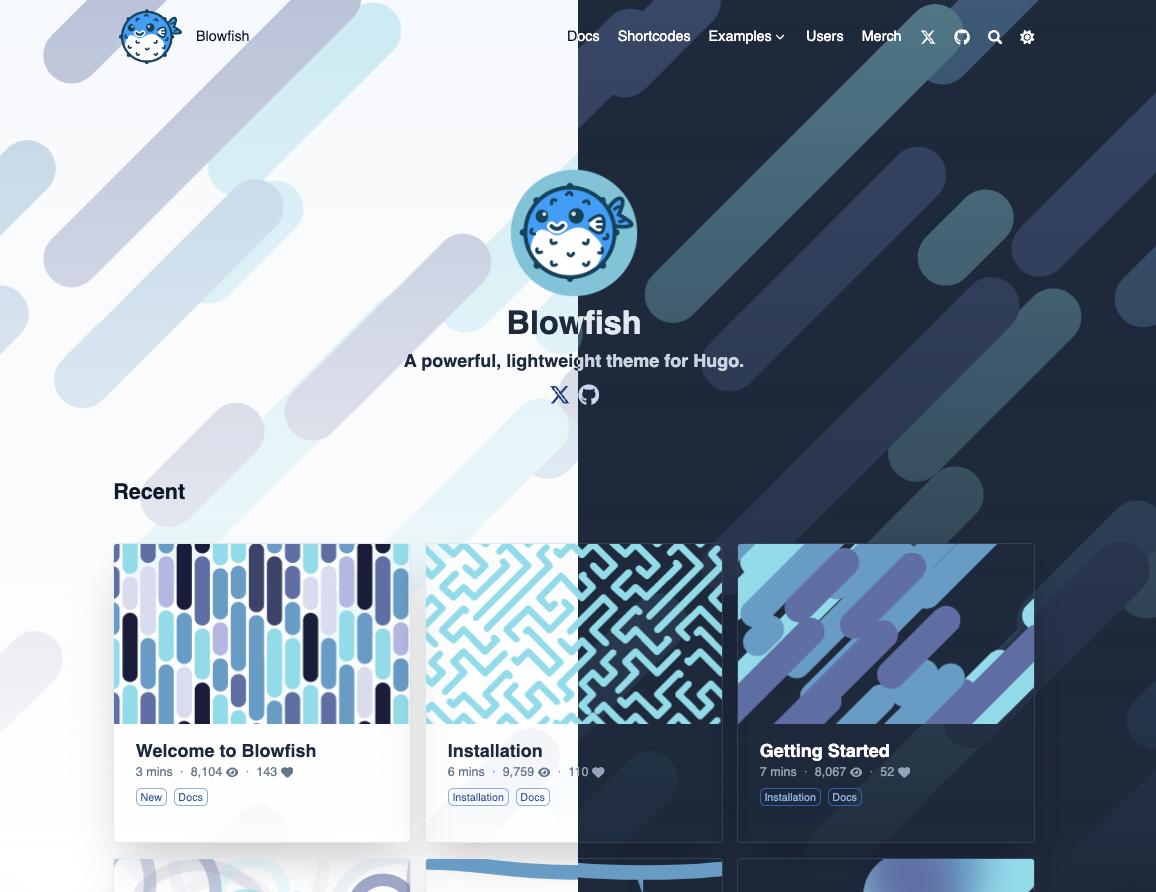
Blowfish 是一个轻量有力的 Hugo 主题。它使用 Tailwind CSS 构建,洁净而富有极简主义,是你网站内容载体的不二之选。
|
||
|
||
|
||
|
||
|
||
🌏 [示例站点](https://blowfish.page/zh-cn/)
|
||
📑 [主题文档](https://blowfish.page/zh-cn/docs/)
|
||
🐛 [Bug 问题报告](https://github.com/nunocoracao/blowfish/issues)
|
||
💡 [问答和功能需求](https://github.com/nunocoracao/blowfish/discussions)
|
||
|
||
|
||
<a href="https://www.buymeacoffee.com/nunocoracao" target="_blank"><img src="https://cdn.buymeacoffee.com/buttons/v2/default-yellow.png" alt="Buy Me A Coffee" style="height: 60px !important;width: 217px !important;" ></a>
|
||
|
||
|
||
## 特性
|
||
|
||
- 使用 Tailwind CSS 4 构建全面响应式布局
|
||
- 多种配色方案,亦可完全由你定义
|
||
- 夜间模式支持(手动开启/关闭或根据用户设备自动切换)
|
||
- 多种主页布局,包括带有主视觉图、数据统计和功能网格的产品风格着陆页
|
||
- 悬浮玻璃质感页眉,支持 ⌘K / Ctrl+K 搜索快捷键
|
||
- 全局背景画布,主视觉区域随滚动溶入其中
|
||
- 文章阅读进度条
|
||
- 可实时预览的交互式主页布局切换器
|
||
- 内置代理技能(agent skill),让 AI 编程代理(如 Claude Code)为你安装和配置主题
|
||
- 配备专用打印样式的打印友好页面
|
||
- 高度自主的配置方式
|
||
- 集成 Firebase 以支持动态数据统计
|
||
- 集成浏览次数统计和点赞机制
|
||
- “相关文章”列表生成
|
||
- 多作者模式支持
|
||
- 可将文章整理成选集列表
|
||
- 禅模式支持
|
||
- 可灵活定义各种内容类型、分类标准和菜单
|
||
- 页眉和页脚双重菜单可选
|
||
- 支持嵌套菜单和子导航菜单
|
||
- 支持多语言内容,包括 RTL 语言
|
||
- 可链接到第三方网站上的帖子
|
||
- 内置 40 多种简码,包括图库、时间轴、GitHub 卡片、轮播、数据统计、功能网格、步骤和 CTA 按钮
|
||
- 支持 GitHub Alerts 语法、15 种类型和可折叠功能
|
||
- 支持 Buy Me a Coffee 和 Ko-fi
|
||
- 拥有由 Fuse.js 支持的客户端一侧网站搜索功能
|
||
- 植入了基于 Mermaid 的图表功能
|
||
- 植入了基于 Chart.js 的图表功能
|
||
- 集成逼真的自动打字效果
|
||
- 集成性能优化的 Youtube 卡片简码
|
||
- 集成 KaTeX 的公式
|
||
- 集成 FontAwesome 6 的矢量图标引用
|
||
- 使用 Hugo Pipes 自动调整图像大小
|
||
- 拥有标题锚点、目录、代码复制、按钮、分类徽章等功能
|
||
- 文章内部支持 HTML 和 Emoji 🎉
|
||
- 便于搜索引擎优化,文章可一键分享到社交媒体
|
||
- 支持 Fathom Analytics 和 Google Analytics
|
||
- 支持 RSS 订阅、网站图标和评论功能
|
||
- 可使用简单的 Tailwind 对颜色和样式进行高级定制
|
||
- 优化了性能和可访问性,拥有极高的 Lighthouse 评分
|
||
- 文档齐全,定期更新
|
||
|
||
---
|
||
|
||

|
||
|
||
## 文档
|
||
Blowfish 有 [全面的文档](https://blowfish.page/zh-cn/docs/),覆盖主题的任何一个方面。 请确保 [阅读文档](https://blowfish.page/zh-cn/docs/) 以详细了解本主题有哪些功能。
|
||
|
||
---
|
||
|
||
## 安装
|
||
|
||
Blowfish 支持多种安装方式,既能作为 git 子模块、Hugo 模块,也可完全手动安装。
|
||
|
||
每种方法的详细说明都可以在 [安装](https://blowfish.page/zh-cn/docs/installation) 文档中找到。为了获得最简单的安装体验,请查阅文档。如果你使用的是 git,请阅读下面使用子模块的快速开始指南;如果你能安装 Hugo 主题,请阅读下面 Hugo 模块的快速开始指南。
|
||
|
||
### 使用 AI 代理快速开始
|
||
|
||
Blowfish 内置了一个[代理技能(agent skill)](https://github.com/nunocoracao/blowfish/tree/main/.claude/skills/blowfish),可以教 AI 编程代理(如 Claude Code)如何安装、配置主题并用它构建网站。在 Claude Code 中通过 Blowfish 插件市场安装:
|
||
|
||
```shell
|
||
/plugin marketplace add nunocoracao/blowfish
|
||
/plugin install blowfish@blowfish
|
||
```
|
||
|
||
或者直接将技能文件夹复制到你网站仓库的 `.claude/skills/blowfish/` 目录中——代理会自动识别项目技能。然后让你的代理为你完成 Blowfish 的设置。
|
||
|
||
### 使用 Blowfish Tools 快速开始
|
||
|
||
> **注:** 请确保你已安装 **Node.js**、 **Git** 和 **Hugo** ,且已经创建了一个 Hugo 工程。
|
||
|
||
Blowfish Tools 是一个帮助你开始使用 Blowfish 的 CLI 工具。它将为你创建一个新的 Hugo 项目、安装主题并设置主题配置文件。请 [报告你发现的任何问题](https://github.com/nunocoracao/blowfish-tools)。
|
||
|
||
使用 npm(或其他软件包管理器)全局安装 CLI 工具:
|
||
```shell
|
||
npm i -g blowfish-tools
|
||
```
|
||
|
||
然后运行 "blowfish-tools "命令,开启一个交互式进程,引导你完成创建和配置。
|
||
```shell
|
||
blowfish-tools
|
||
```
|
||
|
||
你也可以运行命令 `blowfish-tools new` 来创建一个新的 Hugo 项目,并一次性安装主题。更多信息请查看 CLI 帮助。
|
||
```shell
|
||
blowfish-tools new mynewsite
|
||
```
|
||
|
||
### 使用 git 子模块快速开始
|
||
|
||
> **注:** 请确保你已安装 **Git** 和 **Hugo** ,且已经创建了一个 Hugo 工程。
|
||
|
||
1. 从你工程的所在目录初始化 git 仓库
|
||
|
||
```shell
|
||
git init
|
||
```
|
||
|
||
2. 配置 Blowfish 作为 git 子模块
|
||
|
||
```shell
|
||
git submodule add -b main https://github.com/nunocoracao/blowfish.git themes/blowfish
|
||
```
|
||
|
||
3. 在你网站的根目录中删除由 Hugo 自动生成的 `hugo.toml` 文件,并把主题文件夹中的 `*.toml` 配置文件复制到你的 `config/_default/` 文件夹中
|
||
|
||
你可在 Hugo 缓存目录中找到主题配置文件,或者也可以从[这里](https://github.com/nunocoracao/blowfish/releases/latest/download/config-default.zip)下载一份。
|
||
|
||
4. 按照[入门指南](https://blowfish.page/zh-cn/docs/getting-started/)来配置你的网站
|
||
|
||
### 使用 Hugo 快速开始
|
||
|
||
> **注:** 确保你已经安装了 **Go** 和 **Hugo**,且已创建了一个 Hugo 工程。
|
||
|
||
1. 从你工程的所在目录初始化 Hugo 模块
|
||
|
||
```shell
|
||
hugo mod init github.com/<用户名>/<仓库名>
|
||
```
|
||
|
||
2. 新建 `config/_default/module.toml` 并写入以下内容:
|
||
|
||
```toml
|
||
[[imports]]
|
||
path = "github.com/nunocoracao/blowfish/v3"
|
||
```
|
||
|
||
3. 运行 `hugo server` 启动你的本地服务器,本主题就会自动下载。
|
||
|
||
4. 在你网站的根目录中删除由 Hugo 自动生成的 `hugo.toml`文件,并把主题文件夹中的`*.toml`配置文件复制到你的 `config/_default/`文件夹中
|
||
|
||
> **注** 不要覆盖之前的 `module.toml` !
|
||
|
||
你可在 Hugo 缓存目录中找到主题配置文件,或者也可以从[这里](https://github.com/nunocoracao/blowfish/releases/latest/download/config-default.zip)下载一份。
|
||
|
||
5. 按照[入门指南](https://blowfish.page/zh-cn/docs/getting-started/)来配置你的网站
|
||
|
||
### Installing theme updates
|
||
|
||
当新的主题版本发布,你可以在你网站的根目录使用 Hugo 命令`hugo mod get -u`来简单地把主题更新到最新版本。
|
||
|
||
详细的[更新指南](https://blowfish.page/zh-cn/docs/installation/#%E6%9B%B4%E6%96%B0%E4%B8%BB%E9%A2%98)在文档中。
|
||
|
||
### 从 v2 升级到 v3
|
||
|
||
Blowfish v3 完全向后兼容:所有新功能均为可选启用,没有删除任何配置选项或模板。git 子模块和手动安装的用户按常规方式升级即可,无需任何改动;Hugo 模块用户只需将 `config/_default/module.toml` 中的导入路径从 `github.com/nunocoracao/blowfish/v2` 改为 `github.com/nunocoracao/blowfish/v3`,然后运行 `hugo mod get -u`。详情请参阅[升级指南](https://blowfish.page/docs/installation/#upgrading-from-v2-to-v3)。
|
||
|
||
---
|
||
|
||
## 贡献
|
||
|
||
Blowfish 将会持续进化。我打算不断增加功能,并按需进行修改。
|
||
|
||
如有任何问题或对新功能的建议,请随时联系我。
|
||
|
||
- 🐛 **Bug 问题报告** 使用 [GitHub Issues](https://github.com/nunocoracao/blowfish/issues)
|
||
- 💡 **发表关于新功能的想法:** 在 [GitHub Discussions](https://github.com/nunocoracao/blowfish/discussions) 发起讨论
|
||
- 🙋♀️ **一般问题:** 查看 [GitHub Discussions](https://github.com/nunocoracao/blowfish/discussions)
|
||
|
||
如果你有能力修补 Bug 或者实现新功能,欢迎提交 PR。[了解更多](https://github.com/nunocoracao/blowfish/blob/main/CONTRIBUTING.md).
|
||
|
||
---
|
||
|
||
<a rel="me" href="https://masto.ai/@blowfish">Mastodon</a>
|